

To break up with inactive subscribers, first cut how often they hear from you and send them a short re-engagement series. Anyone who still doesn’t respond should get a clear “do you want to stay?” message, and if they stay silent after that, you suppress or remove them. Most senders do this after 90 to 180 days with no clicks. The method hasn’t changed since this post was first written, but the reasons are stronger now. Since 2024, Gmail and Yahoo have required bulk senders to use SPF, DKIM and DMARC, offer one-click unsubscribe and keep spam complaints low, and Apple Mail Privacy Protection now counts many unread emails as “opened.” Use clicks, not opens, to decide who is inactive.
What the experiment found
The team behind The Email Wars looked at a question every list owner runs into sooner or later. Out of everyone on your list, who actually reads your email, opening and clicking on a regular basis? And who is just “lurking”?
In email marketing, a lurker is someone whose messages get marked as read without anyone engaging with them. The email arrives and maybe gets glanced at, but nobody clicks and nothing happens.
The study ran for three months. All the addresses that counted as lurkers were moved into their own segment, which got one email a month instead of one a week. Inside that segment, the team tested subject lines, copy and other elements. The results surprised them: subscribers who had ignored the weekly emails started paying attention again.
By the second month, open rates and click-through rates in the lurker segment had both risen by 25%. Only six weeks earlier, those same people hadn’t been looking at the email at all.
What happened after the test
When the three months ended, the newly engaged subscribers went back to the main list. The ones who were still inactive got a polite request to opt out.
The goal was better results for every campaign. With the dead weight gone, each send reached people who actually wanted it, so open and click rates went up across the board.
The lesson of the study still holds: the size of your list matters less than how you use it.
Why the lesson matters more today
The original study treated inactive subscribers as a performance problem: they dragged down your averages. Today they’re a deliverability problem too, because mailbox providers watch how recipients respond to your mail.
Here are the rules that matter most, as of November 2026:
| Mailbox provider | Who the rules cover | What you must do |
|---|---|---|
| Gmail | Senders of 5,000+ messages a day to personal Gmail accounts | SPF, DKIM and DMARC; one-click unsubscribe for marketing mail; spam rate under 0.3% in Postmaster Tools (Google recommends below 0.1%); process unsubscribes within two days |
| Yahoo | Bulk senders (Yahoo publishes no volume number) | SPF, DKIM and a DMARC policy of at least p=none that passes; one-click unsubscribe; low complaint rate; Yahoo suggests sending a reconfirmation email to inactive subscribers |
| Outlook.com, Hotmail.com, Live.com | Domains sending 5,000+ messages a day, enforced from 5 May 2025 | SPF and DKIM must pass; DMARC of at least p=none, aligned with SPF or DKIM; mail that doesn’t comply goes to Junk first and can be rejected later |
Gmail stepped up enforcement in November 2025, so mail that doesn’t comply can now be rate-limited with temporary errors or rejected outright. Mailing people who never engage won’t break any of these rules directly. But inactive addresses rarely click, some of those people hit “report spam” instead of unsubscribing, and old addresses can turn into spam traps. Every one of those signals hurts your inbox placement for the subscribers who do read.
Opens are no longer a clean signal
Apple Mail Privacy Protection was introduced with iOS 15 in 2021. It loads remote content, including tracking pixels, through Apple’s proxy servers whether or not anyone reads the message. As a result, a subscriber who hasn’t read anything in a year can still show up as “opened” every week. The 25% lift in open rates from the original study came before this change, and a similar open-rate jump today could be partly an artifact. Clicks, replies, purchases and site logins are much more reliable ways to tell who is still active.
How to run the same play in 2026
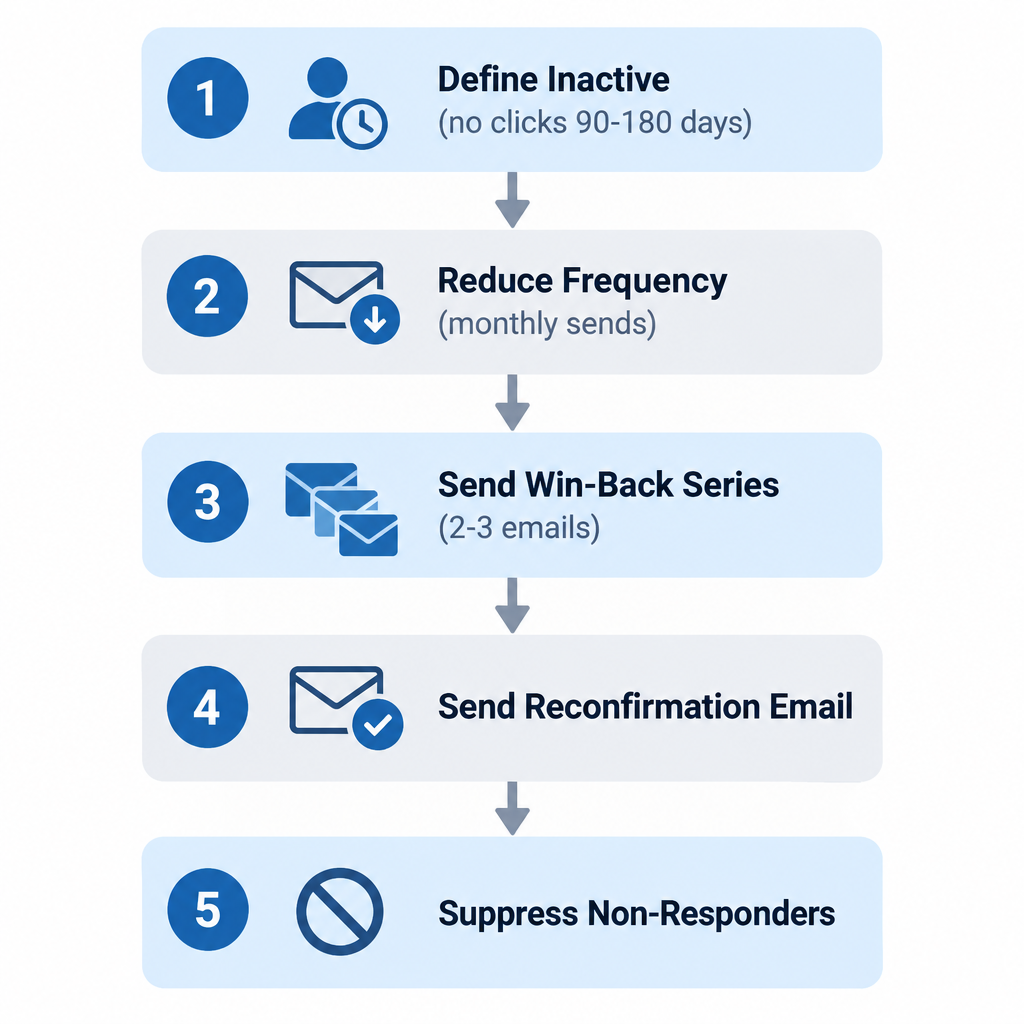
The original plan still works with a few updates. Here is the sequence most ESPs support with built-in segments and automations:
- Define inactive by clicks. A common threshold is no clicks in 90 days for a weekly sender, or 180 days for a monthly one. If your ESP lets you, leave out machine opens or Apple MPP opens.
- Reduce frequency. As in the original test, move inactive subscribers to a monthly send. That puts less pressure on your complaint rate while you test.
- Send a short win-back series. Two or three emails over three to four weeks is typical, with a clear subject line, one strong offer or piece of content, and an easy way to update preferences.
- Ask directly. Send a reconfirmation email (“Do you still want to hear from us?”) with a single button to stay subscribed. Yahoo’s own sender guidance recommends this step.
- Suppress the rest. Anyone who doesn’t click or confirm goes on a suppression list. Suppressing them, rather than deleting them, keeps a record so you don’t import them again by accident.
- Watch the results. Track your spam rate in Google Postmaster Tools and in Yahoo Sender Hub’s complaint feedback loop, along with bounce rate and clicks per send, for the next few campaigns.
Trade-offs worth weighing
Removing people feels like losing value, and there’s a fair argument against it. Some inactive subscribers still read your subject lines, and a few buy later through other channels. For a store with a long buying cycle, such as furniture or B2B software, 180 days can be too short a window. In that case, mailing those people once a quarter is a reasonable middle ground, as long as your complaint rate stays low. For most lists, though, keeping a large group of non-clickers costs more in lost inbox placement than you’d make from the occasional late buyer.
Never replace lost subscribers by buying lists or scraping addresses. Purchased contacts have no consent, generate complaints and spam-trap hits, and break the consent rules under GDPR.
FAQ
How long before a subscriber counts as inactive?
Most senders use 90 days without a click for frequent sends and 180 days for monthly or seasonal ones. Base the window on your normal buying cycle. A daily deals list and a quarterly B2B newsletter shouldn’t use the same cutoff.
Should I delete inactive subscribers or just suppress them?
Suppress them. A suppression list stops sends without losing the record, so the same addresses can’t come back in a later CSV import. It also helps you keep a clean history for consent and unsubscribe requests.
Can I still use open rates to find inactive subscribers?
Not on their own. Apple Mail Privacy Protection loads tracking pixels automatically, so many opens are machine-generated. Use clicks, replies, purchases or logins as your main signal, and treat opens as a weak secondary one.
Does mailing inactive subscribers break Gmail’s or Yahoo’s rules?
It doesn’t break a specific rule. It does push up the numbers those rules measure, mainly spam complaints, which Gmail wants under 0.3% and ideally under 0.1%. Low engagement and old addresses also weaken the reputation that decides whether your mail reaches the inbox.
What does CAN-SPAM require when someone opts out?
The FTC’s CAN-SPAM guide requires a clear way to opt out and says you must honor opt-out requests within 10 business days. Gmail and Yahoo set a tighter limit of two days for bulk senders. Each email that violates CAN-SPAM can bring penalties of up to $53,088.
What should a re-engagement email say?
Keep it short and honest. Remind them what they signed up for, give them one reason to stay, and make both options easy: one button to stay subscribed and a visible unsubscribe link. An option to receive fewer emails often keeps people who would otherwise leave.
Sources
- Google: Email sender guidelines FAQ
- Yahoo Sender Hub: Best practices
- Microsoft Tech Community: Outlook’s new requirements for high-volume senders
- FTC: Inflation-adjusted civil penalty amounts for 2025
- Postmark: How Apple’s Mail Privacy changes affect email open tracking