
You get better subscribers by making the signup easy to find, explaining exactly what people will receive, asking only for data you will use, and confirming each address before you mail it. Since this post was first written, the inbox has become far stricter: Gmail and Yahoo set bulk sender rules in 2024 (SPF, DKIM, DMARC, one-click unsubscribe, low spam complaint rates), and Microsoft’s Outlook.com followed in May 2025. As a result, a list full of uninterested or mistyped addresses now hurts your inbox placement directly. Apple Mail Privacy Protection also inflates open rates, so judge subscriber quality by clicks, conversions and complaints rather than by opens.
Give visitors several chances to opt in
The original advice came from this outstanding post by the email marketing team at iMedia. It covered the main ways to improve an email list and lower bounce rates. One of its biggest points was to give people as many chances as possible to opt in on a landing page.
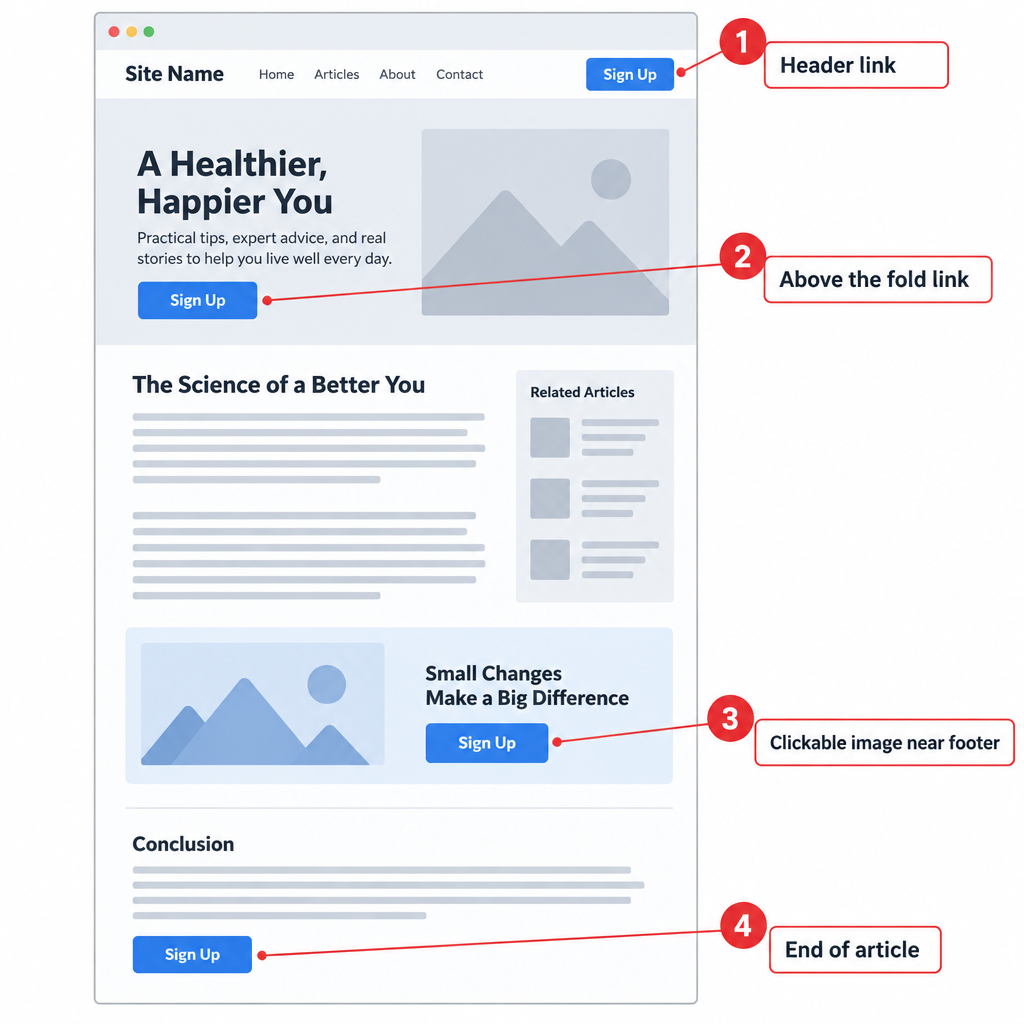
The post suggested at least four signup points on the main page:
- A link in the header.
- A link in the body, above the fold.
- A clickable image near the footer, above an ad.
- One more placement where readers naturally stop, such as the end of an article.
Being “everywhere at once” still works for the number of signups. For quality, the placement matters less than the context. A form at the end of a useful article attracts people who already like your content. A popup that appears the second someone lands on the page tends to collect throwaway addresses. On mobile it also annoys readers, and Google has warned since 2016 that intrusive interstitials can hurt search rankings. Keep the signup points visible, but make them easy to ignore for people who aren’t ready.
Sell the subscription on your opt-in page
Once someone clicks to sign up, the opt-in page has to close the deal. Explain briefly what the newsletter offers, show a few comments from real subscribers, and mention any signup incentive.
Tell people how often they will hear from you, and put your privacy policy where they can see it. This is the part of the old advice that matters most today. Subscribers who expect three emails a week and get them rarely hit “Report spam”. Subscribers who are surprised often do. Gmail asks bulk senders to keep their reported spam rate in Postmaster Tools below 0.1% and never let it reach 0.3%. Clear expectations at signup are the cheapest way to stay under those numbers.
Incentives need care. A discount code or a free download raises signups, but some people take the reward and never open another email. Tie the incentive to what you actually send. A recipe newsletter that offers a recipe ebook attracts better subscribers than one that offers a gift card draw.
Confirm the address before you mail it
This step wasn’t in the original post, but it does more for list quality than anything else here. Send a confirmation email and add the address only after the subscriber clicks the link (this is called double opt-in or confirmed opt-in). It removes mistyped addresses, fake signups and spam traps before they can cause bounces. It also gives you a clear consent record, which helps if you mail people in the EU under GDPR.
The cost is that some real people never click, so confirmed lists grow more slowly. For most senders that is a fair trade, since a smaller list that engages beats a big list that drags your reputation down. Never buy, rent or scrape addresses to make up the difference.
Collect only the data you will use
The original post recommended asking for first name, last name, email address and format preference (HTML or text). Part of that has aged badly.
| Field | Original advice | Today |
|---|---|---|
| Email address | Required | Required. Confirming it by double opt-in is recommended, though not legally required |
| First name | Collect | Optional. Ask only if you will personalize with it |
| Last name | Collect | Usually skip. Every extra field lowers signups |
| Format preference (HTML or text) | Collect | Obsolete. ESPs send both versions in one multipart message, and the email client picks one |
| Interests or frequency | Not mentioned | Worth asking. It lets subscribers pick what they get instead of unsubscribing |
GDPR’s data minimisation principle says you should collect only what you need. Shorter forms also tend to convert better. If you want more details, ask for them later in a welcome email or a preference center.
Keep the list healthy after signup
Quality doesn’t stop at the form. These are the rules that decide whether your mail reaches the inbox in 2026:
| Mailbox provider | Applies to | Key requirements | In force since |
|---|---|---|---|
| Gmail | Senders of about 5,000+ messages a day to Gmail addresses | SPF, DKIM and DMARC; one-click unsubscribe on marketing mail, honored within 2 days; spam rate under 0.1%, never 0.3% | February 2024 |
| Yahoo | Bulk senders (no published threshold) | SPF, DKIM, DMARC; working one-click List-Unsubscribe header; low complaint rate | February 2024, one-click from June 2024 |
| Outlook.com, Hotmail.com, Live.com | Domains sending 5,000+ messages a day | SPF and DKIM pass, DMARC published (at least p=none) and aligned | May 5, 2025 |
A minimal DMARC record that meets the baseline looks like this:
_dmarc.example.com. TXT "v=DMARC1; p=none; rua=mailto:[email protected]"
Remove hard bounces right away. Send a re-permission email to people who haven’t clicked in six to twelve months, and drop those who still don’t respond. Yahoo’s own best practices recommend reconfirming inactive subscribers instead of mailing them forever.
Why this earns subscriber trust
If you follow all of the steps above, you will earn your subscribers’ trust and keep it. People who knew what they signed up for, confirmed their address and can leave with one click are the people who open, click and buy. US law backs this up too: the FTC’s CAN-SPAM rules require a working opt-out and an honest sender identity, and each violating email can cost over $53,000 in penalties.
FAQ
What is a good sign of subscriber quality if open rates are unreliable?
Look at click rate, conversions, unsubscribe rate and spam complaints for each signup source. Apple Mail Privacy Protection loads tracking pixels automatically, so opens from Apple Mail users get counted whether or not anyone read the email. A signup source that produces clicks and few complaints is bringing in good subscribers.
Is double opt-in required by law?
CAN-SPAM in the US doesn’t require it, and GDPR doesn’t name it either. Under GDPR, though, you must be able to prove consent, and a confirmation click is the clearest proof. Gmail, Yahoo and Microsoft don’t require double opt-in, but it lowers bounces and spam trap hits, and both feed into their filtering.
How many signup forms should a website have?
There’s no fixed number. The original advice of about four placements still works for high-traffic pages. Put forms where readers have just gotten value from you (the end of articles, resource pages, checkout) and avoid popups that block the page on mobile.
Do the Gmail and Yahoo rules apply to small senders?
Every sender needs SPF or DKIM, valid DNS and a low spam rate. The stricter rules (DMARC, one-click unsubscribe, alignment) apply in full to Gmail senders of about 5,000 or more messages a day. Small senders who follow them anyway get better inbox placement and won’t need to scramble as they grow.
Should I still ask subscribers to choose HTML or plain text?
No. Modern ESPs send a multipart message with both an HTML version and a text version, and the email client shows the right one. Use that form field to ask about topics or frequency instead.
Sources
- Google Workspace Admin Help: Email sender guidelines and the email sender guidelines FAQ
- Yahoo Sender Hub: Sender best practices
- Microsoft Tech Community, Outlook blog: Outlook’s new requirements for high-volume senders (April 2025)
- Microsoft Outlook.com Postmaster: Policies, practices and guidelines
- Federal Trade Commission: CAN-SPAM Act, a compliance guide for business
- Apple: Mail Privacy Protection documentation
- Postmark Support: Open tracking and Apple Mail