
A simple email with one idea, one image and one clear action still gets read in a crowded inbox, and in November 2026 that matters more than it did when this tip first ran. Keep the idea and the image, but put the main message in live text as well. Write alt text for the image, and make sure the email reads well on a phone and in dark mode. One thing has changed since this was written: Gmail, Yahoo and Microsoft now require bulk senders to authenticate with SPF, DKIM and DMARC, offer one-click unsubscribe and keep spam complaints low. Apple Mail Privacy Protection has also inflated open rates, so a clean design only pays off when the mail reaches the inbox and you judge it by clicks, not opens.
Bring back the basics
The tip is KISS: keep it simple. Subscribers work through crowded inboxes every day, and most messages get a glance before they are opened or skipped. A basic format of one idea and one image can make your message stand out like a buoy in an ocean of email.
Writing an email is really the job of turning a complicated message into something small enough to take in at a glance. Choose the single thing you want the reader to know or do. Then cut everything that doesn’t support it.
A quote to chew on
The line usually quoted here is: “Any intelligent fool can make things bigger, more complex, and more violent. It takes a touch of genius, and a lot of courage, to move in the opposite direction.” It is widely credited to Albert Einstein, but the earliest known source is the economist E. F. Schumacher, in his 1973 essay “Small Is Beautiful.” Einstein died in 1955, years before the line first appeared.
The Hollister example
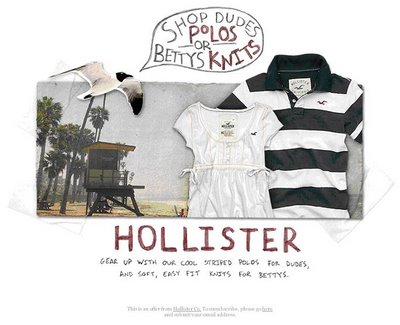
The clothing brand Hollister used this technique well in an email from the period when this tip was written:

In an inbox full of standard typefaces, the handwritten, faded-marker lettering stood out right away. It felt like a note from a person, not another message from a machine that does ten things at once. That feeling is the point of the format.
Hollister built that look with an image, which was the normal way to get a custom font into an email back then. Today the same design needs a few extra steps to work for everyone:
- Put the key words in live text too. Some clients still block images by default, including several Outlook desktop versions, and screen readers can’t read words baked into a picture. A short headline and button in HTML text keep the message intact.
- Write real alt text. If the image says “Summer starts now,” the alt text should say that too, not “banner_final.jpg.”
- Check it in dark mode. Faded or thin lettering on a light background can disappear when an app inverts the colours. Test the image on a dark background before you send.
- Keep the file lean. Gmail is widely documented to clip messages whose HTML goes over about 102KB, and clipping can cut off the open tracking pixel and the footer. A one-idea email rarely gets close to that, which is one more reason to keep it simple.
An email that is one large image with no text used to be a common shortcut. It now counts as an old tactic. It fails when images are off, it is hard to use for anyone on a screen reader, and spam filters tend to distrust messages with almost no text.
Why the human touch works
As Schumacher put it, “it takes a touch of genius” to make something this simple this striking. When you give your email a human element and strip it back to basics, the message can stir a positive feeling and earn more attention from readers.
The modern version of that payoff shows up in clicks and replies, not opens. Apple Mail Privacy Protection loads remote content, tracking pixels included, through Apple’s proxy servers. Many Apple Mail opens get recorded whether or not anyone read the message. Judge a simple design by click rate, click-to-conversion rate and complaint rate.
FAQ
Does KISS mean every email should have only one image?
No. KISS means one main idea and one main action. One strong image is often the cleanest way to carry that idea, but a product email with three supporting photos can still be simple if every element points to the same goal. The thing to avoid is several competing offers in one send.
Are image-heavy emails bad for deliverability?
An email that is mostly image with very little text is riskier than a balanced one. Filters have less text to judge, and the message falls apart when images are blocked. Some email builders, Stripo for example, suggest roughly 80 percent text to 20 percent images as a rule of thumb. The firmer rule is simple: the key message and the call to action should exist as live text.
Can I use handwritten or custom fonts in email?
You can, but support is uneven. Apple Mail renders web fonts, while many clients, Gmail and most Outlook desktop versions included, fall back to a system font. Set a safe fallback font in your CSS, or use the handwritten style in an image with matching alt text and keep the body copy in a standard font.
What do the Gmail and Yahoo sender rules mean for a simple email?
Design doesn’t exempt you. Since February 2024, Gmail and Yahoo have required bulk senders to use SPF, DKIM and DMARC and to support one-click unsubscribe. Unsubscribe requests must be honoured within two days. Google asks senders to keep reported spam below 0.1 percent and never let it reach 0.3 percent. Microsoft added similar authentication rules for Outlook.com senders of more than 5,000 messages a day in May 2025.
How should I measure whether a simple email works?
Use clicks, conversions and spam complaints as your main measures. Apple Mail Privacy Protection inflates opens, and Gmail’s image proxy has loaded images by default since 2013, so opens alone no longer show real readership. A/B test the simple version against your usual layout on click rate over several sends before you draw a conclusion.
Sources
- Google, Gmail Help: Email sender guidelines and Email sender guidelines FAQ
- Yahoo Sender Hub: Sender best practices
- Microsoft, Outlook Blog: Outlook’s new requirements for high-volume senders (April 2025)
- Litmus: The ultimate guide to email image blocking, and the ultimate guide to styled alt text in email
- Postmark Support: Open tracking and Apple Mail
- ActiveCampaign Help Center: Why is Gmail clipping my email
- Federal Trade Commission: CAN-SPAM Act, a compliance guide for business