
When Borders closed in 2011, its liquidation emails dropped the brand people knew, put the store locator in the footer, gave no end date and showed no products. The fixes are the same in November 2026, but more is riding on them now. Since February 2024, Gmail and Yahoo have required bulk senders to authenticate with SPF, DKIM and DMARC, offer one-click unsubscribe and keep spam complaints under 0.3%. An off-brand email that looks like spam can now hurt your deliverability as well as your sales.
Borders Books & Music filed for Chapter 11 bankruptcy in February 2011. Liquidation sales started on July 22, 2011, across its last 399 stores, and the final stores closed in September 2011. Call it a sign of the times or a changing of the guard as web stores replaced brick-and-mortar shops. Either way, Borders was not the last media retailer to go out of business. This post isn’t about the collapse itself, though. It’s about how Borders told its subscribers about its huge closing sales.
The liquidation email
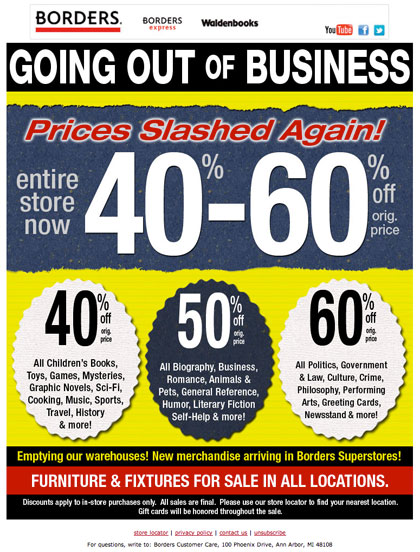
Here is the email Borders sent during the closing sales:

What Borders emails used to look like
For comparison, here is a regular Borders email from before the liquidation:

Five problems with the closing-sale email
The points below come from a design review with Jeremy Carrus. He looked at how inconsistent and stiff the liquidation email was next to the brand’s earlier emails, and five problems stood out.
Going out of business is no reason to change or hide your brand
Closing your doors doesn’t mean you have to drop the look people remember you for. You can still go out with some dignity. With this email, it was hard at first glance to tell who had sent it. It looked almost like a knock-off or a spam message.
This matters more today than it did in 2011. Readers who don’t recognise a sender press “Report spam”. Gmail and Yahoo treat a spam complaint rate of 0.3% as the line bulk senders must stay under, and Gmail advises aiming for below 0.1%. Keeping a familiar From name, logo and colours is a cheap way to protect your sender reputation, and that reputation counts most when you have one big final sale to promote.
Social links make little sense when the company is closing
Why would anyone follow a brand that is about to disappear? The social buttons were probably there because the template always had them. In those days, a forward-to-a-friend link went into every email in the same way, whatever the message or the state of the business.
Check your template elements whenever the message changes. In 2026, the same mistake looks like an app download badge, a loyalty points balance or a “refer a friend” block inside a closing-down email.
Give readers direction and a call to action
If you want people in your stores, put the store locator link at the top of the email, not in the footer. Better still, insert the nearest store for each reader automatically.
In 2011, that usually meant IP-based geolocation when the email was opened. That method is much less reliable now. Gmail has loaded images through its own proxy servers since 2013, and Apple Mail Privacy Protection (launched with iOS 15 in 2021) downloads images through Apple’s servers, often soon after delivery and whether or not anyone reads the email. The location detected at open time often belongs to a proxy server, not the reader. A postcode or “preferred store” field in each subscriber’s profile works better, and most email platforms can insert it with merge tags or dynamic content blocks.
Give readers a deadline
The email had no date on it, so a reader could assume the same deal would still be there in a few weeks. A line such as “Our doors close on…” would have created urgency and brought people into stores sooner.
If the closing date isn’t fixed yet, dated steps do the same job. “Extra 10% off through Sunday” sets a deadline without promising a final day. Liquidation discounts usually get deeper over time, so each new step is also a fresh reason to email again and bring people back more than once.
Show off the merchandise
A list of discount percentages by category doesn’t excite anyone. People often need to see the product, and images help sell it.
Today, write the main offer as live text, not as part of an image, and give every product image useful alt text. Some readers still have images turned off, and dark mode in Apple Mail, Gmail and the Outlook apps can make text inside images hard to read. Most email is now read on phones, so a stack of large product photos with short headlines works better than a dense grid.
The verdict on the Borders email
The email looked rushed, as if nobody owned it. A liquidation leaves little staff or budget for creative work, and it showed. Even so, a brand’s last emails are among the ones subscribers remember, and this one gave them no reason to try.
In short, the email was the equivalent of a guy on a street corner waving a going-out-of-business sign at passing traffic:

What happened to the Borders mailing list
The list kept its value after the stores closed. In September 2011, Barnes & Noble bought Borders’ trademarks and customer list in bankruptcy court. Borders customers got a deadline to opt out of having their details transferred, and Barnes & Noble later extended it. A list of opted-in subscribers is a business asset, so the emails that list gets near the end are worth doing well.
A closing-sale email checklist for 2026
If you have to announce a closure, a liquidation or a final sale, these steps keep the email effective and within the rules:
- Keep the brand. Use the same From name, sending domain, logo and colours readers already know.
- Lead with the action. Put the store finder or shop link in the first screen of the email, personalised from profile data where you can.
- Date everything. Give the closing date, or dated discount steps if the final day isn’t set.
- Show products. Use real product images with live-text offers and alt text, and check how the email looks in dark mode.
- Strip template leftovers. Remove social, app and loyalty blocks that no longer make sense.
- Keep authentication in place. Gmail’s bulk sender rules apply to senders who send close to 5,000 or more messages a day to personal Gmail accounts. Microsoft has applied similar rules since May 5, 2025, to senders of more than 5,000 emails a day to Outlook.com, Hotmail.com and Live.com addresses. All of them expect SPF, DKIM and a DMARC record. A minimal DMARC record looks like this:
_dmarc.example.com. TXT "v=DMARC1; p=none; rua=mailto:[email protected]"
- Support one-click unsubscribe. Bulk senders to Gmail and Yahoo need the RFC 8058 header pair. You also still need a visible unsubscribe link in the email itself:
List-Unsubscribe: <https://example.com/unsubscribe?id=abc123>, <mailto:[email protected]>
List-Unsubscribe-Post: List-Unsubscribe=One-Click
- Keep the opt-out working after the doors close. Under CAN-SPAM, the unsubscribe option must keep working for at least 30 days after you send. Gmail and Yahoo expect bulk senders to process unsubscribes within 2 days.
FAQ
Should a company keep emailing subscribers after announcing it is closing?
Yes, as long as there is something useful to say, such as sale dates, final days, gift card deadlines or return policies. A short, dated series usually works better than one vague announcement. Stop once the business stops trading, unless the list is being legally transferred and subscribers have been told.
Does CAN-SPAM still apply to a business that is going out of business?
Yes. Every commercial email needs a truthful header and subject line, a valid physical postal address and a working opt-out. Opt-outs must be honoured within 10 business days. The FTC’s maximum civil penalty is $53,088 per violating email. That is the 2025 level, and it still applies in 2026 because the FTC made no inflation adjustment this year.
Can a bankrupt retailer sell its email list?
It can happen through the bankruptcy court, as it did when Barnes & Noble bought the Borders customer list in 2011, but conditions usually come with it. Borders customers were given a window to opt out of the transfer. If you inherit a list this way, tell subscribers who you are and make unsubscribing easy right away. Otherwise expect complaint rates well above Gmail’s 0.3% limit.
Are open rates a reliable way to measure a closing-sale campaign?
No. Apple Mail Privacy Protection downloads images on Apple’s servers and records opens that never happened, while readers who block images can read an email without registering an open. Measure clicks on the store finder, store visits, coupon redemptions and revenue per send.
Do countdowns and urgency still work in email?
They work when the deadline is real. A specific closing date or a dated discount step gives readers a reason to act now. Fake deadlines that roll over every week teach subscribers to ignore you, and they can cross into misleading claims.
What makes a legitimate brand email look like spam?
Common causes are an unfamiliar sender name, missing logo or brand colours, large blocks of image-only text, all-caps discount banners and a missing or hidden unsubscribe link. Mailbox providers also look at authentication and complaint history. An off-brand design on a domain without DMARC is the worst combination.
Sources
- Google, Email sender guidelines (Gmail Help)
- Yahoo, Sender Hub best practices and sender requirements
- Microsoft, Outlook’s new requirements for high-volume senders (Microsoft Tech Community)
- Federal Trade Commission, CAN-SPAM Act: A Compliance Guide for Business
- Federal Trade Commission, inflation-adjusted civil penalty amounts (Federal Register, 2025 and 2026 notices)
- Twilio SendGrid, Understanding Apple Mail Privacy Protection and Open Events
- Bird, Apple Mail Privacy and open tracking