
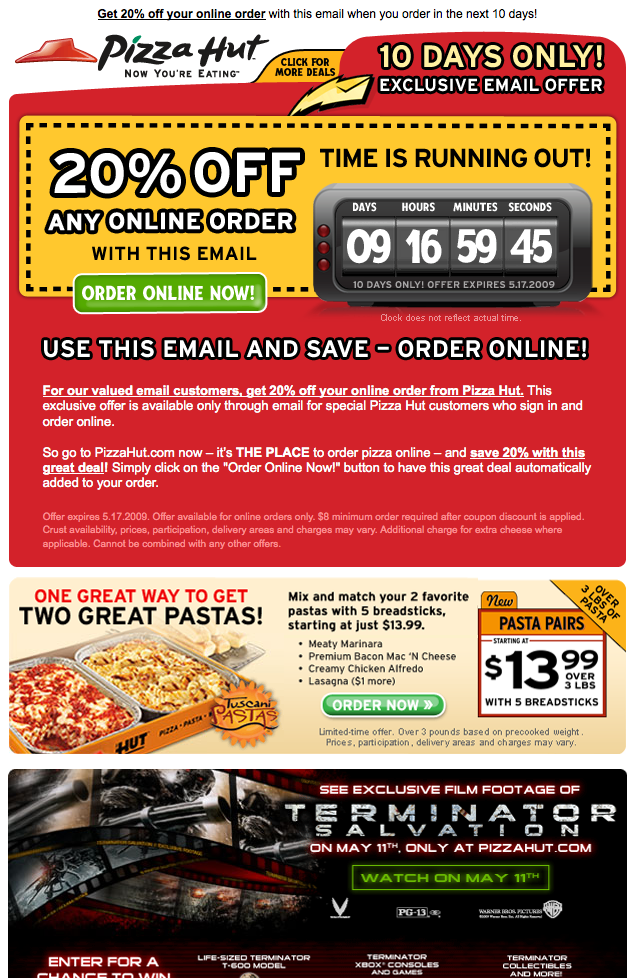
A countdown clock is still one of the strongest ways to make a whole email work as one call to action. In November 2026 it is built differently, though. Senders now use an animated GIF that a timer service draws on its server each time the email is opened, instead of frames fixed in advance like the ones in this 2009 Pizza Hut email. Several things have changed since then. Apple Mail Privacy Protection (MPP) can freeze a timer at the time Apple’s servers first loaded it. Gmail fetches images through its own proxy. And since 2024 Gmail and Yahoo have required bulk senders to use SPF, DKIM and DMARC, offer easy one-click unsubscribe and keep spam rates below 0.3%, or their mail risks not being delivered at all.
Pizza Hut’s marketing team deserves credit for this one. A promotional email from the pizza chain in May 2009 surprised anyone who opened it, because it showed a clock counting down in what looked like real time.
The first guess was that Pizza Hut had somehow got Flash to play inside Gmail. That was impossible. At the time Apple Mail was the only major client that could show Flash content, and only in some setups. Today this is history: Adobe ended Flash support on December 31, 2020, and no email client plays it. So how did they do it?
How the countdown clock worked
The clock was a set of animated GIFs used in a clever way. Reformatting the email’s source code makes that clear.
The seconds GIF counted down, with each frame lasting one second. The minutes GIF also counted down, with one frame for every 60 seconds. The hours and days were static images. If you reopened or refreshed the email, the minutes and seconds went back to “59:59”. Pizza Hut dealt with that by adding fine print saying the “clock does not reflect actual time”. It was a smart fix for a technical limit.
Animated GIFs had their own limit back then. Outlook 2007 and the Outlook for Windows versions that followed it, up to 2013, showed only the first frame of an animation, so many Outlook readers saw a frozen clock. Microsoft’s current help pages say Outlook plays animated GIFs by default. If only the first frame appears, animations have been turned off in that copy of Outlook.
Why it worked as a call to action
The email was extremely effective, and it is still one of the best sales emails you can study. The entire email is one big call to action. Nothing on the page pulls attention away from the deadline and the offer. See for yourself:
 View the email hosted on their server to see the countdown clock in action
That hosted page was the 2009 campaign page. Old promotional pages like this often stop working once a campaign ends, so the image above is now the more reliable record.
Update: the day counter changed
A day after the email went out, the “day” image had changed from “10” to “9”. The image URL explains why:
Opening that address on its own showed “00”. Opening the email or the hosted page that day showed “09”. The server read the “Expirationdate” value in the URL and worked out the days left from the current date. Change 5.18.09 to 5.16.09 and the image showed a different day count. So the day number was the one part of the clock the server drew fresh each time, based on the date.
That small server-side trick turned out to be the future. Modern countdown timers apply it to every digit: the server builds a short GIF at the moment of each image request, starting from the exact time left.
How the same idea works in 2026
Countdown timers today come from services such as Sendtric, CountdownMail and NiftyImages, and from timer blocks built into many email platforms. You set a deadline and a design and paste one image tag into your template. When a reader opens the email, the server sends back a GIF that starts at the real time remaining, usually animating for about a minute.
| Factor | Pizza Hut, 2009 | Typical timer in 2026 |
|---|---|---|
| How it is built | Pre-made animated GIFs, static hours and days | GIF generated by a server for each image request |
| Accuracy | Reset to 59:59 on every open, with a disclaimer | Matches the deadline when the image is fetched live |
| Apple Mail | Not affected | MPP caching can show a frozen time from when Apple loaded the image |
| Outlook for Windows | First frame only in 2007 to 2013 | Animates by default unless animations are turned off |
| Rendering alternatives at the time | Flash in a few clients (Flash ended in 2020) | No real alternative, the GIF is the standard |
The Apple Mail caveat
Apple Mail is the main weak spot for live timers today. Mail Privacy Protection, which arrived with iOS 15 in 2021, has Apple load and store email images in advance, sometimes before the reader opens the message. Sendtric’s help center says this can show the wrong time even on the first open, and that no timer service can stop Apple from caching. Its suggested fix is a fallback image, or hiding the timer for Apple Mail readers.
That leads to the most useful lesson from the Pizza Hut email in 2026. Put the deadline in plain text too, such as “Offer ends Sunday at midnight ET.” Then the call to action works even when the clock doesn’t.
The deadline only matters if the email arrives
A countdown email is usually sent to your whole list at once, which is exactly the kind of mail the bulk sender rules cover. Google’s email sender guidelines apply to anyone sending about 5,000 or more messages a day to Gmail addresses. They require SPF, DKIM and DMARC, one-click unsubscribe for marketing mail, and a spam rate in Postmaster Tools kept below 0.3%, with 0.10% as the target. Yahoo’s Sender Hub sets similar rules. Gmail moved from warnings to rejecting non-compliant traffic in November 2025, and Microsoft began enforcing its own high-volume rules for Outlook.com, Hotmail and Live addresses on May 5, 2025.
A minimal DMARC record you can start from looks like this:
_dmarc.example.com. TXT "v=DMARC1; p=none; rua=mailto:[email protected]"
FAQ
Do countdown timers still work in emails?
Yes, in most clients. Timer services draw a fresh animated GIF each time the image is requested, so Gmail, most Outlook versions and most mobile apps show a running clock, though older Outlook for Windows versions show only the first frame. The exception is Apple Mail with Mail Privacy Protection, where the image may be cached and show an old time. A plain-text deadline next to the timer covers that gap.
Why does my countdown timer show the wrong time in Apple Mail?
Mail Privacy Protection loads and stores email images through Apple’s servers, sometimes before the message is opened. The timer then shows the time from when Apple fetched it, not when the reader looked. Timer services such as Sendtric and CountdownMail offer an option to show a static fallback image, or to hide the timer, for Apple Mail readers.
Do animated GIFs play in Outlook?
Microsoft says current Outlook versions play animated GIFs in the message body by default. If only the first frame shows, animations have been turned off in that install. Older Outlook for Windows versions such as 2007, 2010 and 2013 showed only the first frame. So put the key information, like the deadline, in the first frame.
Can a countdown timer hurt deliverability?
The timer itself is just an image, so it is rarely the problem. The risks come from what surrounds it: an email that is almost all image with little text, a timer hosted on a domain with a poor reputation, or sending so often that spam complaints rise past Gmail’s 0.3% limit. Keep real text in the email, authenticate your domain, and keep one-click unsubscribe working.
Is a fake or resetting countdown timer legal?
A deadline that resets or never ends is a deceptive urgency claim. The FTC’s 2022 report on dark patterns gives baseless countdown timers as an example, meaning timers that reset or simply disappear when they run out. CAN-SPAM separately bans misleading subject lines and headers. The FTC’s maximum civil penalty stays at $53,088 per violation through 2026, because the 2025 level was kept in place. Only use a timer when the deadline is real.
Sources
- Google, Email sender guidelines and the Email sender guidelines FAQ (Gmail Help)
- Yahoo, Sender Hub: Sender Best Practices and bulk sender requirements
- Microsoft, “The animated graphic in my e-mail message doesn’t work” (Microsoft Support)
- Microsoft, Outlook.com requirements for high-volume senders (Microsoft Defender for Office 365 blog)
- Sendtric Help Center, “My countdown timer is not showing correctly on Apple Mail”
- Federal Trade Commission, CAN-SPAM Act: A Compliance Guide for Business
- Federal Trade Commission, Bringing Dark Patterns to Light (2022) and the civil penalty adjustment notice in the Federal Register