
Good senders get blocked when people stop wanting their mail. Recipients ignore it, delete it unread, or click “Report spam” because they don’t recognise the sender or don’t care about the message. Even a clean, opted-in list can’t fix that. Mailbox providers still judge senders mostly on how recipients react, but since this post was written the rules have hardened. Gmail and Yahoo have required SPF, DKIM, DMARC, one-click unsubscribe and a spam complaint rate below 0.3% for bulk senders since February 2024. Microsoft added its own authentication rules for high-volume senders in May 2025, and Gmail began stepping up enforcement in November 2025.
Why this webinar was worth writing up
Plenty of industry webinars are sales pitches with a thin topic attached. They skim the subject in the title and spend most of the hour on the host company. This one was different. The “Why Even Good Senders Get Blocked” webinar from Silverpop, an email platform that IBM bought in 2014 and whose technology now runs Acoustic Campaign, spent its time on the topic. The main points are below, with notes on what has changed since.
Relevance comes first
The whole webinar came back to one theme: relevance. If your content isn’t relevant to your subscribers, they will mark it as spam. If subscribers feel the brand is abusing the relationship, no amount of technical best practice will save you.
Give subscribers a reason to stay active and involved. An occasional incentive, such as an offer, a useful guide or early access, keeps them engaged with the brand.
This matters more today than it did then. Google tells bulk senders to keep their user-reported spam rate below 0.1% in Postmaster Tools and never let it reach 0.3%. Yahoo uses the same 0.3% ceiling. A run of irrelevant sends can push a good sender over that line quickly.
The engagement metrics mailbox providers watch
Mailbox providers (the old webinar said “ISPs”) look at many signals when they decide whether a sender belongs in the inbox, the spam folder or on a blocklist. The webinar listed these:
- How long an email stays in the inbox before it is deleted. The longer it stays, the better for your sender reputation. Deleting without opening is a negative signal.
- “Not spam” clicks. Providers do count it when users move a message out of the junk folder by marking it “Not spam”. That remains one of the strongest positive signals you can earn.
- Panel data. Some providers ask a sample of their users to rate messages as wanted or unwanted, and use the answers to train their filters. Microsoft’s Sender Reputation Data program is the best-known example.
- Mail sent to inactive accounts. Repeatedly emailing abandoned addresses tells providers your list hygiene is poor. Some long-dead addresses are later recycled as spam traps.
- User feedback in general. The people using each provider decide whether your future mail gets delivered. AOL Mail, named in the original webinar, now runs on Yahoo’s infrastructure, so Yahoo’s rules apply to it. Gmail is still the biggest mailbox to satisfy. Be transparent, honest and relevant with subscribers.
One metric needs a caveat today. Apple Mail Privacy Protection, launched with iOS 15 in 2021, preloads tracking pixels, so open rates now overstate real engagement. Judge engagement by clicks, replies, conversions and complaint rates. Opens alone are no longer reliable.
Qdoba: a clever email that looked like spam
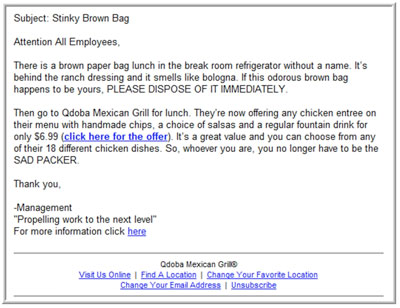
The webinar then showed an email sent by the burrito chain Qdoba.

The email is plain on purpose, and the idea is clever. It’s subtle. It isn’t a standard marketing message with loud imagery. It’s plain text, written in the voice of a snarky co-worker. The problem is that it doesn’t look like it comes from Qdoba. With no clear branding and no obvious reason for it to be in the inbox, it reads like spam, even though the concept only works in that plain style. Small wonder some recipients got confused and reported it.
The lesson: you have to identify yourself clearly. If subscribers can’t tell at a glance who the email is from, they will mark it as spam, and enough complaints can lead to blocking across several providers. Today you can make that identity clearer with a recognisable From name, a From domain that matches your brand, and DMARC alignment. If you want your logo shown next to messages in supporting inboxes such as Gmail and Yahoo, BIMI does that.
Segmentation
Segmentation ties back to relevance. Sending each subscriber messages that match their interests pays off.
The webinar quoted figures showing segmented campaigns earned a 22% higher open rate and click rates about twice as high as non-segmented campaigns. Mailchimp’s later research, covering about 11,000 segmented campaigns, found opens 14.31% higher than for non-segmented sends, with a much larger lift in clicks. Collect the data that actually helps you segment, such as interests, purchase history and signup source, and use it in a way that benefits subscribers as well as you.
Sending frequency
Your sending cadence needs a sensible balance.
- Don’t send too much. If you flood subscribers with email, they will eventually unsubscribe or mark you as spam. The webinar’s rule of thumb was no more than three emails a month per subscriber, about ten days apart. Treat that as an old guideline, not a rule. Many retailers now send several times a week without trouble because subscribers expect it. The right frequency is the one you promised at signup and that keeps complaints low.
- Don’t send too little. You need to stay familiar to subscribers. If your email looks like it came from “Random Brand X”, it gets reported as spam. One touch-base email every two to three months does more good than one a year. Very long gaps carry a risk of their own, though. A sudden send to a list that has gone quiet tends to produce bounces, complaints and spam-trap hits, so re-engage or prune inactive subscribers before you mail them again.
What to expect from your ESP
A good email service provider should give you deliverability help. That means guidance on authentication, reputation monitoring, and help with blocklist removal and mailbox provider issues. In the webinar’s day, this was sold as getting you “whitelisted”. The industry now says “allowlisted”, and no ESP can buy you a place in the Gmail or Yahoo inbox. Your own data and behaviour earn it.
Most ESPs now offer self-serve tools and documentation on every plan. Dedicated deliverability consultants usually come only with higher tiers or as a paid add-on. If you send at volume and your provider offers neither, look at other providers.
What changed after the webinar: authentication and bulk sender rules
The core message still holds: engagement decides inbox placement. What changed is that authentication and unsubscribe handling are now required, at least for bulk senders. The main rules today:
| Mailbox provider | Who it applies to | Main requirements | In force since |
|---|---|---|---|
| Gmail | Senders of 5,000+ messages a day to personal Gmail accounts | SPF and DKIM, DMARC (p=none minimum) aligned with the From domain, one-click unsubscribe on marketing mail, spam rate below 0.3% | February 2024; one-click unsubscribe from June 2024; stricter enforcement from November 2025 |
| Yahoo (including AOL) | Bulk senders (Yahoo publishes no exact threshold) | SPF and DKIM, DMARC, one-click unsubscribe, opt-outs honoured within two days, spam rate below 0.3% | February 2024; one-click unsubscribe from June 2024 |
| Microsoft Outlook.com | Domains sending 5,000+ messages a day to Outlook.com, Hotmail.com and Live.com | SPF, DKIM and DMARC (p=none minimum) aligned with SPF or DKIM | May 5, 2025; non-compliant mail goes to junk and may later be rejected |
Smaller senders aren’t exempt in practice. Gmail asks all senders to set up SPF or DKIM, and unauthenticated mail is the first to be filtered.
Here’s what the three DNS records look like for a domain that sends through an ESP. Use the exact values your ESP gives you.
example.com. TXT "v=spf1 include:_spf.youresp.com ~all"
selector1._domainkey.example.com. TXT "v=DKIM1; k=rsa; p=MIIBIjANBgkqh..."
_dmarc.example.com. TXT "v=DMARC1; p=none; rua=mailto:[email protected]"
One-click unsubscribe (RFC 8058) is set in the message headers. The List-Unsubscribe header carries an HTTPS URI (and optionally a mailto: URI), and the List-Unsubscribe-Post header signals one-click support:
List-Unsubscribe: <https://example.com/unsub?id=abc123>, <mailto:[email protected]>
List-Unsubscribe-Post: List-Unsubscribe=One-Click
Many ESPs add both headers for you. Twilio SendGrid, for example, adds them when Subscription Tracking is on. Whatever platform you use, send yourself a test and check the raw headers to make sure both are there.
The law sits alongside these rules. In the US, the FTC’s CAN-SPAM rules require a working opt-out that you honour within 10 business days, accurate header information and a valid postal address. Honour unsubscribes quickly anyway. Every ignored opt-out invites a spam complaint.
Final thoughts
One slide from the presentation sums up the webinar: seven aspects of engagement. Apply them to your campaigns and you should find deliverability, open rates and click-through rates easier to manage.

Those seven points are still a good starting checklist. Today they come with an extra condition: authenticate your domain, make unsubscribing take one click, and watch your complaint rate in Google Postmaster Tools and Yahoo Sender Hub every week. Good senders get blocked when they assume a clean list is enough. They stay in the inbox when they keep checking how subscribers react.
FAQ
Why are my emails going to spam when my list is fully opted in?
Opt-in only gets you permission to send. Providers filter on engagement and authentication. If subscribers ignore or report your mail, or your SPF, DKIM or DMARC setup fails, permission-based mail still lands in spam. Check your Postmaster Tools spam rate and authentication results first.
What spam complaint rate is too high?
Google and Yahoo both treat 0.3% as the ceiling for bulk senders, and Google recommends staying below 0.1%. Google measures this daily from user reports. A single bad campaign can lift the rate for days, so look at the trend, not one data point.
Do the Gmail and Yahoo rules apply if I send fewer than 5,000 emails a day?
The strictest requirements target bulk senders. Gmail’s threshold is 5,000 messages a day to personal Gmail accounts. Smaller senders are still asked to authenticate with SPF or DKIM and keep complaints low, and unauthenticated mail is filtered harder. Setting up all three records is cheap insurance as you grow.
Are open rates still a reliable engagement metric?
Not on their own. Apple Mail Privacy Protection preloads images, so Apple Mail users can show as opens even when nobody read the message. Use clicks, replies, conversions and complaint rates to judge engagement and to define inactive subscribers.
How often should I email my list?
Send as often as you promised at signup and as often as your complaint and unsubscribe rates allow. The old rule of three emails a month is a cautious starting point, not a limit. Raise or lower it based on how each segment responds.
Can my ESP get me allowlisted at Gmail or Yahoo?
No. Major mailbox providers don’t sell or grant inbox placement. A good ESP helps with authentication, reputation monitoring and blocklist problems, but placement depends on how your recipients treat your mail.
Sources
- Google Workspace Admin Help: Email sender guidelines and Email sender guidelines FAQ
- Yahoo Sender Hub: Sender requirements and recommendations
- Microsoft Outlook.com Postmaster: Policies, practices and guidelines, and the Microsoft Tech Community post on requirements for high-volume senders
- Federal Trade Commission: CAN-SPAM Act, A Compliance Guide for Business
- Mailchimp: Effects of list segmentation on email marketing stats