
To build a better email list in 2026, put a short sign-up form on every page and ask for the address at checkout and in your order emails. Then promote the list through print and in-store signage, partner newsletters, search ads and referrals. Confirm every new address, ideally with double opt-in, and send email people actually want. Gmail and Yahoo have required bulk senders to use SPF, DKIM and DMARC, offer one-click unsubscribe and keep spam complaints under 0.3% since 2024, and Microsoft’s Outlook.com added similar rules in May 2025. That means a list padded with unwilling sign-ups now hurts your inbox placement as well as your results.
Who wouldn’t want a bigger mailing list for their opt-in marketing program? Surprisingly, many marketers still haven’t covered the basic steps that make a list grow. The tactics below have worked for years. The notes on each one show how they hold up against today’s laws and mailbox provider rules.
Make Sign-up Available Everywhere
Put your sign-up invitation on every page of your site. Future subscribers who have to hunt for a form will get frustrated and give up before they find it.
How you place it matters as much as the fact that it’s there:
- Footer form on every page. This is the baseline. Visitors scroll to the footer looking for it.
- Inline forms on your best content. A form at the end of a popular article or guide catches readers just when they’ve seen what you offer.
- A dedicated sign-up page. You need one URL to point to from print, social profiles, partner newsletters and ads (see the sections below).
- Pop-ups and slide-ins, used carefully. They work, but on mobile a full-screen pop-up that covers the content annoys readers. A small slide-in or a bar at the bottom of the screen is gentler on phones, which is where much of your audience will see the form and later read your email.
Test the form on a phone, and in dark mode if it’s embedded in an email or landing page. A form with low-contrast text or a submit button below the fold quietly costs you sign-ups.
Make Sign-up Simple
The less information future subscribers have to fill in, the more likely they are to finish. Catch the urge with a single box for the email address and a sign-up button. Once your subscribers have double opted-in, send them a short survey or preference center to collect more data if you need it.
Double opt-in means the subscriber confirms by clicking a link in a confirmation email before they join the list. No US law requires it, but it does three jobs a single-step form can’t:
- It keeps typo addresses and fake sign-ups off your list, so you get fewer bounces.
- It blocks bots that fill in forms with other people’s addresses. Those people complain, and complaints count against you at Gmail and Yahoo.
- It gives you a dated record of consent, which helps if you mail people in the EU under GDPR or in Canada under CASL.
The trade-off is real. Some people never click the confirmation link, so your raw list grows more slowly. For most senders the confirmed list still wins, because every address on it belongs to someone who asked for your mail. If you stay with single opt-in, at least add a CAPTCHA or a hidden honeypot field to your form so bots can’t flood it.
Request Sign-up at Checkout
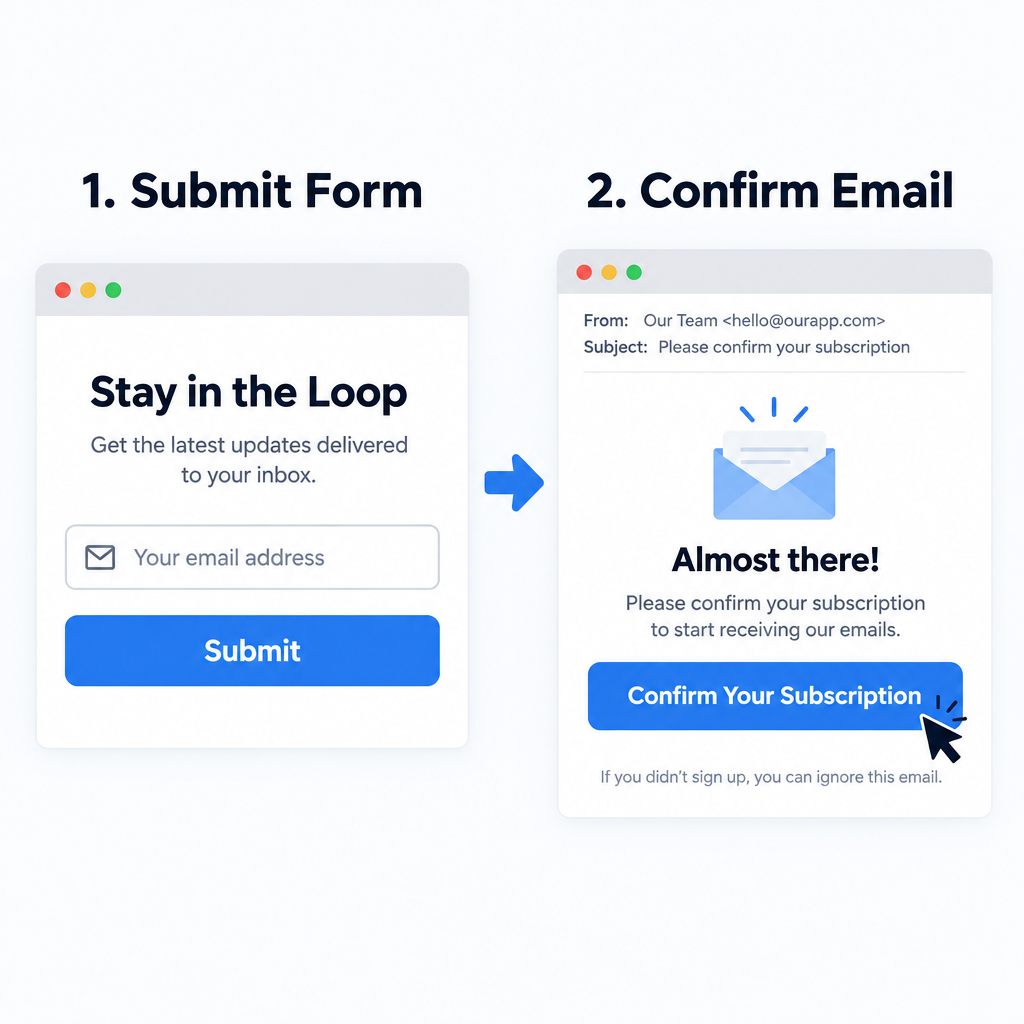
If you run an ecommerce site, add an opt-in box at checkout. People who are buying your products are probably interested in hearing more from you.
How you word the box depends on where your customers live:
| Region | Law | What the checkout box needs |
|---|---|---|
| United States | CAN-SPAM Act | No prior consent required, but every marketing email needs a working opt-out and your postal address |
| European Union and UK | GDPR, ePrivacy rules | Consent must be active. A pre-ticked box doesn’t count |
| Canada | CASL | Express or implied consent. Record which one you have and when you got it |
The safe default for a store that sells internationally is an unticked box with a clear line such as “Email me new arrivals and offers.” Uncheck it by default even for US customers. Buyers who never chose to subscribe are the ones most likely to hit “Report spam.”
Request Sign-up in Automated Messages
If you send automated emails to confirm purchases, add an invitation to join your list. Maybe your future subscriber keeps meaning to sign up and never remembers. A receipt is the perfect place to remind them.
Keep the invitation small. The FTC’s CAN-SPAM guide judges a message by its primary purpose. A receipt with a short sign-up line stays transactional. A receipt that turns into a sales flyer can be treated as commercial email, and then it has to follow all the commercial rules. The same applies to shipping notices, password resets and account welcome emails. Put the order details first and the invitation below them.
Use Traditional Media to Request Sign-up
Make your broadcast, print and in-store marketing help your list grow too.
Today that usually means a QR code or a short, easy-to-type URL that leads to your dedicated sign-up page. You can put it on packaging, receipts, catalogs, event signage, podcast ad reads and point-of-sale displays. Paper sign-up sheets at events and counters still work. Expect handwriting mistakes, though, and send each address a confirmation email before it joins your marketing list.
Promote Your Email in Non-Competing Newsletters
Look for email programs that reach your target audience but don’t compete with you. Place an ad for your newsletter in them, with a link to your sign-up page.
This tactic has grown up into a whole market. You can do it in three ways:
- Paid sponsorships. You buy a placement in a newsletter your audience already reads.
- Newsletter swaps. Two non-competing senders recommend each other to their readers.
- Recommendation networks. Newsletter platforms such as Kit and beehiiv have built-in networks where publishers recommend each other at sign-up.
Whichever you choose, the partner sends readers to your sign-up page and each reader subscribes themselves. Never accept a partner’s list as a file to import, and never buy one. Rented or bought addresses didn’t consent to your mail. They fill your list with spam traps and complainers, and they’re the fastest route past Google’s 0.3% spam-rate limit.
Use Search to Promote Your Email
Use search engine marketing to promote the content of your emails as well as your site.
There are two parts to this. In organic search, give your best newsletter content a permanent home on your site, as an archive or as articles, with a sign-up form on each page. In paid search and social, Google Ads lead form assets and Meta’s lead ads let people subscribe without leaving the ad. Sign-ups from lead forms tend to be lower intent, so send them a confirmation or welcome email quickly, while they still remember who you are.
Forward to a Friend
Add a forward-to-a-friend option to your emails. Your subscribers know people you don’t, so let them help spread the word.
Two things have changed since this tactic was first popular:
- Rewards make you the sender. Under the FTC’s 2008 CAN-SPAM rule, a plain “forward this” prompt usually doesn’t make you legally responsible for the forwarded message. If you offer a reward for forwarding, such as a discount, points or prize entries, you’re treated as having caused the email. That means you have to meet CAN-SPAM’s requirements for it, including honoring opt-outs.
- Referral programs work better. Instead of having your system email strangers, give each subscriber a personal referral link to your sign-up page. The friend subscribes themselves, you get a clean opt-in, and you can reward the subscriber who referred them. Most email platforms now offer this as a feature or through an integration.
A visible “Subscribe” link near the top of every email still matters too. Anyone reading a forwarded copy should be able to join in one click.
Make Your Emails Worth Subscribing To
Real success means sending emails your subscribers keep reading and look forward to. Put your customers’ needs first and your marketing goals second, and your program will start drawing customers to you and earning recommendations.
Today this is also how you protect your inbox placement. Gmail and Yahoo measure how your readers react to your mail. Every growth tactic above adds people, and your content decides whether they stay, click or complain. Decide what to send based on what subscribers signed up for, set expectations about frequency on the sign-up form, and keep your promises.
Protect the List You Build
A bigger list only pays off if your mail reaches the inbox. All three of the biggest consumer mailbox providers now have published rules for senders.
| Provider | Applies to | Main requirements | Since |
|---|---|---|---|
| Gmail | All senders, with stricter rules for close to 5,000+ messages a day to personal Gmail accounts | SPF or DKIM for everyone. Bulk senders need SPF, DKIM and DMARC with alignment, one-click unsubscribe on marketing mail, and a spam rate below 0.3% | February 2024, with one-click unsubscribe by June 1, 2024 |
| Yahoo Mail | Bulk senders (no published volume threshold) | SPF, DKIM, DMARC of at least p=none, one-click unsubscribe, opt-outs honored within two days, spam rate below 0.3% | February 2024 |
| Outlook.com, Hotmail.com, Live.com | Domains sending more than 5,000 emails a day | SPF pass, DKIM pass, DMARC of at least p=none, aligned with SPF or DKIM | May 5, 2025 |
A minimal DMARC record to start with looks like this. It only monitors and doesn’t block anything, and it sends reports to the address you choose:
_dmarc.example.com. IN TXT "v=DMARC1; p=none; rua=mailto:[email protected]"
Track your spam rate in Google Postmaster Tools. Google treats 0.3% as the hard limit, so aim well below it. Most deliverability teams treat 0.1% as the working target.
Judge your growth tactics on clicks and conversions rather than opens. Since Apple Mail Privacy Protection arrived with iOS 15 in 2021, Apple Mail preloads tracking pixels, so open rates look higher than they really are. Gmail also serves images through Google’s own proxy servers.
Finally, the penalties for breaking the law are steep. Each email that violates CAN-SPAM can cost up to $53,088. The FTC kept its 2025 penalty levels for 2026 because that year’s inflation adjustment was cancelled.
FAQ
Is double opt-in legally required?
No US law requires double opt-in. GDPR doesn’t name it either, but it does require you to prove consent, and a confirmation click is the clearest proof you can have. Double opt-in also keeps typo addresses, bots and spam traps off your list, so most senders who care about deliverability use it.
Can I buy or rent an email list to grow faster?
No. People on a bought or rented list never agreed to hear from you, so they complain, bounce and include spam traps that mailbox providers use to spot bad senders. Under GDPR and CASL you also won’t have valid consent, and even under CAN-SPAM the hit to your sender reputation is rarely worth it.
Do the Gmail and Yahoo rules apply to small senders?
Some of them do. Gmail asks every sender to authenticate with SPF or DKIM and keep spam complaints below 0.3%. The full set of rules (SPF and DKIM, DMARC, alignment of the From domain with SPF or DKIM, and one-click unsubscribe for marketing and subscribed messages) applies to senders who send around 5,000 or more messages a day to personal Gmail accounts. Setting all of it up early costs little, and it means growth won’t catch you out later.
Which metrics show my list growth is healthy?
Watch net growth (new confirmed subscribers minus unsubscribes, bounces and complaints), your confirmation rate if you use double opt-in, and your spam complaint rate in Google Postmaster Tools. Use clicks and conversions to measure engagement, because Apple Mail Privacy Protection inflates open rates.
How often should I clean my list?
Remove hard bounces right away and process unsubscribes within two days, as Yahoo and Google expect. Every few months, send subscribers who haven’t engaged in a long time a re-engagement or reconfirmation email, and remove the ones who don’t respond. Yahoo’s Sender Hub recommends that kind of reconfirmation instead of mailing inactive addresses indefinitely.
Is it safe to reward subscribers for referring friends?
Yes, if the friend signs up on your own form. Offering a reward for forwarding an email makes you legally the sender of that message under the FTC’s CAN-SPAM rule, with all the obligations that come with it. Referral links that lead to your sign-up page avoid that problem and give you a clean opt-in.
Sources
- Google Workspace Admin Help: Email sender guidelines and Email sender guidelines FAQ
- Google Postmaster Tools help documentation
- Yahoo Sender Hub: Best practices and sender requirements
- Microsoft Defender for Office 365 blog: Outlook’s requirements for high-volume senders (April 2025)
- Federal Trade Commission: CAN-SPAM Act, A Compliance Guide for Business
- Federal Register: FTC notice on 2026 civil penalty amounts