
The three costliest email mistakes are still the ones in this post: cramming too much into one message, assuming everyone saw your last email, and sending more often than you promised. What has changed is that mailbox providers now enforce the third one. Since February 2024, Gmail and Yahoo require bulk senders to authenticate with SPF, DKIM and DMARC, offer one-click unsubscribe and keep spam complaints below 0.3%, and Microsoft added similar rules for Outlook.com in May 2025. Apple Mail Privacy Protection has also made open rates too unreliable to decide who “read” a message.
Chris Marriott’s column in iMedia on email mistakes to avoid listed five errors. Three of them hold up especially well and are worth a closer look: having too much text, making assumptions about opens, and abusing the subscriber relationship.
Too much text
Long newsletters can work when every section earns its place. The danger is that readers can’t find the part they care about, so they skim, give up and stop opening later issues.
Two formats have long helped with heavy content:
- A table of contents at the top. Short links at the head of the email jump to each section, so readers can skip to what interests them. Anchor links don’t behave the same in every email client, though, and some mobile apps ignore them. Test before relying on them, and make sure the email still makes sense when they fail.
- Clearly separated, repeatable sections. Give each piece of content its own block with a consistent label and position. Readers learn what to expect in every issue and can scroll straight to their favorite part.
The format that still works best for most senders is the third one: short snippets, each with a link to the full article on your site. The email stays light, and clicks become your main engagement signal.
Two newer constraints make this matter more than it used to. Most email is now read on phones, where long blocks of text turn into endless scrolling. And Gmail clips messages larger than about 102 KB, hiding everything below the cut behind a “View entire message” link. That can include your unsubscribe link and your tracking pixel. Dark mode is another reason to keep layouts simple: text baked into images and hard-coded background colors are the first things to break when a client inverts colors.
Assumptions about who opened
Never assume a subscriber opened your previous email. Many didn’t, so a line like “in my last email” leaves part of your audience confused about something they never saw.
The old advice was to use your stats and open with “for those who read the last email,” plus a link to the archived version of the newsletter whenever you refer back to it. The archive link is still good practice. The stats part needs an update.
Since Apple introduced Mail Privacy Protection in 2021, Apple Mail loads remote content, including tracking pixels, through Apple’s own proxy servers, often shortly after delivery. The pixel fires whether or not the person ever looks at the message. That means:
- Open rates are inflated, and an “opened” flag no longer proves someone read the email.
- Click-to-open rates look lower than they really are, because the number of opens is padded.
- Segments built on “opened the last email” will include people who never saw it.
A better approach in 2026:
- Write every email so it stands on its own. If you mention an earlier message, summarize the key point in one sentence and link to the web version.
- Build follow-up segments on clicks, replies, purchases or site visits instead of opens.
- If your email service provider flags machine opens (many do), filter them out of any open-based reporting.
Relationship abuse
If you tell subscribers you’ll email them once a month, email them once a month. Breaking that promise is the quickest way to turn a loyal reader into a spam complaint.
The same goes for partner offers. If subscribers agreed to hear from partners, use that permission sparingly and don’t bombard their inbox. In the EU and UK, GDPR requires consent to be specific, so agreeing to your newsletter doesn’t cover sharing addresses with partners or sending partner promotions unless people opted in to that separately.
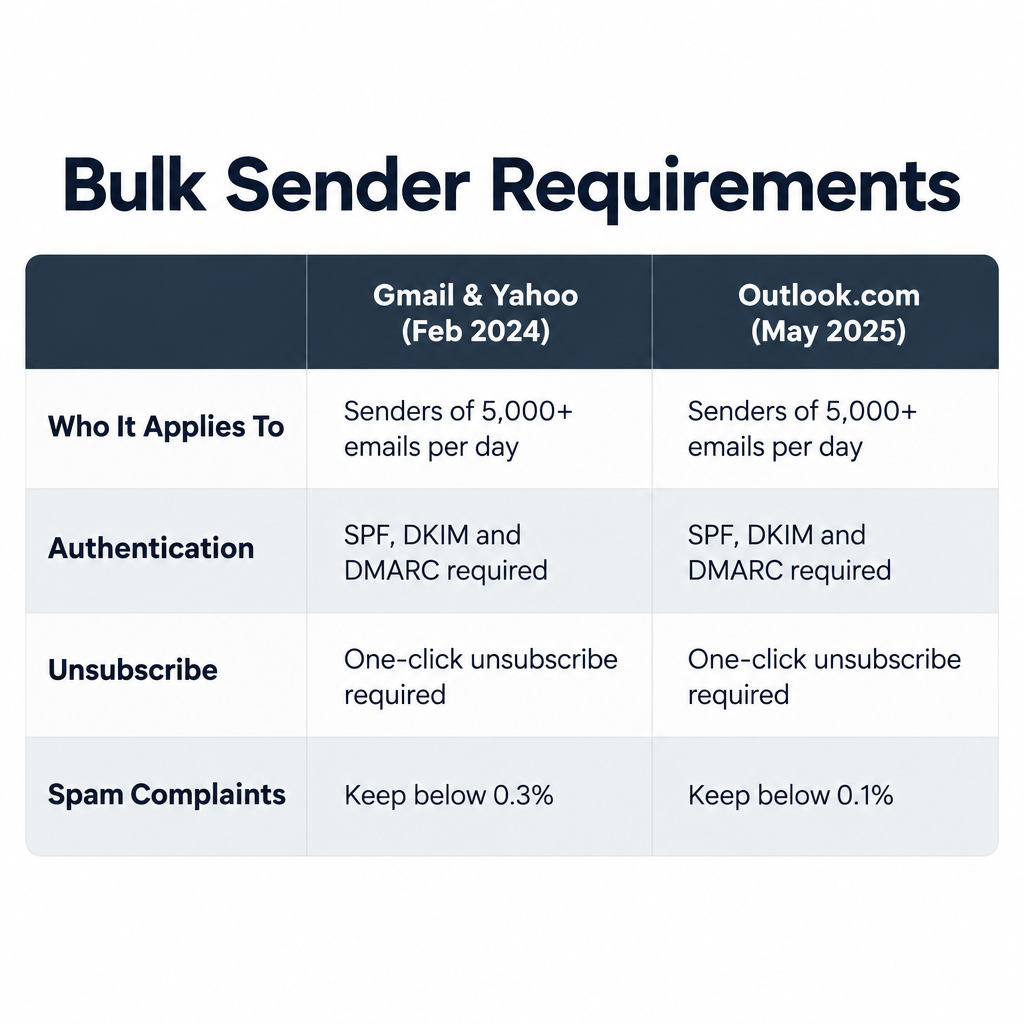
When this was first written, over-sending mostly cost you goodwill. Now it costs deliverability, measured and enforced by the mailbox providers:
| Rule | Gmail and Yahoo (from February 2024) | Outlook.com, Hotmail, Live (from May 5, 2025) |
|---|---|---|
| Who it applies to | Senders of about 5,000+ messages a day to their users | Senders of more than 5,000 messages a day |
| Authentication | SPF, DKIM and DMARC (at least p=none), aligned with the From domain | SPF and DKIM pass, DMARC at least p=none, aligned with SPF or DKIM |
| Unsubscribe | One-click unsubscribe for marketing mail, honored within two days | Working unsubscribe link expected |
| Spam complaints | Keep below 0.3%, ideally under 0.1% | Low complaint rates expected |
The minimum DMARC record that meets these rules looks like this:
_dmarc.example.com. TXT "v=DMARC1; p=none; rua=mailto:[email protected]"
One-click unsubscribe relies on two message headers, which most ESPs add for you:
List-Unsubscribe: <https://example.com/unsub?id=abc123>, <mailto:[email protected]>
List-Unsubscribe-Post: List-Unsubscribe=One-Click
In the US, the CAN-SPAM Act sets separate legal requirements for commercial email, though it does not itself require one-click unsubscribe headers. Every commercial email needs a working opt-out, and you have to honor requests within 10 business days. The FTC says penalties can be as high as $53,088 for each email that breaks the law, a maximum that is adjusted over time.
Email is a great communication tool. Don’t take advantage of it.
FAQ
What is the most common email marketing mistake today?
Sending to people who no longer want your email, either through stale lists or too-frequent sends. It pushes complaint rates toward Gmail’s 0.3% ceiling, and that hurts inbox placement for your whole list, not just for the people who complain. Regular list cleaning and a frequency you announce at signup prevent most of it.
Are open rates still worth tracking?
Use them only for broad trends and deliverability checks. Apple Mail Privacy Protection preloads tracking pixels, so opens are inflated and don’t prove anyone read the email. Clicks, conversions and replies are better measures of engagement and better ways to build segments.
How often should I send marketing emails?
As often as you promised at signup and as often as your content justifies. Weekly and monthly are both fine if you stick to them. If unsubscribes or complaints rise after you increase frequency, that tells you to cut back, or to let subscribers choose their frequency in a preference center.
Do the Gmail and Yahoo sender rules apply to small senders?
The full set, including DMARC and one-click unsubscribe, applies to bulk senders of around 5,000 messages a day. Google still expects every sender to set up SPF or DKIM, keep complaint rates low and send valid, well-formatted messages. Setting up all three records is worth it at any volume.
How long can I wait before honoring an unsubscribe request?
CAN-SPAM allows up to 10 business days. Gmail and Yahoo expect bulk senders to honor one-click unsubscribes within two days. Most ESPs process them instantly, which is the safest standard.
Is it a mistake to send long newsletters?
Not if they are easy to scan on a phone and stay under Gmail’s roughly 102 KB clipping limit. Clear sections, short summaries with links to your site and a consistent layout let long newsletters work. Huge walls of text and image-heavy designs don’t.
Sources
- Google: Email sender guidelines (Gmail Help)
- Yahoo Sender Hub: Sender best practices and requirements
- Microsoft Tech Community: Outlook’s new requirements for high-volume senders
- Federal Trade Commission: CAN-SPAM Act, A Compliance Guide for Business
- Apple Support: Use Mail Privacy Protection on iPhone and Mac