
Asking subscribers what they like, through a short survey or preference form, is still one of the best ways to collect data for targeted email. Customers tell you their preferences directly, so you don’t have to guess them from clicks. That data is worth more now than when this email first went out, because Apple Mail Privacy Protection (launched with iOS 15 in 2021) inflates open rates and makes opens a weak signal. The sending rules have also changed. Gmail and Yahoo since February 2024, and Microsoft Outlook since May 5, 2025, require bulk senders to authenticate with SPF, DKIM and DMARC. Gmail and Yahoo also require one-click unsubscribe and a spam complaint rate that never reaches the 0.3% ceiling.
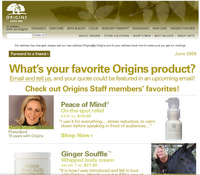
 Origins, the brand promoting beauty and wellness through its good-for-you products and feel-good experiences, sent its customers an email asking for their feedback. The question was simple: which products did they like best? Customers who filled out the form might have hoped for a free sample of a favorite product in return. That would have been a nice touch, but the email never promised one. The more likely goal was to collect preference information so the brand could send more targeted emails and, in return, drive more sales.
 The best part of the email is the way it turns the conversation back to the customer. Origins shares information with its subscribers, and it also asks them to share information back. Email works best as two-way communication, and this is a clear example of it.
The real test of an email like this comes later. Do the messages that follow reflect what customers said? If someone names a favorite moisturizer and keeps getting promotions for unrelated products, the survey has taught them that answering doesn’t matter.
How to run a feedback email like this today
A feedback or preference email works when it is short, explains what happens to the answers, and leads to emails that are visibly more relevant. The basic idea hasn’t changed. What has changed are the technical rules and the way you measure results.
- Ask one to three questions. A single question such as “Which of these do you use most?” with clickable answers gets far more responses than a long form.
- Say why you are asking. One line such as “Tell us your favorites and we’ll send fewer emails about the rest” gives people a reason to answer.
- Save the answers as profile fields in your email platform. Marketers call information that customers volunteer like this zero-party data. Store it where your segments and automations can use it.
- Close the loop. Send a thank-you, deliver any promised incentive quickly, and change the next campaigns based on the answers.
- Meet current sender requirements. If you send 5,000 or more messages a day to personal Gmail accounts, Google classes you as a bulk sender. You then need SPF, DKIM, a DMARC record aligned with your From domain, one-click unsubscribe on marketing mail and a spam rate below 0.1% in Postmaster Tools. Google says the rate should never reach 0.3%. Since November 2025, Gmail has been increasing enforcement, with temporary and permanent rejections for mail that fails these requirements.
- Measure completions and clicks, not opens. Machine opens from Apple Mail Privacy Protection make open rate a poor success metric for a survey email.
One-click unsubscribe uses two message headers defined in RFC 8058. Most email service providers add them automatically, and they look like this:
List-Unsubscribe: <https://example.com/unsub?id=abc123>, <mailto:[email protected]>
List-Unsubscribe-Post: List-Unsubscribe=One-Click
Yahoo’s Sender Hub also expects a visible unsubscribe link in the body and unsubscribe requests honored within two days. The headers do not replace the link in the body.
FAQ
Do feedback and survey emails fall under CAN-SPAM?
If the main purpose of the email is commercial, as it is when a retailer features its products, then yes. The FTC’s CAN-SPAM rules require an honest From line and subject line, a valid physical postal address and a working opt-out that you honor within 10 business days. Messages that are purely transactional or about an existing relationship get lighter treatment, but a brand’s product-preference survey is safest treated as commercial.
How many questions should a feedback email ask?
As few as possible. One question answered with a single click inside the email usually gets the most responses. Save longer surveys for a landing page, and say up front how long it will take.
Should you offer an incentive for answering?
A sample, discount or entry into a draw can lift responses. If you offer one, state the terms clearly and deliver it promptly. Incentives can attract people who only want the reward, so check the answers for patterns that look rushed.
How do you measure a survey email when open rates are inflated?
Use the completion rate (finished responses divided by delivered emails), the click rate on the answer buttons, and the later performance of the segments built from the answers. Apple Mail Privacy Protection preloads images, which records opens that never happened. That makes open rate unreliable for this kind of email.
Can you put an interactive survey inside the email?
Gmail supports AMP for Email for senders that have registered with Google, so form fields can work directly in the inbox. Apple Mail does not display AMP, and most other clients show only the HTML version. Always include a fallback version, such as answer links that each lead to a page that records the response.
Sources
- Google Workspace Admin Help: Email sender guidelines and Email sender guidelines FAQ
- Yahoo Sender Hub: Sender Best Practices
- Microsoft Outlook Postmaster: Policies, Practices, and Guidelines, and the Microsoft Tech Community announcement on high-volume sender requirements (April 2, 2025)
- Federal Trade Commission: CAN-SPAM Act, A Compliance Guide for Business
- IETF RFC 8058: Signaling One-Click Functionality for List Email Headers
- Business Wire: Origins Launches in the U.S. Amazon Premium Beauty Store (May 16, 2025)