
With double opt-in, your welcome email should go out after the subscriber clicks the confirmation link, and it should not read like a second copy of the confirmation. Today the usual approach is a welcome automation that starts on confirmation, with a short delay of minutes to a few hours. The 24-hour gap is now the outer limit, not the default. Two things have changed since this advice was first written: the February 2024 Gmail and Yahoo bulk sender rules require SPF, DKIM, DMARC, one-click unsubscribe and spam rates under 0.3%, and Apple Mail Privacy Protection inflates open rates, so you should judge a welcome message by its clicks rather than its opens.
A contact plan, with one change to the welcome message
Today’s Email Insider Column, by Whitney Hutchinson, makes the case for a “Contact Plan” as the foundation of a successful email program. The column holds up well, apart from one point: when to send the welcome message.
Welcome messages are among the most important emails you will send, and every program should have one. If your sign-up process uses double opt-in, though, you need to think about when it arrives.
Why back-to-back emails feel like too much
Look at it from the subscriber’s side. First an email arrives asking them to confirm the subscription. They click the link, and a welcome message lands straight away. Two emails from a brand they barely know, within seconds of each other, leaves many people thinking “enough already.”
This still happens. In Mailchimp, for example, the “Send a final welcome email” checkbox in your audience settings sends a short welcome as soon as someone confirms. It is off by default and only works when double opt-in is on. If you also run a separate welcome journey, Mailchimp’s own setup can send new subscribers two welcomes. Choose one method and switch the other off.
Space out the welcome message
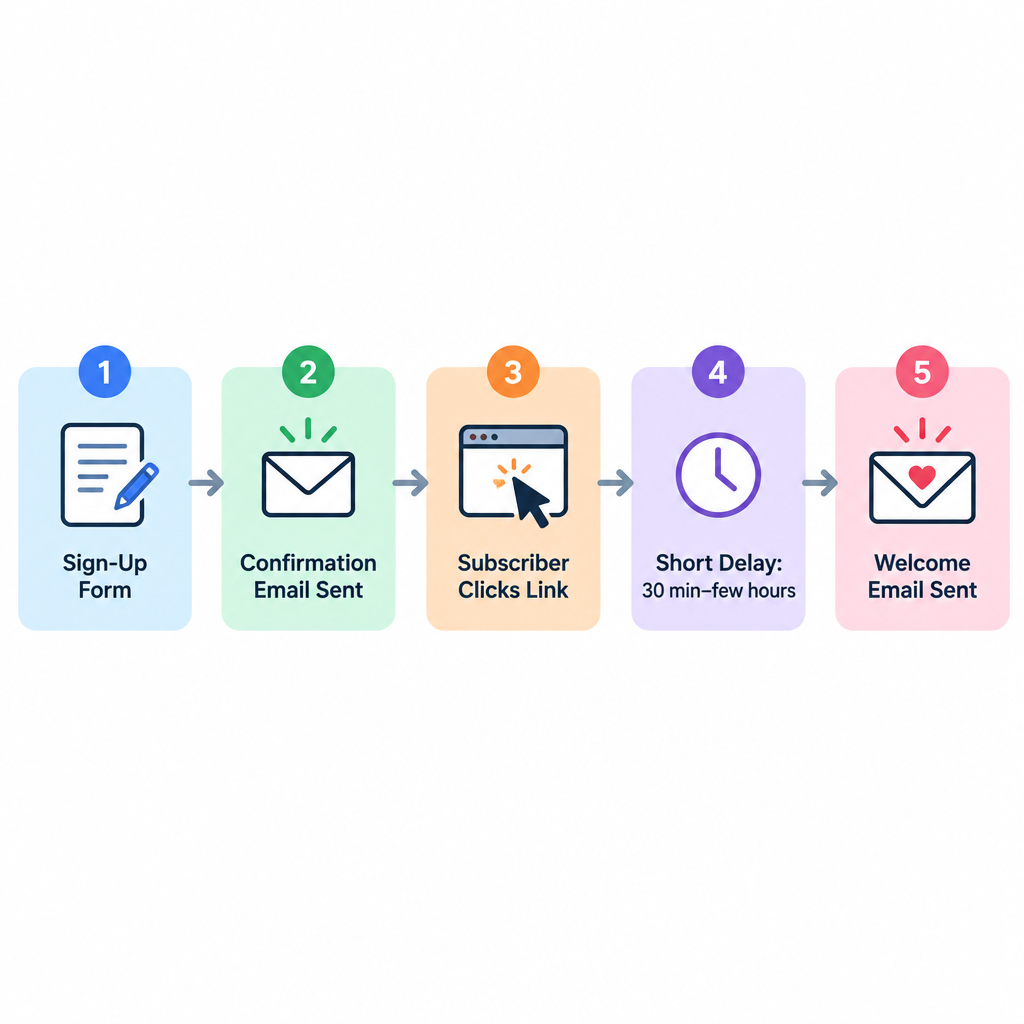
The original advice was to send the welcome message within 24 hours of confirmation instead of the moment the link is clicked. The principle still holds: give the confirmation and the welcome some room.
The window has shrunk, though. A subscriber who has just confirmed is as interested as they will ever be, and waiting a full day costs you some of that interest. A better default in 2026:
- Use the confirmation landing page as the instant “you’re in” moment. Thank the subscriber, say what they will get and how often, and deliver any promised download right there.
- Send the welcome email after a short delay. Somewhere between 30 minutes and a few hours works for most lists. Use 24 hours only if your confirmation page already did most of the welcoming.
- Make the welcome email clearly different from the confirmation. It should have a new subject line, real content and one clear next step, not “thanks for confirming” again.
The honest counter-argument is that some programs, especially ecommerce stores with a sign-up discount, do better sending the code right away, because people sign up at the moment they are ready to buy. In that case, put the code on the confirmation page or in the first email, and save the brand story for a second message a day or two later.
How to schedule a delayed welcome message
Back then, the workaround was to skip the built-in welcome message feature, if your platform had one. Instead, you used a recurring message combined with a query, sending the welcome message to anyone who had opted in one day earlier. That was a clever fix for the email tools of the time. It is history now.
Modern email service providers handle this directly. In Mailchimp you build a Customer Journey that starts when someone signs up, add a time delay step and then the welcome email. Klaviyo flows, Kit sequences and most other platforms use the same idea: a trigger, a delay, then the message. Two things to check:
- Trigger on confirmation, not sign-up. With double opt-in, the journey should start only after the subscriber has confirmed. Otherwise you are emailing people who never verified the address.
- Keep timing consistent with the confirmation. If the confirmation email is slow to arrive, a fixed delay on the welcome email can bring back the “too many emails at once” problem.
Make sure the welcome message reaches the inbox
A welcome email that lands in spam can’t do its job, and the rules have tightened since this post first ran. Google’s sender guidelines, in force since February 2024, require senders of 5,000 or more messages a day to personal Gmail accounts to authenticate with SPF and DKIM and publish a DMARC record. Marketing and subscribed mail must also support one-click unsubscribe (RFC 8058), unsubscribe requests must be processed within two days, and the spam rate shown in Postmaster Tools must stay below 0.3%. Google advises aiming for under 0.1%. Google warned that enforcement would ramp up from November 2025, with non-compliant mail more likely to be delayed or rejected. Yahoo’s Sender Hub lists matching requirements. Microsoft has applied similar rules to Outlook.com, Hotmail.com and Live.com since May 5, 2025, for senders above 5,000 messages a day.
A basic DMARC record to start with looks like this:
_dmarc.example.com. TXT "v=DMARC1; p=none; rua=mailto:[email protected]"
Double opt-in helps here. Every address on your list has proved it is real and wanted, which keeps bounces and spam complaints down from the first send.
Judge the welcome message by clicks, not opens
Welcome emails usually beat every other email you send. A 2026 review of welcome-email research by Stripo found reported open rates ranging from about 35% to 84% across the major benchmarks, with GetResponse at the top with 83.63%. Treat those figures with care. Apple Mail Privacy Protection, introduced in 2021, preloads images and records an “open” whether or not anyone reads the email. Click rate, click-to-open rate and first purchase or first action are better measures of whether your timing works.
Design for how people read now as well. Most welcome emails are opened on a phone, often in dark mode, and in Gmail many land in the Promotions tab. Keep the layout to one column, use a logo that stays visible on a dark background, and make the main button easy to tap.
Your welcome message will be far more welcome if it doesn’t pile on top of the confirmation email. Before you change anything, sign up to your own list with a fresh address and see what arrives, and when.
FAQ
Should the welcome email go out before or after the double opt-in confirmation?
After. Before confirmation you don’t know the address is real or that its owner wants your mail, so the only email to send is the confirmation request. Start your welcome automation on the confirmation event.
Is double opt-in legally required?
Not in the US. CAN-SPAM doesn’t require any opt-in. It requires a working opt-out, honoring opt-outs within 10 business days, accurate headers and a valid physical postal address. Under GDPR you must be able to prove consent, and double opt-in is the most common way to keep that record, especially in Germany.
Does double opt-in hurt list growth?
It usually means fewer sign-ups end up on the list, because some people never click the confirmation link. The addresses that do get through are verified and engaged, which protects your spam rate under the Gmail and Yahoo 0.3% limit. For most senders that trade is worth it.
Do confirmation and welcome emails need an unsubscribe link?
The welcome email does. It is a subscribed message, so bulk senders to Gmail and Yahoo should include a one-click List-Unsubscribe header and a visible unsubscribe link. The confirmation request is a single message the person asked for, but a short note telling them to ignore it if they didn’t sign up is good practice.
How long should a welcome series be?
Two to four emails over the first one to two weeks covers most programs. The first email delivers what you promised, the next sets expectations or shows your best content, and a later one makes the first offer. Stop the series for anyone who converts or unsubscribes.
What if subscribers never click the confirmation link?
Send one reminder, usually a day or two later, then stop. Check that the confirmation email isn’t going to spam and that the subject line says clearly what the email is for. Don’t add unconfirmed addresses to your marketing list.
Sources
- Google: Email sender guidelines
- Google: Email sender guidelines FAQ
- Yahoo Sender Hub: Best practices
- Microsoft: Outlook’s new requirements for high-volume senders
- FTC: CAN-SPAM Act compliance guide for business
- Mailchimp: About Double Opt-in
- Mailchimp: About Classic Automations