
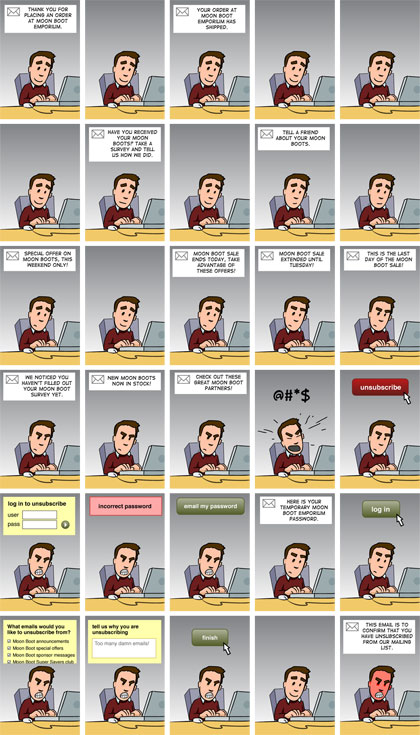
Over-sending means mailing your list more often than subscribers want, and in November 2026 it costs more than ever. Every extra unwanted message raises the chance of a spam complaint. Gmail tells senders to keep their user-reported spam rate below 0.10% and never let it reach 0.30%. Yahoo uses the same 0.3% ceiling, and Microsoft has required SPF, DKIM and DMARC from high-volume senders since May 5, 2025. The comic below still makes the point well. What has changed is that inbox providers now measure your list’s fatigue directly and filter you for it.
This comic, found on bradcolbow.com, sums up over-sending in a single strip. Brad Colbow is the Cleveland web designer and cartoonist behind the web comic “The Brads.” 
Why over-sending hurts more today
The joke in the comic is about annoyed readers. Today the annoyance gets counted, and the count decides where your next campaign lands. When the people on your list stop wanting your mail, they rarely write in to complain. They press “Report spam,” and that click goes straight into the mailbox provider’s reputation score for your domain.
Here is how the major rules line up as of November 2026:
| Mailbox provider | Who the rules cover | What over-senders run into |
|---|---|---|
| Gmail | Senders of about 5,000+ messages a day to personal Gmail accounts (basic authentication applies to everyone) | Aim for a spam rate under 0.10%, never reach 0.30%; one-click unsubscribe on marketing mail, honored within 2 days |
| Yahoo | Bulk senders to Yahoo and AOL addresses | Keep the spam rate under 0.3%; one-click unsubscribe, honored within 2 days |
| Microsoft Outlook.com, Hotmail.com, Live.com | Domains sending 5,000+ emails a day | SPF, DKIM and DMARC required since May 5, 2025; non-compliant mail goes to Junk and can be rejected |
Gmail calculates spam rate daily. A single heavy week of sends can push you over the line. Once your user-reported spam rate goes above 0.3%, Google’s FAQ says you lose access to its mitigation support until the rate comes back down.
Open rates hide the problem
Since Apple Mail Privacy Protection arrived with iOS 15 in 2021, Apple Mail preloads images for many readers. That records an “open” whether or not anyone read the message. A list that is quietly tired of you can still show healthy open rates, so judge frequency by clicks, unsubscribes and spam complaints instead.
Signs you are sending too often
- Unsubscribes jump after each extra send instead of staying flat.
- The spam rate in Google Postmaster Tools climbs toward 0.1%.
- Clicks per campaign drop while the number of campaigns goes up.
- Replies and complaints say “too many emails” in plain words.
The fix is usually a preference center that lets subscribers choose weekly or monthly mail, plus a pause or sunset for people who haven’t clicked in months. Mailing fewer, more relevant messages almost always beats mailing more.
FAQ
How often is too often to send marketing email?
No single number works for every list. Your subscribers set the limit, and their behavior shows it. If unsubscribes and spam complaints rise when you add a send, you’ve passed it. Many senders start weekly and adjust based on clicks and complaints, not opens.
What spam complaint rate should I stay under?
Google asks senders to stay below 0.10% and never reach 0.30%. Yahoo uses 0.3% as its ceiling. In practice, 0.3% means three complaints for every 1,000 delivered messages, and frequent sends to a tired list can get you there quickly.
Does sending more often hurt deliverability?
Yes, once subscribers start ignoring or reporting your mail. Mailbox providers watch complaints, deletes without reading, and engagement over time. A steady rise in volume to unengaged people drags down your domain’s reputation, and then even your best campaigns can land in spam.
Do I need one-click unsubscribe?
If you send bulk marketing mail to Gmail or Yahoo users, yes. You need a List-Unsubscribe header that supports one-click (RFC 8058), and requests must be honored within 2 days. Transactional messages such as receipts are exempt. US law also requires a working opt-out on commercial email.
What does CAN-SPAM say about sending too much?
CAN-SPAM doesn’t cap how often you send. It does require a clear opt-out that you honor within 10 business days, honest headers and subject lines, and a physical postal address. Violations can cost up to $53,088 per email. That is the FTC’s 2025 level, which it kept for 2026 with no new inflation adjustment.
Are open rates still a good way to judge frequency?
Not on their own. Apple Mail Privacy Protection inflates opens for many Apple Mail users. Clicks, conversions, unsubscribe rate and spam rate give a more honest read on whether people want more or less from you.
Sources
- Google Workspace Admin Help: Email sender guidelines and Email sender guidelines FAQ
- Yahoo Sender Hub: Sender best practices
- Microsoft Tech Community: Strengthening Email Security, Outlook’s New Requirements for High-Volume Senders
- Federal Trade Commission: CAN-SPAM Act, A Compliance Guide for Business
- Federal Register: FTC notice on civil penalty amounts for 2026