
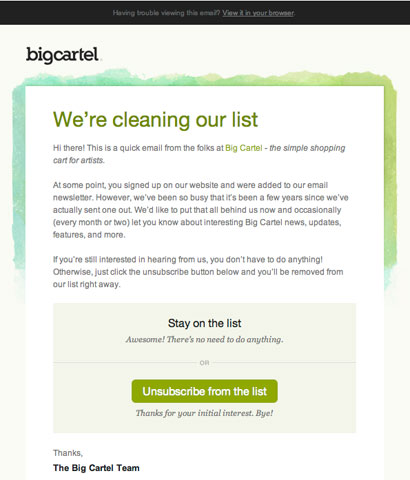
The best way to clean an opt-in list in November 2026 is to send inactive subscribers a short, honest check-in email that makes leaving easy. Then remove anyone who doesn’t click or buy within a set window. Since this post first ran, Apple Mail Privacy Protection has made opens unreliable as a sign of activity. Gmail, Yahoo and Microsoft now also require bulk senders to authenticate their mail, offer one-click unsubscribe and keep spam complaints low, so a clean list matters more than it used to.
The Big Cartel check-in email
Big Cartel’s email showed that you don’t have to make subscribers jump through hoops to get general feedback. The online store platform for artists and makers sent this email to its entire opt-in list, asking whether people wanted to keep getting its messages.

The email was engaging and simple. It made the point clearly: if you want to stay on the list, you don’t have to do anything, and if you want to unsubscribe, the call to action is “right here.” The tone said “no hard feelings,” and it treated leaving as a normal choice instead of something to feel bad about.
Above that one clear call to action, the body openly admitted that Big Cartel hadn’t sent many emails lately. That was the stated reason for checking that people still wanted to hear from them. It was a smart, proactive move.
Why the approach still works
Making it easy to leave remains one of the best list-hygiene tactics, and the reason is now partly technical. When people can’t find an easy way out, they click “Report spam” instead. Google’s sender guidelines tell senders to keep their spam rate below 0.1% and never let it reach 0.3%. Above 0.3%, a bulk sender can’t get help from Google’s mitigation process. Every person who unsubscribes from a check-in email is one fewer possible complaint.
The honesty also helps. If you tell subscribers you’ve been quiet, they can place a brand they haven’t seen in months. That recognition is what stops a sudden email from looking like spam.
What has changed since this email was sent
The rules around this kind of email are much stricter today than when Big Cartel sent it.
| Change | When | What it means for a list-cleaning email |
|---|---|---|
| Apple Mail Privacy Protection | iOS 15, iPadOS 15 and macOS Monterey (2021) | Apple’s proxy loads images ahead of time, so an “open” no longer proves anyone read the email. Use clicks to judge activity. |
| Gmail and Yahoo bulk sender rules | Enforcement began February 2024. Yahoo’s List-Unsubscribe enforcement followed in June 2024. | Bulk senders need SPF, DKIM, DMARC, one-click unsubscribe and a low spam rate. |
| Gmail enforcement ramp-up | November 2025 | Non-compliant mail to personal Gmail accounts is now more likely to be delayed or rejected, not just sent to spam. |
| Microsoft Outlook high-volume rules | May 5, 2025 | Domains sending more than 5,000 emails a day to Outlook.com, Hotmail.com and Live.com addresses need SPF, DKIM and DMARC. Non-compliant mail goes to junk. |
Google’s threshold is the same as Microsoft’s: 5,000 or more messages to personal Gmail addresses in one day. Yahoo doesn’t give a number. It only says “a significant volume.” Treat the rules as the baseline for any list you mail regularly.
How to run a check-in campaign today
Big Cartel’s “do nothing to stay” approach still has one weakness: silent subscribers stay on the list forever. The modern version keeps the friendly tone but adds a deadline and a removal step.
- Choose your inactive group. Pick subscribers with no clicks, purchases or site logins in a set period. Many teams use 90 to 180 days, depending on how often they send. Don’t base this on opens alone, because of Apple’s privacy feature.
- Write the email Big Cartel wrote. Admit the gap, say what you’ll send from now on, and put two clear choices near the top: “Keep me subscribed” and “Unsubscribe.”
- Offer a middle option. A link to a preference center that lets people pick fewer emails or certain topics saves some subscribers who would otherwise leave.
- Send a reminder. One follow-up a few days later is enough.
- Remove the people who stayed silent. Anyone who didn’t click after the reminder goes to a suppression or archive list. Don’t keep mailing them.
- Keep doing it. Run the same flow automatically whenever a subscriber reaches your inactivity limit, instead of a big cleanup once a year.
Mailchimp’s help center says the most successful re-engagement emails typically win back about 10% of inactive subscribers. Plan for most of the group to go. That’s the point: a smaller list of people who click is better for inbox placement than a big list of people who ignore you.
The one-click unsubscribe headers
Your check-in email needs the same unsubscribe headers as every other marketing email. Most email platforms add them for you. If you send through your own system, the RFC 8058 format looks like this:
List-Unsubscribe: <https://example.com/unsubscribe?id=abc123>, <mailto:[email protected]?subject=unsubscribe>
List-Unsubscribe-Post: List-Unsubscribe=One-Click
Gmail and Yahoo expect unsubscribe requests to be processed within two days. The federal CAN-SPAM Act gives you up to 10 business days, but the mailbox providers’ faster deadline is the one that affects your deliverability.
Opt-out or opt-in: which method to use
Big Cartel used an opt-out check: stay by doing nothing. The opposite approach asks subscribers to click to confirm or to fill in their preferences, and anyone who doesn’t is removed. Each has a real trade-off.
| Method | Keeps more subscribers | Cleans the list harder | Best for |
|---|---|---|---|
| Opt-out check (Big Cartel style) | Yes | No | Lists that are mostly healthy and just had a sending gap |
| Click to confirm, then remove | No | Yes | Lists with deliverability problems, rising complaints or old, unmailed addresses |
| Preference center | Partly | Partly | Senders with several types of content or sending frequencies |
The honest argument against the friendly opt-out version is that it leaves the people who matter most to your sender reputation: the ones who never engage. Mailbox providers watch how recipients interact with your mail. A large group of people who never open or click pulls down the signals that decide inbox placement. If your spam rate is creeping toward 0.1% or your messages are landing in junk, use the click-to-confirm method and accept the smaller list.
For a list that’s basically healthy, Big Cartel’s tone is still the one to copy. Pair it with a removal deadline and you get the friendliness and a clean list together.
FAQ
How often should you clean your email list?
Run a re-engagement flow all the time, triggered whenever a subscriber reaches your inactivity limit, instead of waiting for a big yearly cleanup. Remove hard bounces right away. Most email platforms do this for you. A quarterly look at complaint and bounce rates will catch problems before mailbox providers do.
Can you still use open rates to find inactive subscribers?
Not on their own. Apple Mail Privacy Protection loads images through Apple’s servers whether or not the person reads the email, so many Apple Mail users look active when they aren’t. Use clicks, purchases and logins as your main activity signals, and treat opens as a rough extra hint at most.
What spam complaint rate is too high?
Google tells senders to stay below 0.1% and never reach 0.3%. Yahoo also uses 0.3% as its limit for bulk senders. You can see your Gmail spam rate in Google Postmaster Tools. That’s the number to watch before and after a list-cleaning send.
Should you delete unengaged subscribers or just stop emailing them?
Stop emailing them, but keep their addresses on a suppression list so they aren’t added back by an import or a sync with another tool. Mailchimp and other platforms let you archive contacts, which also lowers your billable contact count. Anyone who unsubscribed must stay suppressed, and CAN-SPAM bans selling or transferring their addresses.
Does a re-engagement email have to include an unsubscribe link?
Yes. A check-in email is a commercial message under CAN-SPAM, so it needs a working opt-out and your physical mailing address. Gmail and Yahoo also expect one-click unsubscribe headers on marketing mail from bulk senders. In a list-cleaning email, the unsubscribe link should be one of the two main buttons, not small print at the bottom.
Sources
- Google Workspace Admin Help: Email sender guidelines FAQ
- Yahoo Sender Hub: Sender requirements and recommendations
- Yahoo Sender Hub: FAQs
- Microsoft Tech Community: Outlook’s new requirements for high-volume senders
- FTC: CAN-SPAM Act, a compliance guide for business
- Mailchimp: Re-engage inactive subscribed contacts
- Twilio SendGrid: Understanding Apple Mail Privacy Protection and open events