
To control link color in Yahoo Mail, put the color inline on every ` tag and repeat it on a` inside the link. Yahoo Mail supports embedded styles, but inline styles are the version that holds up. The old “yshortcuts” workaround below fixed a 2010-era Yahoo behavior that recolored links. Today the bigger risks to your link colors are Yahoo’s partial dark mode, and the Gmail and Yahoo bulk sender rules that have applied since February 2024 and decide whether your email reaches the inbox at all.
Why Yahoo turned links dark blue
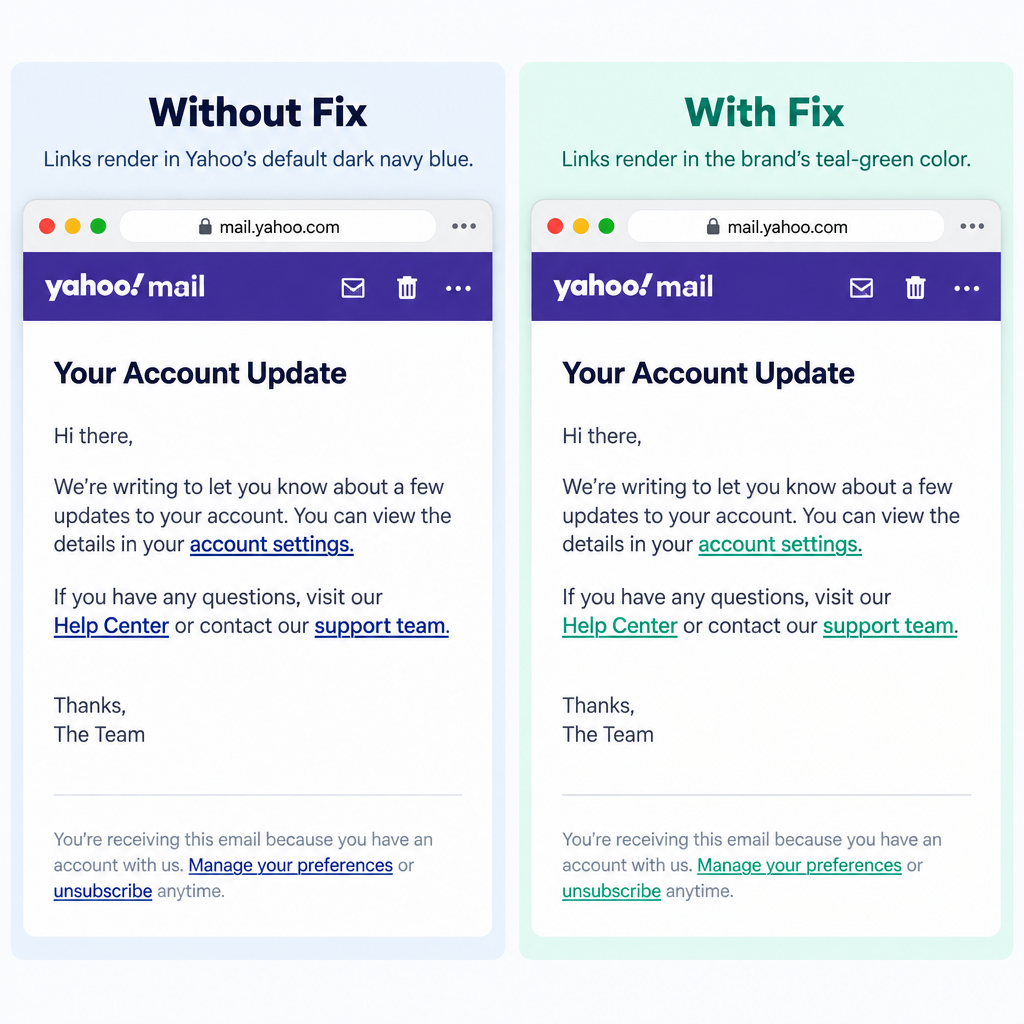
Have you noticed your emails showing up with dark blue default links in Yahoo Mail? That annoyed a lot of designers when the new Yahoo Mail launched, because carefully chosen brand colors were replaced with Yahoo’s own.
CampaignMonitor documented what was happening and how to prevent it. Yahoo was wrapping link text in a span with a CSS class called “yshortcuts”. That class carried Yahoo’s own dark blue, so your link color was ignored.
The good news is that the fix was simple, and there were two ways to apply it.
Fix 1: Add the override to your style tag
Inside your <style> tag, add rules that target the class Yahoo inserts. The version first passed around in 2010 used the selector .yshortcuts a span. That selector doesn’t match the markup Yahoo actually produced, because Yahoo put the span inside the link. Email on Acid’s Yahoo guide describes it as “a span inside your anchor with a class of yshortcuts”. The corrected rules target that span directly:
<style type="text/css">
 a { color: #456456; } /* Your link color */
 span.yshortcuts { color: #456456; background-color: transparent; border: none; }
 span.yshortcuts:hover,
 span.yshortcuts:active,
 span.yshortcuts:focus { color: #456456; background-color: transparent; border: none; }
</style>
You don’t add the yshortcuts class to your own links or wrap them in a div. Yahoo adds the class itself, and your CSS just overrides it. Older Yahoo builds removed every selector in a grouped rule except the last one. If you are supporting old builds, split the three :hover, :active and :focus selectors into separate rules.
Fix 2: Apply the color inline
You can also apply the fix inline:
<a href="https://example.com" style="color:#456456; text-decoration:none;"><span style="color:#456456;">Link</span>
Repeating the color on every link is tedious, but it’s the most reliable way to stop Yahoo from turning your links blue. It also works in clients that strip or rewrite <style> blocks, so this is the version to use in 2026. Most email service providers and template builders inline CSS for you at send time. Check your sent HTML to confirm that both the <a> and the inner <span> kept the color.
What the fix did not cover
The override never stopped Yahoo from turning other text into links, such as physical addresses and popular search terms. Yahoo called those Yahoo Shortcuts. The fix only kept your own embedded links from turning blue.
When this problem first appeared, it only showed up in the new Yahoo Mail and not in Yahoo Mail Classic. Yahoo Mail Classic has since been retired, so that distinction is history. Today the clients to test are Yahoo Mail on the web and the Yahoo Mail apps for iOS and Android. Campaign Monitor’s CSS support guide lists each one as a separate client.
Link colors and dark mode in Yahoo Mail
Dark mode is now the most common reason a link shows up in a color you didn’t pick. Rendering guides from Litmus and Email on Acid classify Yahoo Mail as a partial-inversion client. It changes some light backgrounds and text colors and leaves others alone. They also report that Yahoo doesn’t support the prefers-color-scheme media query, so you can’t reliably serve Yahoo a separate dark palette.
Two practical rules follow from that:
- Choose a link color with enough contrast on both white and near-black backgrounds. A mid-tone brand color usually survives inversion better than a very dark navy or a pale pastel.
- Keep links underlined, or otherwise clearly marked, so readers can still spot them if the color changes.
Then send a test to a real Yahoo account in both light and dark mode, on web and mobile, before you send the full campaign.
Rendering is only half the job: Yahoo’s sender rules
A perfectly styled link means nothing if the message goes to spam. Yahoo started enforcing its sender requirements in February 2024 and added one-click unsubscribe enforcement in June 2024. Gmail introduced matching rules at the same time. Google stepped up enforcement in November 2025, with temporary and permanent rejections for bulk mail that doesn’t comply.
If you send in bulk to Yahoo or Gmail, the core requirements are:
| Requirement | What it means in practice |
|---|---|
| SPF and DKIM | Authenticate your sending domain with both |
| DMARC | Publish a DMARC record for your From domain; p=none is the minimum |
| Alignment | The From domain must align with the domain that passes SPF or DKIM |
| One-click unsubscribe | A List-Unsubscribe header with RFC 8058 one-click support on marketing mail |
| Honor opt-outs fast | Process unsubscribes within two days |
| Spam complaints | Stay below a 0.3% spam rate; Google recommends aiming under 0.1% |
A minimal DMARC record to start monitoring looks like this:
_dmarc.example.com. TXT "v=DMARC1; p=none; rua=mailto:[email protected]"
Gmail defines a bulk sender as anyone who sends 5,000 or more messages a day to personal Gmail accounts. Yahoo doesn’t publish a fixed threshold, so the safe approach is to meet these requirements no matter how much you send.
FAQ
Does Yahoo Mail still change link colors in 2026?
Inline link colors are generally respected in current Yahoo Mail. The bigger variable now is dark mode, which can shift text and background colors. Email on Acid’s Yahoo guide still documents the yshortcuts span, so keeping the inline span on each link is a cheap safeguard.
Should I use the style tag or inline CSS for link colors?
Use both, and treat the inline version as the one you can count on. Yahoo Mail supports embedded styles, but forwarding, other clients and some ESP processing can strip or rewrite a <style> block. Inline color on the <a> and on a span inside it survives almost everywhere.
Why are phone numbers and addresses in my email turning into links?
Many mail clients detect phone numbers, addresses and dates and turn them into links automatically. Gmail has done this since 2017. Your link CSS won’t stop that. If an auto-linked number would clash with your design, avoid putting it on a background where the client’s default blue would be unreadable.
Can I set a separate dark mode link color for Yahoo Mail?
Not reliably. Rendering guides report that Yahoo Mail doesn’t support the prefers-color-scheme media query that other clients use for dark mode styles. Pick one link color that stays readable on light and dark backgrounds, and test in a real Yahoo inbox.
Do link colors affect deliverability?
Not directly. Yahoo and Gmail filter on authentication, complaint rates, unsubscribe handling and sending reputation, not on your CSS. Still, links that readers can’t see or don’t trust can lead to more spam complaints, so clear and readable links help in both places.
Do Yahoo’s bulk sender rules apply to transactional email?
Authentication (SPF, DKIM and DMARC) applies to all of your mail. The one-click unsubscribe requirement covers marketing and promotional messages, not order confirmations or password resets. Under the FTC’s CAN-SPAM rules, commercial email in the US also needs a working opt-out and a valid physical postal address.
If you only change one thing in your template, add the inline color to every link and its span. Then run a light and dark mode test in Yahoo Mail on web and mobile before each new design goes live.
Sources
- Google: Email sender guidelines
- Yahoo Sender Hub: Best practices
- Yahoo Sender Hub: FAQs
- FTC: CAN-SPAM Act compliance guide for business
- Campaign Monitor: CSS support in Yahoo Mail
- Email on Acid: Tips for Yahoo email