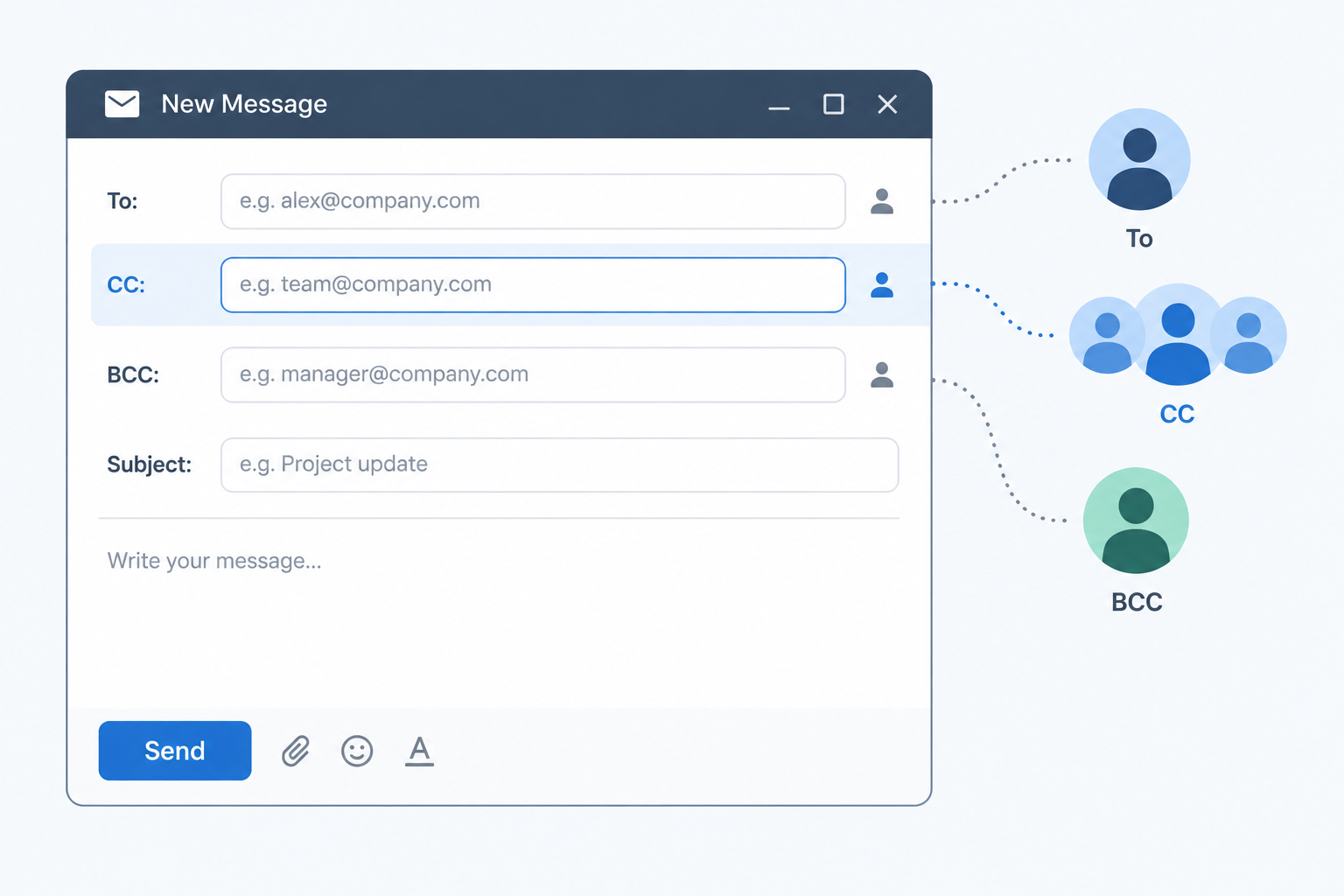
CC stands for “carbon copy,” and in email it is the field you use to send a copy of a message to people who should stay informed but don’t need to act. Everyone on the email can see who was CC’d, which is what separates it from BCC (blind carbon copy). This guide covers what CC means, when to use it, when to leave people off, and the privacy mistakes that have cost organisations real fines.
What CC Stands For and Where “Carbon Copy” Came From
The term is older than email. Before photocopiers, a typist slipped a sheet of carbon paper between two sheets of paper. Pressing the keys printed the letter on the top sheet and a duplicate on the sheet underneath. That duplicate was the carbon copy.
Business letters carried a “cc:” line at the bottom listing everyone who received a duplicate. The main recipient could see exactly who else had a copy. That transparency is the whole point, and email kept it.
When internet email was standardised, the field names came along. The current specification, RFC 5322, defines three destination fields:
- To: the primary recipients
- Cc: additional recipients who receive a copy
- Bcc: recipients whose addresses are hidden from everyone else
So if you have been asking “what is a CC in email?” the plain answer is that it’s a second, visible tier of recipients. They receive exactly the same message as the people in the To field. The difference is social, not technical: CC signals “this is for your information” rather than “this is for you to handle.”
People also use it as a verb. “I’ll CC you” or “can you CC my manager?” both mean “add that person to the CC field.”
How CC Works Compared With To and BCC
All three fields deliver the same message to the inbox of every person listed. What changes is who can see whom, and what recipients assume about their role.
| Field | Stands for | Who can see the address | Gets Reply All responses | What it signals |
|---|---|---|---|---|
| To | (primary recipient) | Every recipient | Yes | “This is for you. Please act or reply.” |
| CC | Carbon copy | Every recipient | Yes | “You should know about this. No action needed.” |
| BCC | Blind carbon copy | Only the sender (and the BCC’d person sees their own) | No | “You’re receiving this quietly.” |
A message needs at least one recipient somewhere. Most clients expect something in To, but you can technically send with only CC or BCC filled in.
What Each Recipient Actually Sees
When someone opens your email, the header shows the To and Cc lines exactly as you filled them in. A CC’d person sees the main recipient and every other CC’d person. A To recipient sees the same.
BCC works differently at the server level. Your mail server delivers a copy to each BCC address but strips the Bcc line from the version everyone else receives. In Gmail, a BCC’d recipient who opens the details dropdown typically sees “bcc: me,” while nobody else sees any trace of them.
That has one practical consequence people forget. If a BCC’d person hits Reply All, their reply goes to everyone in To and CC, and now the whole group knows they were on the email. Your “quiet” copy just announced itself.
What CC Does Not Do
CC doesn’t change delivery speed, priority, or how spam filters treat the message. It doesn’t restrict forwarding either. Anyone who receives a copy, in any field, can forward it to anyone else. Treat CC as a label of intent, not a security setting.
When You Should CC Someone
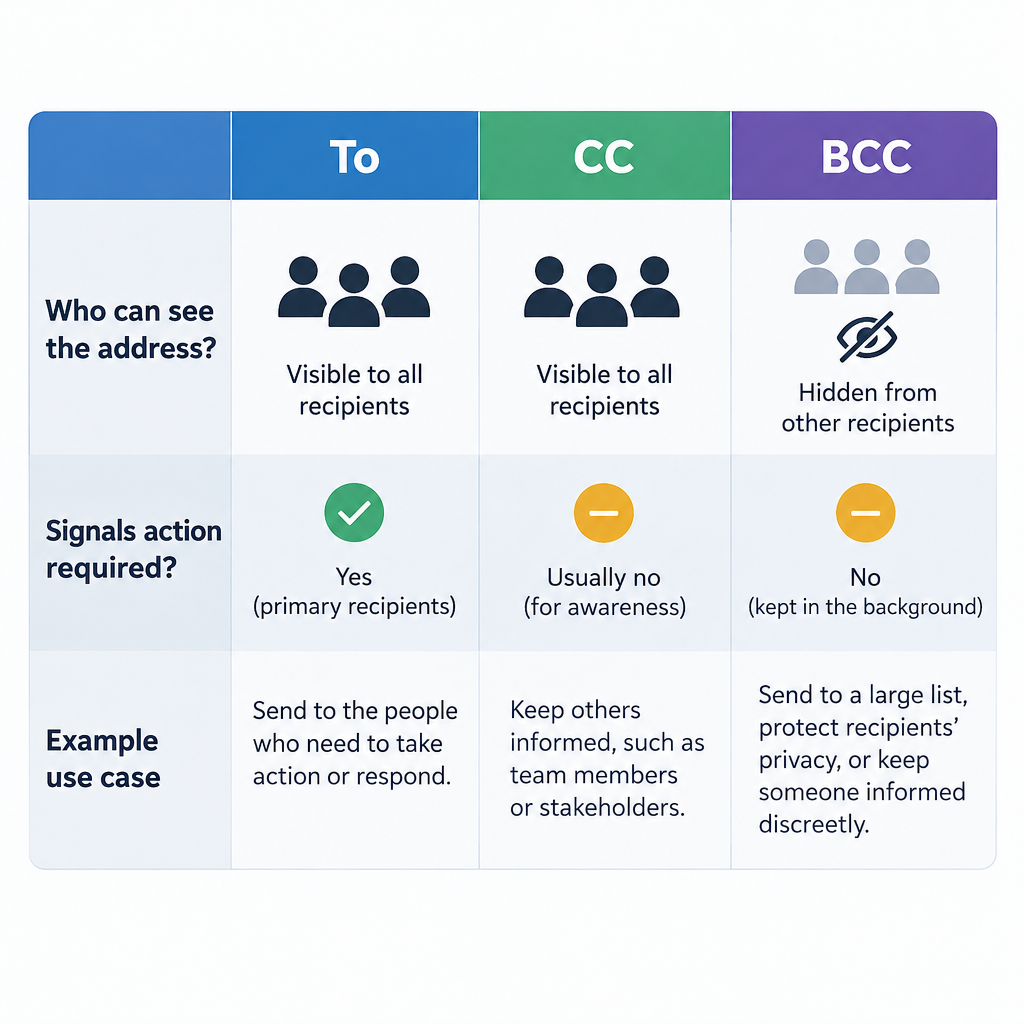
The test is simple. Ask whether this person needs to know or needs to do. If they need to do something, they go in To. If they only need to know, CC works. If they shouldn’t be visible to the others, use BCC.
Good reasons to CC someone at work:
- Keeping a manager in the loop. You’re confirming a deadline with a client, and your manager should know the agreed date without being asked to reply.
- Introductions and handovers. You’re passing a customer to a colleague. You email the customer in To and CC the colleague so both have each other’s address and the history.
- Creating a visible record. You’re confirming a decision made on a call. CCing the people who were on the call means nobody can later claim they never saw it.
- Sharing with a stakeholder who might chip in. A project update goes to the team in To, with the department head on CC. The head can reply if something looks wrong but isn’t expected to.
- Looping in the other half of a shared task. You email a supplier about an invoice and CC your accounts team, who will need the paperwork later.
CC is also handy outside work. Booking a holiday rental and CCing your travel partner means both of you have the confirmation without one of you forwarding it.
Inbox tip
Say why someone is CC’d in the first line, for example “CCing Priya, who’ll take over billing from Monday.” People act on context. A bare CC usually gets skimmed and archived.
When You Should Not CC
CC gets abused more than any other email feature. A few patterns create resentment, cluttered inboxes, or worse.
Don’t CC to apply pressure. Copying someone’s boss on a routine request (“just checking in, CCing Mark”) reads as a threat. If you genuinely need to escalate, tell the person first that you’re going to, or email the manager separately.
Don’t CC “just in case.” Every unnecessary CC is another notification and another thread someone has to decide whether to read. Knowledge workers already wade through a heavy daily volume. If you can’t name the reason someone needs the message, leave them off.
Don’t CC people who don’t know each other when addresses are private. Clients, customers, patients, volunteers, parents at a school: none of these groups agreed to share their email addresses with each other. Use BCC, or better, the right tool (covered below).
Don’t CC for sensitive content. Performance issues, salary, health, legal disputes. Every extra visible recipient is another person who can forward the message.
Don’t use CC to dodge responsibility. “I CC’d you, so you knew” doesn’t hold up if the email didn’t clearly ask for anything. If you need a decision, put the person in To and ask a direct question.
Examples of CC in Real Emails

Here’s how the To, CC and BCC fields look in situations you’ll actually meet.
Client handover
To: [email protected]
CC: [email protected]
Hi Dana, I’m moving to a new role at the end of the month, so I’ve CC’d Leo, who’ll be your account manager from 1 July. He’s read through our last three months of notes and will be in touch this week to set up a call.
Why it works: the client is the person being addressed, and Leo is copied so the introduction is visible and both sides have each other’s address.
Decision confirmation after a meeting
To: [email protected]
CC: [email protected]
Quick recap from today: we’re going with Option B for the checkout redesign, with a review on Thursday. Sam owns the prototype. Shout by end of day if I’ve missed anything.
Why it works: the team owns the work, so they’re in To. The product lead needs the record but has nothing to do.
Vendor request with finance looped in
To: [email protected]
CC: [email protected]
Please send the corrected invoice for PO 4471 with the updated VAT number below. Our accounts team is copied so they can match it on arrival.
Why it works: the supplier acts, accounts receives, and the sentence explains the CC.
Group email where addresses should stay private
To: [email protected]
BCC: 40 volunteer addresses
Hi everyone, the Saturday clean-up has moved to 10am. Reply to me directly if you can no longer make it.
Why it works: the sender’s own address sits in To, everyone else is in BCC, and nobody’s address leaks to 39 strangers. Asking people to reply directly also stops a pile of Reply All messages.
How to CC Someone in Gmail, Outlook, Apple Mail and on Your Phone
Every major client has CC and BCC built in. The fields are sometimes hidden until you ask for them.
How to CC someone (any email client)
- Open a new message, reply or forward.
- Find the Cc option on or next to the To line and click it.
- Type the address of each person you want to copy.
- Put the people who need to act in the To field.
- Add a line in the body explaining why anyone is CC’d.
- Check every field one more time, then send.
The exact location varies by app:
| Email client | How to show CC | How to show BCC | Shortcut |
|---|---|---|---|
| Gmail (web) | Click “Cc” at the right end of the To line | Click “Bcc” at the right end of the To line | Ctrl+Shift+C for Cc, Ctrl+Shift+B for Bcc (Cmd on Mac) |
| Gmail app (iOS/Android) | Tap the down arrow next to the To field | Same down arrow, then the Bcc field | None |
| Outlook (classic desktop) | Cc field shows by default in a new message | Options tab > Show Fields > Bcc | None by default |
| New Outlook and Outlook on the web | Click “Cc” at the right of the To line | Click “Bcc” at the right of the To line | None by default |
| Apple Mail (Mac) | Cc field shows by default | View > Bcc Address Field | Option+Command+B |
| iPhone and iPad Mail | Tap the “Cc/Bcc, From” line to expand it | Same line, then the Bcc field | None |
In classic Outlook, once you switch on the Bcc field it usually stays visible for future messages. That’s worth doing once so you never have to hunt for it under pressure.
BCC: The Field That Hides Recipients
If CC is the copy everyone can see, BCC is the copy nobody else can see. Each BCC recipient gets the message, but their address never appears to the To, CC or other BCC recipients.
Legitimate uses for BCC:
- Small group messages to people who don’t know each other. Event reminders, a club update, a note to a handful of customers.
- Protecting privacy where the group itself is sensitive. A support group, patients of a clinic, people in a legal matter. Membership of the list is personal data.
- Moving people off a long thread. “Thanks for the intro, Sarah. Moving you to BCC to spare your inbox.” The introducer sees the reply landed, then drops out of the conversation.
- Copying your own CRM or archive address. Many CRMs give you a unique address to BCC so the email is logged against a contact.
Uses to avoid:
- Secretly copying a manager on a conversation with a colleague. If the colleague finds out (and Reply All mistakes make that likely), trust is gone.
- Mass mailings. BCC solves the privacy problem but creates deliverability and legal ones. More on that below.
Privacy risk
Putting a group of private contacts in To or CC exposes every address to everyone on the list. Under UK and EU GDPR that can be a reportable personal data breach.
The Real Cost of Using CC When You Meant BCC
This is the angle most “what is CC in email” explainers skip. The difference between CC and BCC is a single click, and regulators have fined organisations for getting it wrong.
The UK Information Commissioner’s Office (ICO) has issued several public penalties for exactly this mistake:
| Organisation | What happened | ICO penalty | Year of fine |
|---|---|---|---|
| Chelsea and Westminster Hospital NHS Foundation Trust (56 Dean Street clinic) | An HIV clinic newsletter went to about 780 patients with every address visible instead of in BCC | £180,000 | 2016 |
| HIV Scotland | An email to 65 members of its community advisory network used CC, exposing addresses from which HIV status could be inferred | £10,000 | 2021 |
| Ministry of Defence | An email to 245 Afghan nationals eligible for relocation was sent with all addresses visible in the To field | £350,000 | 2023 |
Notice the pattern. None of these was a hack. Each was an ordinary email, sent to a sensitive group, with the addresses in a visible field. In two of the three cases the list alone revealed health information, because being on that mailing list told everyone something private about the people on it.
You don’t need to work in healthcare for this to matter. A dentist emailing patients, a lawyer emailing clients in a class action, or a recruiter emailing every candidate for a confidential role can all cause harm through a CC field.
If you do send an email with addresses exposed, act quickly. Recalling messages rarely works outside a single organisation’s Microsoft 365 environment. Apologise to the recipients, ask them to delete the email and not reply all, record what happened, and check whether your local data protection law requires you to report it. The mindset is similar to recovering after a typo email: own it fast, fix what you can, and change the process so it can’t happen twice.
Why You Shouldn’t Use CC or BCC for Mass Emails
Once a list gets past a couple of dozen people, CC and BCC become the wrong tool entirely. There are three reasons.
Recipient Limits Cut You Off
Every provider caps how many recipients one message and one account can reach. Recipients in To, CC and BCC all count toward the same total.
| Provider and account type | Max recipients per message | Daily sending cap |
|---|---|---|
| Gmail (free personal account) | 500 | About 500 recipients |
| Google Workspace | 2,000 total, of which up to 500 external | 2,000 messages per user |
| Outlook.com (free personal account) | 500 | 5,000 recipients |
| Microsoft 365 / Exchange Online | 500 by default (admins can raise to 1,000) | 10,000 recipients |
Limits as published in Google and Microsoft help documentation in 2025. Providers adjust these without much notice, so check the current figures before a large send.
Hit a cap and your account can be temporarily blocked from sending, often for 24 hours. That’s a bad day if it’s also your work address.
Spam Filters Distrust It
A personal or work mailbox blasting a single message to hundreds of BCC recipients looks a lot like spam. There’s no unsubscribe link, no list management, and replies and complaints pile up. Recipients who mark it as junk drag down your sending reputation, and future one-to-one emails from the same address start landing in spam. If you want to understand why, our explainer on how e-mail spam filtering works covers the signals filters weigh.
The big mailbox providers have also tightened the rules for anyone sending at volume. Since February 2024, Google and Yahoo have required senders of 5,000 or more messages a day to their users to authenticate with SPF, DKIM and DMARC, offer one-click unsubscribe, and keep spam complaint rates below 0.3%. Microsoft began enforcing similar requirements for Outlook.com, Hotmail and Live addresses on 5 May 2025. A BCC blast from your inbox meets none of those standards.
The Law Expects an Unsubscribe
If the message is promotional, laws such as CAN-SPAM in the US and GDPR plus PECR in the UK and EU require things a BCC email can’t easily provide: a working opt-out, a valid physical address in the US case, and records of consent in the European one.
The fix is a proper sending platform. Tools built for email marketing handle unsubscribes, bounces, authentication and personalisation, and they send each person an individual copy so no addresses are ever exposed. Most have free tiers for small lists. Our roundup of small business email platforms compares the options if you’re making that switch.
Inbox tip
A rough rule: if you’re emailing more than about 20 people who don’t all work together, it’s no longer a CC or BCC job. Use a mailing tool or a properly configured group list.
Reply All, CC and Email Storms
Every CC’d person is a potential Reply All. On a small thread that’s useful. On a big one it’s a hazard.
A reply-all storm starts when a message goes to a huge distribution list. Someone replies to everyone asking to be removed. Others reply to everyone telling them to stop replying to everyone. Each reply goes to thousands of inboxes, and mail servers buckle. Microsoft’s own late-1990s “Bedlam DL3” incident is the textbook case, and the problem was common enough that Microsoft later added reply-all storm protection to Exchange Online. It detects bursts of reply-alls on threads with very large recipient counts and temporarily blocks further reply-alls.
You can head off most of this yourself:
- Use BCC for large announcements so nobody can reply to the whole group.
- Tell people how to respond. “Reply to me directly, not to all” is one sentence and saves a lot of noise.
- Before you Reply All, scan the CC line. Ask whether every name there needs your answer. Usually only the sender and one or two others do.
- Trim the CC list when you reply. You’re allowed to remove people who are no longer relevant. Say so if it’s not obvious (“dropping the wider team from this”).
CC Etiquette: Best Practices for Professional Email
These habits make CC useful rather than annoying.
- Put action-owners in To, observers in CC. If you want something from someone, they should never be buried in CC.
- Explain every CC. One clause in the opening line is enough.
- Keep the list short. Three CC’d people is common. Ten is a meeting invite in disguise.
- Ask before CCing someone’s manager. If you need to escalate, say “I’m going to loop in Jo on this” first, or escalate in a separate email.
- Don’t add people mid-thread without context. If you CC someone into an existing conversation, summarise the background in two lines. Dumping a 30-message thread on them is rude.
- Remove people when they’re done. Move introducers to BCC and drop people whose part is finished.
- Respect a CC as FYI. If you’re CC’d, you generally don’t need to reply. If you do reply, it’s usually to the sender only.
- Use BCC for groups of strangers, a mailing tool for anything bigger.
- Re-check fields before sending anything sensitive. Autocomplete is the main culprit in misdirected email. A colleague called Alex and a client called Alex sit side by side in your address suggestions.
- Mind your signature on CC-heavy threads. When five external people are reading, a clear, current signature saves them hunting for your title or number. Our email signature examples are a good starting point.
Common CC Mistakes to Avoid
Most CC trouble comes from a handful of recurring errors.
Using CC when you meant BCC. The most expensive mistake on this list, as the ICO cases show. If addresses are private, they go in BCC every time.
Burying the person who needs to act. Putting the decision-maker in CC and an assistant in To means the decision-maker assumes it’s FYI. Then nothing happens.
Passive-aggressive CCs. Copying a boss on a minor complaint, or CCing HR on a disagreement without warning, damages relationships faster than the original problem ever would.
Forgetting that CC’d people see the whole thread. When you reply on a thread that includes clients, every earlier message (including internal comments someone added lower down) goes with it. Read the full quoted text before you send.
Replying all to a BCC. If you were BCC’d, reply only to the sender. Otherwise you reveal that you were quietly copied.
CCing too many people on a thread that will grow. A message to 12 people becomes 12 copies of every reply. Over a week that’s a lot of clutter. If you’re on the receiving end of that kind of thread, filters, mute and labels help, and when the clutter has already piled up our guide to bulk delete Gmail emails will clear it out quickly.
Assuming CC means the person read it. Being copied isn’t the same as being informed. If something matters, ask for a confirmation or put the person in To with a direct question.
Key Takeaways
- CC stands for carbon copy, a term inherited from typed business letters.
- CC’d recipients get the full message and can see everyone else in To and CC.
- To is for people who must act, CC for people who should know, BCC for people whose addresses must stay private.
- Explain every CC in the body of the email, and keep the list short.
- Using CC or To for private contact lists can be a data breach. The largest UK fine for this kind of email mistake so far is £350,000, and UK GDPR allows far higher penalties.
- Past a small group, neither CC nor BCC is the right tool. Use a proper sending platform that handles unsubscribes and authentication.
FAQ
What does CC stand for in email?
CC stands for “carbon copy.” It comes from the carbon paper used to make duplicates of typed letters. In email, the CC field sends a copy of your message to extra recipients, and every recipient can see who was copied.
What is the difference between CC and BCC?
Both send the same message to extra people. CC recipients are visible to everyone on the email. BCC (blind carbon copy) recipients are hidden from all other recipients, and they don’t receive replies when someone clicks Reply All.
Do CC recipients need to reply?
Usually not. CC traditionally means “for your information.” If you need someone to respond or take action, put them in the To field and ask them directly in the email.
Can people in the To field see who was CC’d?
Yes. Everyone in To and CC can see every address in both fields. Only BCC addresses stay hidden.
Can a BCC recipient see who else was BCC’d?
No. Each BCC recipient sees the To and CC addresses, plus usually a note that they themselves were BCC’d. Other BCC recipients are invisible to them.
Is it rude to CC someone’s boss?
It depends on why. CCing a manager who genuinely needs the information is normal. CCing someone’s boss to pressure them, especially without warning, is widely seen as hostile. If you need to escalate, tell the person first or email the manager separately.
How many people can I CC on one email?
Providers cap total recipients per message across To, CC and BCC combined. Free Gmail accounts allow up to 500 per message, free Outlook.com accounts have lower limits (roughly 100 per message), and Microsoft 365 defaults to 500. Google Workspace allows up to 2,000 per message, of which a maximum of 500 can be outside your organisation. Long before you hit those limits, a mailing platform is the better choice.
What does “cc’d” mean?
“CC’d” is the past tense of CC used as a verb. “I’ve CC’d Maria” means Maria’s address was added to the CC field, so she received a copy of the email.