You just spotted a typo in an email that already went out, and your first instinct is to fire off a correction. Slow down for two minutes. Most typos don’t need a follow-up, some need one urgently, and the wrong kind of correction can do more damage than the original mistake.
What You Need Before You Act
Have these in front of you before you send anything else:
- The exact sent version. Open it from your Sent folder or your email platform’s campaign report. Don’t work from the draft or from memory.
- The recipient count. One client, a team of 12, or a list of 40,000 each call for a different response.
- Access to wherever links point. That might be your website, landing page builder or ecommerce admin. Many link mistakes can be fixed there without another email.
- Your campaign stats for a bulk send. You want delivered, opened and clicked counts.
- A second pair of eyes. A colleague who didn’t write the email will judge severity more calmly than you will right now.
Step 1: Check Whether You Can Still Pull It Back
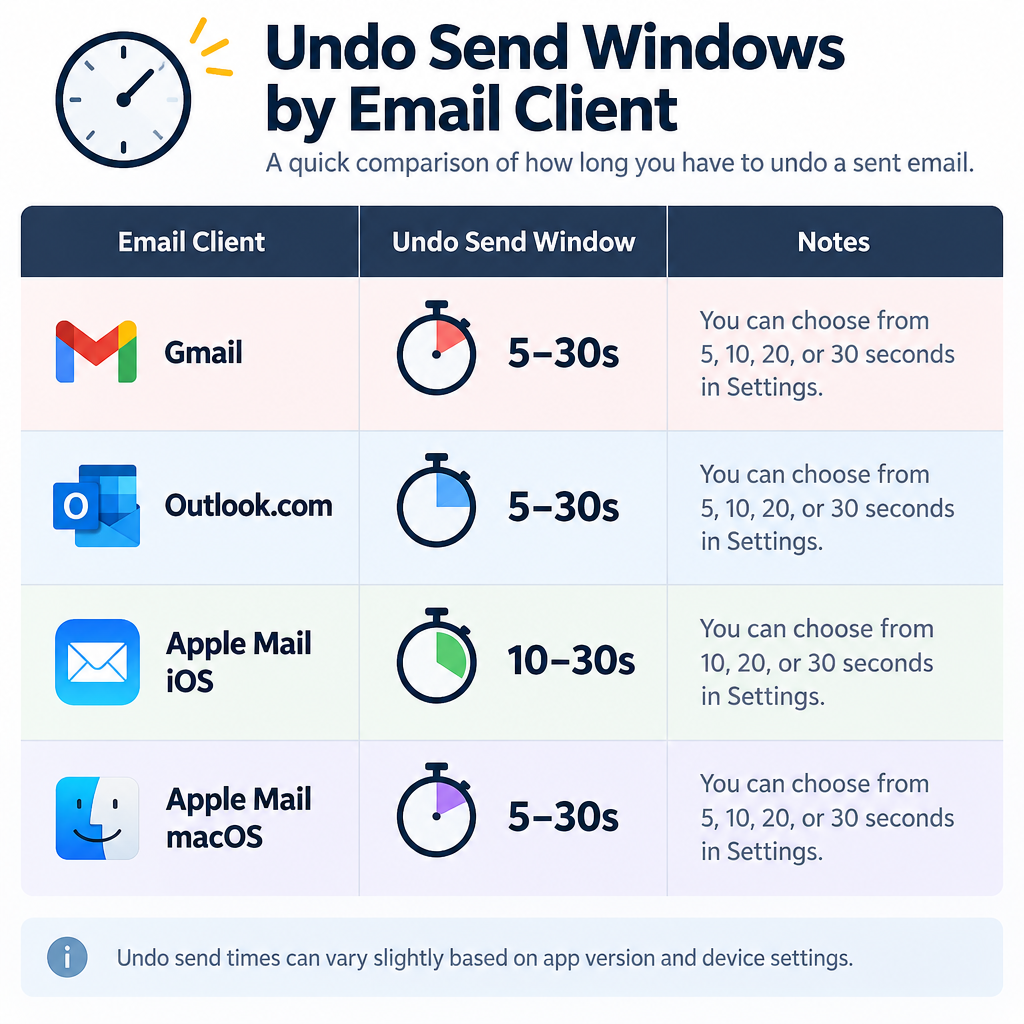
If you sent from a personal inbox in the last few seconds, you may still be inside an undo window. Here is how long each major client gives you.
| Email client | Undo window | Where to set it |
|---|---|---|
| Gmail (web and app) | 5, 10, 20 or 30 seconds (default 5) | Settings gear > See all settings > General > Undo Send |
| Outlook.com and new Outlook | Up to 10 seconds | Settings > Mail > Compose and reply > Undo send |
| Apple Mail (iOS 16 and later) | Off, 10, 20 or 30 seconds (default 10) | Settings > Apps > Mail > Undo Send Delay |
| Apple Mail (macOS Ventura and later) | Off, 10, 20 or 30 seconds | Mail > Settings > Composing > Undo send delay |
| Classic Outlook for Windows | Recall, not undo | Open the sent message > Recall This Message |
Undo Send doesn’t pull a message back from someone’s inbox. Your client simply holds the email for that many seconds before it actually goes out. Once the timer runs out, it’s gone.
Outlook’s Recall feature is different. It only works when you and the recipient are in the same Microsoft 365 or Exchange organization. It will never recall a message sent to a Gmail, Yahoo or other outside address. Recipients may also get a notice that you tried to recall something, which draws more attention to the email than the typo would have.
Marketing platforms work the same way once a campaign is delivered. Klaviyo, HubSpot and Mailchimp all let you cancel a scheduled campaign. None of them can edit or remove an email that has already landed in an inbox. Large sends go out in batches, so if a campaign is still sending, check your platform’s help docs right away to see whether you can cancel the remaining batches.
Inbox tip
Set Gmail’s Undo Send to 30 seconds today. It costs you nothing, and most people spot a typo within a few seconds of clicking Send.
Step 2: Find Out What Actually Went Wrong
Before you write a single word of apology, pin down the error precisely. “There’s a typo” isn’t a diagnosis.
Open the sent email and check each part separately:
- Subject line and preview text. These are seen by everyone, including people who never open.
- Facts. Prices, discount codes, dates, times, time zones, addresses and deadlines.
- Links and buttons. Click every one in the sent version. Don’t trust the editor preview.
- Personalization. Look for “Hi {first_name}” left blank or showing raw merge tags.
- Names. A misspelled client name is a bigger deal than a misspelled common word.
- Plain spelling and grammar. These are usually the least important item on this list.
In a marketing platform, open the campaign report and look at link click data. A link with zero clicks while others are healthy often points to a broken URL. In Klaviyo, the campaign’s click map shows which links got activity. In HubSpot, the email’s performance page lists clicks per link.
Step 3: Decide Whether the Typo Needs a Correction
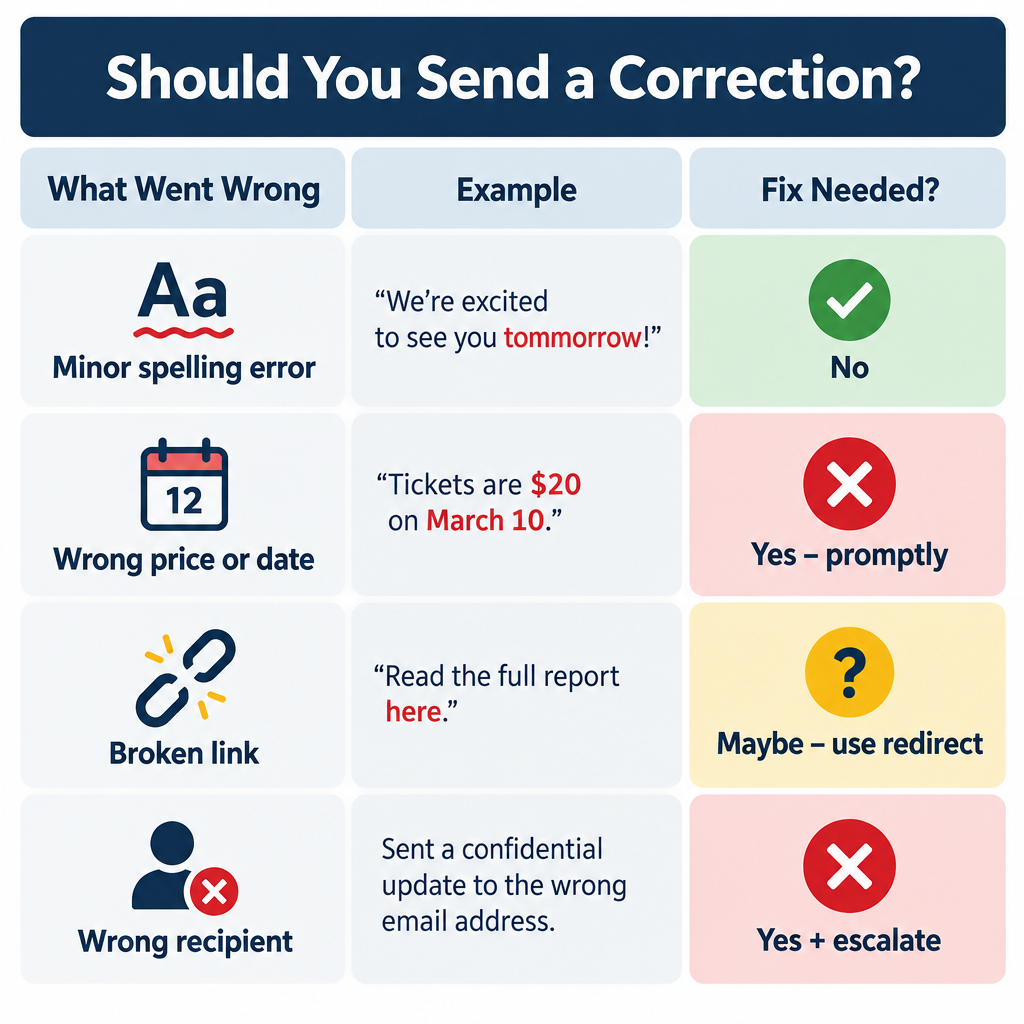
Not every mistake is a mistake your reader will notice or care about. Teams fixate on a missing comma while recipients skim past it. Use this triage table.
| What went wrong | Example | Send a correction? |
|---|---|---|
| Minor spelling or grammar | “recieve”, a doubled word | No |
| Wrong word that changes nothing | “their” for “there” | No |
| Misspelled recipient name, one-to-one | “Dear Jon” to Joan | Yes, a short private reply |
| Broken link to your own site | /spring-sael instead of /spring-sale | Usually no, fix with a redirect |
| Broken link to a third-party page | Wrong event registration URL | Yes |
| Wrong price, code or date | “Ends Friday” when it ends Thursday | Yes, promptly |
| Blank or raw merge tags | “Hi {{ first_name }},” | Usually no, unless it’s widespread and embarrassing |
| Sent to the wrong list or person | Internal pricing sent to customers | Yes, and possibly legal steps (see below) |
The test is simple. If the error will cause someone to take the wrong action, miss a deadline, lose money or feel personally slighted, correct it. If it’s only untidy, let it go.
Repeat offenders are another matter. One typo in one email gets forgiven. Typos in every email tell readers nobody is checking, so fix your process even when you skip the correction.
Step 4: Fix What You Can at the Destination
Here’s the angle most people miss: the email is frozen, but the things it points to are not.
| You can’t change | You often can change |
|---|---|
| Subject line, body copy, link URLs in the email | The landing page those links open |
| Images already cached by Gmail or Apple Mail | Images served from your own server at the same URL (only for clients that haven’t cached them) |
| The discount code printed in the email | Whether your store accepts the misspelled code |
| The date written in the email | The actual deadline (honor the wrong date if it’s later) |
If your link points to a mistyped path on your own site, add a 301 redirect from the wrong URL to the right one. Everyone who clicks lands in the right place, and nobody needs a second email.
On an Apache server, that’s one line in .htaccess:
Redirect 301 /spring-sael /spring-sale
On Nginx:
location = /spring-sael {
    return 301 /spring-sale;
}
Most ecommerce and landing page platforms, including Shopify and WordPress plugins, offer the same thing through a URL redirect setting with no code.
Discount codes work the same way. If you printed SPRNG20 instead of SPRING20, create SPRNG20 as a valid code. If you printed a deadline later than the real one, honor the later date. Fixing it at the source and saying nothing is the cleanest correction there is.
Step 5: Write the Correction for the Person Who Needs It
If you do need to correct, keep it short, factual and lighter than the original. Nobody wants three paragraphs of regret over a wrong time.
One-to-one emails
Reply in the same thread so the context is right there. Lead with the correct information, not the apology.
Quick correction: the call is at 2pm ET, not 3pm. Sorry for the typo.
For a misspelled name, a single line is enough:
Apologies for misspelling your name in my last email, Joan.
“Sorry for the typo” is fine for colleagues and most clients. In more formal settings, “Apologies for the error in my previous message” reads cleaner. Skip “sorry for any inconvenience” unless there was real inconvenience.
Don’t send a correction for a trivial typo to a client. Pointing out “recieve” makes them reread the email looking for it.
Marketing campaigns
A correction campaign should be shorter than the original and name the fix in the subject line:
- “Correction: your code is SPRING20”
- “Oops, here’s the working link”
- “Wrong date in our last email: the sale ends Thursday”
Put the corrected information in the first line of the body. Add one sentence of apology, repeat the main call to action and stop. A touch of humor works if it fits your brand voice. Groveling doesn’t.
Leave your normal footer and unsubscribe link in place. A correction is still a marketing email under CAN-SPAM and GDPR.
Step 6: Send the Correction to the Right People
Don’t resend to your whole list by reflex. Target the people the mistake affected.
Who to include:
- Clickers of a broken link, if the fix needs a new link.
- Openers, for a wrong fact in the body. Since Apple Mail Privacy Protection launched in 2021, open data is inflated by automatic opens, so treat it as a broad net.
- Everyone delivered, only for errors in the subject line or a deadline nobody can afford to miss.
In Klaviyo, build a segment using “What someone has done” with the Received Email, Opened Email or Clicked Email metric, filtered to the campaign name. In HubSpot, create an active list or segment filtered on the specific marketing email’s sent, opened or clicked activity. Mailchimp lets you segment by campaign activity in the same way.
A second send has real deliverability cost. Every extra email to people who didn’t need it raises your odds of unsubscribes and spam complaints, and mailbox providers watch those numbers closely. Understanding how e-mail spam filtering weighs complaints explains why a sloppy blast can hurt your next ten campaigns.
| Provider | Who the rules cover | Key requirements | Dates |
|---|---|---|---|
| Gmail | Senders of 5,000+ messages a day to personal Gmail | SPF, DKIM and DMARC; one-click unsubscribe; spam rate under 0.3% | February 2024; one-click unsubscribe by June 1, 2024 |
| Yahoo | Bulk senders | SPF, DKIM and DMARC; one-click unsubscribe; spam rate under 0.3% | February 2024 |
| Microsoft (Outlook.com, Hotmail, Live) | Senders of 5,000+ messages a day | SPF, DKIM and DMARC passing | Enforcement began May 5, 2025 |
Google also recommends keeping spam rates below 0.1%. A correction that annoys 0.2% of recipients can tip a healthy sender toward that 0.3% ceiling.
Deliverability risk
Blasting a correction to your full list, including people who never opened the original, is how a harmless typo turns into a complaint spike.
If the Typo Was in an Email Address
Some typos aren’t in the message at all. They’re in the address.
You sent to the wrong person. If the email went to “jon@” instead of “joan@” and contained nothing sensitive, ask the wrong recipient to delete it and resend to the right person. If it contained personal data about someone else, treat it as a possible data breach. Under GDPR Article 33, organizations must report a breach that poses a risk to people’s rights to their supervisory authority within 72 hours of becoming aware of it. Tell your data protection lead immediately.
You mistyped your own address when signing up for something. You won’t get the verification email, and you usually can’t fix it yourself. Contact the company’s support team through their website or chat, prove who you are, and ask them to update the address.
Your subscribers mistype their addresses. Addresses like “[email protected]” bounce and drag down your sender reputation. Use double opt-in so mistyped addresses never get confirmed, and turn on any typo suggestion your sign-up form offers.
Common Mistakes That Make a Typo Worse
- Silently fixing a fact that mattered. If you quoted the wrong price and just update your website, anyone who acted on the email feels misled. Silent fixes only suit errors nobody could act on.
- Sending the correction before checking it. Corrections get rushed, and a typo in the correction is far more memorable than the first one.
- Over-apologizing. A long apology makes the error look bigger than it was.
- Resending the entire original email. People get a duplicate, can’t tell what changed and start unsubscribing.
- Correcting at 11pm. Unless a deadline forces it, send the correction at your normal send time.
- Blaming a person. “Our intern made a mistake” is never something readers need to hear.
Build a Preflight That Catches the Next One
Typos in emails come from rushing, not from bad spelling. A written checklist slows you down at exactly the right moment. Never rely on memory for this.
Preflight checklist
- Turn on spelling and grammar checks in your client (Gmail: Settings > General).
- Read the email out loud, or use text-to-speech.
- Send a test to yourself and open it on your phone.
- Click every link in the test email, not the editor.
- Check prices, codes, dates and time zones against the source.
- Preview personalization with a real contact and one with blank fields.
- Have someone who didn’t write it read the subject line and first paragraph.
- Add the recipients or audience last.
Reading out loud is the step teams skip, and it’s the one that catches the most. Your eyes fill in missing words. Your ears don’t.
In Klaviyo, use Preview and test to view the email as a specific profile and send test emails. In HubSpot, use the Preview option to check how it renders for different contacts, then send a test email before you hit Review and send. Both platforms render personalization differently from what you see in the editor, so the test send matters.
Check your signature once in a while too. A typo there repeats in every email you send. If you’re redoing it, a few good email signature examples will help you keep it short and easy to proofread.
Inbox tip
Write the email first and add the recipient’s address last. You can’t send a half-checked email to someone who isn’t in the To field yet.
What a Good Outcome Looks Like
After the dust settles, you should have:
- The right people holding the right information, and nobody else bothered.
- Broken links redirected and wrong codes made valid, so stragglers who open late still get a working email.
- Unsubscribe and complaint rates on any correction send roughly in line with your normal campaigns.
- One new line on your preflight checklist covering whatever slipped through this time.
That last point is the real fix. Every mistake shows you a gap in your process, so close it before your next send.
FAQ
Should I apologize for a typo in an email?
Only when the typo changes the meaning, affects an action or misspells someone’s name. For ordinary spelling slips, an apology draws attention to something most readers missed.
How do I say sorry for a typo professionally?
Lead with the correct information, then add one short line. “Correction: the meeting is Tuesday, not Thursday. Apologies for the error.” That’s all it takes.
Can I unsend an email in Gmail after 30 seconds?
No. Thirty seconds is Gmail’s maximum Undo Send window. After that, the message is delivered, and you’ll need to send a follow-up if a correction is warranted.
Do typos in emails hurt deliverability?
Occasional honest typos don’t trigger spam filters. Your sending reputation, authentication and complaint rate matter far more. Deliberate misspellings used to dodge filters, like swapping letters for numbers in spammy words, are a different story and do get flagged.
Should I resend the whole campaign with the typo fixed?
Rarely. Send a short correction to the affected segment instead. A full resend duplicates the email for everyone and increases unsubscribes and spam complaints.