
As of November 2026, if Yahoo starts bouncing your mail or putting it in the spam folder, start with the error code in the bounce, check that you meet Yahoo’s sender requirements, and only then file a sender support request through the Yahoo Sender Hub. The old Yahoo Postmaster forms covered in this post have been replaced. Since February 2024, bulk senders to Yahoo and AOL need SPF, DKIM and a DMARC policy. Since June 2024 they also need one-click unsubscribe, and they have to keep spam complaints below 0.3%. A support request can’t get you past those rules, so fix the cause before you ask for help.
What Yahoo offered senders at the time
This post was written when Yahoo still ran its old Postmaster site. Back then, senders who managed their own campaigns and saw Yahoo bounce rates climb had a direct option: contact the Yahoo Postmaster team and explain the problem. Yahoo was openly asking senders with bounce or bulk folder problems to get in touch.
Yahoo had three forms, and you picked one based on the problem you kept running into:
Delivery Issues Form
ISP Issues Form
Bulk Senders Form
More detail on the forms came from:
Those forms are history now. The postmaster site and its forms were replaced by the Yahoo Sender Hub, which is now Yahoo’s single home for sender documentation, the Complaint Feedback Loop and the sender support request.
How Yahoo handles bounces and bulk folder placement now
Today a high Yahoo bounce rate or a sudden flood of mail into the spam folder usually comes from one of three things: missing authentication, a high complaint rate, or a sudden jump in volume from a sender Yahoo doesn’t trust yet. Yahoo also runs AOL Mail, so the same rules and errors apply to AOL addresses.
Read the bounce code first
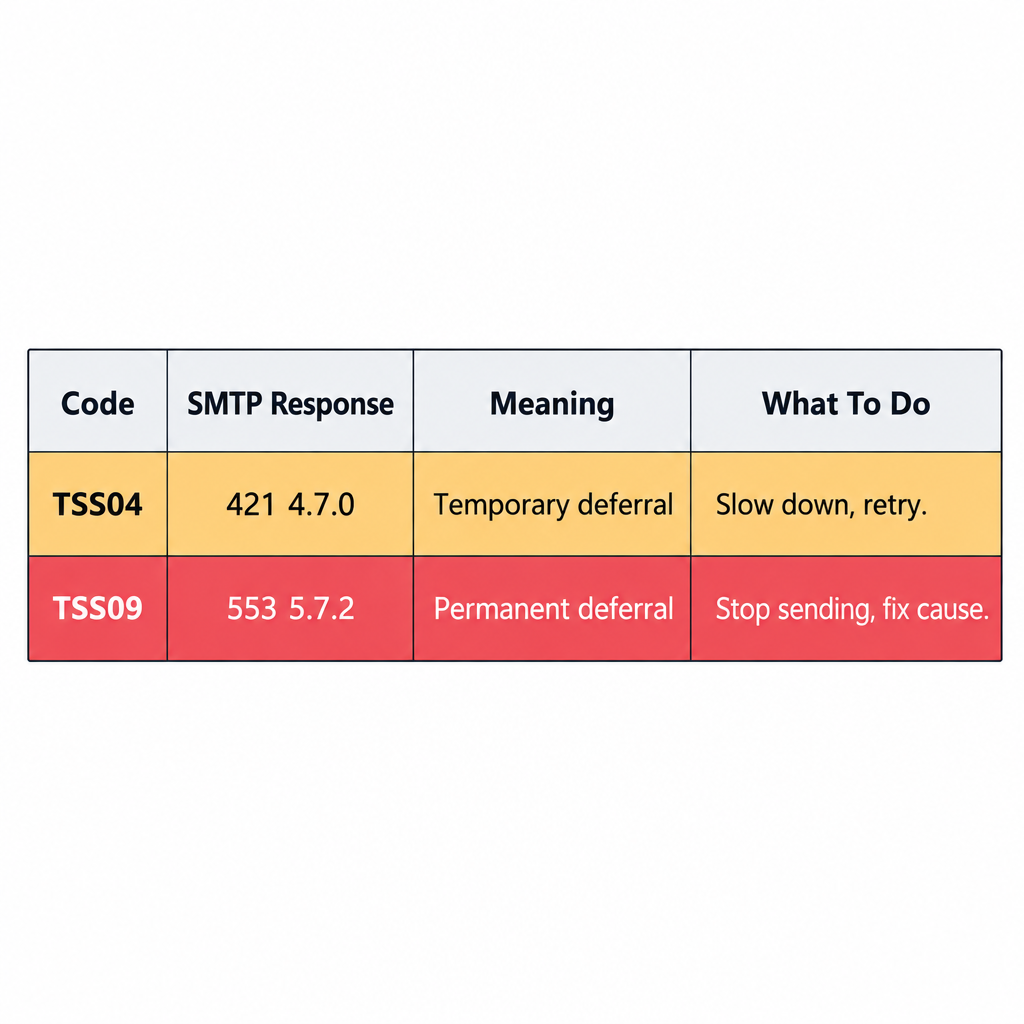
The SMTP response tells you whether Yahoo is slowing you down or refusing your mail. The two codes senders see most often are:
| Code | Typical SMTP response | What it means | What to do |
|---|---|---|---|
| TSS04 | 421 4.7.0 | Temporary deferral, tied to unexpected volume or user complaints | Slow down, cut unengaged addresses, let your mail server retry |
| TSS09 | 553 5.7.2 | Mail from the IP is being permanently deferred | Stop sending from that IP, find the cause, then file a support request |
A TSS04 deferral isn’t a blocklisting. It’s Yahoo throttling a sender whose recent traffic looks risky. With TSS09, retrying again and again tends to make things worse. Each bounce message includes a pointer to Yahoo’s error code page. That page is the official reference, and it’s worth reading before you change anything.
Meet the sender requirements
Yahoo’s requirements took effect in February 2024, alongside matching rules from Gmail. These are the rules that decide whether your mail is accepted at all:
- Authentication for everyone. All senders need at least SPF or DKIM. Bulk senders need both.
- DMARC for bulk senders. Publish a valid DMARC policy of at least
p=none. The From domain also has to align with the SPF or DKIM domain. - One-click unsubscribe. Marketing mail needs a working one-click unsubscribe. Yahoo began enforcing this in June 2024. Honor unsubscribe requests within two days.
- Low spam complaints. Keep your spam rate below 0.3%. Running well under that gives you room to absorb a bad send.
- Valid forward and reverse DNS. Your sending IPs need matching DNS records.
Yahoo doesn’t publish a volume number that makes you a “bulk sender.” Google uses 5,000 messages a day to Gmail addresses, and many senders use that figure for Yahoo as well. The safer approach is to meet the bulk rules no matter how much you send.
A minimal DMARC record to start monitoring looks like this:
_dmarc.example.com. IN TXT "v=DMARC1; p=none; rua=mailto:[email protected]"
One-click unsubscribe uses two message headers, as defined in RFC 8058:
List-Unsubscribe: <https://example.com/unsub?id=abc123>, <mailto:[email protected]>
List-Unsubscribe-Post: List-Unsubscribe=One-Click
Use the Complaint Feedback Loop
Yahoo’s Complaint Feedback Loop (CFL) is free and sends you a report each time a Yahoo or AOL user marks your mail as spam. It works only with DKIM-signed mail, so you enroll by verifying your DKIM signing domain in the Sender Hub. Remove complainers from your list automatically as soon as the report arrives. That’s the fastest way to keep your complaint rate under the 0.3% ceiling.
File a sender support request only after fixing the cause
The Sender Hub’s support form replaced the three old Postmaster forms, and it has an option for problems delivering mail. Yahoo responds to specific evidence, so include:
- The full SMTP error text and code (for example, TSS04 or TSS09)
- Your sending IPs and the domains you send from
- Timestamps and message IDs for affected messages
- Your daily volume and what you have changed since the problem started
Requests that only say “Yahoo is blocking us,” with no codes or examples, rarely get anywhere. Filing a request also doesn’t exempt you from the sender requirements.
What changed elsewhere since this post
Yahoo was not the only mailbox provider to tighten its rules. Gmail’s sender guidelines added the same authentication, unsubscribe and 0.3% spam rate rules in February 2024, and Google said enforcement would ramp up from November 2025, with more temporary and permanent rejections for mail that doesn’t comply. Microsoft began rejecting non-compliant bulk mail to Outlook.com, Hotmail.com and Live.com addresses on May 5, 2025. Getting your Yahoo setup right now covers most of what the other big providers expect.
Open rates from Yahoo and every other provider are also less reliable than they used to be. Apple Mail Privacy Protection preloads images, which pushes open counts up. Judge bulk folder problems by bounces, complaint rates and clicks, not by opens.
FAQ
Can I still contact the Yahoo Postmaster team directly?
Not the way this post described. The old Postmaster forms are gone, and the sender support request in the Yahoo Sender Hub is the official route now. Direct, personal replies are uncommon, so the request should include error codes, IPs and message examples.
Why are my emails going to the Yahoo spam folder when they used to reach the inbox?
The usual causes are a rising complaint rate, missing or misaligned DMARC, no one-click unsubscribe, or a sudden jump in volume. Check your authentication, look at complaint data from the Complaint Feedback Loop, and remove subscribers who haven’t engaged in months. Inbox placement usually recovers after a few weeks of clean sending.
What does Yahoo error TSS04 mean?
TSS04 is a temporary deferral (421 4.7.0). It means Yahoo saw unexpected volume or user complaints from your traffic. Your mail server will retry automatically. You fix it by sending less, sending to engaged subscribers, and lowering complaints.
Is a spam rate of 0.3% safe for Yahoo?
No. 0.3% is the upper limit, not a target. Senders who stay well below it, typically around 0.1% or less, have room for a bad campaign without getting deferred.
Do small senders need DMARC for Yahoo?
Yahoo requires DMARC only from bulk senders and doesn’t publish a volume number for that. Because Gmail requires DMARC at 5,000 messages a day and a p=none record takes minutes to publish, any sender of marketing email should have one.
Does Yahoo’s Complaint Feedback Loop work without DKIM?
No. The CFL identifies your mail by its DKIM signing domain, so mail without a DKIM signature produces no reports. Set up DKIM first, then enroll the signing domain in the Sender Hub.
Sources
- Yahoo Sender Hub: Sender Best Practices and Sender Requirements FAQ
- Yahoo Sender Hub: Complaint Feedback Loop
- Yahoo Postmaster: SMTP Error Codes
- Google Workspace Admin Help: Email sender guidelines and FAQ
- Microsoft Defender for Office 365 blog: Outlook requirements for high-volume senders
- IETF RFC 8058: Signaling One-Click Functionality for List Email Headers
- Federal Trade Commission: CAN-SPAM Act, A Compliance Guide for Business