
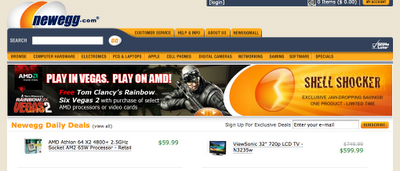
A good email sign-up process asks for as little as possible, tells people exactly what they’ll get, and sends a confirmation or welcome email straight away that says what’s coming and how often. In November 2026 that email also has to arrive, so the basics now include authenticating your domain with SPF, DKIM and DMARC, offering one-click unsubscribe and keeping spam complaints low. Gmail and Yahoo brought in those rules for bulk senders in 2024, Microsoft’s Outlook.com followed in May 2025, and Gmail started enforcing them more strictly in November 2025. Your open rates also mean less than they did when this post was written, because Apple Mail Privacy Protection, launched in 2021, loads tracking pixels automatically and makes many messages look opened.
A discussion in the
asked members which companies run a strong email marketing program. Newegg.com was one of the names, and its sign-up process at the time was a clean example of how to do it well.
Why Newegg’s sign-up process worked
Each step below gave subscribers less work, clearer expectations or a better chance of getting the email. Most of them still apply, and the notes under each point say what has changed since.
The sign-up field was easy to find on the home page
You didn’t have to look for the email sign-up form on the home page. If people can’t see the field, they can’t subscribe, and a form placed where shoppers already look will pick up sign-ups that a form tucked into the footer misses.
Today, most visitors will see your form on a phone first. Check that the field stays visible without much scrolling on a small screen, and that any pop-up you use follows Google’s rules on intrusive interstitials, so it doesn’t hurt your search rankings.

The call to action said what you were signing up for
The button and text made it clear that you were signing up for deals. Spelling out the benefit works better than a plain “Subscribe” or “Join our newsletter,” because people know the value before they hand over their address.
It also matters for compliance and for complaints. When subscribers get the kind of email they were promised, fewer of them hit “report spam.” Google’s sender guidelines tell bulk senders to keep the spam rate shown in Postmaster Tools below 0.10% and never let it reach 0.30%.
The form only asked for an email address
Newegg only asked for an email address. Other details, such as name, interests or location, could be collected later, once the subscriber trusted the brand. Every extra field is one more reason to leave the form.
This is still the right default. Progressive profiling, where a preference center or a later email asks for one more detail at a time, has become a standard feature in ESPs like Klaviyo, Mailchimp and HubSpot.
A pop-up asked new subscribers to add the sender to their address book
Once you entered your address, a window reminded you to add Newegg’s sending address to your address book, which made it more likely that later emails would reach the inbox.
When this post was written, being added to the address book was one of the main ways to get past spam filters and image blocking. Hotmail and the desktop Outlook versions of the time often hid images from unknown senders. Since then, Gmail has moved to proxying images and showing them by default (rolled out in 2013), and inbox placement now depends far more on domain authentication and how subscribers engage with your mail. Gmail has no formal safe-senders list, but saving a sender to Contacts still sends a positive signal. The reminder is still worth including in your welcome email. Just don’t treat it as a fix for bad authentication.

A confirmation email set expectations from day one
Newegg sent a confirmation email that covered the main details: what kind of emails were coming and when the first ones would arrive. Subscribers knew what they had signed up for before the first promotion turned up.
Today, this message is usually the first email in an automated welcome series, and it is often the most-read email a brand ever sends. Many senders also use it for double opt-in, where the subscriber clicks a link to confirm the address. In the US, CAN-SPAM doesn’t require double opt-in. Still, it keeps typos and fake addresses off your list, and in the EU it is a common way to show the consent that GDPR asks for.

Newegg kept its process simple and to the point, and told subscribers what to expect. Those same three things are still the base of a good sign-up flow. What’s changed is the work behind it: authentication, one-click unsubscribe and complaint monitoring now decide whether the promised deals ever reach the inbox.
FAQ
Should you use single opt-in or double opt-in for your sign-up form?
Double opt-in gives you a cleaner list with fewer typos, bots and spam traps. Single opt-in grows faster. US law allows either. If you’re seeing fake sign-ups, high bounce rates or complaints, switch to double opt-in. If your list is healthy, single opt-in followed by a strong welcome email is a reasonable choice.
What should a welcome or confirmation email include?
It should confirm what the subscriber signed up for, say how often you’ll send, and give a reason to click, such as a first deal or a guide. Add a visible unsubscribe link and your physical postal address, which CAN-SPAM requires in commercial email. A short reminder to save your sending address to their contacts still helps.
Do Gmail and Yahoo’s sender rules affect small lists?
All senders to Gmail need SPF or DKIM, valid DNS records and a low spam rate. The stricter rules apply once you send close to 5,000 messages a day to personal Gmail accounts. Those senders need SPF, DKIM, a DMARC policy of at least p=none, and one-click unsubscribe. Yahoo applies similar rules to bulk senders but doesn’t publish a fixed volume threshold, so the safe move is to set up all three records regardless of list size.
How quickly do you have to process unsubscribes?
CAN-SPAM gives you 10 business days. Gmail and Yahoo expect bulk senders to honor one-click unsubscribe requests within two days. Most ESPs process them instantly, so this mainly matters if you sync lists between systems by hand.
Are open rates still a good way to judge a new sign-up flow?
Not on their own. Apple Mail Privacy Protection preloads images for many Apple Mail users, so opens are inflated and don’t reliably show real reading. Judge your sign-up flow by confirmation rate, click rate on the welcome series, first purchase or conversion, and spam complaints.
Is it legal to add people to a list without a sign-up form?
In the US, CAN-SPAM doesn’t require opt-in, but mailbox providers judge you on complaints. Mail sent to people who never asked for it gets reported, and penalties for violations can exceed $50,000 per email. GDPR in the EU generally requires a lawful basis such as consent. Buying or scraping lists leads to complaints, spam traps and blocklisting, so grow your list only through sign-ups.
Sources
- Google Workspace Admin Help: Email sender guidelines
- Gmail Help: Email sender guidelines FAQ
- Yahoo Sender Hub: Best practices
- Microsoft Tech Community: Outlook’s new requirements for high-volume senders
- FTC: CAN-SPAM Act, a compliance guide for business