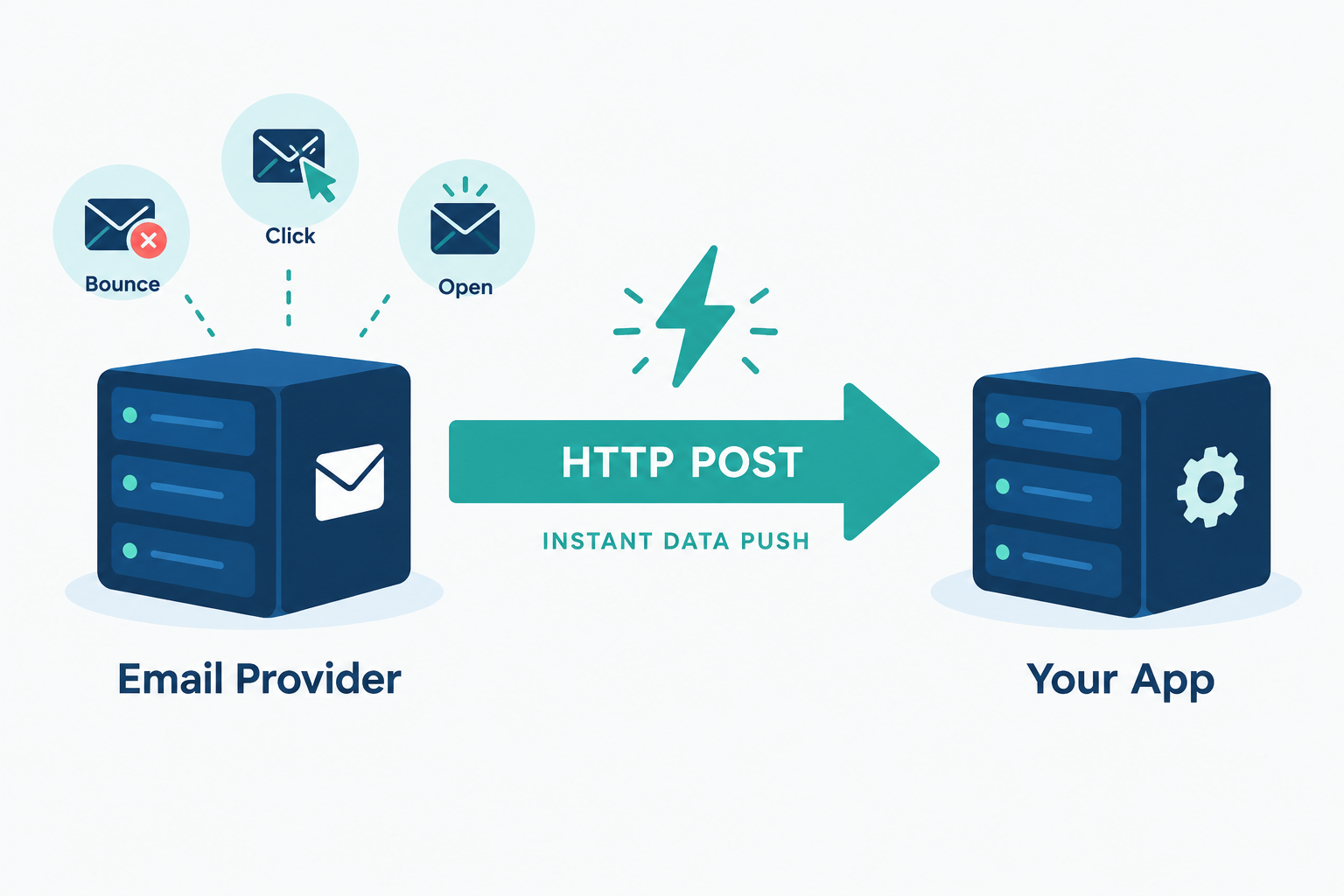
A webhook is an automated HTTP message that one application sends to another the moment something happens, such as an email bouncing or a subscriber clicking unsubscribe. Your system doesn’t keep asking for updates. The sending service pushes the data to a URL you provide. Email platforms rely on webhooks to report deliveries, bounces, complaints, opens and clicks to your CRM, store or database in near real time.
What are webhooks, in plain terms?
Webhooks are user-defined HTTP callbacks. You register a URL with a service, choose the events you care about, and the service sends an HTTP request to that URL each time one of those events occurs. The request body carries the details: which event, when it happened, which message or contact it relates to.
The term dates to 2007, when developer Jeff Lindsay described “web hooks” as a way for web apps to notify each other the way Unix programs pass output through pipes. The idea caught on because it solved a common integration problem with very little machinery: any system that can receive an HTTP request can receive a webhook.
A useful analogy is the difference between refreshing a parcel tracking page every ten minutes and getting a text when the courier drops off the box. Polling an API is the refreshing. A webhook is the text.
People sometimes call webhooks “reverse APIs” or “push APIs”. The labels are loose, but they capture the key point. With a normal API call, you start the conversation. With a webhook, the other system does.
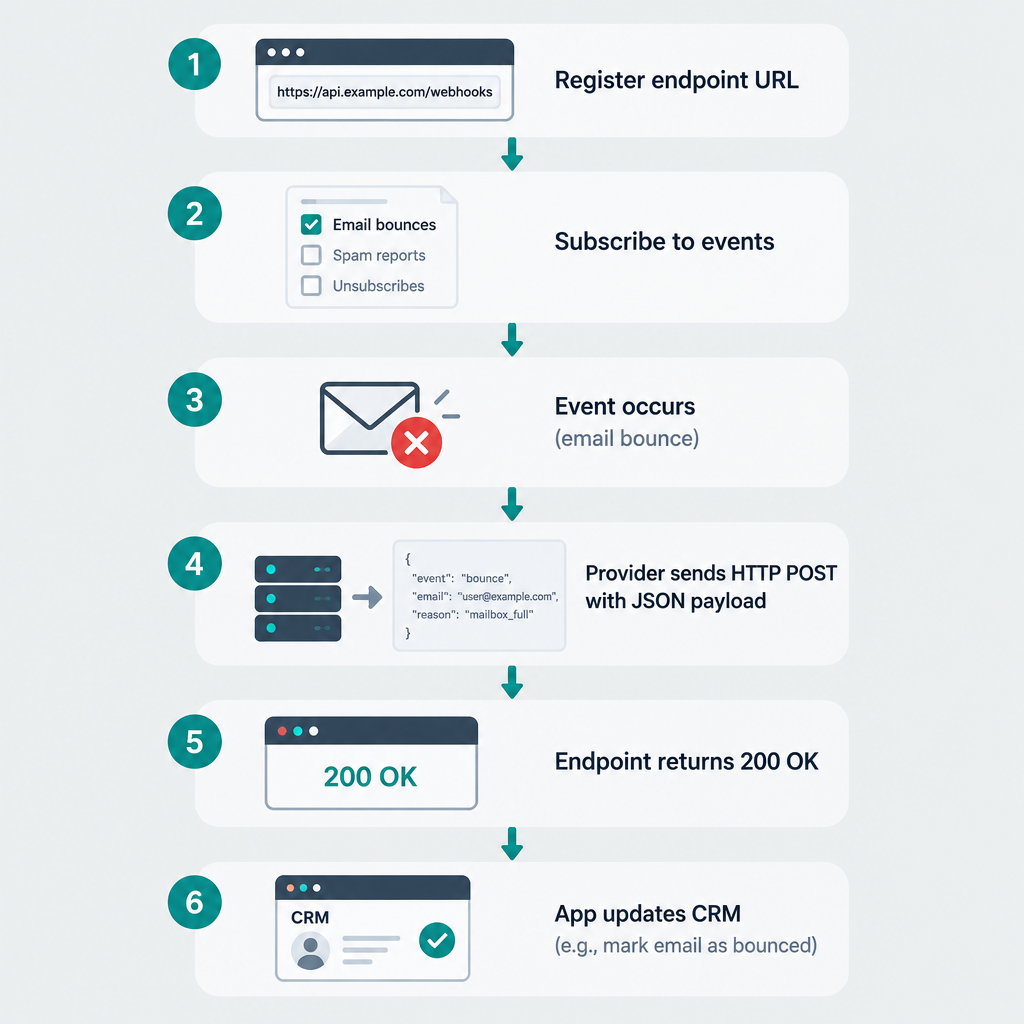
How a webhook works, step by step
Every webhook follows the same basic flow, regardless of which apps are involved:
- You register an endpoint. This is a URL on your server or in an automation tool, for example
https://example.com/hooks/email-events. - You pick the events. Most providers let you subscribe only to the events you need, such as bounces and spam complaints.
- An event happens. A receiving mail server rejects a message, or a subscriber clicks a link.
- The provider sends an HTTP POST. The request contains a payload, usually JSON, describing the event.
- Your endpoint responds with a 2xx status code. This tells the provider the delivery worked. Anything else, or a timeout, usually triggers a retry.
- Your code acts on the data. It might suppress an address, update a contact record or post an alert to Slack.
A semi-realistic webhook example
Say a subscriber’s mailbox no longer exists and the receiving server returns a hard bounce. SendGrid’s Event Webhook would send your endpoint a JSON array of events. A simplified version looks like this:
[
  {
    "email": "[email protected]",
    "timestamp": 1735689600,
    "event": "bounce",
    "type": "bounce",
    "reason": "550 5.1.1 The email account that you tried to reach does not exist",
    "status": "5.1.1",
    "sg_event_id": "a1b2c3d4e5f6",
    "sg_message_id": "14c5d75ce93.dfd.64b469.filter0001.16648.5515E0B88.0"
  }
]
Your code reads event, sees a hard bounce with a 5.1.1 status, marks [email protected] as undeliverable in your CRM and returns 200 OK. Total elapsed time from bounce to suppression: usually seconds.
Mailgun structures things differently. It wraps the event inside an event-data object and adds a separate signature object for verification:
{
  "signature": {
    "timestamp": "1735689600",
    "token": "a8ce0edb2dd8301dee6c2405235584e45aa91d1e9f979f3de0",
    "signature": "d2271d12299f6592d9d44cd9d250f0704e4674c30d79d07c47a66f95ce71cf55"
  },
  "event-data": {
    "event": "failed",
    "severity": "permanent",
    "recipient": "[email protected]",
    "id": "CPgfbmQMTCKtHW6uIWtuVe"
  }
}
Same event, different shape. That is the first lesson of working with email webhooks: every provider has its own payload format, so your handler needs to be written for the specific service sending to it.
Webhooks vs. APIs (and polling)
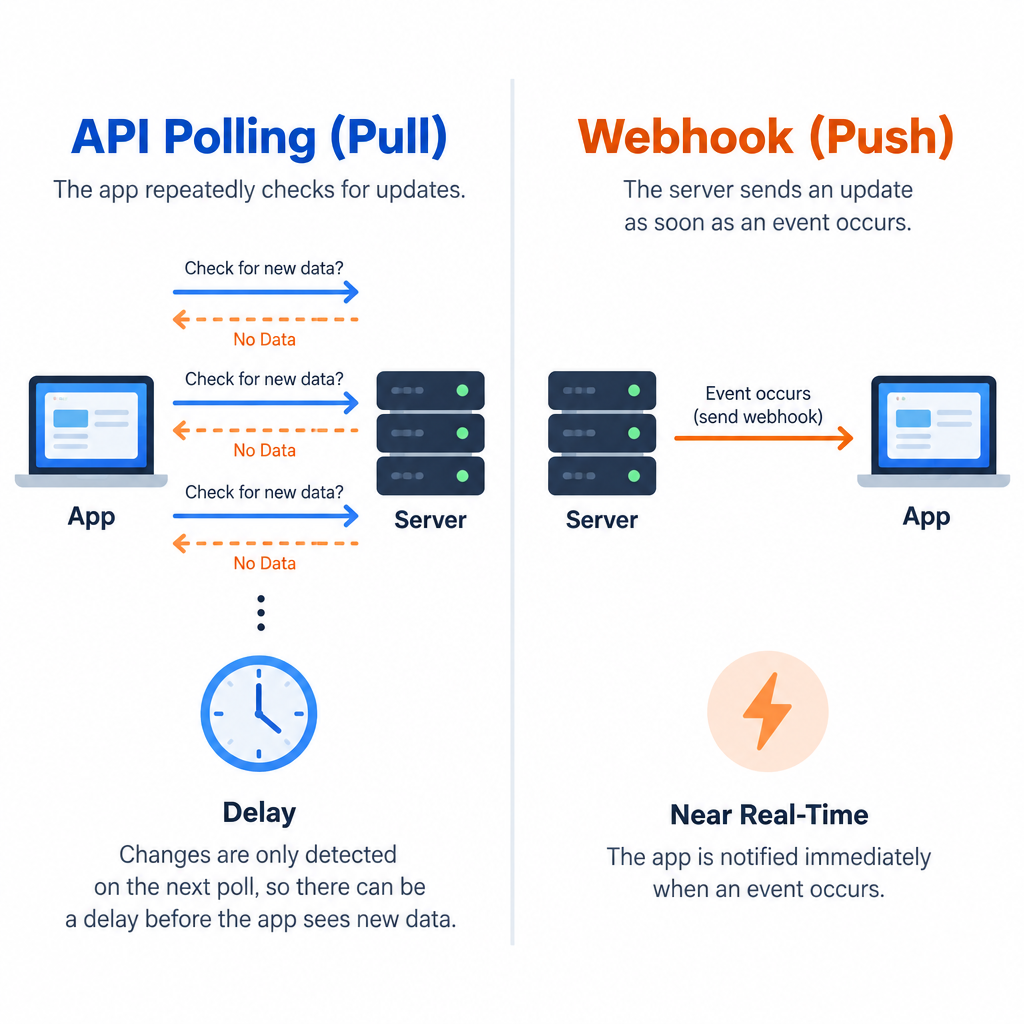
Webhooks and APIs aren’t competitors. Webhooks travel over HTTP and are part of a provider’s API surface. The real comparison is between push (webhooks) and pull (polling an API endpoint on a schedule).
| Webhook (push) | API polling (pull) | |
|---|---|---|
| Who starts the request | The provider | Your application |
| Timing | Near real time, seconds after the event | Delayed by your polling interval |
| Wasted requests | None; a request means something happened | Many; most polls return nothing new |
| Rate limit pressure | Low | High at short intervals |
| What you need to run | A public HTTPS endpoint | A scheduled job and API credentials |
| Missed data risk | Events can be lost if your endpoint is down too long | Low; you can re-query history |
| Best for | Reacting to events as they happen | Backfills, reconciliation, bulk reads |
The strongest setups use both. Webhooks handle the live flow, and a nightly API query catches anything that slipped through during an outage. Email providers make this easy because most of them expose an events or logs API alongside their webhooks.
How email services use webhooks
Sending an email kicks off a chain of events you can’t see from your own app. The provider accepts the message, hands it to the recipient’s mail server, and then gets back a delivery, a deferral or a bounce. Later, the recipient might open it, click it, mark it as spam or unsubscribe. Webhooks are how the provider tells you about each of those steps.
Here are the event types you’ll see across most email platforms and what you should do with each one.
| Event | What it means | What your system should do |
|---|---|---|
| Delivered | Receiving server accepted the message | Log it; delivered does not mean inbox |
| Deferred / delayed | Temporary failure, provider will retry | Usually nothing; watch for spikes by domain |
| Hard bounce | Permanent failure, e.g. address doesn’t exist | Suppress the address immediately |
| Soft bounce | Temporary issue, e.g. full mailbox | Count them; suppress after repeated failures |
| Spam complaint | Recipient clicked “Report spam” | Unsubscribe them at once and flag the source |
| Unsubscribe | Recipient opted out | Update every system that can email them |
| Open | Tracking pixel loaded | Treat as a soft signal only (see below) |
| Click | Tracked link followed | Trigger follow-ups, score engagement |
| Dropped / rejected | Provider refused to send, often a suppressed address | Check why; fix the list or template |
Why bounce and complaint webhooks matter most
If you only wire up two events, make them bounces and spam complaints. Gmail and Yahoo’s bulk sender requirements, enforced from February 2024 for anyone sending 5,000 or more messages a day to Gmail addresses, ask senders to keep their spam complaint rate below 0.3%. Google recommends staying under 0.1%. Microsoft added its own requirements for high-volume senders to Outlook.com addresses in May 2025.
Your email service already suppresses bounced and complaining addresses on its own sending infrastructure. The problem is the other systems. If your CRM, your e-commerce platform or a second email tool doesn’t know about the complaint, it may keep mailing that person. A complaint webhook closes that gap.
Deliverability risk
Mailing addresses that already hard bounced or complained elsewhere is one of the fastest ways to push your complaint rate past 0.3% and get filtered or blocked by Gmail and Yahoo.
Unsubscribe webhooks are compliance plumbing
The same Gmail and Yahoo rules require one-click unsubscribe for marketing mail and expect opt-outs to be honoured within two days. In the US, CAN-SPAM gives you 10 business days. Under GDPR, a withdrawn consent has to stop processing for that purpose.
Those deadlines get tricky when you send from more than one tool. Your newsletter might go out through Mailchimp while receipts and win-back flows come from a transactional service. An unsubscribe webhook from one platform, pushed into your central contact record, is the simplest way to keep every system in sync.
Open events need a pinch of salt
Since Apple launched Mail Privacy Protection with iOS 15 in September 2021, Apple Mail can preload images (including tracking pixels) through proxy servers whether or not the person reads the email. That means a large share of “open” webhooks now fire automatically. Don’t build important automations on opens alone. Clicks, replies and purchases are far more trustworthy triggers.
Webhook support across major email providers
Every major email service offers webhooks, but the details differ in ways that affect your code. This table summarises how the main providers handle them, based on their published documentation at the time of writing (early 2025). Check the current docs before you build, as these change.
| Provider | Webhook name | Payload format | Request signing | Retry behaviour |
|---|---|---|---|---|
| Twilio SendGrid | Event Webhook | JSON array, batched | Optional ECDSA signature (Signed Event Webhook) | Retries non-2xx responses for up to 24 hours |
| Mailgun | Webhooks (per domain) | JSON, one event per request | HMAC-SHA256 with your webhook signing key | Retries for about 8 hours; a 406 response stops retries |
| Postmark | Webhooks (per message stream) | JSON, one event per request | No signatures; supports Basic Auth and IP allowlisting | Retries failed deliveries with increasing delays |
| Amazon SES | Event publishing via SNS or EventBridge | JSON in an SNS or EventBridge envelope | SNS messages are signed by AWS | Governed by SNS or EventBridge delivery policy |
| Mailchimp (Marketing) | Audience webhooks | Form-encoded POST | No signatures; use a secret in the URL | Disables webhooks that keep failing |
| Mailchimp Transactional (Mandrill) | Webhooks | Form-encoded batch of JSON events | HMAC-SHA1 via X-Mandrill-Signature |
Retries failed batches |
| Resend | Webhooks | JSON, one event per request | Signed via Svix headers | Retries on a backoff schedule |
A few practical takeaways from that table:
- SendGrid batches. One request may contain dozens of events, so your handler must loop through the array.
- Mailgun lets you say “stop”. Returning
406 Not Acceptabletells it not to retry that event. - Postmark and Mailchimp don’t sign requests. You need Basic Auth, an IP allowlist or a hard-to-guess token in the URL to keep strangers from posting fake events.
- Amazon SES isn’t a classic webhook. You publish events through a configuration set to SNS (which can call an HTTPS endpoint) or EventBridge. You also have to confirm the SNS subscription before events flow.
Most common use cases for webhooks in email
Beyond bounce and complaint handling, here is where webhooks earn their keep for email teams:
- CRM sync. Push clicks, unsubscribes and bounces into HubSpot, Salesforce or your own database so sales and support see the same contact status as marketing.
- E-commerce triggers. Shopify, WooCommerce and Stripe all send webhooks for orders, refunds and failed payments. Your email platform (or a middleware tool) catches them and fires order confirmations, shipping updates and dunning emails. These receipts get used in more places than you might expect, since Google says Chrome autofill can now pull order and flight details from Gmail.
- Double opt-in. A signup form posts to your email platform, and a subscribe webhook tells your app to unlock a download or create an account.
- Team alerts. Send a Slack or Teams message when complaint events spike, or when a key customer’s emails start bouncing.
- Data warehouse loading. Stream every event into BigQuery, Snowflake or Postgres for long-term reporting that outlives your provider’s log retention.
- Inbound email. Most transactional providers can parse replies sent to your domain and post them to a webhook, which is how many support desks and reply-to-comment features work.
No-code tools like Zapier, Make and n8n give you a webhook URL in a few clicks. That’s the quickest way to try these use cases before you write any code.
How to set up an email webhook
Menu paths below were accurate at the time of writing. Providers redesign their dashboards often, so look for “Webhooks” or “Event Webhook” under settings if a label has moved.
- SendGrid: Settings > Mail Settings > Event Webhooks
- Mailgun: Send > Sending > Webhooks, then choose the domain
- Postmark: Servers > your server > your message stream > Webhooks
- Amazon SES: Configuration sets > your set > Event destinations
- Mailchimp: Audience > Manage Audience > Settings > Webhooks
Setup steps
- Create an HTTPS endpoint that accepts POST requests and returns 200.
- In your provider, open the webhook settings and paste the endpoint URL.
- Select only the events you will actually use.
- Turn on request signing and copy the signing key.
- Send a test event from the dashboard and confirm it arrives.
- Add signature checks and event handling, then go live.
Before you write real code, point the webhook at a request inspection service or a local tunnel such as ngrok to see the exact payload. It saves guesswork about field names.
Securing your webhook endpoint
A webhook URL is a public door into your system. Anyone who finds it can post fake “unsubscribe” or “bounce” events and quietly wreck your list. Lock it down with these layers:
- Use HTTPS only. Never accept webhook data over plain HTTP.
- Verify signatures. Where the provider signs requests, recompute the signature with your secret key and compare it before trusting anything in the body.
- Check timestamps. Reject requests older than a few minutes to block replay attacks.
- Add Basic Auth or a URL token for providers that don’t sign requests.
- Allowlist IPs where the provider publishes its sending ranges.
Here is how Mailgun signature verification looks in Python. Mailgun concatenates the timestamp and token, then signs them with HMAC-SHA256 using your webhook signing key:
import hashlib
import hmac def verify_mailgun(signing_key, timestamp, token, signature):
    expected = hmac.new(
        key=signing_key.encode(),
        msg=f"{timestamp}{token}".encode(),
        digestmod=hashlib.sha256,
    ).hexdigest()
    return hmac.compare_digest(expected, signature)
Use compare_digest rather than == so the comparison takes constant time. For extra protection, store each token you’ve seen and reject repeats.
A growing number of services, including those built on Svix, follow the Standard Webhooks specification. It uses three headers (webhook-id, webhook-timestamp and webhook-signature), which means one verification routine can cover several providers.
Inbox tip
Never act on an unsubscribe or complaint event until the signature checks out. A forged event is rare; a forged event that resubscribes people who opted out is a legal problem.
Webhook challenges: how to troubleshoot common issues
Most webhook problems fall into a handful of patterns. Start here when events go missing or arrive twice.
| Symptom | Likely cause | Fix |
|---|---|---|
| No events arriving at all | Wrong URL, firewall block, or SES SNS subscription not confirmed | Send a test event; check server logs; confirm the SNS subscription |
| Provider shows repeated failures | Endpoint returns non-2xx or times out | Return 200 immediately, then process in the background |
| Same event processed twice | Retries after a slow response; at-least-once delivery | Deduplicate on the event ID (e.g. SendGrid’s sg_event_id) |
| Events in the “wrong” order | Parallel delivery and retries | Sort by the event timestamp, not arrival time |
| Signature check always fails | Body parsed or re-encoded before verification, or wrong key | Verify against the raw request body; confirm the key |
| Mailchimp webhook won’t save | Mailchimp validates the URL with a GET request first | Make the endpoint return 200 to GET as well as POST |
| Huge spike after an outage | Provider replaying its retry queue | Queue incoming events; scale workers, not the endpoint |
| Webhook silently disabled | Too many consecutive failures | Re-enable it, then backfill from the provider’s events API |
The second row causes more trouble than all the others combined. Providers expect a fast answer, and some time out after just a few seconds. If your handler calls three other APIs before responding, you’ll see timeouts, retries and duplicates.
Tips for optimizing webhook usage
These habits separate a webhook integration that runs quietly for years from one that pages you at 3 a.m.
Acknowledge first, work later. Write the raw payload to a queue or table and return 200 straight away. A separate worker handles the business logic. This keeps you inside every provider’s timeout and lets you replay events if your code has a bug.
Make handlers idempotent. Assume every event will arrive at least twice at some point. Processing a bounce twice should give the same result as processing it once.
Subscribe to less. If you don’t use open events, turn them off. A large newsletter send can generate an open webhook for most Apple Mail recipients within minutes, and that’s a lot of traffic to receive and discard.
Keep the raw payloads. Providers retain event logs for a limited period, often days or weeks depending on plan. Your own copy lets you answer “why did this person stop getting emails?” months later.
Monitor the endpoint. Alert on rising error rates, falling event volume and queue backlog. A webhook that quietly stops is worse than one that fails loudly.
Reconcile on a schedule. Run a daily job that pulls suppressions or events through the provider’s API and compares them with your records. It catches anything lost during downtime.
Separate environments. Use different endpoints and signing keys for staging and production so test sends never touch real contact records.
Benefits of using webhooks
For an email program, the payoff is concrete:
- Faster list hygiene. Bad addresses are suppressed everywhere in seconds, not on the next nightly sync.
- Lower complaint rates. Complainers stop receiving mail from every tool, protecting your sender reputation.
- Fewer API calls. No polling loops eating into rate limits.
- Better automation triggers. Clicks and purchases can start follow-up sequences while the subscriber is still engaged.
- Simpler architecture. Any system that can accept an HTTP POST can join the integration.
The cost is that you now run an endpoint that must be available, secure and fast. For most teams that trade is well worth it, especially once the sending volume puts you under Gmail, Yahoo and Microsoft’s bulk sender rules.
FAQ
What is a webhook in simple terms?
A webhook is a message one app sends to another automatically when something happens. Instead of your system repeatedly asking “anything new?”, the other service sends an HTTP request to a URL you gave it, with details of the event.
What are webhooks used for in email marketing?
Mainly for syncing email events to other systems: suppressing hard bounces, unsubscribing people who report spam, updating CRM records with clicks, triggering follow-up emails and loading event data into reporting tools.
Is a webhook the same as an API?
No. An API is something you call when you want data. A webhook is a call the provider makes to you when an event occurs. Both use HTTP, and most email services offer both, so you can react in real time with webhooks and fill gaps with API queries.
Do webhooks always deliver every event?
No delivery system is perfect. Most providers retry failed deliveries for a set window (24 hours for SendGrid, roughly 8 to 12 hours for Mailgun depending on which of its docs you consult), but if your endpoint is down longer than that, events can be lost. A daily reconciliation job through the provider’s API covers the gap.
Do I need to be a developer to use webhooks?
Not to get started. Zapier, Make and n8n generate webhook URLs you can paste into your email platform and connect to Slack, Google Sheets or a CRM without code. For high volumes or compliance-critical events like unsubscribes, a coded endpoint with signature checks is the safer choice.
Are webhooks secure?
They are as secure as your endpoint. Use HTTPS, verify signatures where the provider offers them, reject old timestamps and add Basic Auth or IP allowlisting for providers that don’t sign requests.