Category: Automation & Cold Email

  • Cold Email Explained and How to Do It the Right Way

    Cold Email Explained and How to Do It the Right Way

    A cold email is a one-to-one message you send to someone who has never heard from you, with a specific reason to start a conversation. Done well, it books meetings and opens doors. Done badly, it burns your domain and lands every future email in spam. This guide covers the writing, the setup behind it, and 12 templates you can adapt today.

    Best forB2B sales, partnerships, PR
    Safe pace30-50 emails per inbox daily
    Key recordsSPF, DKIM, DMARC
    Top templateThe trigger-based opener

    What Is Cold Email? The Meaning in Plain Terms

    Cold email is unsolicited outreach to a person you have no existing relationship with. “Cold” means the recipient did not sign up, did not request contact and probably does not know your name.

    Cold emailing is the practice of doing this deliberately and repeatedly, usually for business. Salespeople use it to book demos. Founders use it to reach investors. Freelancers use it to find clients. PR teams use it to pitch journalists and media outlets.

    A real cold email is narrow. It goes to one person, or a small, carefully chosen list. It references something specific about them. It asks for one small action.

    That is what separates it from spam. Spam is untargeted, often deceptive, and sent at volume to people who never had a reason to hear from you.

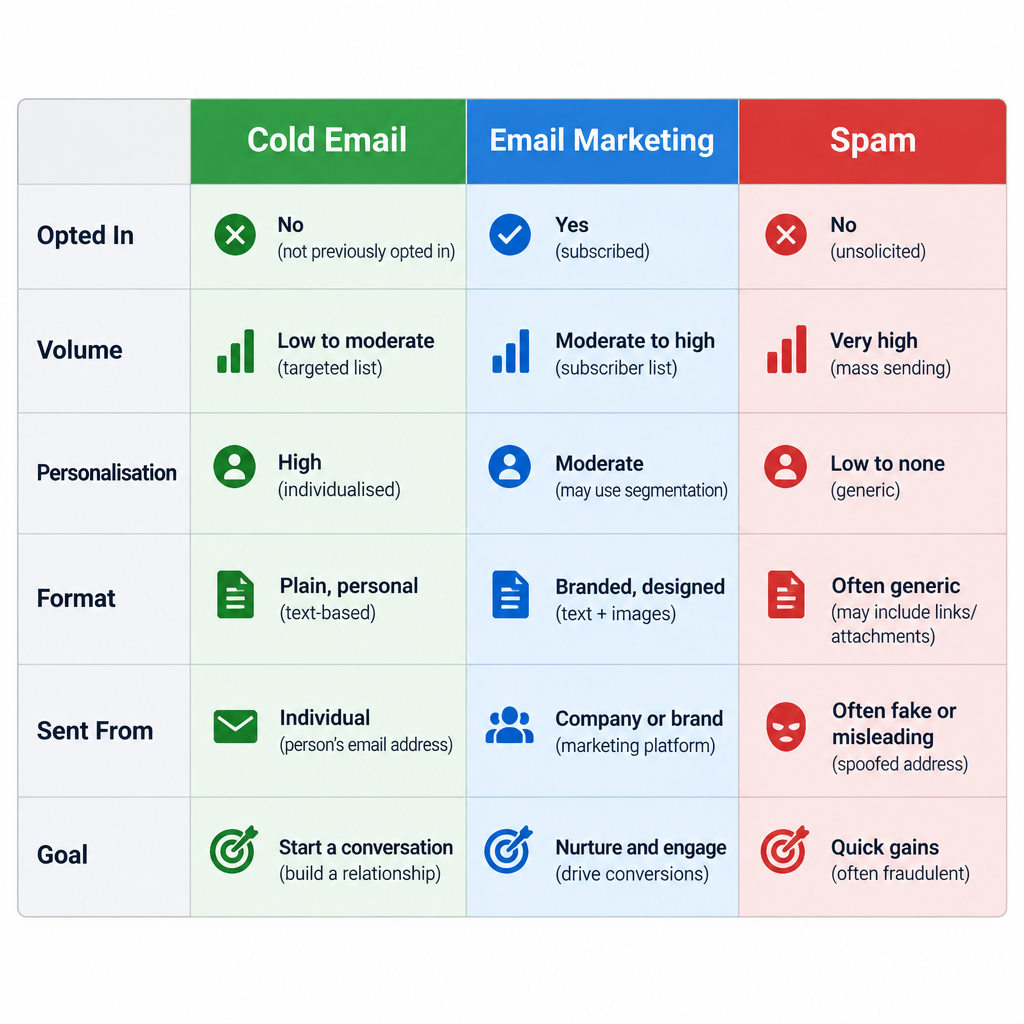
    Cold email vs. email marketing vs. spam

    People mix these up all the time. The difference matters because each one runs under different rules and on different tools.

    Cold email Email marketing Spam
    Recipient opted in? No Yes No
    Typical volume Dozens to hundreds per day Thousands per send As many as possible
    Personalisation Written for one person or segment Segment-level None or fake
    Format Plain text, short Designed, often with images Varies
    Sent from Real inbox (Google Workspace, Microsoft 365) An ESP such as Mailchimp or Klaviyo Anywhere
    Goal Start a conversation Nurture and sell to subscribers Trick or flood

    Email marketing works with people who already gave you permission. Cold email is about earning the first reply. If you want the full picture of permission-based campaigns, our guide to what email marketing is and how it actually works covers that side.

    One practical consequence: do not send cold email through your email service provider. Mainstream ESPs require opt-in lists in their acceptable use policies and will suspend accounts that send to people who never subscribed. Cold outreach goes out from real mailboxes, either by hand or through a cold email platform that connects to those mailboxes.

    Is Cold Emailing Legal?

    In most markets, yes, for B2B outreach, provided you follow the rules. The rules differ a lot by country, and “B2B” does not give you a free pass everywhere.

    Region Law Consent needed for B2B cold email? Key obligations Maximum penalty
    United States CAN-SPAM Act No (opt-out model) Honest headers and subject, physical postal address, working opt-out, honour opt-outs within 10 business days $53,088 per email (2025 FTC adjustment)
    European Union GDPR + national ePrivacy laws Varies by country; many allow B2B under legitimate interest Lawful basis, tell people where you got their data, honour objections €20 million or 4% of global annual turnover
    Germany UWG §7 + GDPR Generally yes, prior consent Stricter than most EU states for email advertising Varies; injunctions and fines
    United Kingdom UK GDPR + PECR No for corporate addresses; yes for sole traders and some partnerships Identify yourself, offer opt-out, lawful basis Enforced by the ICO
    Canada CASL Yes (express or implied) Implied consent can apply if the address is conspicuously published and your message relates to their role Up to CAD $10 million per violation

    Two points get missed most often.

    GDPR Article 14 applies to you. If you collected someone’s details from a source other than them, such as a company website or LinkedIn, you have to tell them where you got the data and how to object. A single line in the email or a link to your privacy notice handles this.

    CAN-SPAM covers B2B email. There is no business exemption. Every commercial message needs a valid postal address and a clear way to opt out.

    Deliverability risk

    Bought or scraped lists break the law in many regions and wreck your sender reputation everywhere. Build your list from research, not from a CSV you paid for.

    This is not legal advice. If you sell into Germany, Canada or a regulated industry, get a lawyer to review your approach once.

    Set Up Your Sending Before You Write a Word
    Cold Email vs Email Marketing vs Spam Comparison Table

    Most cold email fails at the infrastructure level. The copy never gets a chance because the message lands in spam or bounces. Fix this first.

    Use a separate sending domain

    Do not send cold outreach from your main company domain. If your cold campaigns pick up spam complaints, your invoices, password resets and customer emails suffer too.

    Register a secondary domain that clearly belongs to your brand. If your company is acme.com, something like tryacme.com or acmehq.com works. Redirect the website to your main site so anyone who checks finds a real business. Never use a lookalike domain designed to impersonate someone else.

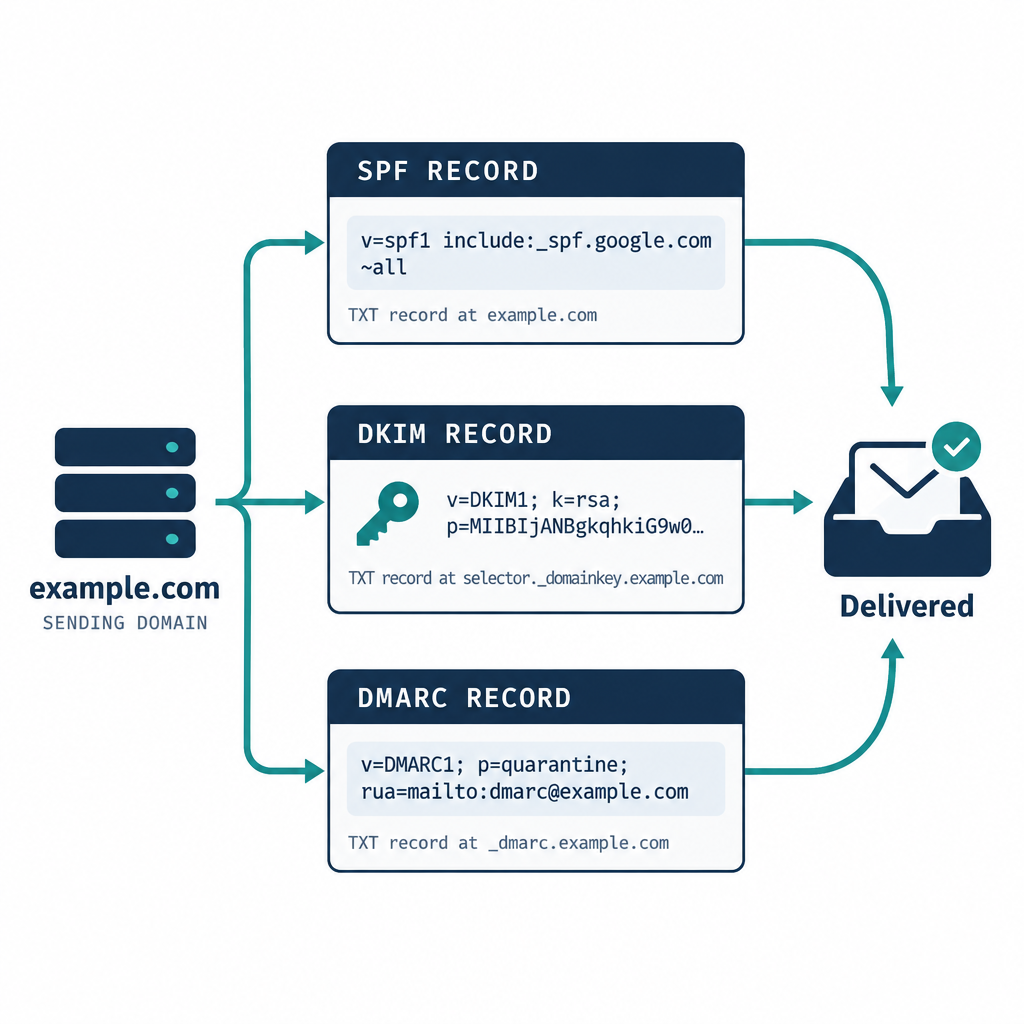
    Authenticate the domain with SPF, DKIM and DMARC

    Every sending domain needs all three records. Since February 2024, Gmail and Yahoo require them for bulk senders, and Microsoft started enforcing similar rules for Outlook.com in May 2025.

    An SPF record for a Google Workspace domain looks like this:

    Type: TXT
    Host: @
    Value: v=spf1 include:_spf.google.com ~all
    

    For Microsoft 365, swap the include:

    Type: TXT
    Host: @
    Value: v=spf1 include:spf.protection.outlook.com ~all
    

    Only keep one SPF record per domain. If a cold email platform sends on your behalf through its own servers, add its include to the same record.

    DKIM is generated inside your mail provider. In Google Workspace, go to Admin console > Apps > Google Workspace > Gmail > Authenticate email, generate a 2048-bit key, and publish it:

    Type: TXT
    Host: google._domainkey
    Value: v=DKIM1; k=rsa; p=MIIBIjANBgkqhkiG9w0BAQEFAAOCAQ8AMIIBCgKCAQEA...
    

    Then return to the same screen and click Start authentication. Many people publish the record and forget this last click.

    DMARC ties it together. Start with monitoring:

    Type: TXT
    Host: _dmarc
    Value: v=DMARC1; p=none; rua=mailto:[email protected]
    

    Once reports show your legitimate mail passing, move to p=quarantine. A policy of p=none meets the current Gmail, Yahoo and Microsoft minimum.

    Know the mailbox provider rules

    These are the rules your cold email lives under. Even if you never reach the bulk thresholds, meeting them is the baseline for decent inbox placement.

    Provider Effective date Who it applies to Requirements
    Gmail (all senders) February 1, 2024 Anyone sending to personal Gmail accounts SPF or DKIM, valid forward and reverse DNS, TLS, spam rate below 0.3%
    Gmail (bulk senders) February 1, 2024, with phased enforcement through 2024 5,000+ messages per day to Gmail accounts SPF and DKIM, DMARC (p=none minimum), From domain aligned with SPF or DKIM, one-click unsubscribe for marketing mail, unsubscribes processed within 2 days
    Yahoo February 2024 Bulk senders SPF, DKIM, DMARC, one-click unsubscribe, honour unsubscribes within 2 days, low complaint rate
    Microsoft (Outlook.com, Hotmail, Live) May 5, 2025 5,000+ messages per day to Microsoft consumer domains SPF, DKIM, DMARC (p=none minimum, aligned with SPF or DKIM)

    Google’s guidance is to keep your spam rate under 0.1% and never let it reach 0.3%. With cold email, a few annoyed recipients clicking “Report spam” gets you there fast. That is the strongest argument for tight targeting.

    Respect sending limits

    Each mailbox has a hard cap. Free Gmail allows 500 recipients per day. Google Workspace allows 2,000 messages per user per day. Microsoft 365 allows 10,000 recipients per day and 30 messages per minute.

    Those caps are ceilings, not targets. For cold outreach, we keep each inbox to roughly 30 to 50 new cold emails a day, and we add inboxes rather than pushing one harder. A brand-new domain should start lower and ramp up over two to four weeks.

    If you connect your inbox to a sending platform over SMTP, use port 587 with STARTTLS unless the tool specifies otherwise. Our explainer on which SMTP port you should use covers the options.

    Setup steps

    1. Register a secondary domain tied to your brand.
    2. Create two or three real mailboxes on Google Workspace or Microsoft 365.
    3. Publish SPF, DKIM and DMARC records, then start DKIM signing.
    4. Point the domain’s website to your main site.
    5. Send normal, low-volume email from each inbox for two weeks.
    6. Ramp cold sends slowly, starting at 5 to 10 a day per inbox.
    7. Watch bounces, replies and spam complaints daily for the first month.

    How to Write a Cold Email That Gets a Reply

    Every good cold email answers three questions within about five seconds. Who are you? Why me? What do you want?

    Here is the anatomy, part by part.

    Subject line

    Write it like a colleague would. Short, lowercase-friendly, specific. Three to six words is plenty.

    Good: “question about your Q3 hiring”, “idea for {Company}’s onboarding”, “{Mutual contact} suggested I reach out”.

    Bad: “Quick question!!!”, “Partnership Opportunity”, “Re:” on a first email. That last one is deceptive and it falls foul of CAN-SPAM’s rule against misleading subject lines.

    Opening line

    Drop “I hope this email finds you well.” Everyone skips it, and it signals a template. Open with them instead: something they wrote, launched, hired for or said.

    The first line also shows as preview text in most inboxes. Treat it as a second subject line.

    Relevance

    One or two sentences connecting their situation to a problem you solve. Be specific. “Companies like yours struggle with churn” says nothing. “You’ve opened four CS roles since March, which usually means onboarding is straining” shows you did the work.

    The offer

    What do you bring? Keep it to one result, ideally with a number from a real customer. Skip feature lists. Nobody reads them in a cold email.

    Call to action

    Ask for one small thing. “Worth a 15-minute call next week?” works better than a calendar link in a first email, because it asks for a reply rather than a commitment. Interest-based CTAs (“Is this on your radar?”) work well for senior people.

    Sign-off and footer

    Your name, title, company and one link at most. Add an opt-out line and your postal address to stay on the right side of CAN-SPAM. Something as simple as “Not relevant? Reply ‘no thanks’ and I won’t follow up” works for the opt-out.

    Format rules

    • Plain text. No images, logos or HTML designs.
    • Under 125 words for the first email. Shorter is usually better.
    • One link at most. Zero is often safer on new domains.
    • Turn off open tracking. Tracking pixels are tiny images that can hurt deliverability, and Apple Mail Privacy Protection has inflated open rates since 2021 anyway, so the data is unreliable.
    • No attachments. Offer to send assets after they reply.

    Inbox tip

    Before a campaign goes live, run one email through a spam checker and look at your SpamAssassin score. Spammy phrases, broken HTML and a missing DKIM signature all show up there before they show up in your results.

    How to Pick the Right Cold Email Template
    Email Authentication Setup Diagram

    Templates save time, but the wrong one wastes a good prospect. Use these criteria to choose.

    How much do you know about them? If you found a real trigger, such as a funding round, new hire or product launch, use a trigger template. If all you have is a job title, you need more research, not a cleverer template.

    What relationship exists already? A mutual contact, a shared event or a past touchpoint beats any pitch. Always use the warmest angle you have.

    How senior are they? Executives respond to short, outcome-led notes. Managers respond to specifics about their daily work.

    What do you want? A meeting, an introduction, a piece of feedback or a partnership each need a different ask.

    What proof can you offer? If you have a strong case study from their industry, lead with it. If you don’t, lead with insight about their business instead.

    Quick-Reference: 12 Cold Email Templates Compared

    # Template Best use Research needed Ask size Ideal length
    1 Trigger-based opener Sales, any industry High Small 60-90 words
    2 Observation and idea Agencies, consultants High Small 70-100 words
    3 Right-person referral Finding the decision maker Low Very small 40-60 words
    4 Mutual connection Any warm-ish lead Medium Small 50-80 words
    5 Peer proof Sales with strong case studies Medium Medium 70-100 words
    6 Value-first share Long sales cycles Medium Very small 60-80 words
    7 Event follow-up After conferences or webinars Low Small 50-80 words
    8 New role congrats Leaders in their first 90 days Medium Small 60-90 words
    9 Partnership pitch Co-marketing, integrations High Medium 80-120 words
    10 Media pitch PR, guest posts High Medium 80-120 words
    11 Networking or job ask Career outreach Medium Small 60-100 words
    12 Breakup follow-up Final touch in a sequence None Very small 30-50 words

    12 Cold Email Templates, Ranked

    These are ranked by how reliably each one starts real conversations across the widest range of situations. Replace everything in curly brackets. If you can’t fill a bracket with something true and specific, skip that prospect or pick a different template.

    1. The Trigger-Based Opener (Top Pick)

    This is our top pick because it forces you to have a reason for every email. A trigger is a recent, public event that makes your offer timely: funding, hiring, a launch, an expansion, a tech change.

    Subject: {Trigger} at {Company}

    Hi {First name},

    Saw {Company} just {trigger, e.g. “opened a Berlin office”}. Teams expanding into new markets usually hit {specific problem} in the first few months.

    We help {type of company} {result}. {Customer} cut {metric} by {number} after a similar move.

    Worth a short call to see if it applies to you?

    {Your name}

    Why it works: The timing feels natural, and the problem is one they are likely facing right now. Good sources of triggers include company press pages, job boards, funding announcements and the prospect’s own posts.

    2. The Observation and Idea

    Best for agencies, consultants and anyone selling expertise. You point out something specific you noticed and offer one idea for free.

    Subject: idea for {Company}’s {area}

    Hi {First name},

    I was looking at {specific asset, e.g. “your pricing page”} and noticed {observation}.

    One quick idea: {specific, useful suggestion in one sentence}. We did something similar for {client} and saw {result}.

    Happy to send over two or three more ideas if this is useful. Want them?

    {Your name}

    Why it works: You give before you ask. The CTA is tiny, and a reply costs them nothing. Make sure the observation is accurate. Getting their product wrong ends the relationship before it starts.

    3. The Right-Person Referral

    Use this when you know the company is a fit but can’t tell who owns the decision.

    Subject: who handles {area} at {Company}?

    Hi {First name},

    I’m trying to reach whoever looks after {area} at {Company}. Is that you, or would someone else be better?

    Short version: we help {type of company} {result}.

    Thanks either way,

    Why it works: It is easy to answer, and a referral from inside the company (“Emma suggested I reach out”) warms up your next email. Send it to someone adjacent to the decision, not to the CEO of a 2,000-person company.

    4. The Mutual Connection

    If you share a contact, lead with it. Ask the mutual contact first whether you can use their name.

    Subject: {Mutual contact} suggested I reach out

    Hi {First name},

    {Mutual contact} mentioned you’re working on {project or goal}. We’ve been helping {similar company} with exactly that.

    {One line on result.}

    Would you be open to a 15-minute chat next week?

    {Your name}

    Why it works: Borrowed trust is the fastest way to warm a cold lead. Never name-drop someone without permission. It gets checked more often than you’d think.

    5. The Peer Proof

    Lead with a customer they know or respect, ideally a direct competitor or peer.

    Subject: how {Peer company} {result}

    Hi {First name},

    {Peer company} was dealing with {problem}. After switching to {product}, they {specific result with number} in {timeframe}.

    Given {Company}’s {similar situation}, I suspect you might see something similar.

    Open to seeing how they did it?

    {Your name}

    Why it works: Social proof from a peer lowers perceived risk. Only use customer names and numbers you have permission to share.

    6. The Value-First Share

    For long sales cycles or senior buyers who won’t take a meeting from a stranger. You share useful content with no strings.

    Subject: {topic} data you might find useful

    Hi {First name},

    We just pulled together {content, e.g. “a breakdown of how 40 SaaS companies price annual plans”}. Given {Company}’s {relevant context}, figured it might be useful.

    Want me to send it over?

    {Your name}

    Why it works: Asking before sending keeps the first email link-free, which helps deliverability on newer domains. Make sure the content is genuinely good. Recycled blog posts won’t earn a second email.

    7. The Event Follow-Up

    Use within a week of a conference, webinar or meetup where they spoke or attended.

    Subject: your talk at {Event}

    Hi {First name},

    Caught your session on {topic} at {Event}. Your point about {specific detail} stuck with me, especially {why}.

    We work on {related problem} with {type of company}. Would be good to compare notes for 15 minutes if you’re open to it.

    {Your name}

    Why it works: A shared experience makes the email feel lukewarm rather than cold. Quote something specific so it’s obvious you were really there.

    8. The New Role Congrats

    New leaders usually have budget, a mandate to change things and a 90-day window to show results.

    Subject: congrats on the new role

    Hi {First name},

    Congrats on joining {Company} as {title}. The first few months in a role like that usually mean {common priority}.

    We’ve helped {number or names} of new {titles} {result} in their first quarter.

    Worth a quick chat once you’ve settled in?

    {Your name}

    Why it works: The timing is right, and the CTA respects that they’re busy. Wait two to three weeks after the announcement so they’re not buried in congratulations.

    9. The Partnership Pitch

    For integrations, co-marketing, affiliate deals and joint content.

    Subject: {Your company} x {Their company}?

    Hi {First name},

    I run {role} at {Your company}. We serve {audience}, which overlaps heavily with {Their company}’s customers.

    Idea: {specific partnership, e.g. “a joint webinar on X” or “a native integration between our platforms”}. For context, {proof of reach or traction}.

    Is this something you’d explore? Happy to send a one-page outline.

    {Your name}

    Why it works: It frames mutual gain early and offers a concrete next step. Our guide to email pitch examples for sales, PR and partnerships has more variations on this one.

    10. The Media Pitch

    For PR, podcast guest spots and expert commentary. Journalists get buried in pitches, so relevance is everything.

    Subject: data on {topic they cover}

    Hi {First name},

    Read your piece on {recent article}. We have {new data, story or expert} that adds {angle} to it.

    Headline finding: {one striking, verifiable fact}.

    Happy to share the full data or set up a call with {expert}. Would that be useful for an upcoming story?

    {Your name}

    Why it works: You’re offering material for their next story, not asking for a favour. Never pitch a journalist something outside their beat.

    11. The Networking or Job Ask

    For career outreach, informational interviews and reaching hiring managers directly.

    Subject: question about {team} at {Company}

    Hi {First name},

    I’m a {role} with {experience} and I’ve followed {Company}’s work on {specific thing} for a while.

    Would you be open to 15 minutes to share how your team approaches {topic}? I’d value the perspective, and I’ll keep it to the time.

    {Your name}

    Why it works: Asking for insight gets far more replies than asking for a job. If the conversation goes well, the job question follows naturally.

    12. The Breakup Follow-Up

    The last email in a sequence. It closes the loop politely and often gets the highest reply rate of any follow-up.

    Subject: closing the loop

    Hi {First name},

    I’ve reached out a few times about {topic} and haven’t heard back, so I’ll assume the timing isn’t right.

    If that changes, just reply here. Wishing you a good quarter.

    {Your name}

    Why it works: It removes pressure and gives an easy out. Some people reply simply to say “not now, try in Q2,” which is valuable information.

    How to Follow Up Without Being Annoying

    Most replies come after the first email, not from it. A short sequence of three to four emails total is our working standard.

    Email Timing Purpose
    1 Day 1 Main pitch using one of the templates above
    2 Day 3-4 Short bump in the same thread with one new detail
    3 Day 8-10 New angle: a case study, a question or a useful resource
    4 Day 15-20 Breakup email

    Rules for follow-ups:

    • Reply in the same thread so context stays visible.
    • Add something new each time. “Just bumping this to the top of your inbox” adds nothing.
    • Stop immediately when someone replies, books, opts out or bounces. Good cold email platforms do this automatically.
    • Never follow up after a “no.” Remove them and move on.

    If you’re sending manually, you can schedule emails in Gmail to land at the start of the recipient’s workday in their own time zone. That small detail helps more than most subject line tweaks.

    Manual Sending vs. a Cold Email Platform

    Below about 20 emails a day, sending by hand from Gmail or Outlook is fine. You’ll write better emails because each one gets your full attention.

    Past that, a dedicated cold email platform makes sense. Look for these features:

    • Multiple inbox support so you can spread volume across mailboxes and domains.
    • Automatic stop-on-reply across every step in a sequence.
    • Sending windows and throttling to space emails out like a human would.
    • Plain-text sending with open tracking off by default, or easy to disable.
    • CRM sync so replies and meetings land in your pipeline without manual entry.
    • Bounce handling that removes bad addresses after the first hard bounce.

    Avoid any tool that sells you contact data scraped without a lawful basis, or that encourages huge volumes from a single inbox. Those are shortcuts that end with a blocklisted domain.

    Metrics to Watch

    Opens are no longer a reliable signal, so focus on what happens after delivery. These are the thresholds we work to.

    Metric What it tells you Where to check Healthy range
    Bounce rate List quality Your sending platform or inbox Under 2%; pause and clean the list above that
    Spam complaint rate How recipients feel about you Google Postmaster Tools, Yahoo Sender Hub Under 0.1%; never reach 0.3% (Google’s limit)
    Reply rate Overall relevance Sending platform Track the trend by campaign
    Positive reply rate Real interest Manual tagging or CRM The number that matters most
    Meetings booked Business outcome CRM or calendar Measure per 100 prospects contacted

    Treat reply rate as relative, not absolute. Compare one campaign against another, not against a figure from someone else’s industry. When you want to know which subject line or opener works better, run proper A/B testing with only one variable changed and enough sends on each side to mean something.

    Google Postmaster Tools only shows data once you send meaningful volume to Gmail users, so small senders may see nothing there. In that case, watch for a sudden drop in replies. It’s often the first sign you’ve slipped into spam.

    Deliverability risk

    A sudden spike in bounces is the fastest way to get a new domain flagged. Verify every address before it enters a sequence, and stop sending the moment bounces climb.

    Common Cold Email Mistakes

    Writing about yourself first. If the first two sentences are about your company, the reader has already gone. Open with them.

    Faking personalisation. “I loved your recent post!” with no detail is worse than no personalisation at all. People can tell.

    Asking for too much. A 45-minute demo request from a stranger rarely gets a yes. Ask for a reply, a short call or permission to send something.

    Sending too fast on a new domain. Volume on day one is the most common reason new senders end up in spam. Ramp slowly.

    Using HTML designs and images. Cold emails should look like a person typed them. Banners and logos make them look like campaigns, and filters treat them that way.

    Ignoring opt-outs. Every “please remove me” must be honoured quickly and permanently, across every inbox and tool you use. CAN-SPAM gives you 10 business days. Gmail and Yahoo expect unsubscribes processed within 2 days for bulk senders. Aim for same-day.

    Hiding where you found their data. Under GDPR, you owe recipients that information. A short line such as “I found your details on your company’s team page” handles it and builds trust.

    FAQ

    How to create a cold email?

    Start with research: find one specific, recent reason to contact the person. Then write a short subject line, an opening line about them, one sentence on the problem you solve, one result as proof, and a single small ask. Keep it under 125 words, send it as plain text from an authenticated domain, and include an opt-out line and postal address.

    What is the 60/40 rule in email?

    It is an informal content guideline, not a formal standard, and different marketers define it slightly differently. The most common version says about 60% of your content should give value (insight, help, useful information) and 40% can promote your product or offers. In cold email, push it further: the first email should be almost entirely about the recipient’s situation, with only a line or two about you.

    What are the 5 C’s of email?

    The most widely used version is clear, concise, correct, courteous and complete. Some trainers swap in “compelling” or “conversational.” For cold email, concise and clear matter most: one idea, one ask, no jargon, and nothing the reader has to reread to understand.

    What does “cold reach out” mean?

    Cold reach out means contacting someone who has no prior relationship with you and hasn’t asked to hear from you. It can happen over email, LinkedIn or phone. Cold email is the most common form because it’s scalable, asynchronous and easy for the recipient to answer on their own time.

    Is cold email the same as spam?

    No. Cold email is targeted, honest and sent to people with a plausible reason to care. Spam is untargeted, often deceptive and sent at volume. The line is crossed when you mislead people, ignore opt-outs, use bought lists or send to people with no connection to your offer.

    How many cold emails can I send per day?

    Hard limits are 500 recipients per day for free Gmail, 2,000 messages and 10,000 total recipients per day per Google Workspace user, and 10,000 recipients per day on Microsoft 365 business plans (consumer Outlook.com accounts are capped at 5,000 recipients per day). For cold outreach, stay far below those. We recommend 30 to 50 new cold emails per inbox per day, after a warm-up period of two to four weeks on a new domain.

  • Email Pitch Examples for Sales, PR and Partnerships

    Email Pitch Examples for Sales, PR and Partnerships

    A strong email pitch is usually under 150 words. It opens with something specific to the recipient, offers one clear piece of value and ends with one easy ask. Below are 14 email pitch examples for sales prospects, journalists and potential partners, with notes on why each works and when to use it. After the examples you’ll find follow-up timing, the deliverability setup and the legal rules that decide whether anyone reads your pitch.

    Best forSales, PR, partnerships
    Ideal length75-150 words
    Follow-upsOne to three
    Key recordDMARC

    The four parts every pitch needs

    Every pitch that gets a reply has the same skeleton, whatever the context. Strip away the tone and the industry jargon and you’ll find four parts.

    1. The hook. The first line proves you know who they are. It could be a recent article, a new job posting, a product launch or a mutual connection. A generic compliment doesn’t count.
    2. The bridge. One or two sentences that connect their world to yours. This answers “why are you emailing me, and why now?”
    3. The value. What they get. For a prospect, that’s a result. For a journalist, it’s a story their readers will care about. For a partner, it’s access to an audience or a product gap filled.
    4. The ask. One action, small enough to say yes to in ten seconds. “Worth a 15-minute call Thursday?” works better than “Let me know your thoughts.”

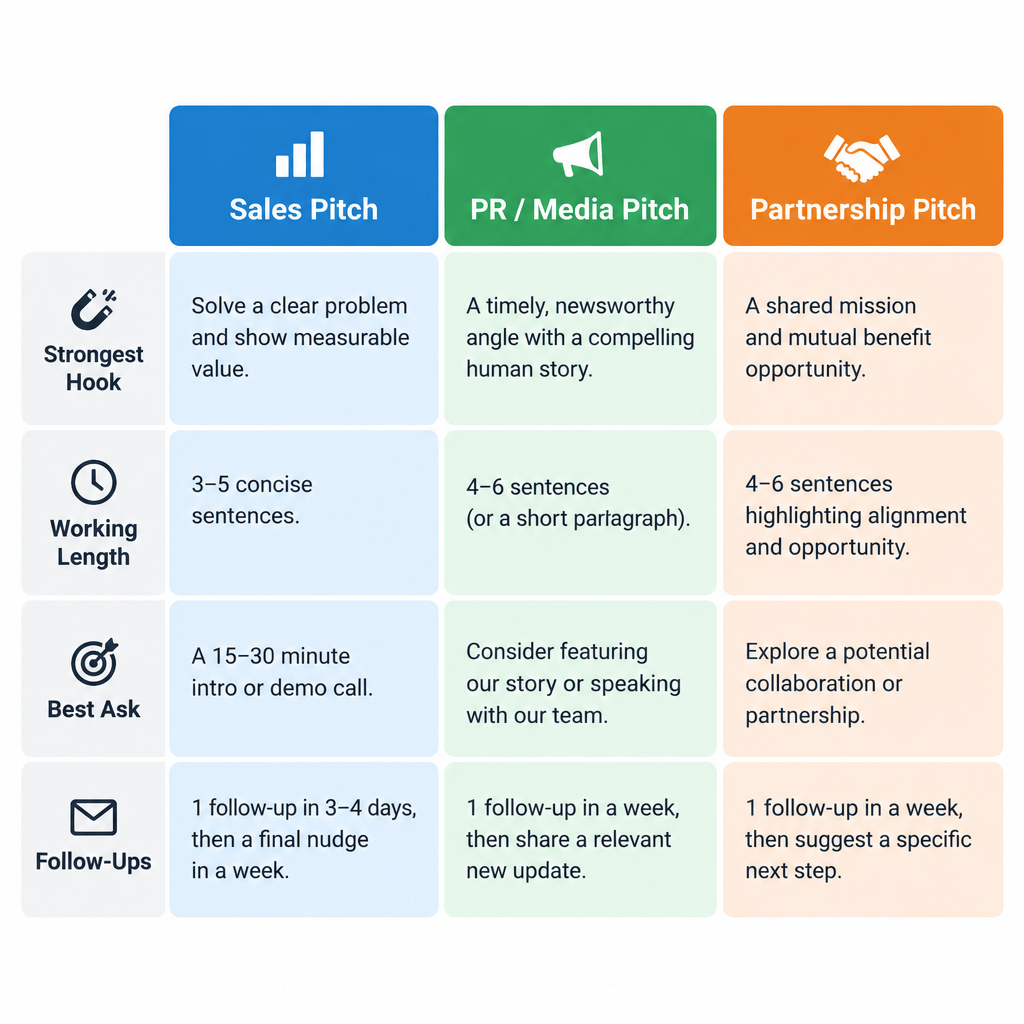
    The weight of each part shifts by pitch type. Sales prospects care about their problem, reporters care about their readers, and partners care about the trade. The table below shows the working ranges I use. They come from practice, not from a survey.

    Sales pitch PR / media pitch Partnership pitch
    Question in the reader’s head Does this fix a problem I have? Will my audience care? What do we each get?
    Strongest hook Trigger event, peer result Fresh data, exclusive, timely angle Audience overlap, complementary product
    Working length 50-125 words 100-200 words 100-150 words
    Best ask Short call or yes/no question “Want the full data?” Short call or a specific proposal
    Follow-ups 2-3 over two to three weeks 1, three to five days later 1-2 over two weeks

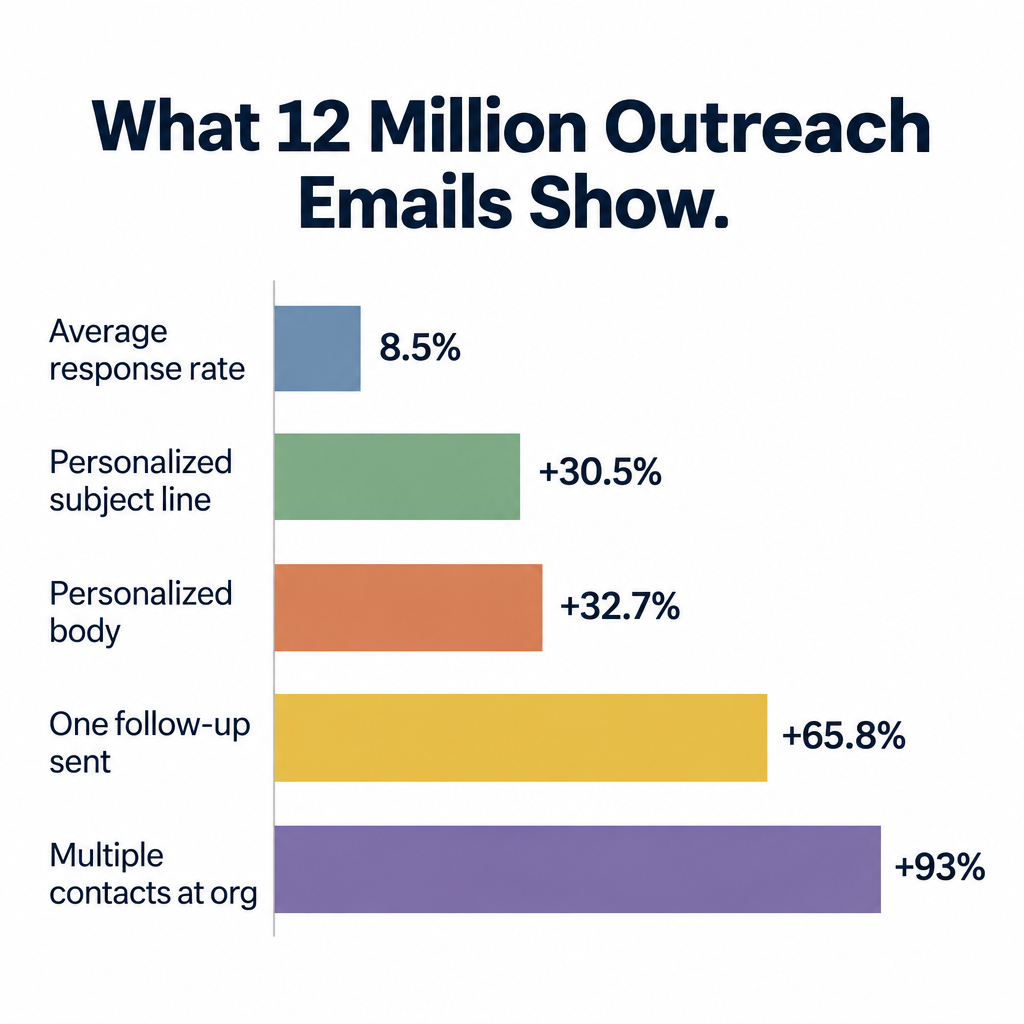
    What 12 million outreach emails tell you

    The most useful public dataset on cold pitching is still the analysis Backlinko ran with outreach platform Pitchbox. It looked at 12 million outreach emails and was published in 2019. That makes it old, and inboxes have only grown more crowded since, so treat the response rate as a ceiling rather than a target. The relative findings still match what most outreach teams see today.

    Finding (Backlinko and Pitchbox, 12M emails, 2019) Result
    Average response rate across all outreach 8.5%
    Personalized subject line vs none 30.5% higher response rate
    Personalized message body vs none 32.7% higher response rate
    Sending at least one follow-up 65.8% more responses
    Contacting multiple people at the same organization 93% higher response rate
    Subject line length with the best response rate 36-50 characters

    Two things stand out. First, more than 90% of cold pitches get no reply at all, so silence is the default rather than a verdict on you. Second, the biggest lifts come from things that take effort: personalizing, following up and finding the right second contact. No template does that part for you.

    Find the angle before you write a word

    Pitch Type Comparison Table

    Most bad pitches fail before the first sentence because the sender never found an angle. They had a product or a press release and went looking for people to send it to. Flip that order.

    Three rules for getting replies

    • Relevance beats volume. Ten pitches to people who have written about, bought or partnered on exactly your thing will outperform 500 to a loosely related list. Every annual journalist survey from Cision and Muck Rack puts irrelevant pitches at the top of reporters’ complaints.
    • Give before you ask. Lead with a data point, a fix, a quote or an introduction they can use even if they ignore the rest of the email.
    • Make yes easy. One ask, one time slot, one attachment at most. Every extra decision you hand someone lowers the chance they make any of them.

    Where good angles come from

    Good angles come from a handful of reliable places. Recent work is one: an article they wrote, a podcast they appeared on, a feature their product shipped. Trigger events are another, such as funding rounds, new leadership, hiring sprees, expansions and pricing changes.

    Your own data counts too: customer results, survey findings and usage patterns nobody else has. So do gaps, meaning a story their competitor covered and they didn’t, or a product category their customers keep asking for.

    If you can’t name the angle in one sentence, you aren’t ready to send.

    Subject lines that get opened

    The subject line has one job: get the email opened by the person it was written for. It shouldn’t sell, explain or tease. It should signal relevance.

    Subject lines that tend to work:

    • Your piece on four-day weeks (references their work)
    • Data: 61% of freelancers raised rates in Q1 (leads with the hook for a reporter)
    • Northwind + Fieldstack webinar idea (partnership, both names)
    • Broken link on your pricing page (useful, specific, hard to ignore)
    • Question about your SDR hiring (short, personal, curious)

    Subject lines that get deleted:

    • Quick question (every cold emailer uses it)
    • Partnership opportunity!! (vague and shouty)
    • Re: our conversation when there was no conversation (deceptive, and a CAN-SPAM problem)
    • PRESS RELEASE: Company X Announces... (reads like a wire dump)

    Inbox tip

    Write the subject line last. Once the hook is clear in your body copy, the subject line is usually the hook in five to eight words.

    Sales email pitch examples

    Cold Email Stats Visualization

    Company names, people and figures in every example below are placeholders. Swap in your own verified numbers. A pitch with an invented result is worse than one with no result at all.

    Example 1: The trigger event pitch

    When to use it: The prospect just did something public that creates a problem you solve, like hiring, raising money or launching in a new market.

    Subject: Your six new SDR roles

    Hi Priya,

    Saw Northwind is hiring six SDRs this quarter. Congrats on the growth.

    When outbound teams double in size, ramp time usually becomes the bottleneck. Fieldstack, a 40-person sales team in a similar spot, used Lumen Coach to cut new-rep ramp from 14 weeks to 9.

    Worth a 15-minute look before your new hires start? I’m free Thursday at 11 or 2 your time.

    Sam

    Why it works: The opening line could only have been written to Priya. The bridge names the problem her hiring creates before she has felt it, and the proof comes from a comparable company. The ask offers two specific times, so replying takes one word.

    Example 2: The “results” email

    When to use it: You have a strong case study from a customer the prospect will recognize or relate to.

    Subject: How Brightline cut refund requests by 22%

    Hi Marcus,

    You and Brightline sell into the same mid-market retail buyers, so this might be useful.

    Their support team was handling about 900 refund requests a month. After adding our pre-purchase sizing quiz, that dropped 22% in one quarter, and the quiz paid for itself in the first month.

    I put the before-and-after numbers on a single page. Want me to send it over?

    Dana

    Why it works: It leads with the result in the subject line, which is the only thing a busy buyer wants to know. The ask is a yes/no question about receiving a document rather than booking a meeting. That’s a smaller step and a natural opening for a reply.

    Example 3: The relevant share email

    When to use it: Early in a relationship, or with a prospect who isn’t ready to buy, to build familiarity without pushing.

    Subject: Benchmark for your onboarding emails

    Hi Leah,

    I noticed Copperleaf just rebuilt its welcome sequence. It looks sharp.

    We recently pulled activation data from 140 SaaS onboarding flows and found that the second email, not the first, drives most trial-to-paid conversions. The full breakdown is in a short PDF. No form, no gate.

    Happy to send it if it’s useful. No pitch attached.

    Owen

    Why it works: It delivers something useful with no strings, and the observation proves Owen looked. Some prospects will reply just to get the PDF, which opens a conversation on your terms. Use this one sparingly. Three “no pitch attached” emails in a row and the reader stops believing you.

    Example 4: The typo email

    When to use it: You spotted a genuine error on the prospect’s site, app or emails, ideally one related to what you sell.

    The typo email has been a staple of link-building outreach for years, and it works just as well in sales. You hand someone a fix before you ask for anything.

    Subject: Broken link on your pricing page

    Hi Tomas,

    Quick heads-up: the “Compare plans” button on your pricing page returns a 404 on mobile Safari. I checked twice this morning.

    I only noticed because I was looking at how SaaS teams handle plan comparison. We build pricing page tests for companies like yours, and broken mobile CTAs are the most common leak we find.

    Either way, worth fixing today. If you’d like a free audit of the rest of the page, just reply “audit.”

    Rina

    Why it works: The first paragraph has value with no conditions attached. The pitch is one sentence and naturally connected to the problem. The ask is a one-word reply.

    Be accurate. Point out an error that isn’t real, or one they’ve already fixed, and you look careless rather than helpful.

    Example 5: The breakup follow-up

    When to use it: As the final email in a sequence, after two or three unanswered attempts.

    Subject: Closing the loop

    Hi Priya,

    I’ve reached out a couple of times about ramp time for your new SDRs and haven’t heard back, which usually means the timing’s wrong.

    I’ll stop emailing about this. If onboarding becomes a priority later in the year, reply to this thread and I’ll pick it up from there.

    Thanks either way,
    Sam

    Why it works: It’s honest, it removes pressure and it gives a clear exit. Breakup emails often get more replies than the emails before them, because people answer to say “not now, try in Q3.” That’s a useful answer. Stick to your word afterward. A breakup email followed by another pitch next week burns the relationship.

    PR and media pitch examples

    Journalists get far more pitches than they can read, so the rules tighten. Put the story in the first two lines. Paste the key facts into the email body instead of attaching them. Never pitch a reporter something outside their beat.

    Example 6: The story pitch

    When to use it: You have a human story with a clear arc, a tension and a person willing to talk on the record.

    Subject: Bakery that moved to a 4-day week and grew 30%

    Hi Jordan,

    Your piece on the four-day week pilots got a lot of people in our town talking, including the owner of Crumb & Co.

    Ellie Park moved her 18 staff to four-day weeks last spring, expecting to lose money. Instead, revenue grew 30% year over year and she hasn’t lost an employee since. She’s candid about what went wrong in the first two months too, including a rota disaster that nearly ended the experiment.

    Ellie’s available for an interview this week and can share her monthly numbers. Would this fit something you’re working on?

    Mia Chen
    Communications, Crumb & Co.

    Why it works: It ties the pitch to the reporter’s own coverage, and the story has tension: she expected failure. It also offers something the reporter needs, an on-record source with real numbers and a willingness to talk about mistakes. Polished success stories are dull. Admitted struggles are a story.

    Example 7: The exclusive research email

    When to use it: You’ve commissioned a survey or have proprietary data, and you want one strong placement before wide release.

    Subject: Exclusive: 61% of freelancers raised rates in Q1

    Hi Sofia,

    You’ve covered freelance pay more closely than anyone on the beat, so I wanted to offer you this first.

    We surveyed 1,200 US freelancers in March. Three findings stood out:

    • 61% raised their rates in Q1, up from 38% a year earlier
    • Designers raised rates most often; writers least
    • 1 in 4 now require a deposit before starting work

    I can offer this to you exclusively until 9 a.m. ET on May 14, with the full dataset and methodology. Interested?

    Raj

    Why it works: The headline finding sits in the subject line. The bullets let the reporter judge the story in five seconds. The exclusive has a clear deadline, so she knows what she’s being offered and when it expires.

    If she passes, honor the exclusive window before you take the data to anyone else. Methodology matters as well. Have sample size, dates and how respondents were recruited ready to send, because serious reporters will ask.

    Example 8: The related story email

    When to use it: A reporter covered a topic recently, and you have a genuine follow-up angle, new development or missing perspective.

    Subject: Follow-up to your EV charger piece

    Hi Andre,

    Your story last month on broken public EV chargers named reliability as the top complaint. We track uptime across 4,000 chargers in the Northeast, and our April numbers suggest the problem is concentrated in a small set of hardware models rather than spread across the network.

    I can share the model-by-model breakdown and put you in touch with our head of field operations, who’s happy to go on record.

    Would a follow-up angle on this be useful?

    Kate

    Why it works: It doesn’t ask the reporter to start from scratch. It extends a story he already owns and offers a narrower, more surprising angle. Reporters like follow-ups because their editor already approved the topic once.

    A second version of this pitch works when a reporter covered your competitor. “You wrote about X’s approach; here’s a company doing the opposite, with different results” is a legitimate angle, provided you can back the difference with numbers.

    Example 9: The infographic email

    When to use it: You’ve turned data into a clear visual and want editors, bloggers or newsletter writers to use it.

    Subject: Chart for your remote work roundup

    Hi Grace,

    Your weekly remote work roundup regularly includes a “chart of the week,” so I thought this one might fit.

    We mapped average home-office spending by country from our 2,000-customer dataset. The gap between Germany and the US surprised even us. A preview is pasted below, and the full-size chart and source CSV are free to use with credit.

    [chart preview pasted inline]

    Want the files?

    Leo

    Why it works: It targets a specific recurring slot in Grace’s newsletter, which shows research. The visual is in the body rather than hidden behind an attachment, and the source data is offered upfront, which matters to any editor who checks numbers.

    Keep the inline image small. A large image with little text is a classic spam-filter signal, and many corporate mail systems block images by default.

    Example 10: The expert commentary email

    When to use it: A big news story just broke, and you have a credible expert who can add something reporters don’t already have.

    Subject: Source on today’s Gmail spam rule change

    Hi Nadia,

    If you’re covering today’s Gmail sender announcement, our deliverability lead, Chris Okafor, has audited authentication for 300+ brands and can explain what changes for small senders.

    One line you’re welcome to use: “Most small businesses already pass SPF. The ones who’ll get hurt are those who never set up DMARC and don’t know who’s sending email in their name.”

    Chris is available by phone until 6 p.m. ET today.

    Ben

    Why it works: Speed and a usable quote. Reporters on deadline need sources who can talk now. A strong, quotable line in the email itself often gets used even without a call. Only send this when your expert truly has standing on the topic. Newsjacking with a weak source annoys reporters and gets you remembered for the wrong reasons.

    Partnership pitch examples

    Partnership pitches are closer to negotiations than requests. Both sides need to see the trade quickly, and the trade has to be roughly even. If the email reads like you want their audience for free, it’s dead.

    Example 11: The co-marketing webinar pitch

    Subject: Northwind + Fieldstack webinar idea

    Hi Elena,

    Our customers keep asking how to connect their CRM data to onboarding emails, and Fieldstack is the integration we recommend most often.

    Idea: a 45-minute joint webinar in June, “From signed deal to activated customer,” with one speaker from each side. We’d handle production and promotion to our 22,000 subscribers. You’d promote to yours, and both teams get the full registrant list.

    If that’s interesting, I can send a one-page outline. Does a quick call next week work?

    James

    Why it works: It starts from a real overlap, shared customers, and names a specific format, date and title. That saves Elena from having to invent the idea herself. Spelling out who does what and who gets the leads answers her biggest question before she asks it.

    Check consent before you promise registrant lists. Under GDPR in particular, sharing leads between companies needs a clear basis, usually stated on the registration form.

    Example 12: The integration partnership pitch

    Subject: 140 of your customers already use us

    Hi Arjun,

    We looked at our customer base and found 140 accounts that also use Ledgerly. Most of them export invoices to CSV and re-upload them into our dashboard every week.

    A native integration would kill that step. We’ve scoped it at roughly six weeks of work on our side using your public API. We’d just need a sandbox account and a technical contact for questions.

    Would you be open to listing it in your marketplace once it’s live? Happy to share the scope doc.

    Wen

    Why it works: It opens with a number that matters to Arjun, his own customers, and it shows the pain they’re living with. Then it lowers the effort on his side to almost nothing. Partners say yes to integrations that make their product stickier and cost them little.

    Example 13: The newsletter sponsorship or creator pitch

    Subject: Sponsoring your April issues

    Hi Theo,

    I’ve read your newsletter on indie SaaS pricing for about a year. Your teardown of usage-based plans is still pinned in our team channel.

    We’d like to sponsor two issues in April. We make billing software for small SaaS teams, which seems a natural fit for your readers, and we’re happy to follow your usual format and disclosure rules.

    Could you send your current rates and open dates?

    Ana

    Why it works: It’s direct. Creators get plenty of vague “let’s collaborate” emails, and one that says “we want to pay you, here’s when” stands out. Respecting their format and disclosure rules signals you won’t be a difficult sponsor. In the US, the FTC expects paid placements to be clearly disclosed, so a sponsor who mentions it upfront is easier to work with.

    Example 14: The guest content or newsletter swap pitch

    Subject: Content swap for May?

    Hi Carla,

    Your readers are mostly freelance designers and ours are mostly freelance developers. Both lists keep asking how to work together without scope creep.

    Proposal: I write a piece for your blog on “how to brief a developer,” and you write one for ours on “how to brief a designer.” Each about 1,200 words, each linking back to the author’s site. We’d also feature yours in our newsletter, which goes to 9,000 subscribers.

    Here are two posts I’ve written recently, so you can judge the fit: [titles pasted]

    Interested?

    Rob

    Why it works: The trade is symmetrical and spelled out in two sentences. The topic idea already fits both audiences, and including writing samples answers the quality question before it’s raised.

    Before and after: rewriting a weak pitch

    Here’s a pitch that looks like thousands sent every day.

    Subject: Partnership opportunity

    Hi there,

    I hope this email finds you well! My name is Jake and I’m the founder of Taskwise, an innovative AI-powered productivity platform that is revolutionizing the way teams work. We’ve been featured in several publications and have a growing user base.

    I came across your website and think there could be some great synergies between our companies. We’d love to explore potential partnership opportunities, whether that’s co-marketing, integrations or something else.

    Let me know if you’d be open to a call to discuss!

    Best,
    Jake

    What’s wrong with it:

    • “Hi there” tells the reader it went to a list.
    • The first two sentences are about Jake, not the recipient.
    • “Innovative,” “revolutionizing” and “synergies” carry no information.
    • “Partnership opportunities… or something else” means Jake hasn’t done the thinking.
    • The ask is a call with no agenda, which is a big commitment for zero clarity.

    Here’s the rewrite.

    Subject: Taskwise + Plannly: shared calendar sync

    Hi Ruth,

    Your changelog last week mentioned that calendar sync is the top request on your roadmap board. About a third of our 6,000 users also use Plannly, and they ask us for the same thing.

    We’ve already built two-way sync with Google and Outlook calendars. We could expose it to Plannly through a lightweight integration, with no engineering needed on your end beyond OAuth approval.

    Would a 20-minute walkthrough next Tuesday or Wednesday be useful?

    Jake

    The rewrite is about the same length. Every sentence now carries information, the opening is about Ruth’s roadmap, and the proposal is specific enough to say yes or no to.

    Following up without being annoying

    The Backlinko data shows at least one follow-up lifts responses by nearly two-thirds. Most replies to cold outreach still come from the first email, and each follow-up brings in fewer, but those later replies come from people who saw your pitch, meant to reply and forgot.

    A cadence that works for most sales pitches:

    Email Timing What it does
    1. Pitch Day 0 Full hook, value, ask
    2. Nudge Day 3-4 Reply in the same thread, one or two lines, a new detail
    3. Value add Day 8-10 Share a relevant resource or result
    4. Breakup Day 15-20 Close the loop politely (Example 5)

    For journalists, one follow-up is the norm. Send it three to five days later and only if you have something to add, like a new data point, a confirmed interview slot or a timely news peg. “Just checking you saw this” adds nothing. A reporter who wanted it would have replied.

    For partnerships, one or two follow-ups over two weeks is fine. If you have a mutual connection, the second follow-up is the moment to ask them for a warm intro instead.

    A follow-up that adds something:

    Hi Elena,

    One addition to my webinar note: we just confirmed our VP of Customer Success as a speaker. She ran onboarding at a 2,000-seat rollout last year and has some good stories. Still keen if June works for your team.

    James

    Always reply in the same thread so the original pitch stays visible. And keep your sign-off consistent. A clean signature with name, role, company and one way to reach you looks more credible than a banner ad. If yours needs work, our email signature examples are a good place to steal from.

    Get your pitches into the inbox

    The best pitch in the world does nothing in a spam folder. Cold pitches are risky for deliverability because recipients haven’t asked for your email, and mailbox providers judge you on how people react.

    Send from your own authenticated domain

    Pitching from a free Gmail or Outlook address looks amateur to journalists and buyers, and you can’t authenticate it properly. Set up domain email on your company’s own address first. Then publish the three authentication records Gmail, Yahoo and Microsoft check.

    Setup steps

    1. Create a mailbox on your company domain in Google Workspace, Microsoft 365 or your host.
    2. Add an SPF record listing every service that sends mail as your domain.
    3. Turn on DKIM signing in your mail provider’s admin console and publish the key it gives you.
    4. Publish a DMARC record starting at p=none with reporting turned on.
    5. Send a test to a Gmail address, open Show original and confirm SPF, DKIM and DMARC all say PASS.

    An SPF record for a domain that sends through Google Workspace looks like this. If you send through other services too, add their include statements to the same single record.

    example.com.  TXT  "v=spf1 include:_spf.google.com ~all"
    

    DKIM is a public key published at a selector your provider names. In Google Workspace, you generate it under Admin console > Apps > Google Workspace > Gmail > Authenticate email.

    google._domainkey.example.com.  TXT  "v=DKIM1; k=rsa; p=MIIBIjANBgkqhkiG9w0BAQEFAAOCAQ8AMIIBCgKCAQEA..."
    

    A starter DMARC record monitors without blocking anything and sends aggregate reports to an address you control:

    _dmarc.example.com.  TXT  "v=DMARC1; p=none; rua=mailto:[email protected]"
    

    Once reports show all your legitimate mail passing, move to p=quarantine and then p=reject to stop others spoofing your domain.

    The sender rules you’re working under

    Provider Effective date Rules that matter for pitching
    Gmail (all senders) February 1, 2024 SPF or DKIM, valid forward and reverse DNS, TLS, spam rate kept below 0.3% (Google advises under 0.1%)
    Gmail (5,000+ messages a day to Gmail accounts) February 1, 2024, with one-click unsubscribe required from June 1, 2024 SPF, DKIM and DMARC (p=none minimum), From domain aligned with SPF or DKIM, one-click unsubscribe on marketing mail
    Yahoo (bulk senders) February 2024 SPF, DKIM, DMARC, spam rate below 0.3%, one-click unsubscribe, unsubscribes honored within 2 days
    Microsoft Outlook.com, Hotmail, Live (5,000+ messages a day) May 5, 2025 SPF, DKIM and DMARC (p=none minimum) aligned with SPF or DKIM; non-compliant mail first routed to Junk, with rejection to follow

    Most individual pitching never reaches 5,000 messages a day. Meet the bulk-sender rules anyway. Authentication costs nothing, and a single spam complaint from a cold pitch counts against you whatever your volume.

    Keep volume human

    Mailbox providers also cap how much one account can send. Google lists 500 messages a day for a free Gmail account and 2,000 per user for paid Google Workspace (limits as published by Google in 2025, lower during trials). Microsoft 365 caps most mailboxes at 10,000 recipients a day. Stay far below those. Pitching is a one-to-one activity, and 20 to 50 carefully researched emails a day is a sensible ceiling for a single sender.

    Don’t run cold pitches through your newsletter tool either. Most small business email platforms, Mailchimp included, prohibit sending to contacts who haven’t opted in, and they will suspend your account for it.

    Deliverability risk

    Bounce rates above 2% or a burst of spam complaints from one cold campaign can push your whole domain into spam, including invoices and password resets. Verify every address before you send, and never pitch purchased or scraped lists.

    High-volume sales teams often send outreach from a subdomain, such as mail.example.com, so a bad campaign doesn’t drag down the main domain. That’s reasonable for sales. For PR and partnership pitches, send from a real person’s mailbox on your main domain. A reporter who sees an unfamiliar lookalike domain has every reason to be suspicious.

    The legal rules for cold pitches

    Cold email is legal in many places when done right, but the rules vary by where the recipient is. A media pitch about genuine news is arguably not “commercial” under some laws. Sales and partnership pitches clearly are. The safe approach is to treat every pitch as if the rules apply.

    Law Where What it requires for cold B2B pitches Penalties
    CAN-SPAM Act United States Accurate From and subject lines, your physical postal address, a clear way to opt out, opt-outs honored within 10 business days; applies to B2B email too Up to $53,088 per violating email (FTC’s January 2025 inflation adjustment)
    GDPR EU and UK A lawful basis (legitimate interest is common for B2B), telling people where you got their data, honoring objections promptly Up to €20 million or 4% of global annual turnover (UK: £17.5 million)
    PECR / national ePrivacy rules UK and EU member states UK allows cold email to corporate addresses with an opt-out; sole traders and individuals need consent. Several EU countries, including Germany, are much stricter Set by national regulators
    CASL Canada Consent required; implied consent can apply when an address is conspicuously published, carries no “no unsolicited email” notice and your message is relevant to the person’s role. Identify yourself and include an unsubscribe Up to C$10 million per violation for businesses

    This isn’t legal advice. For any outreach program beyond a handful of personal pitches, have a lawyer review your process for the countries you target. A short line at the bottom of sales pitches costs you nothing and keeps you on the right side of most of these rules. “Not relevant? Reply ‘no thanks’ and I won’t email again” works well.

    Metrics worth tracking

    Open rates are a weak signal for pitches. Apple Mail Privacy Protection, launched with iOS 15 in September 2021, preloads tracking pixels and inflates opens. Tracking pixels can also hurt deliverability on low-volume cold email. Many experienced outreach teams turn open tracking off entirely. Watch these instead:

    • Reply rate: replies divided by delivered emails. Compare it to the 8.5% Backlinko average with caution, since that data is from 2019.
    • Positive reply rate: replies that move things forward, such as a meeting, an interview or a “send me the data.” This is the number that matters.
    • Outcome rate: meetings booked, articles published, partnerships signed per 100 pitches.
    • Bounce rate: keep it under 2%. Above that, your list research needs fixing.
    • Spam complaint rate: check Google Postmaster Tools if you send enough volume to see data, and keep it under 0.1%.

    Review results by pitch type and angle, not just in aggregate. You’ll usually find one angle, often the trigger event or exclusive data pitch, outperforming everything else by a wide margin. Double down on it.

    FAQ

    What is an email pitch?

    An email pitch is a short, personalized message asking someone to take one specific action. That might be a sales meeting, press coverage or a partnership. It differs from a newsletter or announcement because it’s written for one recipient and built around a reason they in particular should care.

    How long should a pitch email be?

    Aim for 75 to 150 words for sales and partnership pitches, and up to about 200 words for a media pitch that includes data. If the recipient has to scroll on a phone, it’s too long. Move detail into a follow-up or a one-page document they can request.

    What are good email pitching examples for beginners?

    Start with the typo email (Example 4) and the related story email (Example 8). Both are built on something you can verify, a real error or a real article. You don’t need a big brand or impressive results to make them work, only careful research.

    How many follow-ups should I send?

    For sales, two or three follow-ups over two to three weeks, ending with a breakup email. For journalists, one follow-up after three to five days, and only with new information. Stop immediately if anyone asks you to.

    Should I attach a press release or pitch deck?

    No, at least not in the first email. Attachments from unknown senders trigger spam filters, and many recipients won’t open them for security reasons. Paste the key facts into the body and offer the full document if they’re interested.

    When is the best time to send a pitch?

    Send during the recipient’s working hours, early in their week, and avoid Friday afternoons and holidays. For journalists, morning sends tend to fit editorial planning better than late-day pitches. Timing matters much less than relevance, though. A well-aimed pitch sent at a bad time beats a generic one sent at the perfect minute.

  • SMTP Ports Explained and Which One You Should Use

    SMTP Ports Explained and Which One You Should Use

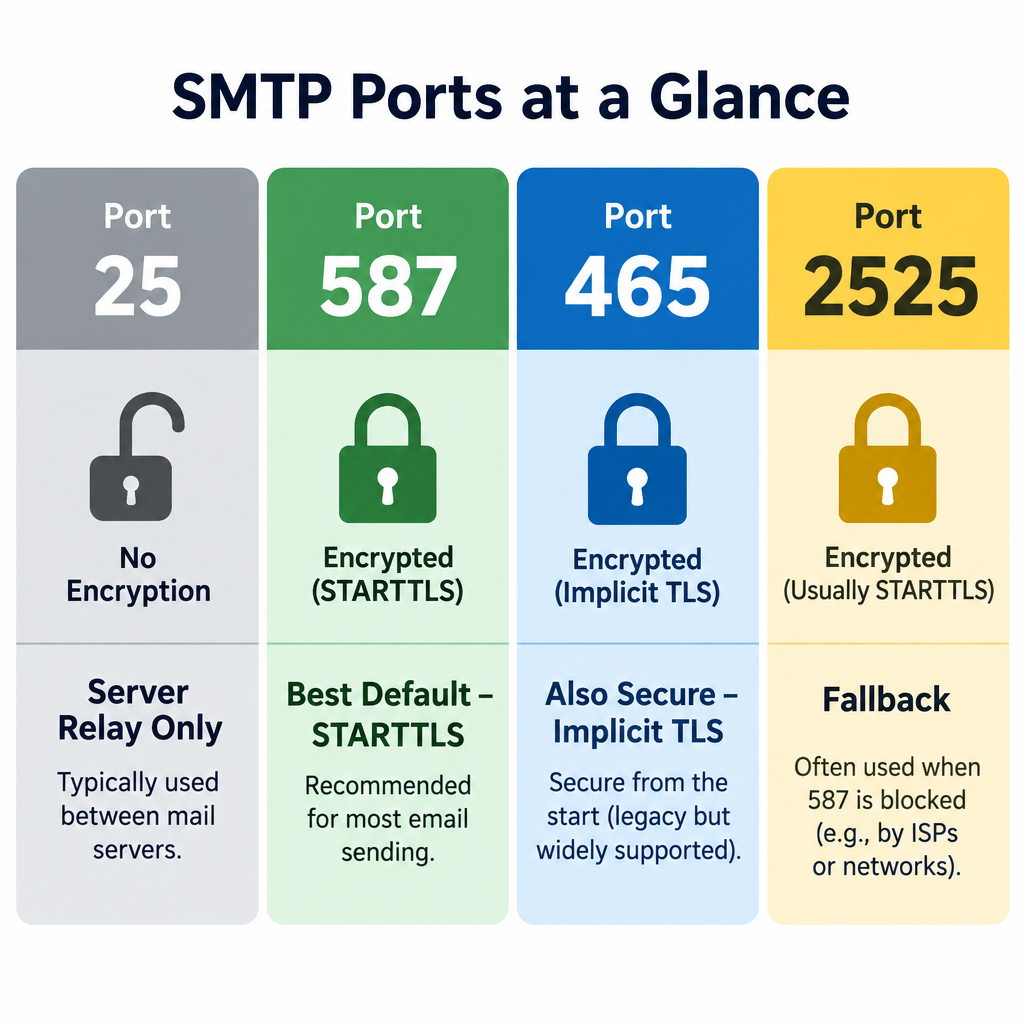
    Use port 587 with STARTTLS for sending email from an app, website or mail client. Port 465 with implicit TLS is just as good if your provider supports it. Port 25 is the default SMTP port, but it is meant for server-to-server relay and is often blocked on home and cloud networks.

    Best defaultPort 587 (STARTTLS)
    Also securePort 465 (implicit TLS)
    Server relay onlyPort 25
    Fallback when blockedPort 2525

    Quick SMTP port reference

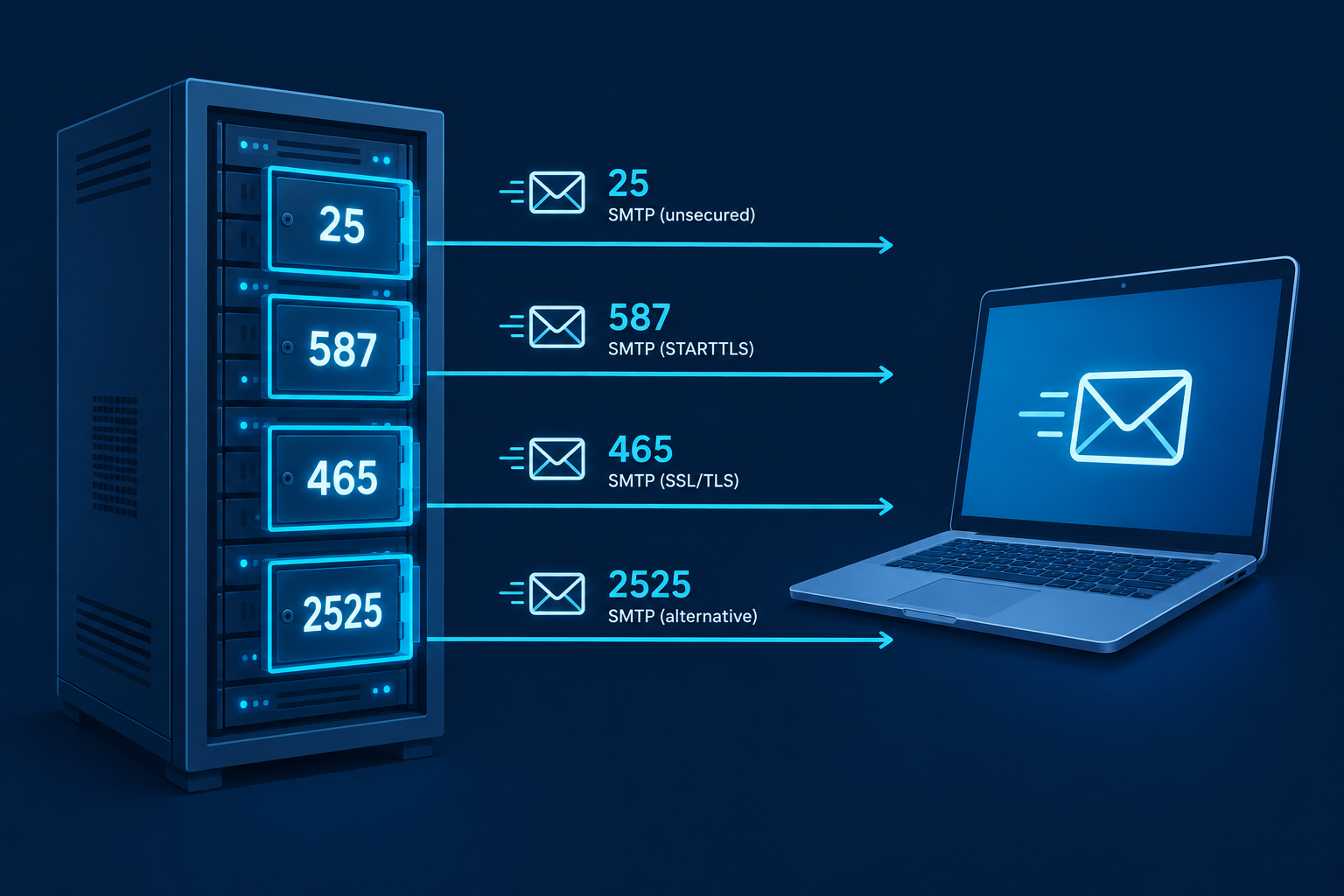
    Here is every SMTP port number you will run into, and what each is actually for.

    Port Encryption Main use Recommended?
    25 None or opportunistic STARTTLS Server-to-server relay (MTA to MTA) Only for mail servers
    587 STARTTLS (upgrade after connecting) Authenticated message submission Yes, the safe default
    465 Implicit TLS (encrypted from the start) Authenticated message submission Yes, if supported
    2525 Usually STARTTLS Unofficial alternative to 587 Fallback only

    What an SMTP port actually is

    SMTP (Simple Mail Transfer Protocol) is the protocol that sends mail. A port is the numbered “door” on a server that a connection knocks on. Your mail client, website plugin or app needs both the server hostname and the right port to hand off a message.

    SMTP only handles sending. Receiving and reading mail uses IMAP or POP3, which have their own ports (covered below).

    Port 25: the original default SMTP port

    SMTP Port Comparison Table Visual

    Port 25 is the default port for SMTP, defined back in the early 1980s. It is still how mail servers pass messages to each other across the internet. When Gmail delivers a message to a company’s mail server, it connects on port 25.

    The problem is that port 25 became the favourite of spam botnets. Infected home computers could connect directly to any mail server and blast junk. So many ISPs now block outbound port 25 on residential connections. Major cloud providers do too. Google Cloud blocks outbound port 25 to external addresses, and AWS restricts it on EC2 until you request removal.

    Deliverability risk

    Sending directly from a home or cloud IP on port 25 usually fails outright. If it gets through, receiving servers tend to treat residential IPs as spam sources.

    That is a big part of how e-mail spam filtering works: the sending IP’s reputation matters as much as the message itself.

    Port 587: your best bet for sending

    Port 587 is the official message submission port (RFC 6409). It exists so that clients and apps can hand mail to their own provider, with a login, separate from server-to-server relay on port 25.

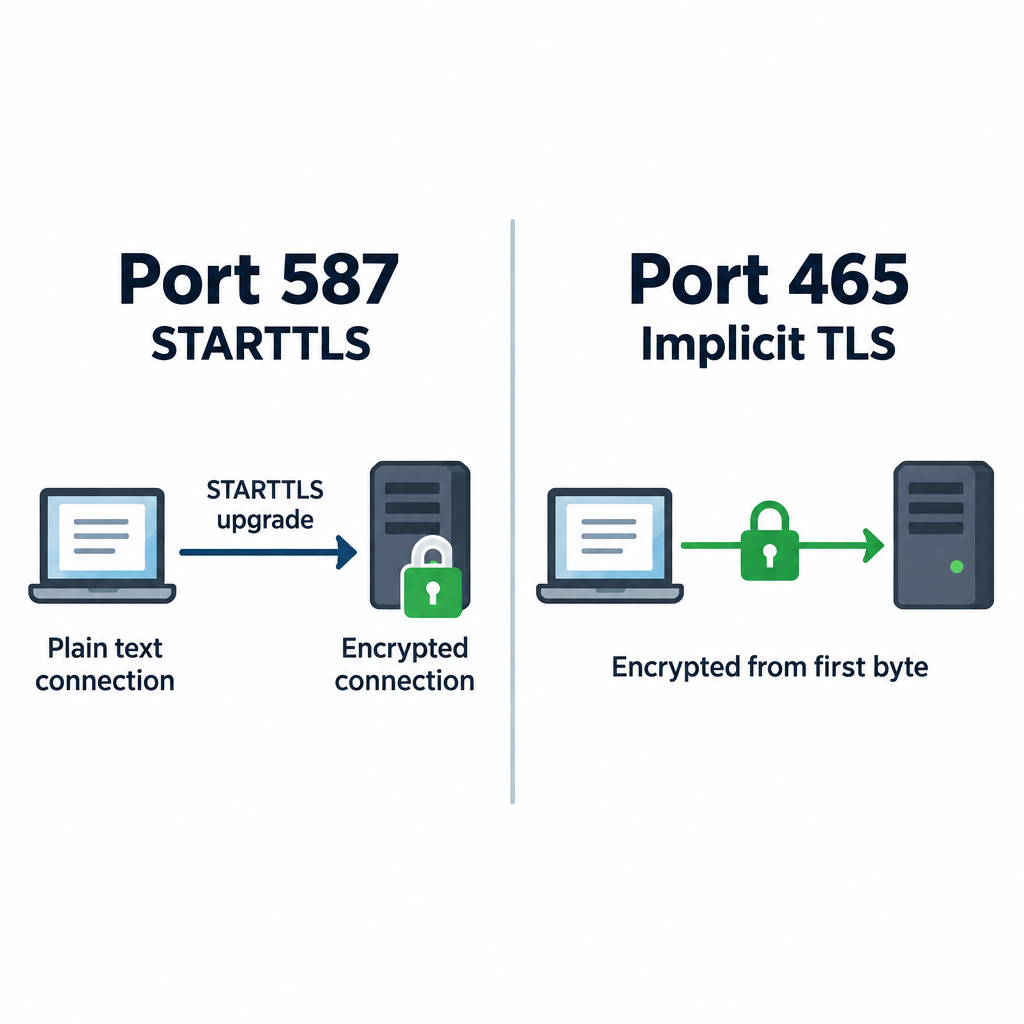
    The connection starts in plain text. The client then issues the STARTTLS command, and the session upgrades to an encrypted one before your password is sent. Every major provider supports it, and ISPs rarely block it.

    If you only remember one SMTP port, make it 587.

    Port 465: SMTP over SSL/TLS

    STARTTLS vs Implicit TLS Diagram

    Port 465 has a messy history. It was assigned for SMTPS in the late 1990s, then revoked, but providers kept using it anyway. In 2018, RFC 8314 officially brought it back for message submission using implicit TLS.

    Implicit TLS means the connection is encrypted from the first byte. There is no plain-text phase and no upgrade step. RFC 8314 actually prefers this approach over STARTTLS, because a STARTTLS upgrade can in theory be stripped by an attacker on the network.

    In practice, both 465 and 587 are secure when configured correctly. Pick whichever your provider documents first.

    Port 2525: the unofficial fallback

    Port 2525 is not registered with IANA for SMTP. Transactional email services offer it anyway because some hosting companies block 25, 465 and even 587. If your server cannot reach your email service on standard ports, 2525 often gets through.

    Email service SMTP host Supported ports
    SendGrid smtp.sendgrid.net 25, 587, 2525 (STARTTLS); 465 (TLS)
    Mailgun smtp.mailgun.org 25, 587, 2525 (STARTTLS); 465 (TLS)
    Amazon SES email-smtp.[region].amazonaws.com 25, 587, 2587 (STARTTLS); 465, 2465 (TLS)

    Many small business email platforms hide these settings entirely and give you an API or plugin instead. If you are only doing email marketing through a hosted tool, you may never touch an SMTP port at all.

    SMTP server and port for Gmail, Outlook and other providers

    These are the common SMTP mail port settings for the big mailbox providers.

    Provider SMTP server Port Encryption
    Gmail / Google Workspace smtp.gmail.com 587 or 465 STARTTLS / SSL
    Outlook.com / Hotmail smtp-mail.outlook.com 587 STARTTLS
    Microsoft 365 smtp.office365.com 587 STARTTLS
    Yahoo Mail smtp.mail.yahoo.com 465 or 587 SSL / STARTTLS
    iCloud Mail smtp.mail.me.com 587 STARTTLS
    Zoho Mail smtp.zoho.com 465 or 587 SSL / STARTTLS

    Your normal account password usually will not work here. Gmail, Yahoo and iCloud expect an app password, which requires two-step verification, or an OAuth sign-in. Microsoft is retiring basic password authentication for SMTP, so plan on OAuth or an app password for Outlook and Microsoft 365 too.

    SMTP, IMAP and POP3 ports

    Setting up a mail client means entering both incoming and outgoing servers. Here is the full email port list.

    Protocol Job Plain / STARTTLS port Implicit TLS port
    SMTP Sending mail 587 (25 for relay) 465
    IMAP Reading mail, synced to server 143 993
    POP3 Downloading mail to one device 110 995

    For incoming mail, use 993 for IMAP or 995 for POP3. The unencrypted variants are rarely needed today.

    How to choose the right SMTP port

    Pick your port in four checks

    1. Check your provider’s help page for its documented SMTP port.
    2. Use 587 with STARTTLS if both 587 and 465 are listed.
    3. Switch to 465 with SSL/TLS if 587 times out.
    4. Try 2525 only if your email service supports it and both fail.

    Only use port 25 if you run a mail server that relays to other mail servers. Apps, websites and mail clients should never need it.

    How to tell if an SMTP port is blocked

    Test the connection before you blame your password. On macOS or Linux, open a terminal and run:

    nc -vz smtp.gmail.com 587
    

    On Windows, use PowerShell:

    Test-NetConnection smtp.gmail.com -Port 587
    

    A “succeeded” or “TcpTestSucceeded : True” result means the port is open. A timeout means something between you and the server is blocking it.

    To confirm encryption actually works, use OpenSSL. For port 587:

    openssl s_client -starttls smtp -connect smtp.gmail.com:587
    

    For port 465:

    openssl s_client -connect smtp.gmail.com:465
    

    You should see a certificate chain and a 220 greeting from the server. If the port is blocked, contact your ISP or hosting company. Most will unblock 587 on request. Very few will open port 25 for residential customers.

    Inbox tip

    If you can connect on 587 from your laptop but not from your web server, the block is at the host. Switch to 2525 or use your email service’s HTTP API instead.

    Common mistakes when setting the SMTP port

    Most “can’t send mail” tickets come down to a handful of errors:

    • Encryption mismatch. Choosing SSL on port 587 or STARTTLS on port 465. The client hangs, then times out. Match 587 with STARTTLS and 465 with SSL/TLS.
    • Using port 25 from an app. It gets blocked or lands in spam. Use 587.
    • Account password instead of an app password. You will see an authentication error like 535. Generate an app password.
    • Wrong hostname. smtp.office365.com and smtp-mail.outlook.com are not interchangeable for every account type.
    • Local firewall or antivirus. Some security suites intercept outgoing mail connections. Temporarily disable the email scanning feature to test.
    • No authentication enabled. Port 587 and 465 expect a username and password. Without them, the server rejects the message.

    Correct ports get mail out of your app. They do not guarantee inbox placement. That still depends on SPF, DKIM and DMARC records for your sending domain.

    FAQ

    How to find port for SMTP server?

    Check your email provider’s help documentation for “SMTP settings.” It will list the server name, port and encryption type. If you use a hosting company’s mailbox, the settings are usually in your control panel under email accounts. When in doubt, try 587 with STARTTLS first.

    Is SMTP always port 25?

    No. Port 25 is the default SMTP port for server-to-server relay. Mail clients and apps should send on port 587 with STARTTLS or port 465 with implicit TLS. Port 2525 is an unofficial alternative some services offer.

    What are the port numbers used for IMAP and POP3?

    IMAP uses port 143 (plain or STARTTLS) and port 993 (implicit TLS). POP3 uses port 110 (plain or STARTTLS) and port 995 (implicit TLS). Use the encrypted ports, 993 and 995, whenever possible.

    What is the difference between IMAP and POP3?

    IMAP keeps your mail on the server and syncs it across every device, so reading or deleting on your phone shows up on your laptop. POP3 downloads messages to one device and, by default, removes them from the server. IMAP is the better choice for almost everyone today.

    Which is more secure, port 465 or 587?

    Both are secure when configured correctly. Port 465 encrypts from the first byte, which RFC 8314 prefers. Port 587 upgrades to encryption with STARTTLS before any login details are sent. Use whichever your provider supports.

  • What Is a Webhook and How Email Services Use Them

    What Is a Webhook and How Email Services Use Them

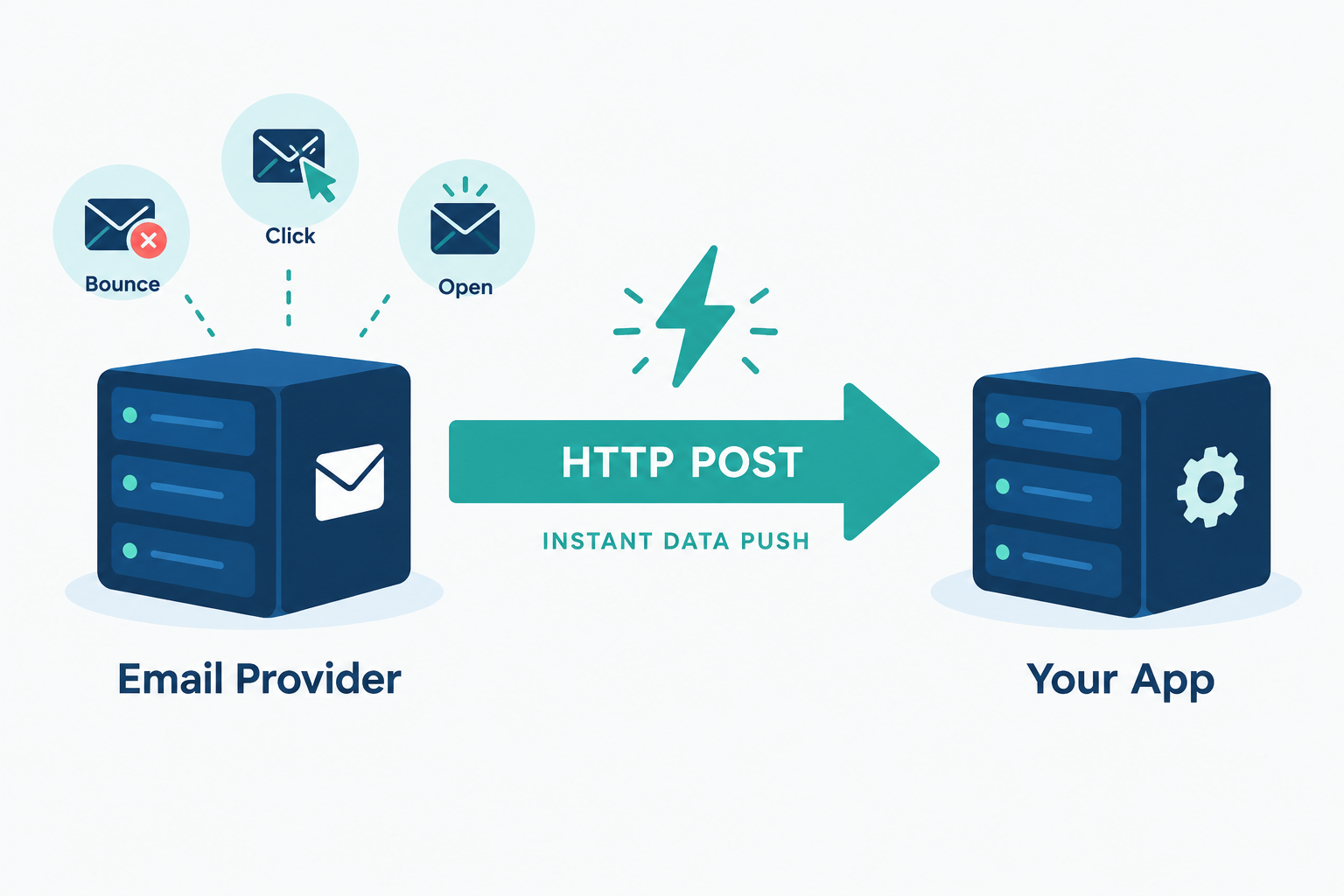
    A webhook is an automated HTTP message that one application sends to another the moment something happens, such as an email bouncing or a subscriber clicking unsubscribe. Your system doesn’t keep asking for updates. The sending service pushes the data to a URL you provide. Email platforms rely on webhooks to report deliveries, bounces, complaints, opens and clicks to your CRM, store or database in near real time.

    Best forReal-time email event data
    DirectionProvider pushes to you
    FormatHTTP POST, usually JSON
    Key security stepVerify the signature

    What are webhooks, in plain terms?

    Webhooks are user-defined HTTP callbacks. You register a URL with a service, choose the events you care about, and the service sends an HTTP request to that URL each time one of those events occurs. The request body carries the details: which event, when it happened, which message or contact it relates to.

    The term dates to 2007, when developer Jeff Lindsay described “web hooks” as a way for web apps to notify each other the way Unix programs pass output through pipes. The idea caught on because it solved a common integration problem with very little machinery: any system that can receive an HTTP request can receive a webhook.

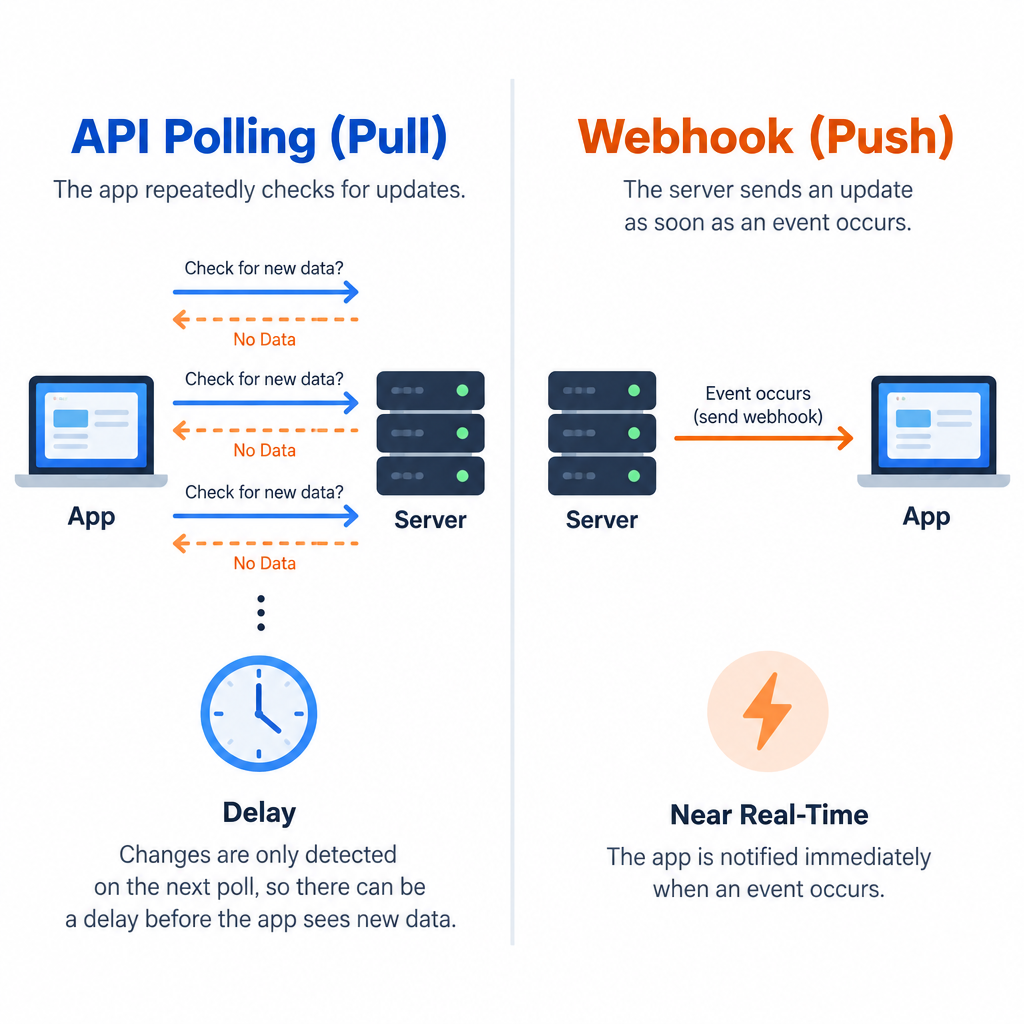
    A useful analogy is the difference between refreshing a parcel tracking page every ten minutes and getting a text when the courier drops off the box. Polling an API is the refreshing. A webhook is the text.

    People sometimes call webhooks “reverse APIs” or “push APIs”. The labels are loose, but they capture the key point. With a normal API call, you start the conversation. With a webhook, the other system does.

    How a webhook works, step by step

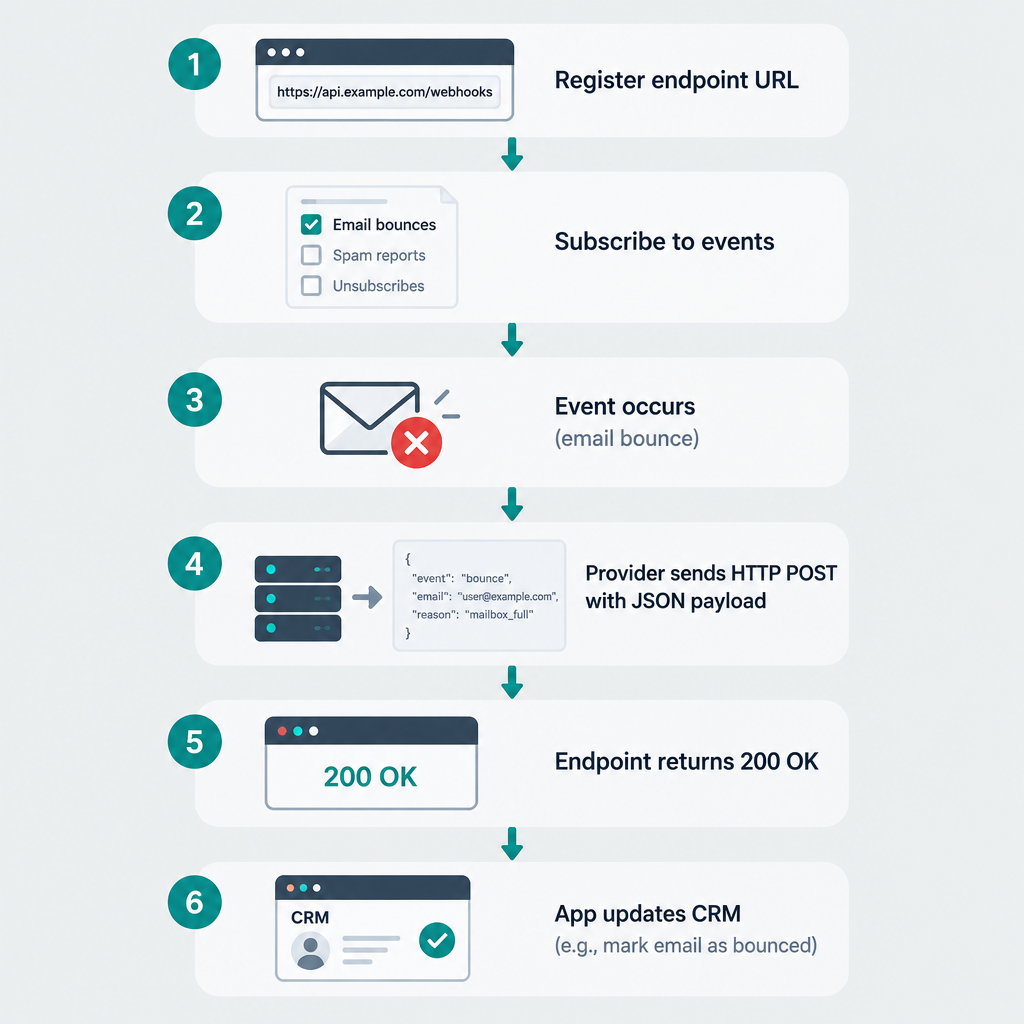
    Every webhook follows the same basic flow, regardless of which apps are involved:

    1. You register an endpoint. This is a URL on your server or in an automation tool, for example https://example.com/hooks/email-events.
    2. You pick the events. Most providers let you subscribe only to the events you need, such as bounces and spam complaints.
    3. An event happens. A receiving mail server rejects a message, or a subscriber clicks a link.
    4. The provider sends an HTTP POST. The request contains a payload, usually JSON, describing the event.
    5. Your endpoint responds with a 2xx status code. This tells the provider the delivery worked. Anything else, or a timeout, usually triggers a retry.
    6. Your code acts on the data. It might suppress an address, update a contact record or post an alert to Slack.

    A semi-realistic webhook example

    Say a subscriber’s mailbox no longer exists and the receiving server returns a hard bounce. SendGrid’s Event Webhook would send your endpoint a JSON array of events. A simplified version looks like this:

    [
      {
        "email": "[email protected]",
        "timestamp": 1735689600,
        "event": "bounce",
        "type": "bounce",
        "reason": "550 5.1.1 The email account that you tried to reach does not exist",
        "status": "5.1.1",
        "sg_event_id": "a1b2c3d4e5f6",
        "sg_message_id": "14c5d75ce93.dfd.64b469.filter0001.16648.5515E0B88.0"
      }
    ]
    

    Your code reads event, sees a hard bounce with a 5.1.1 status, marks [email protected] as undeliverable in your CRM and returns 200 OK. Total elapsed time from bounce to suppression: usually seconds.

    Mailgun structures things differently. It wraps the event inside an event-data object and adds a separate signature object for verification:

    {
      "signature": {
        "timestamp": "1735689600",
        "token": "a8ce0edb2dd8301dee6c2405235584e45aa91d1e9f979f3de0",
        "signature": "d2271d12299f6592d9d44cd9d250f0704e4674c30d79d07c47a66f95ce71cf55"
      },
      "event-data": {
        "event": "failed",
        "severity": "permanent",
        "recipient": "[email protected]",
        "id": "CPgfbmQMTCKtHW6uIWtuVe"
      }
    }
    

    Same event, different shape. That is the first lesson of working with email webhooks: every provider has its own payload format, so your handler needs to be written for the specific service sending to it.

    Webhooks vs. APIs (and polling)

    Webhook vs API Polling Diagram

    Webhooks and APIs aren’t competitors. Webhooks travel over HTTP and are part of a provider’s API surface. The real comparison is between push (webhooks) and pull (polling an API endpoint on a schedule).

    Webhook (push) API polling (pull)
    Who starts the request The provider Your application
    Timing Near real time, seconds after the event Delayed by your polling interval
    Wasted requests None; a request means something happened Many; most polls return nothing new
    Rate limit pressure Low High at short intervals
    What you need to run A public HTTPS endpoint A scheduled job and API credentials
    Missed data risk Events can be lost if your endpoint is down too long Low; you can re-query history
    Best for Reacting to events as they happen Backfills, reconciliation, bulk reads

    The strongest setups use both. Webhooks handle the live flow, and a nightly API query catches anything that slipped through during an outage. Email providers make this easy because most of them expose an events or logs API alongside their webhooks.

    How email services use webhooks

    Sending an email kicks off a chain of events you can’t see from your own app. The provider accepts the message, hands it to the recipient’s mail server, and then gets back a delivery, a deferral or a bounce. Later, the recipient might open it, click it, mark it as spam or unsubscribe. Webhooks are how the provider tells you about each of those steps.

    Here are the event types you’ll see across most email platforms and what you should do with each one.

    Event What it means What your system should do
    Delivered Receiving server accepted the message Log it; delivered does not mean inbox
    Deferred / delayed Temporary failure, provider will retry Usually nothing; watch for spikes by domain
    Hard bounce Permanent failure, e.g. address doesn’t exist Suppress the address immediately
    Soft bounce Temporary issue, e.g. full mailbox Count them; suppress after repeated failures
    Spam complaint Recipient clicked “Report spam” Unsubscribe them at once and flag the source
    Unsubscribe Recipient opted out Update every system that can email them
    Open Tracking pixel loaded Treat as a soft signal only (see below)
    Click Tracked link followed Trigger follow-ups, score engagement
    Dropped / rejected Provider refused to send, often a suppressed address Check why; fix the list or template

    Why bounce and complaint webhooks matter most

    If you only wire up two events, make them bounces and spam complaints. Gmail and Yahoo’s bulk sender requirements, enforced from February 2024 for anyone sending 5,000 or more messages a day to Gmail addresses, ask senders to keep their spam complaint rate below 0.3%. Google recommends staying under 0.1%. Microsoft added its own requirements for high-volume senders to Outlook.com addresses in May 2025.

    Your email service already suppresses bounced and complaining addresses on its own sending infrastructure. The problem is the other systems. If your CRM, your e-commerce platform or a second email tool doesn’t know about the complaint, it may keep mailing that person. A complaint webhook closes that gap.

    Deliverability risk

    Mailing addresses that already hard bounced or complained elsewhere is one of the fastest ways to push your complaint rate past 0.3% and get filtered or blocked by Gmail and Yahoo.

    Unsubscribe webhooks are compliance plumbing

    The same Gmail and Yahoo rules require one-click unsubscribe for marketing mail and expect opt-outs to be honoured within two days. In the US, CAN-SPAM gives you 10 business days. Under GDPR, a withdrawn consent has to stop processing for that purpose.

    Those deadlines get tricky when you send from more than one tool. Your newsletter might go out through Mailchimp while receipts and win-back flows come from a transactional service. An unsubscribe webhook from one platform, pushed into your central contact record, is the simplest way to keep every system in sync.

    Open events need a pinch of salt

    Since Apple launched Mail Privacy Protection with iOS 15 in September 2021, Apple Mail can preload images (including tracking pixels) through proxy servers whether or not the person reads the email. That means a large share of “open” webhooks now fire automatically. Don’t build important automations on opens alone. Clicks, replies and purchases are far more trustworthy triggers.

    Webhook support across major email providers

    Webhook Step-by-Step Flow

    Every major email service offers webhooks, but the details differ in ways that affect your code. This table summarises how the main providers handle them, based on their published documentation at the time of writing (early 2025). Check the current docs before you build, as these change.

    Provider Webhook name Payload format Request signing Retry behaviour
    Twilio SendGrid Event Webhook JSON array, batched Optional ECDSA signature (Signed Event Webhook) Retries non-2xx responses for up to 24 hours
    Mailgun Webhooks (per domain) JSON, one event per request HMAC-SHA256 with your webhook signing key Retries for about 8 hours; a 406 response stops retries
    Postmark Webhooks (per message stream) JSON, one event per request No signatures; supports Basic Auth and IP allowlisting Retries failed deliveries with increasing delays
    Amazon SES Event publishing via SNS or EventBridge JSON in an SNS or EventBridge envelope SNS messages are signed by AWS Governed by SNS or EventBridge delivery policy
    Mailchimp (Marketing) Audience webhooks Form-encoded POST No signatures; use a secret in the URL Disables webhooks that keep failing
    Mailchimp Transactional (Mandrill) Webhooks Form-encoded batch of JSON events HMAC-SHA1 via X-Mandrill-Signature Retries failed batches
    Resend Webhooks JSON, one event per request Signed via Svix headers Retries on a backoff schedule

    A few practical takeaways from that table:

    • SendGrid batches. One request may contain dozens of events, so your handler must loop through the array.
    • Mailgun lets you say “stop”. Returning 406 Not Acceptable tells it not to retry that event.
    • Postmark and Mailchimp don’t sign requests. You need Basic Auth, an IP allowlist or a hard-to-guess token in the URL to keep strangers from posting fake events.
    • Amazon SES isn’t a classic webhook. You publish events through a configuration set to SNS (which can call an HTTPS endpoint) or EventBridge. You also have to confirm the SNS subscription before events flow.

    Most common use cases for webhooks in email

    Beyond bounce and complaint handling, here is where webhooks earn their keep for email teams:

    • CRM sync. Push clicks, unsubscribes and bounces into HubSpot, Salesforce or your own database so sales and support see the same contact status as marketing.
    • E-commerce triggers. Shopify, WooCommerce and Stripe all send webhooks for orders, refunds and failed payments. Your email platform (or a middleware tool) catches them and fires order confirmations, shipping updates and dunning emails. These receipts get used in more places than you might expect, since Google says Chrome autofill can now pull order and flight details from Gmail.
    • Double opt-in. A signup form posts to your email platform, and a subscribe webhook tells your app to unlock a download or create an account.
    • Team alerts. Send a Slack or Teams message when complaint events spike, or when a key customer’s emails start bouncing.
    • Data warehouse loading. Stream every event into BigQuery, Snowflake or Postgres for long-term reporting that outlives your provider’s log retention.
    • Inbound email. Most transactional providers can parse replies sent to your domain and post them to a webhook, which is how many support desks and reply-to-comment features work.

    No-code tools like Zapier, Make and n8n give you a webhook URL in a few clicks. That’s the quickest way to try these use cases before you write any code.

    How to set up an email webhook

    Menu paths below were accurate at the time of writing. Providers redesign their dashboards often, so look for “Webhooks” or “Event Webhook” under settings if a label has moved.

    • SendGrid: Settings > Mail Settings > Event Webhooks
    • Mailgun: Send > Sending > Webhooks, then choose the domain
    • Postmark: Servers > your server > your message stream > Webhooks
    • Amazon SES: Configuration sets > your set > Event destinations
    • Mailchimp: Audience > Manage Audience > Settings > Webhooks

    Setup steps

    1. Create an HTTPS endpoint that accepts POST requests and returns 200.
    2. In your provider, open the webhook settings and paste the endpoint URL.
    3. Select only the events you will actually use.
    4. Turn on request signing and copy the signing key.
    5. Send a test event from the dashboard and confirm it arrives.
    6. Add signature checks and event handling, then go live.

    Before you write real code, point the webhook at a request inspection service or a local tunnel such as ngrok to see the exact payload. It saves guesswork about field names.

    Securing your webhook endpoint

    A webhook URL is a public door into your system. Anyone who finds it can post fake “unsubscribe” or “bounce” events and quietly wreck your list. Lock it down with these layers:

    1. Use HTTPS only. Never accept webhook data over plain HTTP.
    2. Verify signatures. Where the provider signs requests, recompute the signature with your secret key and compare it before trusting anything in the body.
    3. Check timestamps. Reject requests older than a few minutes to block replay attacks.
    4. Add Basic Auth or a URL token for providers that don’t sign requests.
    5. Allowlist IPs where the provider publishes its sending ranges.

    Here is how Mailgun signature verification looks in Python. Mailgun concatenates the timestamp and token, then signs them with HMAC-SHA256 using your webhook signing key:

    import hashlib
    import hmac def verify_mailgun(signing_key, timestamp, token, signature):
        expected = hmac.new(
            key=signing_key.encode(),
            msg=f"{timestamp}{token}".encode(),
            digestmod=hashlib.sha256,
        ).hexdigest()
        return hmac.compare_digest(expected, signature)
    

    Use compare_digest rather than == so the comparison takes constant time. For extra protection, store each token you’ve seen and reject repeats.

    A growing number of services, including those built on Svix, follow the Standard Webhooks specification. It uses three headers (webhook-id, webhook-timestamp and webhook-signature), which means one verification routine can cover several providers.

    Inbox tip

    Never act on an unsubscribe or complaint event until the signature checks out. A forged event is rare; a forged event that resubscribes people who opted out is a legal problem.

    Webhook challenges: how to troubleshoot common issues

    Most webhook problems fall into a handful of patterns. Start here when events go missing or arrive twice.

    Symptom Likely cause Fix
    No events arriving at all Wrong URL, firewall block, or SES SNS subscription not confirmed Send a test event; check server logs; confirm the SNS subscription
    Provider shows repeated failures Endpoint returns non-2xx or times out Return 200 immediately, then process in the background
    Same event processed twice Retries after a slow response; at-least-once delivery Deduplicate on the event ID (e.g. SendGrid’s sg_event_id)
    Events in the “wrong” order Parallel delivery and retries Sort by the event timestamp, not arrival time
    Signature check always fails Body parsed or re-encoded before verification, or wrong key Verify against the raw request body; confirm the key
    Mailchimp webhook won’t save Mailchimp validates the URL with a GET request first Make the endpoint return 200 to GET as well as POST
    Huge spike after an outage Provider replaying its retry queue Queue incoming events; scale workers, not the endpoint
    Webhook silently disabled Too many consecutive failures Re-enable it, then backfill from the provider’s events API

    The second row causes more trouble than all the others combined. Providers expect a fast answer, and some time out after just a few seconds. If your handler calls three other APIs before responding, you’ll see timeouts, retries and duplicates.

    Tips for optimizing webhook usage

    These habits separate a webhook integration that runs quietly for years from one that pages you at 3 a.m.

    Acknowledge first, work later. Write the raw payload to a queue or table and return 200 straight away. A separate worker handles the business logic. This keeps you inside every provider’s timeout and lets you replay events if your code has a bug.

    Make handlers idempotent. Assume every event will arrive at least twice at some point. Processing a bounce twice should give the same result as processing it once.

    Subscribe to less. If you don’t use open events, turn them off. A large newsletter send can generate an open webhook for most Apple Mail recipients within minutes, and that’s a lot of traffic to receive and discard.

    Keep the raw payloads. Providers retain event logs for a limited period, often days or weeks depending on plan. Your own copy lets you answer “why did this person stop getting emails?” months later.

    Monitor the endpoint. Alert on rising error rates, falling event volume and queue backlog. A webhook that quietly stops is worse than one that fails loudly.

    Reconcile on a schedule. Run a daily job that pulls suppressions or events through the provider’s API and compares them with your records. It catches anything lost during downtime.

    Separate environments. Use different endpoints and signing keys for staging and production so test sends never touch real contact records.

    Benefits of using webhooks

    For an email program, the payoff is concrete:

    • Faster list hygiene. Bad addresses are suppressed everywhere in seconds, not on the next nightly sync.
    • Lower complaint rates. Complainers stop receiving mail from every tool, protecting your sender reputation.
    • Fewer API calls. No polling loops eating into rate limits.
    • Better automation triggers. Clicks and purchases can start follow-up sequences while the subscriber is still engaged.
    • Simpler architecture. Any system that can accept an HTTP POST can join the integration.

    The cost is that you now run an endpoint that must be available, secure and fast. For most teams that trade is well worth it, especially once the sending volume puts you under Gmail, Yahoo and Microsoft’s bulk sender rules.

    FAQ

    What is a webhook in simple terms?

    A webhook is a message one app sends to another automatically when something happens. Instead of your system repeatedly asking “anything new?”, the other service sends an HTTP request to a URL you gave it, with details of the event.

    What are webhooks used for in email marketing?

    Mainly for syncing email events to other systems: suppressing hard bounces, unsubscribing people who report spam, updating CRM records with clicks, triggering follow-up emails and loading event data into reporting tools.

    Is a webhook the same as an API?

    No. An API is something you call when you want data. A webhook is a call the provider makes to you when an event occurs. Both use HTTP, and most email services offer both, so you can react in real time with webhooks and fill gaps with API queries.

    Do webhooks always deliver every event?

    No delivery system is perfect. Most providers retry failed deliveries for a set window (24 hours for SendGrid, roughly 8 to 12 hours for Mailgun depending on which of its docs you consult), but if your endpoint is down longer than that, events can be lost. A daily reconciliation job through the provider’s API covers the gap.

    Do I need to be a developer to use webhooks?

    Not to get started. Zapier, Make and n8n generate webhook URLs you can paste into your email platform and connect to Slack, Google Sheets or a CRM without code. For high volumes or compliance-critical events like unsubscribes, a coded endpoint with signature checks is the safer choice.

    Are webhooks secure?

    They are as secure as your endpoint. Use HTTPS, verify signatures where the provider offers them, reject old timestamps and add Basic Auth or IP allowlisting for providers that don’t sign requests.