
The simplest way to grow an email list is still a short sign-up form that sits in the same place on every page of your website, so you don’t have to buy contacts or chase anyone. As of November 2026, the form also has to collect clear permission. Gmail and Yahoo have required bulk senders to use SPF, DKIM and DMARC, offer one-click unsubscribe and keep spam complaints low since 2024, and Gmail began enforcing those rules more strictly in November 2025. Since then, a list built from people who actually asked for your email has become your best protection against the spam folder.
A sign-up form on your website is an easy, organic way to grow your email list. Someone who visits your site is already interested in what you sell, which makes them a likely subscriber. A visit is not permission, though. You still need to ask, and the ask needs to be easy to find. So don’t hide your sign-up form on the “Contact Us” page.
Use a simple form on every page, ideally one that asks only for an email address. Keep it in the same spot across the whole site, such as the footer, a sidebar or a slim bar at the top. Many visitors won’t sign up on their first page. After a few pages, some will be ready. If the form is always in the same place, they’ll know where to find it when that happens.
A few things matter more now than they did when this advice was first given:
- Say what people are signing up for. A line like “Weekly recipes and early sale access” sets expectations. People who know what’s coming are less likely to hit “Report spam” later.
- Don’t pre-tick consent boxes or add people quietly at checkout. Google’s sender guidelines ask senders to email only people who chose to subscribe. If you have subscribers in the EU or UK, GDPR requires clear, active consent.
- Think about double opt-in. A confirmation email removes typos, fake addresses and bot sign-ups before they hurt your bounce and complaint rates.
- Protect the form from bots. Automated sign-ups can fill a list with addresses that bounce or complain, and that damages your sender reputation quickly.
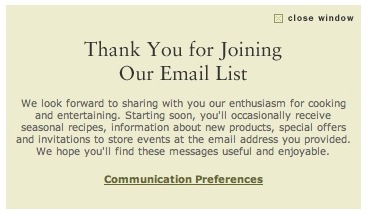
Back when this post was first written, Williams-Sonoma had a simple sign-up form on its homepage. It could have grown its list faster by putting that form in the left sidebar on every page. Today the retailer offers email sign-up across its site, along with a text-message option (text JOINWS to 79094). Its text sign-up says that consent isn’t required to make a purchase. That’s the kind of clear permission language the inbox providers now expect.
At the time, Williams-Sonoma also asked new subscribers for optional details, such as first and last name, through a link on the confirmation page. It later replaced that link with one to communication preferences.

That change seemed odd back then. Right after you had opted in, the main preference choice on offer was to opt out.
Today the logic runs the other way. An easy way out is now a requirement. Gmail and Yahoo expect marketing email from bulk senders to support one-click unsubscribe through the List-Unsubscribe and List-Unsubscribe-Post headers (RFC 8058), along with a visible unsubscribe link in the message, and they expect requests to be honored within two days. In the US, the CAN-SPAM Act requires a working opt-out in every commercial email and gives you 10 business days to honor it. The confirmation page is still a good place to ask for more, though. After someone joins, you can ask for their first name, interests or preferred frequency. Asking at that moment gets you better data without making the first form longer.
FAQ
Where should an email sign-up form go on a website?
Put it on every page, in the same place each time. The footer, a sidebar and a slim header bar are common choices. A dedicated sign-up page also helps for links from social profiles and printed materials. Hiding the form on a contact page is the main mistake to avoid.
How many fields should a sign-up form have?
For most lists, one field (the email address) gets the most sign-ups. Ask for a name, interests or birthday on the confirmation page or in the welcome email, once the person has already said yes. Every extra field on the first form costs some sign-ups.
Is double opt-in required?
US law (CAN-SPAM) doesn’t require any opt-in, and neither do Gmail’s or Yahoo’s sender rules. Double opt-in is still the safest choice, because it keeps typos, fake addresses and bots off your list. In parts of Europe, confirmed opt-in is the normal way to prove consent.
What do Gmail and Yahoo require from bulk senders?
Gmail treats anyone sending about 5,000 or more messages a day to Gmail addresses as a bulk sender. Bulk senders must authenticate mail with SPF, DKIM and DMARC, support one-click unsubscribe and keep their spam rate in Google Postmaster Tools below 0.3%. Yahoo’s Sender Hub sets out similar rules. Both providers expect unsubscribe requests to be honored within two days.
Can I buy an email list to grow faster?
No. Bought lists are full of people who never asked to hear from you. They drive up spam complaints and bounces, and they can get your domain blocked by Gmail, Yahoo and Microsoft. CAN-SPAM violations can cost up to $53,088 per email, and the FTC kept that 2025 amount unchanged for 2026.
Are open rates still a good way to judge new subscribers?
Not on their own. Apple Mail Privacy Protection downloads images, including the tracking pixel, through Apple’s proxy servers, so many messages show as “opened” whether or not anyone read them. Clicks, conversions, replies and unsubscribes give you a more reliable picture of how engaged your new subscribers are.
Sources
- Google Workspace Admin Help: Email sender guidelines
- Yahoo Sender Hub: Sender best practices
- FTC: CAN-SPAM Act, A Compliance Guide for Business
- Federal Register: FTC Adjustments to Civil Penalty Amounts (January 2025)