
If you survey your subscribers, respect their time. Tell them up front how long it takes. Offer a small, real incentive. Screen people out before they answer any questions, and save whatever they tell you so you never ask twice. Give them a way to stop getting surveys while they keep the newsletter. A lot has changed since this post was first written: Gmail, Yahoo and Microsoft now require bulk senders to keep spam complaints under 0.3% and to offer one-click unsubscribe. That makes an annoying survey email a deliverability risk on top of a bad experience.
Email is one of the best ways to get feedback from customers. Every company needs feedback, and every company needs to listen to what its customers want. That goes double for subscribers who care enough to opt in and let your emails fill their inbox every day, week or month.
This core group of customers should be looked after and never taken for granted. Yet surveys keep arriving that offer nothing in return. The incentive doesn’t have to be big. A small gesture goes a long way.
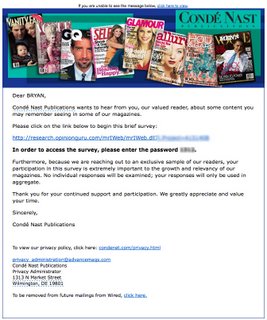
Take the survey email below. It came from Condé Nast, the publisher behind magazines such as WIRED, GQ and Vanity Fair. It told the reader they were part of an “exclusive sample” of readers, so you’d expect some kind of thank-you. The subscriber was giving up time and opinions. What did they get in return?

Nothing, as it turned out. The subscriber filled out the survey, starting with the demographic questions. After they entered their age, location and annual salary, the next screen said: “Thank you very much for your interest in our survey. Unfortunately you did not qualify for today’s survey. Because our research was targeted at individuals that match a particular profile, not everyone who receives an initial e-mail will qualify to take the survey. Please be assured that information is not recorded unless a survey is successfully completed.”
There were three problems with that. The first is small: “e-mail” with a hyphen already looked dated. The AP Stylebook switched to “email” in 2011. The second is bigger. The publisher threw away what it had just learned, that this reader was a 26-year-old in Florida earning under $75,000 a year. The next time a survey arrives, the same reader will click through, type in the same details and may get turned away again. That approach is lazy and short-sighted. Capturing the answers would have prepared the publisher for future surveys. It was a chance to learn about its “exclusive” members and send them better-targeted messages, and it was wasted.
Screen-outs are still standard in market research today, because studies often need a specific type of respondent. What has changed is what people will put up with. If a screener asks for income, you should either use that answer (with consent and a clear privacy notice) or not ask for it at all. Ask the qualifying questions first, keep them short, and show anyone who doesn’t qualify a thank-you that respects the minute they spent. A small reward helps too, such as a free article, a discount or entry into a prize draw.
That left one option: unsubscribe. The publisher brought it on itself. The unsubscribe page was the next frustration. It only offered an opt-out from all WIRED-related email, with no way to drop just the Condé Nast surveys. The reader liked the WIRED newsletters but didn’t want any more time-wasting surveys. So the choice was all or nothing.
The reader still had a paid print subscription, so they chose nothing and left the list. The publisher lost a newsletter subscriber over a survey.
What a better subscriber survey looks like today
The fix is the same as it always was, with higher stakes. Today an irritated subscriber is more likely to hit “Report spam” than to send a complaint, and that hurts every email you send afterwards.
- Ask for permission and set expectations. Put the length in the subject line or the first sentence (“3 questions, 2 minutes”).
- Screen first, briefly. Put any qualifying questions on the first screen, before anything that takes effort.
- Store what people tell you. Save screener answers to the subscriber’s profile in your ESP, so the next survey can skip them or go only to people who qualify.
- Reward people. In Anja Göritz’s meta-analysis of 32 web-survey incentive experiments, offering an incentive raised the odds of response by about 20%. Research also finds that cash and prepaid rewards tend to work better than promised ones or lotteries.
- Give surveys their own subscription option. Let people opt out of research emails and keep the newsletter.
- Measure clicks and completions, not opens. Apple Mail Privacy Protection, which launched with iOS 15 in 2021, preloads email content, so open rates are inflated and say little about survey interest.
Why the unsubscribe page matters more now
Your unsubscribe flow is now a compliance requirement, not just a design choice. Under the FTC’s CAN-SPAM rules, you can offer a menu of email types, but it must include an option to stop all commercial email from you. You must also honor opt-outs within 10 business days. Each violating email can draw a civil penalty of up to $53,088. That figure was set in January 2025 and kept for 2026.
Mailbox providers ask for more. Since February 2024, Google’s sender guidelines have required anyone sending about 5,000 or more messages a day to personal Gmail accounts to:
- authenticate with SPF, DKIM and DMARC
- support one-click unsubscribe through the List-Unsubscribe and List-Unsubscribe-Post headers
- process unsubscribe requests within 48 hours
- keep the spam rate shown in Postmaster Tools below 0.3%
Google began enforcing these rules more strictly in November 2025, with temporary and permanent rejections for mail that doesn’t comply. Yahoo has the same core rules, including one-click unsubscribe and a spam rate under 0.3%. Microsoft began enforcing similar rules for Outlook.com and Hotmail.com in May 2025.
The one-click header unsubscribes people from the stream they act on. If survey email and newsletters share one list, an annoyed reader can wipe out both with one tap. A preference center with a separate “research and surveys” option keeps the readers you’d otherwise lose.
FAQ
Should you offer an incentive for an email survey?
Yes, for anything longer than a question or two. Göritz’s meta-analysis of web-survey experiments found incentives raised the odds of response by about 20%. The reward can be small, like a discount code, a free download or a prize draw entry. If you run a prize draw in the US, check the sweepstakes rules for your states.
How long should a subscriber survey be?
Keep it as short as possible, and state the length honestly in the email. A one-question survey placed inside the email gets far more responses than a long form. If you need depth, send it to a smaller, engaged segment rather than the whole list.
Can survey emails hurt deliverability?
Yes. Spam complaints count toward the 0.3% limit that Gmail and Yahoo set for bulk senders, whatever the email was about. Repeated surveys sent to people who never engage, or who get screened out again and again, are a common source of complaints. Send surveys to engaged segments and keep them occasional.
Do survey emails have to follow CAN-SPAM?
If the email’s main purpose is commercial, CAN-SPAM applies. That means accurate header and subject information, a physical postal address, and a working opt-out honored within 10 business days. A survey that promotes products or services generally counts as commercial, so treating every survey send as covered is the safe default.
How do you let people stop surveys without losing them as subscribers?
Create a separate subscription type, or a preference center option, for research and survey emails. Link to it from the footer of every survey, alongside the option to unsubscribe from everything, which CAN-SPAM requires. Most ESPs, including Mailchimp, Klaviyo and HubSpot, support subscription types or preference pages.
Which metric shows whether a survey email worked?
Use the completion rate: completed surveys divided by delivered emails. Click-through rate comes second. Open rates are unreliable because Apple Mail Privacy Protection preloads content. Also track the unsubscribe and spam complaint rates for each survey send, because a high response rate isn’t worth it if the send costs you subscribers.
Sources
- Google Gmail Help: Email sender guidelines and the Email sender guidelines FAQ
- Yahoo Sender Hub: Sender best practices
- Federal Trade Commission: CAN-SPAM Act, A Compliance Guide for Business
- Federal Register: FTC adjustments to civil penalty amounts
- Göritz, A. S. (2006), “Incentives in Web Studies: Methodological Issues and a Review,” International Journal of Internet Science