
Images are fine in email as long as the message still works without them. Put your headline, offer and call to action in live HTML text, use real buttons built in code, and treat images as support, with descriptive alt text on every one. The image-blocking problem looks different today. Gmail has shown images by default through its own proxy since December 2013, while classic Outlook for Windows still blocks automatic picture downloads unless you change the setting, and Apple Mail Privacy Protection preloads images, which inflates open rates. Since 2024, Gmail and Yahoo’s bulk sender rules also make SPF, DKIM, DMARC and one-click unsubscribe as important to deliverability as your content.
Getting your message across, not only into the inbox
This post is about deliverability in a wider sense. Reaching the inbox is one part of it. The other part is whether the content inside your message actually gets across once someone opens it. How is it being displayed? Are the most important parts, such as your calls to action, locked inside images? If they are, it is time to rethink how you build your campaigns.
Why image-heavy emails are risky
Image-heavy emails are risky because you never control whether images load. If images are off, readers see empty boxes or, at best, your alt text. If your message lives only in those images, it never reaches them.
When this post was first published, most major email clients blocked images by default. The main exception was a recipient who had added you to their address book. That picture has changed, client by client:
| Email client | Default image behavior today | What changes it |
|---|---|---|
| Gmail (web and apps) | Images shown automatically, served through Google’s proxy (since December 2013) | Users can pick “Ask before displaying external images”; Gmail also hides images from senders or messages it considers suspicious |
| Classic Outlook for Windows | Automatic picture downloads blocked | File > Options > Trust Center > Trust Center Settings > Automatic Download; per message through the Download Pictures bar; organizations can lock the setting |
| Outlook for Mac | External pictures not downloaded by default | Outlook > Settings > Reading > “Download external images”: always, only from contacts and safe senders, or ask first |
| Apple Mail with Mail Privacy Protection | Remote content loaded privately in the background through Apple’s proxy relays, whether or not the email is opened | Settings > Apps > Mail > Privacy Protection on iPhone and iPad; Mail > Settings > Privacy on Mac |
The address book exception still exists in a modern form. Outlook loads images for contacts and safe senders, so asking subscribers to add your sending address still helps.
Even where images load, an email built mostly from images has other problems:
- Spam filtering. A message that is one big image with almost no text gives filters little to read. Image-only spam was a classic spammer trick, so image-only marketing mail tends to get treated with suspicion.
- Accessibility. Screen readers cannot read words baked into an image. They read alt text if you wrote any, and nothing if you didn’t.
- Mobile and dark mode. Text inside an image cannot reflow on a small screen or switch colors in dark mode. A dark logo on a transparent background can disappear completely on a dark background.
- Slow connections and clipping. Heavy images load slowly on mobile data, and the reader may scroll past your offer before it appears.
The conclusion from the original post still holds. Sending nothing but images is a gamble you don’t need to take.
How to balance images and live text
Live HTML text should carry the message and images should support it. If a subscriber reads your email with images off, they should still understand the offer and be able to act on it.
- Write the headline, the core offer and any deadline in HTML text, not inside a graphic.
- Build calls to action as HTML and CSS buttons (“bulletproof buttons”) that render without images.
- Give every meaningful image descriptive alt text, such as “20% off patio furniture through Sunday” instead of “banner_v3.jpg”. Mark purely decorative images with empty alt text so screen readers skip them.
- Set width and height on images so the layout doesn’t collapse while they load or when they’re blocked.
- Test with images off, in dark mode and on a phone before every send. Most ESPs and testing tools, such as Litmus and Email on Acid, show these previews.
An example that gets it right
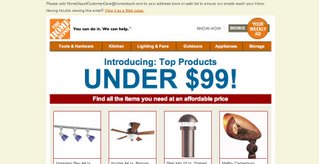
The Home Depot’s emails were the example this post pointed to: large, live text laid over enticing product images, with calls to action that still read clearly when images didn’t load. The approach is still a good model for any retailer. The words do the selling and the pictures make them look good.

If you want to study the pattern today, subscribe to a few big retailers’ lists and open their emails with images turned off. The well-built ones still make sense. The weaker ones turn into a column of empty boxes.
What else decides whether your email is seen
Good content only matters if the email gets delivered. Since February 2024, Gmail and Yahoo have set baseline rules for everyone who sends to their users, and Microsoft’s Outlook.com followed for high-volume senders in May 2025.
- All senders to Gmail: SPF or DKIM authentication, TLS for transmission, and a spam rate kept below 0.1% in Google Postmaster Tools, never reaching 0.3%.
- Bulk senders to Gmail (5,000 or more messages a day to personal Gmail accounts): SPF, DKIM and DMARC, alignment of the From domain, and one-click unsubscribe (the RFC 8058 List-Unsubscribe headers) for marketing mail, plus a visible unsubscribe link in the body.
- Yahoo: similar requirements, including one-click unsubscribe for bulk senders and honoring unsubscribe requests within two days.
- Outlook.com, Hotmail.com and Live.com: domains sending more than 5,000 emails a day must pass SPF and DKIM and publish a DMARC record of at least
p=nonealigned with SPF or DKIM.
A minimal DMARC record looks like this:
_dmarc.example.com. TXT "v=DMARC1; p=none; rua=mailto:[email protected]"
In the US, CAN-SPAM also requires an honest From line and subject, a valid physical postal address and a working opt-out in every commercial email. A clear unsubscribe link in live text covers that requirement and the mailbox provider rules at the same time.
FAQ
Do email clients still block images by default?
Some do and some don’t. Gmail shows images automatically through its proxy unless the user turns on “Ask before displaying external images” or the message looks suspicious. Classic Outlook for Windows and Outlook for Mac block external pictures by default, except for senders the user has marked as trusted.
What is a good image-to-text ratio for email?
No mailbox provider publishes an official ratio, so treat any exact percentage as a rule of thumb, not a rule. The test that matters is whether the email makes sense with images off. If the headline, offer and button are live text and the images are supporting visuals, the balance is right.
Are open rates still reliable if images load automatically?
Not on their own. Opens are counted by a tracking image, and Apple Mail Privacy Protection loads remote content in the background whether or not the email is read, which inflates opens. Gmail’s proxy caching also blurs the data. Clicks, conversions and revenue per email are more trustworthy measures.
Can an image-only email land in spam?
Yes, it can. Filters get very little text to judge, and image-only messages look like an old spammer technique. Authentication and a low complaint rate matter most for inbox placement, but a real text version of your message removes an avoidable risk.
What should alt text say in a marketing email?
It should say what the image communicates, not what file it is. For a banner, write the offer itself, such as “Free shipping on orders over $50”. Keep it short, and leave alt text empty on spacers and purely decorative graphics so screen readers skip them.
Does dark mode affect images in email?
Yes. Some clients invert or darken backgrounds but leave images untouched, so dark text inside an image or a dark logo on a transparent background can become hard to see. Using live text and adding a light outline or solid background to logos keeps them readable in both modes.
Sources
- Google: Email sender guidelines
- Google: Email sender guidelines FAQ
- Gmail Help: Turn images on or off in Gmail
- Official Gmail Blog: Images now showing (December 2013)
- Microsoft Support: Block or unblock automatic picture downloads in classic Outlook
- Microsoft Support: Automatically download pictures from the Internet in Outlook for Mac
- Microsoft Tech Community: Outlook’s new requirements for high-volume senders
- Apple: Mail Privacy Protection and Privacy
- Apple Support: Unable to load remote content privately
- Yahoo Sender Hub
- FTC: CAN-SPAM Act, A Compliance Guide for Business