
You can still share your email campaigns on X, the platform that used to be Twitter. It remains a cheap way to get each issue in front of people who aren’t on your list yet. The best way to do it in November 2026 is to post your email service provider’s public campaign link with UTM tags, rather than a “view in browser” link copied from a test subscriber’s inbox. Twitter became X in July 2023 and moved to x.com in May 2024. Posts now allow 280 characters, and every link counts as 23 of them. Most third-party analyses also find that X’s feed shows posts with external links to fewer people, so the post itself has to earn the click.
The original seed-subscriber method
The blog returnonsubscriber.com once suggested a clever idea: send your email campaigns out through Twitter. The method is simple. It dates from early 2009, so read the steps as history, with notes on what works differently now.
- Create a dedicated address. Set up a new email address, for example [email protected], and forward or alias it to an inbox you already check. This address is the “subscriber” you will use to track your Twitter activity.
- Subscribe that address to your own campaigns. When you send your next email, [email protected] will receive it. Make sure the email has a “view in browser” link at the top.
- Open the web version and shorten the link. When the email arrives, click “view in browser”, copy the URL from the browser and shorten it. The original post used tinyurl.com.
- Post it. From your Twitter account, paste the short link into a tweet and send it. The original example read: Company Newsletter for January ’09, New Blogs, Recent Launches: http://tinyurl.com/asdfa89. As a rule of thumb, use the email’s subject line in the post. Even with the old 140-character limit, a tweet gave you room to say more than a subject line could.
- Check the stats in your ESP. Log in to your email service provider and search for [email protected]. You can see the statistics for the message sent to that address, and they include activity that came from the tweet.
The method won’t tell you which Twitter users clicked your link. It does extend the reach of your message beyond your list.
What has changed since 2009
The idea still holds up, but nearly every detail around it has changed.
- The name and domain. Twitter was renamed X on July 24, 2023. Twitter.com has redirected to x.com since May 17, 2024.
- The character limit. The 140-character limit doubled to 280 in November 2017, and that is still the cap for free accounts. Paid X Premium tiers allow much longer posts.
- Link shorteners. X wraps every URL in its own t.co shortener and counts it as 23 characters, however long or short the original is. Running the link through TinyURL first no longer saves any space. A shortener now only helps if you want a branded short domain or its click counts.
- Open data on the seed address. Apple Mail Privacy Protection (launched with iOS 15 in 2021) and Gmail’s image proxy load tracking pixels on their own, so opens recorded on a seed address prove little. Clicks are the number to watch.
Why a subscriber’s web-view link is risky today
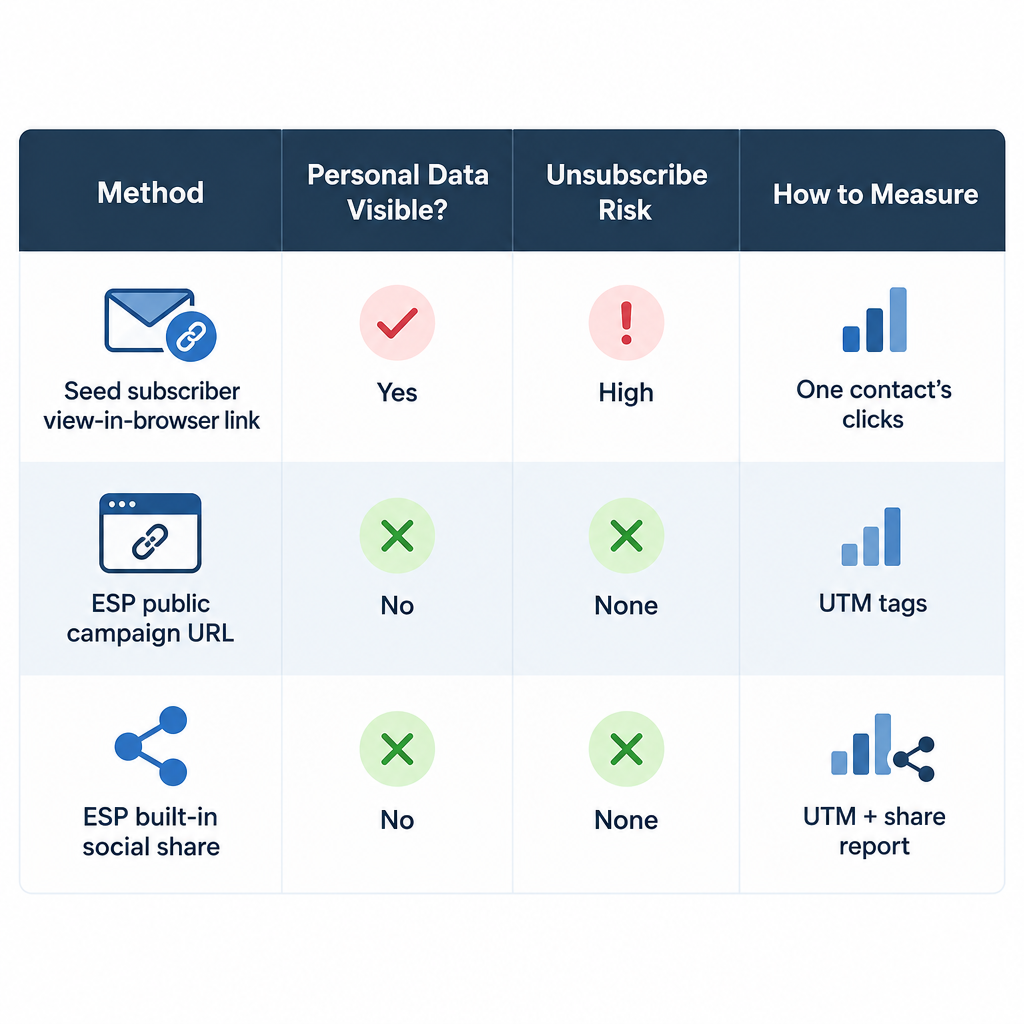
A “view in browser” link taken from a subscriber’s copy belongs to that subscriber. When you post it in public, you hand everyone a page tied to your seed address. Merge tags and personalized blocks show that contact’s data. Any stranger who clicks the unsubscribe link in the footer unsubscribes the seed address. Every public click also counts as that one contact’s activity, which skews any segment or automation built on engagement.
Most ESPs now give you a public version built for sharing. Mailchimp is a good example. Its Campaign URL option gives you a link to the sent campaign page that you can share anywhere. Its Social Share feature, found in the dropdown for a sent campaign in the All campaigns list, posts the campaign to Facebook or X, but only for regular and plain-text campaigns. Mailchimp also notes that a new campaign can take up to 48 hours to show up in the audience archive, and that Social Cards (the image and text shown when the link is shared) can’t be edited after you send.
| Method | Who can see personal data | Unsubscribe risk | How you measure it |
|---|---|---|---|
| Seed subscriber’s “view in browser” link (2009 method) | Anyone, if the email uses merge tags | Strangers can unsubscribe the seed | Clicks credited to one contact |
| ESP public campaign or archive URL | Nobody, merge data is stripped | None | UTM tags in your web analytics |
| ESP built-in social share | Nobody | None | UTM tags plus the ESP’s share report |
How to share a campaign on X now
The modern version keeps the 2009 idea and swaps in a safer link and better tracking.
- Send the campaign to your list as usual.
- Copy the public campaign URL from your ESP. In Mailchimp, that is the Campaign URL for the sent campaign.
- Add UTM parameters so your analytics tool, such as Google Analytics 4, can tell X traffic apart from email traffic:
https://yourbrand.example/newsletter/january?utm_source=x&utm_medium=social&utm_campaign=jan-newsletter
- Write a post that leads with the most useful line from the email, not just the subject line. You have 280 characters, and the link takes 23 of them.
- Make sure the page has a clear sign-up form or link, so a reader who likes the issue can subscribe.
- Compare traffic and sign-ups from
utm_source=xwith your other channels after a week.
Writing the post so people click
Lead with one concrete takeaway, a number or a question your issue answers. Third-party studies of X’s ranking keep finding that posts with external links get less reach. Their estimates vary a lot, and X hasn’t published a figure. Many brands respond by putting the main point in the post and the link in the first reply. That is ordinary formatting, so try both and keep whichever brings more sign-ups.
Social sharing grows your list, so keep it clean
The real payoff from sharing on X is new subscribers, and how you collect them matters more than it did in 2009. Since February 2024, Gmail and Yahoo have required bulk senders (Google’s line is 5,000 or more messages a day to Gmail addresses) to authenticate with SPF, DKIM and DMARC. They must also offer one-click unsubscribe on marketing mail and keep the spam complaint rate in Google Postmaster Tools below 0.3%. Microsoft added similar rules for Outlook.com, Hotmail.com and Live.com on May 5, 2025. Google stepped up enforcement in November 2025, and mail that fails the rules can now be rejected outright.
Readers who arrive from a post and subscribe on their own are the kind of contacts that keep complaint rates low. Use a sign-up form with clear consent. Never add people to your list just because they follow, reply to or retweet you, and never buy lists. Under CAN-SPAM in the US and GDPR in the EU, each marketing email must also include a working way to opt out.
FAQ
Should I post the “view in browser” link from my own inbox?
It’s better not to. That link is tied to one subscriber, so it can expose merge-tag data, and anyone who clicks the unsubscribe link will unsubscribe that contact. Use your ESP’s public campaign URL or its built-in social share option instead.
Do I still need a link shortener for X?
Not to save space. X turns every link into a t.co link that counts as 23 characters, whatever its length. A shortener only helps if you want a branded domain or a second set of click counts. Use UTM parameters for your main tracking.
How do I know how many subscribers came from X?
Tag the shared link with utm_source=x and track sign-ups on the landing page in your analytics tool. Many ESPs can also save a source field or tag on each form, so new contacts carry their source into your list.
Does sharing campaigns on X affect deliverability?
Not directly. Gmail, Yahoo and Microsoft judge your authentication, complaint rates and unsubscribe handling, not your social posts. Indirectly it helps if it brings in engaged, opted-in subscribers who rarely mark your mail as spam.
Which campaigns are worth sharing publicly?
Share content-led issues, like guides, roundups, news and announcements, that make sense to someone who doesn’t know you yet. Don’t share subscriber-only offers, personalized discount codes, or emails where most of the value comes from merge-tag content.
Is the seed-address trick useful for anything now?
Yes, as a monitoring address. A seed inbox lets you see what subscribers actually get and when, and check how your mail renders in Gmail tabs, on mobile and in dark mode. Just don’t post its links in public.
Sources
- Google Workspace Admin Help: Email sender guidelines and the bulk sender FAQ
- Yahoo Sender Hub: Sender best practices and requirements
- Microsoft Tech Community and Outlook.com Postmaster: requirements for high-volume senders (May 2025)
- Federal Trade Commission: CAN-SPAM Act, A Compliance Guide for Business
- X Developer Platform: Counting characters
- Mailchimp Help Center: Share a Sent Email Campaign, and About Email Campaign Archives and Pages