
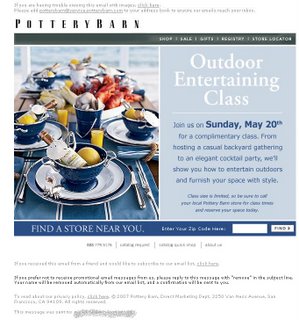
If an email invites subscribers to an in-store event, segment your list by store or ZIP code. Then put the nearest store, the class times and an RSVP button inside the message itself, because every extra click between the inbox and the sign-up loses you attendees. Mailchimp and Klaviyo now have ZIP code and radius segments built in. Two things have also changed since this post was first written: Apple Mail Privacy Protection has made location guesses based on IP address unreliable, and the 2024 Gmail and Yahoo bulk sender rules make untargeted blasts, and the spam complaints they bring, more costly.
Why segmentation matters for offline events
Email works well for getting subscribers to offline promotions and events. When you plan the campaign, segment your list by store location, or at least by region. If you decide not to segment, make the click-through steps as easy as possible. Every extra step a subscriber has to take to find the details makes them more likely to give up, because at some point it stops being worth the trouble. Most subscribers react this way.
A Pottery Barn example
 This example comes from an older Pottery Barn email. The subject line read “Decorating Class at your Local Pottery Barn Store.” Subscribers could attend a class on May 20th that promised to teach them how to host a backyard party and how to furnish their space in style. The small print said class size was limited and told readers to call their local store for times and to reserve a spot.
With simple ZIP code segmentation, Pottery Barn could have shown each subscriber the closest store, the class times and a way to RSVP online, or at least a phone number. The email didn’t do that. It offered a store locator and a box for a ZIP code.
Entering a ZIP code brought up a certificate error in Internet Explorer 7. Clicking past it meant starting over with a full street address and ZIP code, which finally returned the ten closest stores. That browser is history now: Microsoft retired the Internet Explorer desktop app in June 2022. A certificate warning on a store locator today would stop most visitors in Chrome, Safari or Edge.
That was too many frustrating steps just to reach a phone number and ask about the class.
Where the sign-up process fell short
Going back through the sign-up process on the Pottery Barn website showed where the problem started. The subscriber had originally opted-in from a Benjamin Moore promotion several weeks earlier. Signing up on the site itself meant entering an email address, then seeing a pop-up thank-you message with a link to update communication preferences.
That link looked like the place to give Pottery Barn enough information to target its messages. It wasn’t. The only options were to opt out, change preferences for other Williams-Sonoma communications, or request a catalog.
A better approach is to collect everything in one place. If the form asks for a mailing address, or at least a ZIP code, and then offers a checkbox for the catalog, the brand has what it needs for targeted emails.
Pottery Barn has since moved in this direction. In June 2023 the brand announced a free monthly decorating class series across its full fleet of stores, with sign-ups handled through an RSVP link instead of a phone call.
How to build location segments for store events today
To send location-based event emails today, collect a ZIP code at sign-up, build a radius segment around each store, and use one dynamic content block per store. Don’t count on IP-based location estimates to do the work for you. They have become much less reliable since 2021.
The setup, step by step
- Add a ZIP code field to your sign-up form and your preference center. Label it with the benefit, for example “Get invites to events near you.”
- Store the subscriber’s country next to the ZIP code, since ESPs that support other countries need both.
- Build one radius segment per store, such as all subscribers within 25 miles of the store’s ZIP code.
- Write one email with a dynamic block for each store showing the address, event date and time, and an RSVP button that links to that store’s sign-up page.
- Write a fallback version for subscribers with no ZIP code on file. Link it to a store finder that needs one entry, and ask for their ZIP code so next time they get the targeted version.
- Send reminders only to people who RSVP’d, and send a short follow-up to people who clicked but didn’t sign up.
What the major ESPs offer
| ESP | Location option | Data it uses | Limits to know |
|---|---|---|---|
| Mailchimp | Zip code segment, including “is within distance of” a ZIP | The Zip code audience field | Only works with 5-digit US ZIP codes; ignores Address fields and geolocation data |
| Mailchimp | Predicted location | An estimate based on the subscriber’s IP address | An estimate, not data the subscriber gave you |
| Klaviyo | “Someone’s proximity to a location” | ZIP code plus country, or IP geolocation | Radius segments supported for the US, EU, Australia, New Zealand and Canada; imported profiles without a ZIP code are not given a location automatically |
Data that subscribers give you directly beats data you infer. Both platforms do better when a subscriber has typed in a ZIP code than when the platform has to guess.
Why IP-based location has weakened
Apple Mail Privacy Protection, launched with iOS 15 in 2021, preloads email content through Apple’s proxy servers. The IP address your ESP records belongs to Apple’s relay, not the reader’s home or phone. The same preloading fires tracking pixels, so open rates for Apple Mail readers come out inflated. Gmail’s image proxy also hides readers’ IP addresses. Taken together, location estimates built from opens are rough at best. For store events, ask for the ZIP code and measure clicks and RSVPs, not opens.
A worked example
Picture a retailer with three stores, each hosting a styling class on the same Saturday. Each store gets its own radius segment. Subscribers near Store A see Store A’s address, a 10 a.m. class time and an RSVP button. Subscribers near Store B see their own details. Anyone without a ZIP code gets a version that says “Classes at all three stores this Saturday” and a short list of the three, plus a one-field form to add their ZIP code. No one has to call a store, re-enter an address or click past a browser warning.
How the 2024 sender rules affect event emails
Untargeted event blasts carry more risk than they used to. Since February 2024, Google has required anyone sending 5,000 or more messages a day to personal Gmail accounts to authenticate with SPF, DKIM and DMARC. Marketing mail has needed one-click unsubscribe since June 2024, and unsubscribe requests must be honored within two days. Google wants your user-reported spam rate below 0.3%, and advises keeping it under 0.1%. Yahoo set similar requirements for bulk senders the same year, and Microsoft began enforcing authentication for high-volume senders to Outlook.com in 2025.
An invitation to a class 800 miles away is the kind of email people mark as spam. Location segments keep event mail relevant, which keeps complaint rates down. One-click unsubscribe is set with two message headers, which most ESPs now add automatically:
List-Unsubscribe: <https://example.com/unsubscribe?id=abc123>, <mailto:[email protected]>
List-Unsubscribe-Post: List-Unsubscribe=One-Click
In the US, CAN-SPAM still applies to every commercial email. You need a valid physical postal address, a working opt-out that you honor within 10 business days, and subject lines that don’t mislead. A subject line promising a class “at your local store” has to be true for every recipient who gets it. Civil penalties now top $50,000 per violating email.
FAQ
Is a ZIP code enough for location segmentation, or do I need a full address?
A ZIP code is enough for store events. Mailchimp’s distance segments and Klaviyo’s proximity condition both work from a ZIP code, and asking for one field gets far more completed forms than asking for a full street address. Ask for the full address only if you mail a printed catalog.
Can I segment by location without asking subscribers?
Partly. Mailchimp’s predicted location and Klaviyo’s IP geolocation estimate where subscribers are. But Apple Mail Privacy Protection and Gmail’s image proxy hide many readers’ real IP addresses, so those estimates miss or misplace a large share of a list. Use them as a fallback and ask for a ZIP code wherever you can.
What radius should I use around each store?
Base it on how far your customers actually travel. That might be 10 to 15 miles for a city store and 30 miles or more in suburban or rural areas. Check past RSVP or purchase data by ZIP code if you have it. If two stores’ circles overlap, assign each subscriber to the closer store so nobody gets two invitations.
What should go in the email if a subscriber has no location data?
Send a general version that lists the participating stores or links to a store finder that needs only one entry. Add a short prompt asking for their ZIP code so they get personalized invites next time. Don’t use “your local store” in the subject line for this group, because CAN-SPAM prohibits misleading subject lines.
How do I measure whether an event email worked?
Track clicks on the RSVP button, completed RSVPs and actual attendance by store, not open rates. Apple Mail Privacy Protection inflates opens, so they are a weak signal for this kind of campaign. Comparing RSVPs per thousand recipients across store segments shows which locations and offers draw people in.
Sources
- Google Workspace Admin Help: Email sender guidelines
- Google Workspace Admin Help: Email sender guidelines FAQ
- Yahoo Sender Hub: Sender best practices
- FTC: CAN-SPAM Act, A Compliance Guide for Business
- Mailchimp Help: Save and Manage Segments
- Klaviyo Help Center: How to create a location-based segment