
Yes. If you publish a copy of each campaign on your own domain, every send leaves a crawlable page on your site, and the traffic from your “view in browser” link stays with you instead of landing on your email service provider’s domain. In November 2026 the tip still works, but the payoff comes from turning issues into real pages, with personal data stripped out and a canonical tag in place. Raw email HTML uploaded by FTP doesn’t earn much. Since the post was written, Gmail, Yahoo and Microsoft have added sender rules on SPF, DKIM, DMARC, one-click unsubscribe and spam rates, and Apple Mail Privacy Protection has made open rates unreliable. That makes clicks through to your own site one of the more trustworthy signals you have left.
Why the hosting location of your web version matters
Most campaigns still carry a link near the top that points to a web version of the email, usually worded as “View this email in your browser.” It started as a fix for clients that broke HTML or blocked images. Today most readers open on phones in Gmail, Apple Mail and Outlook, many of them in dark mode, so fewer people click it. It’s still a sensible fallback.
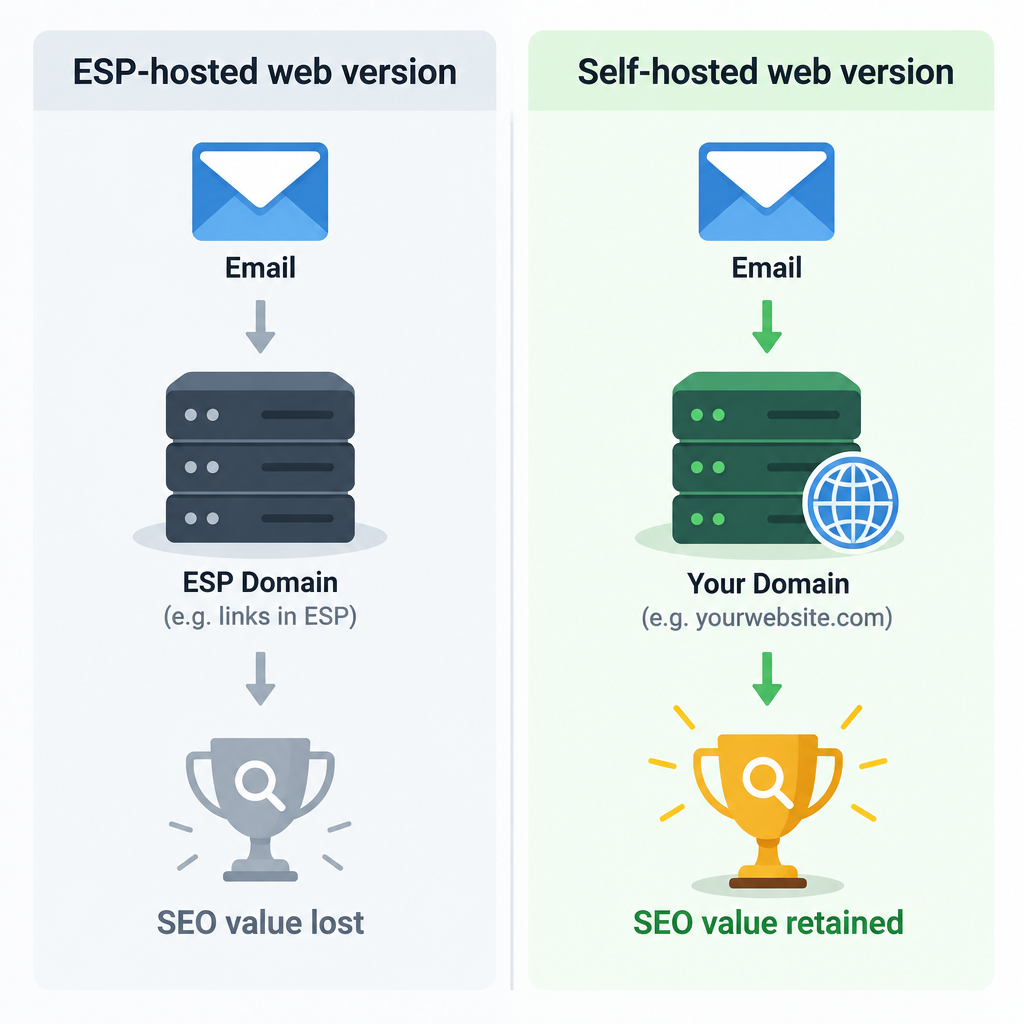
Where that link points matters more than the fact that it exists. Your ESP almost certainly hosts the web version for you. Mailchimp, for example, creates a unique web page for every campaign you send and can publish a hosted campaign archive for each audience. Those pages sit on the ESP’s domain, though, so any links, visits or search visibility they earn go to the ESP and not to you. If you want the SEO value on your own website, think about hosting the newsletter there yourself instead of relying only on your ESP’s copy.
The original idea, and what has changed since
Blue Sky Factory posted a clever idea about SEO, traffic and email campaigns. Blue Sky Factory was a Baltimore email marketing firm founded in 2001, and WhatCounts bought it in July 2011. The argument still holds: if the links in your email are meant to send readers to your site, why send part of that traffic somewhere else through a web version hosted on another domain?
The old advice said it took seconds to put a new.html file on your site, as long as you had FTP access. That workflow is history now. Today you publish through a content management system such as WordPress or Shopify, or use an ESP feature that pushes campaigns to your own domain. Some newsletter platforms publish each issue as a web post by default.
What has changed is how much effort it takes to make the hosted copy worth having. Pasting the raw email in rarely helps. Email HTML is built from nested tables and inline styles so that it renders in old clients (Outlook 2007’s Word-based rendering engine was the classic headache). As a web page it is usually thin, hard to read on mobile and light on proper headings. To get the added traffic, host the email yourself on your own site in a form that works as a page:
- Rebuild the issue as a normal web page with a real H1, subheadings and readable body text.
- Remove merge tags, greetings by name, account details, tracking pixels and the personal unsubscribe link. Mailchimp lets you hide content from campaign pages with conditional merge tags, and other ESPs have similar options.
- Add a self-referencing canonical tag so Google knows which copy is the preferred one, especially if the ESP’s version is also public.
- Point the “view in browser” link in the email to your own page.
- Add a signup form to the page so visitors who arrive from search can subscribe.
The canonical tag goes in the page’s <head>:
<link rel="canonical" href="https://www.example.com/newsletter/2026-11-issue/">
Google treats rel=canonical as a strong hint, not a command. It can still pick another URL if the signals disagree, so link to your own copy consistently from the email, your archive and your sitemap.
Use your archive as a preview for new subscribers
While you’re at it, link to these past newsletters from your signup page so potential subscribers can see what they’ll get before they hand over an address. A visible archive shows how often you send and what you send, and it sets expectations. That matters more now than it did when this tip first appeared. Gmail asks bulk senders to keep user-reported spam rates below 0.10% and never let them reach 0.30%, Yahoo sets its limit at 0.3%, and people who know what they signed up for are less likely to hit the spam button.
An archive also gives you a way to measure value now that opens are noisy. With Apple Mail Privacy Protection turned on, Apple fetches remote content, including the tracking pixel, through its own proxy servers soon after delivery, so the open gets recorded whether or not anyone read the email. Visits to your hosted issues and clicks through to your site are harder to fake.
More on the original idea can be found at the Blue Sky Factory blog, though the company now lives on only as part of WhatCounts’ history.
How the hosted copy fits the current sender rules
Hosting the web version on your site doesn’t change your authentication requirements, but the two work well together. Since February 2024, Google has required anyone sending close to 5,000 or more messages a day to personal Gmail accounts to authenticate with SPF, DKIM and DMARC, keep user-reported spam rates below 0.10% and never let them reach 0.30%, and add one-click unsubscribe to marketing mail (the deadline for one-click was June 1, 2024). Yahoo introduced matching requirements at the same time. Microsoft began enforcing SPF, DKIM and DMARC for senders of more than 5,000 messages a day to Outlook.com, Hotmail and Live addresses on May 5, 2025.
A minimal DMARC record that meets the baseline looks like this:
_dmarc.example.com. IN TXT "v=DMARC1; p=none; rua=mailto:[email protected]"
When your From address, your links and your web version all use the same domain, the email is easier to recognize and trust. In the US, the FTC’s CAN-SPAM rules still apply to every commercial message, whoever hosts the web version: an honest header and subject line, a valid physical postal address, and opt-outs honored within 10 business days. Penalties reach up to $53,088 per violating email after the FTC’s January 2025 inflation adjustment.
FAQ
Does hosting a newsletter on my own site actually help SEO?
It helps when the hosted issue is a useful page in its own right: a clear topic, readable text, and links people want to follow or share. A raw copy of a promotional email with “50% off this weekend” and little else won’t rank. Newsletters with substantial editorial content get the most out of it.
Will the ESP’s web version and my copy count as duplicate content?
Google doesn’t penalize duplicates. It picks one version to show and combines signals into it. Put a self-referencing canonical tag on your copy and point every link to it, so your page is the one Google is most likely to pick over the ESP’s.
Can I just embed my ESP’s campaign archive on my site?
Yes. Mailchimp, for example, offers code to embed a campaign archive on your website. That’s quick, but the issues still open on the ESP’s domain, so most of the SEO value stays there. Publishing each issue as a native page on your site captures more of it.
What should I remove before publishing an email on the web?
Remove anything personal or tied to one recipient: first-name greetings, account numbers, personalized offers, tracking pixels and the subscriber’s own unsubscribe link. Also remove expired coupon codes, or label them as expired, so search visitors aren’t frustrated by them.
Do I still need a “view in browser” link in 2026?
No mailbox provider requires one, and few readers click it now that most clients render HTML reliably. Keep it if your emails are image-heavy or complex, and point it to your own domain so the clicks it does get land on your site.
Do open rates still show whether my newsletter is working?
Not on their own. Apple Mail Privacy Protection records machine opens for many Apple Mail users, which inflates open rates. Clicks, visits to your hosted issues, signups from the archive page and conversions give a more reliable picture.
Next step
Choose your next campaign and publish it as a proper page on your own domain before you send. Add a canonical tag and a signup form, and point the email’s browser link to it. After a few issues, check in Google Search Console whether the archive pages are getting indexed and bringing in new subscribers.
Sources
- Google Workspace Admin Help: Email sender guidelines FAQ
- Google Search Central: How to specify a canonical URL with rel=”canonical” and other methods
- Yahoo Sender Hub: Best practices
- Microsoft Tech Community: Outlook’s new requirements for high-volume senders
- Microsoft Postmaster: Policies, practices and guidelines
- Mailchimp Help: About email campaign archives and pages
- Twilio SendGrid Docs: Understanding Apple Mail Privacy Protection and open events
- FTC: CAN-SPAM Act, a compliance guide for business