
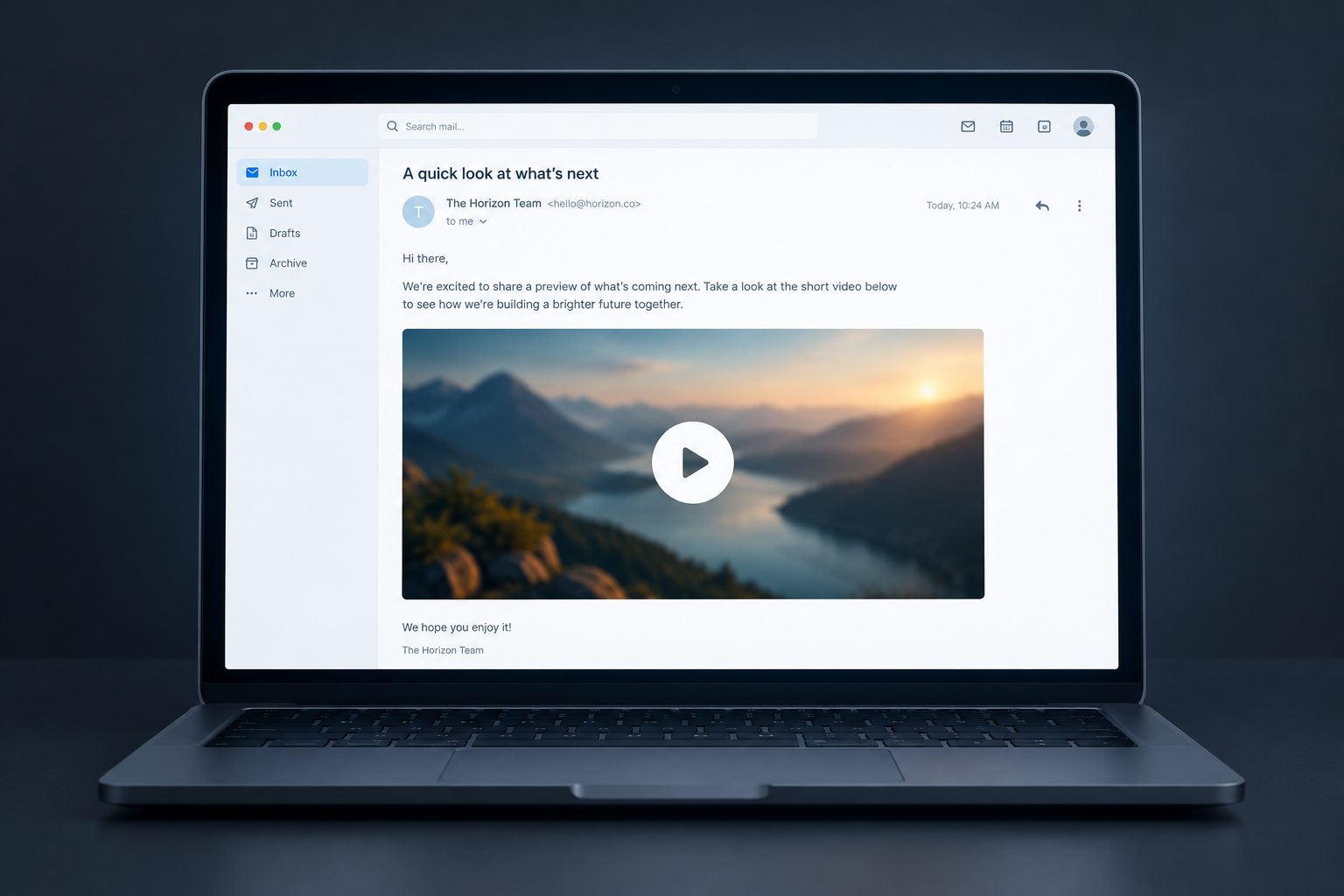
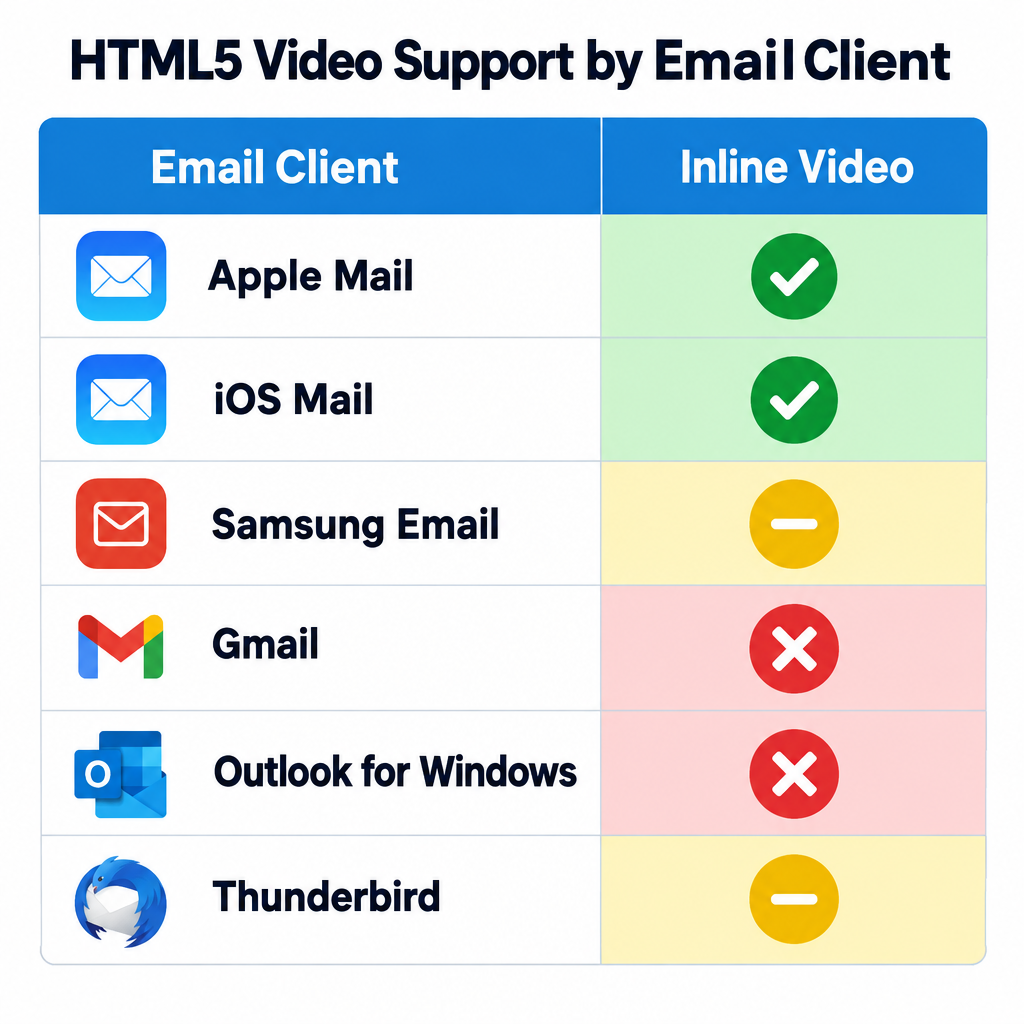
As of November 2026, a video still won’t play inside every inbox. Apple Mail, iOS Mail and Samsung Email can play HTML5 video, but Gmail and most versions of Outlook remove it. That’s why a clickable thumbnail with a play button, or an animated GIF, linking to a landing page is still the reliable choice. The big change since this post was first written is that Flash is gone completely: Adobe ended support on December 31, 2020 and blocked Flash content from January 12, 2021. Separately, Gmail and Yahoo’s 2024 bulk sender rules now decide whether your video email reaches the inbox at all.
The short answer: true video playback in email is limited
People have argued for years about the best way to put video in email. When this post first ran, the honest answer was that it couldn’t be done. Back then the industry was waiting for email clients to support Flash, and they never did.
Today the answer is “partly.” HTML5 video, coded with the <video> tag, plays in a small group of clients. The rest show a fallback, or show nothing if you didn’t build one. On a typical consumer list, a large share of readers use Gmail or Outlook. So any campaign that depends on inline playback will fail for many of your subscribers.
| Email client | Inline HTML5 video | What your reader sees |
|---|---|---|
| Apple Mail (macOS) | Yes | Video plays with controls |
| iOS Mail (iOS 10 and later) | Yes, with the controls attribute |
Plays when tapped; autoplay is unreliable |
| Samsung Email | Yes, rated partial in some charts | Usually plays; test before sending |
| Mozilla Thunderbird | Partial | Often plays, autoplay is often blocked |
| Outlook for Mac | Partial | Playback can need extra steps |
| Gmail (web and apps) | No | Video is removed; only your fallback shows |
| Outlook for Windows, Outlook.com, Outlook mobile | No | Fallback only |
Client behaviour changes between versions. Run a rendering test before every video send instead of trusting a chart from last year.
The simplest method: a clickable screenshot
There are still clever, creative ways to get video into email. The simplest is to take a screenshot of the video, make it clickable, and link it to a landing page where the video plays.
Add a play button to the thumbnail
You can push this further. Use a frame from before the video starts and lay a semi-transparent play button over it. Readers recognise that symbol right away, so they’re more likely to click, and that sends more traffic to your site.
A few details make this thumbnail work harder today:
- Pick a frame that tells the story. A face, the product, or a clear text overlay works better than a blurry opening frame.
- Make the play button part of the image. Don’t build it from CSS layers that some clients strip.
- Size for mobile. Most people now read email on a phone, so the image should scale to the screen width and the play button should be big enough to tap.
- Check dark mode. Clients such as Apple Mail, Gmail and Outlook can invert or dim colours. A thin white border or a solid background behind the play button keeps it visible on dark screens.
- Link to a page that plays the video at once. Don’t send people to a homepage where they have to hunt for it.
Include a text link and alt text
Also add a plain text link in the email for readers who can’t see images, something like “Watch the 90-second demo.” In the past this mattered because so many clients blocked images by default. It still matters now: some people turn images off, and corporate filters strip them. Give the thumbnail descriptive alt text too, so screen reader users and anyone with images off know what the video is about.
Animated GIFs: motion that works in most inboxes
Another quick, effective way to show there’s a “video” in your email is to take several screenshots and combine them into an animated GIF.
Animated GIFs play in Gmail, Apple Mail, iOS Mail, Yahoo Mail and the new Outlook for Windows. The main exception is classic desktop Outlook for Windows. Outlook 2007 through 2019 render email with Word’s HTML engine, which shows only the first frame. Some Microsoft 365 desktop setups also show a static frame, depending on a user setting. The fix is simple: design the first frame so it works alone. Put the headline, the product and the play button in that frame.
Keep GIFs short and light. A loop of a few seconds, a limited colour palette and a modest file size help the email load fast on mobile data. A heavy file adds little to the story and slows everything down.
Where Flash fits now: history
When this post was first published, the advice ended with “until email clients across the board support Flash, this is your best bet.” That wait is over, because Flash itself is over. Adobe stopped supporting Flash Player after December 31, 2020 and started blocking Flash content on January 12, 2021. Email clients never supported it in a reliable way, and nobody should build email around it now.
The old post also called anyone who claimed to put video in email “liars. Straight up.” That was fair at the time. Today the line is more nuanced. Vendors and ESPs that offer “embedded video” are usually serving HTML5 video to Apple clients and a fallback image to everyone else. That’s a real technique. Just don’t let anyone promise you universal playback, because that still doesn’t exist.
Deliverability rules that now apply to video emails
A video email has to reach the inbox before anyone can click play. Since February 2024, Google and Yahoo have required bulk senders to meet stricter standards. Google defines a bulk sender as anyone sending more than 5,000 messages a day to personal Gmail accounts.
| Requirement | What it means for your video campaign |
|---|---|
| SPF, DKIM and DMARC | Authenticate the domain you send from; DMARC can start at p=none |
| One-click unsubscribe (RFC 8058) | Marketing mail needs List-Unsubscribe and List-Unsubscribe-Post headers, and unsubscribes should be honoured within two days |
| Spam complaint rate | Google asks you to stay below 0.1% and never reach 0.3% |
| Valid forward and reverse DNS, TLS | Usually handled by your ESP, but worth confirming |
A minimal starting DMARC record looks like this:
_dmarc.example.com. IN TXT "v=DMARC1; p=none; rua=mailto:[email protected]"
The one-click unsubscribe headers look like this:
List-Unsubscribe: <https://example.com/unsubscribe?id=abc123>, <mailto:[email protected]>
List-Unsubscribe-Post: List-Unsubscribe=One-Click
Video emails also bring their own risks. Inline <video> code and embedded images make messages bigger, and Gmail clips any message whose HTML goes over about 102 KB. A clipped email can hide your unsubscribe link and your tracking pixel. Host video files and large GIFs on a server or CDN, and never attach them.
How to measure a video email
Clicks on the thumbnail are the number to watch. Opens are a weak signal now. Apple Mail Privacy Protection launched with iOS 15 in 2021, and it preloads images through Apple’s proxy servers, so many emails count as “opened” whether or not anyone read them. Track these instead:
- Click-through rate on the thumbnail and the text link, measured separately so you know which one works
- Play rate on the landing page, from your video host’s analytics
- Watch time or completion rate, which shows whether the video kept the people who clicked
- Conversions after viewing: sign-ups, purchases or demo bookings
If you use HTML5 video for Apple clients, remember that plays inside the inbox usually don’t show up as clicks. Compare those segments with care, and judge the campaign mostly on clicks and conversions from the full list.
FAQ
Can you embed a YouTube video directly in an email?
No. YouTube embeds use an iframe, and the major email clients block iframes, so the video won’t appear. The standard approach is a thumbnail of the video with a play button, linked to the YouTube page or to your own landing page where the video is embedded.
Does Gmail play video in emails?
No. Gmail removes HTML5 video from email, both on the web and in its mobile apps, so Gmail readers only see your fallback image or link. Gmail does play animated GIFs, which makes a GIF preview a good way to add motion for those readers.
Is it worth coding HTML5 video for Apple Mail users?
It can be, if a large share of your list reads on Apple Mail or iOS Mail and you have the development time to build and test a solid fallback. For most senders, a thumbnail or GIF that links out gets most of the benefit with far less risk. It also keeps reporting simpler, because every view starts with a trackable click.
Will putting video in an email hurt deliverability?
Video doesn’t cause spam filtering by itself, but the extra code and weight can. Large HTML gets clipped by Gmail, image-heavy emails with very little text can look suspicious to filters, and attachments are a bad idea. Keep the message light, host your media files externally, and meet the Gmail and Yahoo authentication and unsubscribe rules.
Why does my animated GIF stop on the first frame in Outlook?
Classic Outlook for Windows renders email with Word’s HTML engine, which shows only the first frame of a GIF. Some Microsoft 365 desktop users also have GIF animation turned off. The new Outlook for Windows plays GIFs, but put your key message in the first frame so classic Outlook readers still get it.
Does the word “video” in a subject line help?
It can raise curiosity, but it only works if the email delivers a clear, clickable video preview. Readers who click “video” and find no obvious play button lose trust quickly. Test it against your usual subject lines and judge the result on clicks, since Apple Mail Privacy Protection makes open rates unreliable.
The best next step is a test: build a thumbnail version and a GIF version of your next video email, send each to a slice of your list, and keep whichever one wins on landing page plays and conversions.
Sources
- Google Workspace Admin Help: Email sender guidelines and the Email sender guidelines FAQ
- Yahoo Sender Hub: Best practices and FAQs for bulk senders
- Federal Trade Commission: CAN-SPAM Act, A Compliance Guide for Business
- Adobe: Flash Player end of life information
- Postmark Support: Open tracking and Apple Mail Privacy Protection
- Bird Docs: Gmail and Yahoo sender requirements, and Email media support guide