
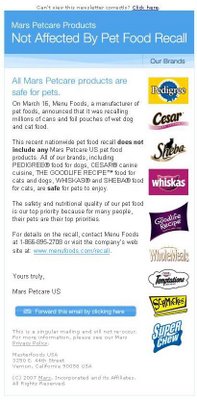
People usually get an email they don’t remember asking for because they signed up with one brand, and then the parent company or a sister brand used the same address. As of November 2026, a sender who does this should say why the message arrived in its first lines and include a working unsubscribe link. Bulk senders also need a one-click unsubscribe header. The rules are stricter than when this post was first written. Since February 2024, Gmail and Yahoo have required bulk senders to authenticate with SPF, DKIM and DMARC, to honor one-click unsubscribes within two days and to keep spam complaint rates below 0.3%. Gmail’s Manage subscriptions view, launched in July 2025, lets a confused reader drop a sender in one click.

Good intentions behind a send don’t always land the way a brand planned.
A mystery email from Mars PetCare US
In spring 2007, a subscriber got an email at 9:15 PM from Mars PetCare US. It was the first email they had ever received from that company, and they were almost certain they had never signed up for it.
The subject line read: “Our brands not affected by pet food recall.” The timing explained the subject. Menu Foods had started a large recall on March 16, 2007, after unexpected animal deaths turned up in its internal taste tests. Melamine in the wheat gluten was identified only later. That recall eventually covered more than 50 dog food brands and more than 40 cat food brands.
The subscriber opened the message out of curiosity, mostly to find out how the company had got the address. Mars brands ran down the right sidebar of the email. A few were familiar, but the household didn’t buy any of them. The family dogs ate a different brand.
Tracing where the address came from
The email headers held the answer. The sender was part of the same parent company as M&M’s: Masterfoods, as Mars’s US food business was known then. A few months earlier, the subscriber had opted in to emails from M&M’s. That is the most likely way the address ended up on the pet care list. Nobody had agreed to hear from the pet food division. The address had simply been shared across a corporate family.
This is still the most common answer to “why did I get this email?” A reader signs up with one brand, and a sister brand, a parent company or a newly acquired business mails them under a different name. To the company it is one database. The reader just sees an unfamiliar sender.
The privacy policy didn’t match what happened
The footer of the message read: “This is a singular mailing and will not re-occur. For more information, please see our Mars Privacy Policy.” The second line of the Mars privacy policy at the time said:
We will only send you materials you have indicated you want to receive according to your preferences, and we will honor your opt-out requests.
That promise didn’t hold up. The M&M’s signup page had no preference settings. It asked how often the subscriber ate M&M’s. It never asked whether they wanted messages from other Mars divisions, or whether they had pets at all.
On top of that, the message had no opt-out link.
Under the CAN-SPAM Act, what counts is the email’s primary purpose. A message that reassures customers about a product line and shows those brands in a sidebar is very likely a commercial message. Every commercial message needs a clear way to opt out, even one billed as a single mailing.
How to send a one-off message to your whole list
Think hard about whether a one-off send to your entire database is needed at all. If it is, tell readers why they are getting it.
- Explain the connection up front. Add a sentence or two at the top, such as: “You’re receiving this because you subscribed to M&M’s emails, part of the Mars family of brands. With the current pet food recall in the news, we wanted to share an update.” Readers who understand why a message arrived are far less likely to mark it as spam.
- Use a sender name people recognize. If they signed up with M&M’s, a From line that mentions the brand they know will be trusted more than a division name they have never seen.
- Always include an opt-out. Put a visible unsubscribe link in the footer. Bulk senders also need a one-click List-Unsubscribe header. This is the law for commercial email, and since 2024 it has also been an inbox requirement.
- Ask before you cross-sell. Use a preference center or a checkbox at signup (“Send me news from other Mars brands”). If your privacy policy promises preferences, the signup form needs to collect them.
A clear explanation helps subscribers accept the message. An opt-out link is required by law.
The same send under today’s rules
If a company repeated the 2007 mailing in November 2026, it would hit the same legal problem and several inbox rules that didn’t exist back then. A mass send with no unsubscribe option to people who don’t recognize the sender is the pattern that drives spam complaints. Complaint rates now decide whether Gmail and Yahoo deliver your mail at all.
| Rule | Who sets it | What it requires | In force since |
|---|---|---|---|
| CAN-SPAM Act | US law, enforced by the FTC | Clear opt-out in every commercial email, honored within 10 business days, valid postal address, no misleading From or subject lines | January 2004 |
| Gmail email sender guidelines | Bulk senders (5,000+ messages a day to Gmail) must pass SPF and DKIM, publish DMARC, offer one-click unsubscribe, honor it within two days and keep spam rate below 0.3% | February 2024, enforcement phased in since | |
| Yahoo sender requirements | Yahoo | SPF, DKIM and DMARC for bulk senders, one-click List-Unsubscribe for marketing mail, unsubscribes honored within two days, spam rate below 0.3% | February 2024, one-click from June 2024 |
| Outlook high-volume sender requirements | Microsoft | Domains sending 5,000+ messages a day to Outlook.com, Hotmail.com and Live.com must pass SPF and DKIM and publish DMARC (at least p=none) aligned with SPF or DKIM | May 5, 2025 |
A DMARC record that meets the minimum Google, Yahoo and Microsoft ask for looks like this:
_dmarc.example.com. TXT "v=DMARC1; p=none; rua=mailto:[email protected]"
The one-click unsubscribe these providers require is a header pair defined in RFC 8058:
List-Unsubscribe: <https://example.com/unsub?id=abc123>, <mailto:[email protected]?subject=unsubscribe>
List-Unsubscribe-Post: List-Unsubscribe=One-Click
Readers have new tools too. Gmail’s Manage subscriptions view collects newsletters and promotional senders in one list, sorted by how often they send, and sends the unsubscribe request for the reader. It reached the web on July 8, 2025, then Android and iOS later that month. A reader who doesn’t recognize your brand can drop you in seconds. Worse, they can report you as spam, which hurts delivery for the rest of your list.
Watch your complaint rate in Google Postmaster Tools after any unusual send. Google says to aim for below 0.1% and never reach 0.3%. A one-off email to people who don’t expect it can push you past that line in a single day.
FAQ
Is it legal to email customers of a sister brand or parent company?
US law doesn’t require opt-in, so a parent company can email addresses it collected through another brand. Every commercial message still has to meet CAN-SPAM: honest sender details, a valid postal address and a working opt-out honored within 10 business days. In the EU and UK, GDPR and PECR rules on consent and purpose make sharing addresses across brands much riskier. You generally need consent that covers the other brand.
Does a “one-time” or “singular” email still need an unsubscribe link?
Yes, if its primary purpose is commercial. CAN-SPAM has no exception for one-off mailings, and the FTC treats each non-compliant message as a separate violation. Penalties are up to $53,088 per email. The FTC kept that 2025 amount for 2026 because the year’s inflation adjustment was skipped.
What is the difference between a transactional and a commercial email?
A transactional or relationship message mainly confirms or updates something the reader already did with you, such as a receipt, a shipping notice or an account change. A commercial message mainly promotes a product or service. Under CAN-SPAM, if a message mixes the two and the subject line or the opening suggests it is promotional, it is treated as commercial and needs the full set of requirements.
Do Gmail and Yahoo’s sender rules apply to small senders?
Some of them do. Google asks all senders to authenticate with SPF or DKIM and to keep spam rates low. The full bulk sender list (SPF and DKIM, DMARC, one-click unsubscribe) applies to anyone sending around 5,000 or more messages a day to Gmail accounts. Yahoo doesn’t publish a fixed number. Once a sender is classed as bulk, it keeps that status, so it makes sense to meet the full list from the start.
How do you tell subscribers why they are receiving an email?
Put one plain sentence near the top, ideally in the preheader, that names where they signed up: “You’re getting this because you joined the M&M’s email list.” Repeat it in the footer next to the unsubscribe link. Many ESPs, including Mailchimp and Klaviyo, let you add a permission reminder to a template so it appears on every send.
Can a confused reader’s spam report hurt the whole list?
Yes. Gmail and Yahoo track complaint rates by domain. A spike from one send can push your mail into the spam folder for every recipient, including your most engaged subscribers. That is why a clear explanation and an easy unsubscribe protect your deliverability as well as your legal standing.
Sources
- Google Workspace Admin Help: Email sender guidelines
- Yahoo Sender Hub: Sender best practices
- FTC: CAN-SPAM Act, A Compliance Guide for Business
- Federal Register: FTC Civil Penalty Inflation Adjustments (2026)
- Microsoft Tech Community: Outlook’s new requirements for high-volume senders
- Google Keyword: Declutter your inbox with Gmail’s Manage subscriptions