
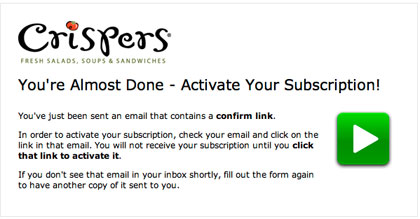
An audio double opt-in page plays a short recording right after someone signs up. The recording tells them to check their inbox and click the confirmation link. As of November 2026 the idea still holds up, but the way it was done has to change: Chrome blocks autoplay with sound until the visitor clicks or taps on the site, so any audio needs a play button and the same instructions in text on the page. Confirmed opt-in also matters more now than when this post was written. Since February 2024, Gmail and Yahoo require bulk senders to use SPF, DKIM and DMARC, offer one-click unsubscribe and keep spam complaints low, and lists where every address was confirmed have a much easier time meeting those rules.
A confirmation page that talked
The rare part was that the confirmation page spoke out loud. Subscribers who submitted their address for Crisper’s newsletter were driven to this landing page, and a recorded voice played as soon as it loaded. Anyone opening it was warned to turn their speakers on first.

It was a small, clever touch. Most confirmation pages then were a plain line of text, and many still are.
Some history for context. Crispers was a salad and sandwich chain founded in Lakeland, Florida, in 1989. Publix owned it from 2007 and sold it in 2011 to Healthy Food Concepts, an affiliate of Boyne Capital. The last four restaurants closed in October 2022, so the newsletter and its sign-up flow no longer exist. The lesson about confirmation pages is still useful.
The audio transcript
Visitors without working audio could read the message instead. Here is the full recording:
“In a moment you’ll receive an email message asking you to confirm your email address and activate your subscription. Please check your email inbox now. Open that email and click on the confirm link. Once you do, your subscription will immediately be activated!”
The script follows the right order. It tells the subscriber an email is coming, tells them to check their inbox now, names the action (click the confirm link) and says what happens next. That is the same order a written confirmation page should use.
A templated clip hosted by the email service provider
The recording never says “Crispers,” which shows it was a default or template clip, not a custom one. The URL wasn’t a branded vanity domain either. The page didn’t sit on the Crispers website. It lived on the domain of the brand’s email service provider, AWeber.
That trade-off is still around. A hosted confirmation page from the email platform takes no work to set up, but it moves the subscriber off your site and breaks the branding at the moment they are deciding whether to trust you. Today the provider’s help center describes three choices for landing page sign-ups: its basic thank-you page, a custom URL of your own, or no thank-you page. On the basic page, the wording changes depending on whether confirmation is required.
Does audio confirmation still work today
It was a nice surprise to hear instructions through earbuds right after opting in. Using sound, video or animation to guide brand-new subscribers is still a good idea. The technology around it has changed, though:
| Factor | When the Crispers page ran | November 2026 |
|---|---|---|
| Autoplay with sound | Usually played when the page loaded | Chrome blocks it until the visitor clicks or taps on the site, so calls to play audio fail |
| Where people sign up | Mostly desktop browsers | Mostly phones, often with the sound off |
| Hosted confirmation page | Common default | Still offered, and custom URLs are easy to set |
| Why confirmation matters | Cleaner lists | Cleaner lists plus Gmail and Yahoo sender rules on authentication, unsubscribes and spam rates |
| Accessibility | A transcript was a bonus | Text on the page is required for deaf and hard-of-hearing visitors and for anyone on mute |
Audio that starts on its own was a tactic of its time and is now history. The version that works today has three parts:
- Put the instructions in large text at the top of the thank-you page.
- Add a clearly labelled play button for a short audio or video clip, if you want one.
- Show the subscriber exactly what to look for in their inbox.
How to set up confirmation instructions that get clicked
The aim of any confirmation page is one action: the subscriber opens one specific email and clicks one link. AWeber’s own guidance for confirmed opt-in thank-you pages lists what to include:
- The from name and from address the confirmation will come from
- The exact subject line of the confirmation message
- A sincere thank you
- A screenshot of how the message looks in an inbox
The confirmation email should repeat what the page says. In AWeber, you edit the subject line and body under List Options, then List Settings, then Confirmation Message. Confirmed opt-in is on by default for its sign-up forms, manual adds and API adds. It is off by default for imported subscribers. Under Confirmation Message Settings there are separate toggles for sign-up forms, imports and API subscribers.
Also add a line telling subscribers to check their spam or Promotions folder if the message hasn’t arrived within a few minutes. In Gmail, a confirmation email can land in the Promotions tab, where people miss it.
FAQ
Is double opt-in legally required in the US?
No. The FTC’s CAN-SPAM rules cover commercial email after it is sent: honest headers and subject lines, a valid physical postal address, a working opt-out, and honoring opt-outs within 10 business days. CAN-SPAM does not require confirmed opt-in. Brands use it because it keeps fake and mistyped addresses off the list and gives them a clear record of consent.
Does double opt-in help with Gmail and Yahoo deliverability?
Indirectly, yes. Since February 1, 2024, Gmail asks senders to keep spam rates reported in Postmaster Tools below 0.1% and never let them reach 0.3%. It started enforcing harder in November 2025, with temporary and permanent rejections for mail that doesn’t comply. Subscribers who confirmed they wanted your mail complain less, and confirmation also keeps out spam traps and dead addresses that hurt your sender reputation.
Should a confirmation page autoplay audio or video?
Not with sound. Chrome’s autoplay policy blocks audio until the visitor has clicked or tapped on the site, and many people browse on phones with the sound off. Use text first, then a play button, and add captions to any video.
How do you measure whether your confirmation flow works?
Track the confirmation rate: the share of sign-ups who click the confirm link. It is based on clicks, so Apple Mail Privacy Protection, which inflates open rates, doesn’t distort it. If the rate drops, check the confirmation email’s subject line, its inbox placement and whether the thank-you page clearly says what to look for.
What should a confirmation email say?
Keep it short and give it one job: a plain subject line that names your brand, one sentence saying what the subscriber signed up for, and one big confirm button. Leave out promotions, extra links and long welcome text. Save those for the welcome email that goes out after confirmation.
Sources
- Google, Gmail Help: Email sender guidelines and Email sender guidelines FAQ
- Yahoo Sender Hub: Best practices for senders
- Federal Trade Commission: CAN-SPAM Act, A Compliance Guide for Business
- AWeber Help Center: Customize the confirmed opt-in message; Enabling or disabling confirmed opt-in; What should I write in my thank you page
- Chrome for Developers: Autoplay policy in Chrome