
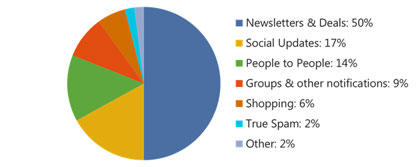
Hotmail’s October 2011 attack on “graymail” gave users an automatic Newsletter category, a built-in unsubscribe option and the Sweep and Scheduled Cleanup tools. Those ideas are still in Outlook.com, which replaced Hotmail in 2013. Today the Focused and Other tabs sort your mail, and Sweep can still delete or move everything from a sender. The bigger change is on the sender side: since May 5, 2025, Microsoft requires domains that send more than 5,000 messages a day to Outlook.com to pass SPF and DKIM and to publish a DMARC record with a policy of p=none or stricter that aligns with SPF or DKIM. Gmail and Yahoo brought in similar bulk sender rules in February 2024, which also cover one-click unsubscribe and spam complaint rates.
What Hotmail called graymail
Graymail is email you signed up for but no longer want, such as newsletters, sales offers and notifications. In 2011, Microsoft’s Dick Craddock said about 75% of the messages Hotmail users reported as spam were really legitimate newsletters, offers or notifications. Since this mail wasn’t true spam, Hotmail started calling it “graymail.” Microsoft explained its reasoning on their blog and shared a pie chart of what the average Hotmail inbox contained.

At that point Microsoft said its SmartScreen filtering had already brought true spam down to under 3% of inbox mail. That left graymail as the clutter users complained about most.
The automatic Newsletter category
Hotmail’s answer was a “Newsletter” category that sorted mail automatically. To decide which messages were newsletters, it used its SmartScreen technology, and Microsoft said the classifier was 95% accurate. Engineers trained it on a reference set of about 10,000 messages labelled “newsletter” or “not a newsletter.” When users marked or unmarked a message as a newsletter, the filter learned from that.
The Newsletter category joined automatic categories Hotmail had added in an earlier release: social updates, messages with Office documents, messages with photos and shipping notifications.
What it meant for email marketers
The worry in 2011 was that open rates from Hotmail users would dip for a while, until people got used to the automatic sorting. That’s how tabbed and categorized inboxes usually play out. Subscribers who value a newsletter learn to look for it. Subscribers who don’t simply stop seeing it.
Today, open rate is a weaker signal than it was then. Apple Mail Privacy Protection preloads images for many Apple Mail users, so opens get counted even when nobody read the email. Clicks, conversions and complaint rates tell you more about whether a sorted inbox is hurting your program.
A built-in unsubscribe option
Hotmail also added its own unsubscribe process, separate from the CAN-SPAM unsubscribe links inside each email. When a user unsubscribed this way, Hotmail contacted the sender on their behalf, used Sweep to clear out that sender’s old newsletters and sent any new mail from that sender to the junk folder. This screenshot shows what users saw:

This was an early version of what every major mailbox provider now expects. Gmail and Yahoo require bulk senders to support one-click unsubscribe through the RFC 8058 List-Unsubscribe headers. Microsoft lists a working unsubscribe link as a best practice for high-volume senders. The CAN-SPAM Act still requires you to honor opt-outs within 10 business days. Gmail and Yahoo expect opt-outs to be processed within two days.
Sweep and Scheduled Cleanup
Sweep let users clear out a sender’s marketing mail in one action, with an option to keep only that sender’s most recent email in the inbox. Scheduled Cleanup automated this, so old messages from a sender were removed on a schedule. Microsoft later reported that 90% of all Sweep actions were used to delete all email from a sender.
Sweep is still part of Outlook.com and Outlook on the web. Microsoft’s support page describes three options: delete all incoming email from a sender, keep only the latest email, or delete email older than 10 days. By default, swept mail goes to Deleted Items. Users can choose another folder instead. Sweep only works with Outlook.com and Microsoft 365 mailboxes. IMAP and POP accounts added to Outlook don’t support it.
For senders, a Sweep rule is a quiet unsubscribe. Your messages keep getting delivered and then removed without being read. A clear unsubscribe link and a frequency option are often what keep a subscriber from setting one up.
Did other mailbox providers follow
They did. In 2011 it was an open question whether other major ISPs would sort and clean inboxes by default, and many marketers thought Hotmail’s approach was too intrusive. Over the next decade, automatic sorting became standard. Gmail added inbox tabs in 2013, including a Promotions tab. Outlook.com replaced the old categories with Focused Inbox, which splits mail into Focused and Other tabs. Messages in the Other tab are still in the inbox and stay available. They aren’t junked or deleted.
Hotmail itself is history. Microsoft finished moving every Hotmail account to Outlook.com on May 2, 2013, and reported over 400 million active Outlook.com accounts. Hotmail.com addresses still work, but the mail is handled by Outlook.com’s filters and rules.
What Outlook.com expects from senders today
The 2011 tools let users clean their own inboxes. Today’s rules put the burden on senders. On its Postmaster policy page, Microsoft says domains sending more than 5,000 emails a day to Outlook.com addresses must be fully compliant with SPF, DKIM and DMARC as of May 5, 2025. In practice, that means SPF and DKIM must pass, and the domain must publish a DMARC record at p=none or stricter that aligns with SPF or DKIM. Mail that misses the bar is rejected with this error:
550 5.7.515 Access denied, sending domain [yourdomain] does not meet the required authentication level.
A basic setup that meets the requirement includes an SPF record that authorizes your email service provider (ESP), DKIM signing on your own domain, and a DMARC record at p=none or stricter that aligns with SPF or DKIM:
example.com. TXT "v=spf1 include:_spf.youresp.com ~all"
_dmarc.example.com. TXT "v=DMARC1; p=none; rua=mailto:[email protected]"
For marketing mail, add the one-click unsubscribe headers Gmail and Yahoo require. Most ESPs insert them for you:
List-Unsubscribe: <https://example.com/unsubscribe?id=12345>, <mailto:[email protected]>
List-Unsubscribe-Post: List-Unsubscribe=One-Click
Watch complaint rates as well. Google tells senders to keep their user-reported spam rate below 0.1% and never let it reach 0.3%. Yahoo uses the same 0.3% ceiling.
The original feature announcements from October 2011 are still archived on their blog.
FAQ
Do Hotmail addresses still work?
Yes. Microsoft moved all Hotmail accounts to Outlook.com in 2013, and hotmail.com addresses still send and receive mail. For deliverability, treat them as Outlook.com addresses: the same filters, Focused Inbox and sender requirements apply.
What is graymail in email marketing?
Graymail is bulk email a person opted into but no longer engages with, such as old newsletters, promotions and notifications. It isn’t spam in a legal sense, but mailbox providers watch how people react to it. If subscribers ignore, delete or report your mail, it gets sorted lower, so cleaning out inactive subscribers protects your inbox placement.
Does landing in the Outlook Other tab hurt deliverability?
The Other tab is still the inbox, not the junk folder, so the message counts as delivered. It does get less attention, which can lower engagement over time. When subscribers move a message to Focused, Outlook learns to put that sender’s future mail there.
What happens if my domain fails Microsoft’s authentication rules?
If you send more than 5,000 messages a day to Outlook.com addresses and fail SPF or DKIM, or have no aligned DMARC record, Microsoft can reject your mail with error 550 5.7.515. Check that your ESP signs with DKIM on your own domain, that SPF includes your ESP, and that you’ve published a DMARC record at p=none or stricter that aligns with one of them.
Do I need one-click unsubscribe for Outlook.com subscribers?
Microsoft lists a working unsubscribe link as a best practice for high-volume senders. Gmail and Yahoo require one-click unsubscribe from bulk marketing senders. Supporting the RFC 8058 headers for every list keeps you covered at all three providers, and CAN-SPAM still requires opt-outs to be honored within 10 business days.
How do Sweep rules affect my email list?
A Sweep rule deletes or moves your messages without unsubscribing the person, so the address stays on your list but no longer engages. These addresses tend to show up as long-term non-openers and non-clickers. Run a re-engagement campaign for them, then remove the ones who don’t respond, rather than mailing them forever.
Sources
- Microsoft Postmaster: Policies, Practices, and Guidelines (Outlook.com high-volume sender requirements)
- Microsoft Support: Fix NDR error 550 5.7.515 in Outlook.com
- Microsoft Support: Organize your inbox with Archive, Sweep, and other tools in Outlook on the web
- Microsoft Support: Focused Inbox for Outlook
- Google Workspace Admin Help: Email sender guidelines and the email sender guidelines FAQ
- Yahoo Sender Hub: Sender best practices
- Federal Trade Commission: CAN-SPAM Act: A Compliance Guide for Business