
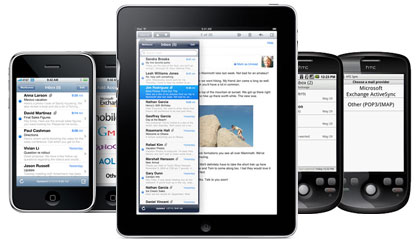
Most marketing email is now opened on a phone. Apple Mail and Gmail lead Litmus’s email client market share data by a wide margin, so your emails need to be designed for mobile first and still look right on desktop. Several things have changed since this post first ran. Apple Mail Privacy Protection, launched with iOS 15 in 2021, inflates open counts. Dark mode changes how your colours look. Since 2024, Gmail and Yahoo have required bulk senders to authenticate with SPF, DKIM and DMARC, offer one-click unsubscribe and keep spam complaints low, and Microsoft added similar rules for Outlook.com in May 2025.

The 2011 Campaign Monitor findings
According to a recent study conducted by Campaign Monitor, published in June 2011, mobile email was on the rise. That was no surprise, since mobile devices were spreading fast almost everywhere in the world. The surprise was how quickly mobile reading was growing.
After the iPhone, iPad and Android phones launched, mobile’s share of email opens went from 4% to 20% in 24 months. That was extremely fast growth. The iPhone made up most of that 20%, with the iPad and Android devices behind it. Desktop clients such as Outlook and Apple Mail fell just as sharply. Coverage of the study reported a drop of roughly 11% to 12% over the same two years.
Go here and check out this fantastic article. It is well worth reading as a record of when the shift to mobile began.
The data made a clear case for mobile-friendly email design. The advice at the time was to use your ESP’s mobile alternative if it had one, meaning a separate, stripped-down mobile version of each email. That approach is now outdated. Responsive templates that adapt one email to any screen size replaced it years ago, and every major ESP builds them in.
What mobile email design looks like today
Today, designing for mobile means designing for everyone. Mobile is no longer a small slice of your list. It is the default way most subscribers first see your email. A few habits matter most.
- Use a single-column, responsive layout. Make sure your template stacks cleanly on narrow screens. Use body text around 14 to 16px and buttons that are easy to tap with a thumb.
- Front-load the message. Your subject line, preview text and first screen do most of the work. Many readers decide from the inbox view alone.
- Test in dark mode. Apple Mail, Gmail and Outlook can invert or adjust colours, so check that logos, transparent images and text stay readable.
- Keep images light and add alt text. Gmail serves images through its own proxy, and some readers block images, so the email should still make sense with no images at all.
- Read opens with caution. Apple Mail Privacy Protection preloads images, which records opens that may never have happened. Clicks, conversions and replies are better signals of mobile engagement.
The sender rules that apply on every device
Most of the rules that decide whether your email reaches the inbox now come from mailbox providers, and they apply on every device.
| Provider | Applies to | Key requirements | In force since |
|---|---|---|---|
| Gmail | Senders of about 5,000+ messages a day to personal Gmail accounts | SPF, DKIM and DMARC; one-click unsubscribe; unsubscribes honoured within two days; spam rate under 0.3% in Postmaster Tools | February 2024 (one-click unsubscribe from June 2024) |
| Yahoo | Bulk senders (no published volume threshold) | SPF or DKIM plus DMARC; one-click unsubscribe and a visible unsubscribe link; unsubscribes honoured within two days; low complaint rate | February 2024 (one-click unsubscribe from June 2024) |
| Microsoft Outlook.com | Senders of 5,000+ messages a day to Outlook.com, Hotmail.com and Live.com | Passing SPF and DKIM; DMARC at least p=none, aligned with SPF or DKIM | May 5, 2025 |
A minimal DMARC record to start monitoring looks like this:
_dmarc.example.com. TXT "v=DMARC1; p=none; rua=mailto:[email protected]"
One-click unsubscribe uses two headers defined in RFC 8058:
List-Unsubscribe: <https://example.com/unsubscribe?id=abc123>, <mailto:[email protected]>
List-Unsubscribe-Post: List-Unsubscribe=One-Click
Most ESPs add these headers for you. Check your account settings, and add the DNS records for your own sending domain, so that SPF and DKIM align with the address in your From line.
FAQ
What share of email is opened on mobile devices?
Most industry trackers now put mobile at around half or more of all email opens, though the exact figure depends on whose data you read. Apple Mail Privacy Protection blurs the numbers, because it records machine opens that hide the real device. Your ESP’s device reports for your own list are a better guide than any industry average.
Do I still need a separate mobile version of my email?
No. Separate mobile versions date from the early smartphone years. A single responsive template that adapts to the screen is the standard today, and every major ESP offers responsive templates.
Why are my open rates so high on Apple devices?
Apple Mail Privacy Protection preloads email content, including tracking pixels, for users who turn it on. Those preloads count as opens even when nobody reads the email. Judge performance on clicks and conversions instead, and leave opens out of any automation that depends on knowing whether someone really read the email.
How do I check how my emails look in dark mode?
Send test emails to Apple Mail, Gmail and Outlook with dark mode turned on, or use a preview tool such as Litmus or Email on Acid. Watch for dark logos that disappear on dark backgrounds and for text colours that become unreadable when the client inverts them.
Do the Gmail and Yahoo sender rules apply to small senders?
Some rules apply to everyone. Gmail asks every sender to use SPF or DKIM and to keep spam rates low. The stricter rules, including DMARC, one-click unsubscribe and the 0.3% spam-rate ceiling, are aimed at bulk senders. Meeting them at any list size protects your deliverability as your list grows.
Sources
- Google: Email sender guidelines and the Email sender guidelines FAQ (Gmail Help)
- Yahoo Sender Hub: Sender Best Practices
- Microsoft Tech Community: Outlook’s new requirements for high-volume senders
- FTC: CAN-SPAM Act, A Compliance Guide for Business
- Litmus: Email Client Market Share
- IETF: RFC 8058, Signaling One-Click Functionality for List Email Headers