
An “email me less often” option on your unsubscribe or preference page still works in November 2026. It keeps subscribers who like your brand but are tired of your sending pace. The rules around it have changed, though. Since Gmail and Yahoo’s 2024 bulk sender rules, the one-click unsubscribe in the email header has to unsubscribe the person with no further action, and Google expects bulk senders to process the request within two days. You can still show an opt-down offer separately, for example on the page behind your footer link, but it can’t replace the one-click unsubscribe. Under CAN-SPAM, that page also needs a clear way to stop all commercial email. Gmail’s Manage subscriptions view (July 2025) also ranks senders by how often they email, which makes heavy sending schedules easy to cut in one tap.
Why subscribers unsubscribe
Nearly every marketing email carries an “Update your preferences” link and an “Unsubscribe” link. Most people click unsubscribe much more often than the preferences link, and it usually comes down to one of two reasons:
- The content isn’t relevant to them.
- There’s too much of it. One company sends so many messages that the inbox feels flooded.
You can’t fix the first reason with a frequency option. You can fix the second one. If you offer an “email me less often” choice, your total send count goes down, but your list stays the same size. The people who pick it are telling you they still want to hear from you, just not as often.
Why frequency matters more now than it used to
Sending too often costs more today than it did when this tactic first spread. Three changes did it:
- Gmail and Yahoo bulk sender rules (February 2024). Senders who push about 5,000 or more messages a day to Gmail personal accounts must authenticate with SPF, DKIM and DMARC, support one-click unsubscribe and keep the spam complaint rate in Google Postmaster Tools below 0.3%. Google says to aim for under 0.1%. One-click unsubscribe became mandatory on June 1, 2024, and Google expects requests to be processed within two days.
- Microsoft’s rules for Outlook.com, Hotmail and Live (May 5, 2025). Domains sending more than 5,000 messages a day to Microsoft consumer addresses need SPF, DKIM and DMARC, and Microsoft expects a working unsubscribe link.
- Gmail’s Manage subscriptions view (July 2025). It lists a person’s subscriptions sorted by how often each sender emails, shows a recent message count and offers a one-tap unsubscribe that Gmail sends to the sender for them.
So a subscriber who gets too much from you is now one tap from leaving. And a subscriber who hits “Report spam” instead counts against your complaint rate. Giving people a “less often” option on your preference page is a cheap way to catch some of them before they go.
How J. Crew handled it
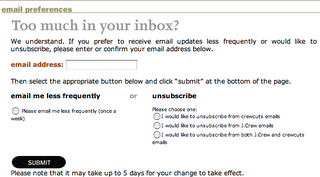
J. Crew’s unsubscribe page was the classic example of this tactic. When someone clicked unsubscribe, the page that loaded focused on getting less email from the brand while still staying in the loop. Leaving completely was still an option, but cutting back came first.

The screenshot above shows that page as it looked when this post was first published. J. Crew’s current page may look different. The idea behind it still holds up: treat an unsubscribe click as a chance to offer a lighter schedule, not as a dead end.
Brands that sent too much
Levi’s was a good example of a sender that needed this option. At the time, a subscriber could get about three emails a week from the brand. Its online discounts were good enough to stop people leaving, but only just.
The lesson still stands: few subscribers want three promotional emails a week from any one company. If they’re tempted to opt out and only the deals keep them around, you’re one weak offer away from losing them. If you can’t send less to everyone, at least let the people who want less choose it.
Building an opt-down option that stays compliant
Make the opt-down an offer, never an obstacle. The legal and technical rules decide where it can go.
What the rules allow
The FTC’s CAN-SPAM compliance guide lets you show a menu of choices on your opt-out page, but one of those choices must stop all commercial email from you. You also can’t charge a fee, ask for anything beyond an email address, or make people do more than reply to an email or visit a single web page to opt out. You have to honor opt-outs within 10 business days, and penalties can run past $50,000 per violating email, adjusted for inflation each year.
The mailbox providers’ rules are stricter. The one-click unsubscribe defined in RFC 8058 must unsubscribe the person without a landing page, a login or any confirmation step. Gmail, Yahoo and Apple Mail show it as an unsubscribe button next to your sender name, and a request sent through it must end the subscription. You can’t send it to a “Would you like fewer emails instead?” page.
The header pair looks like this:
List-Unsubscribe: <https://example.com/unsub?id=abc123>, <mailto:[email protected]?subject=unsubscribe>
List-Unsubscribe-Post: List-Unsubscribe=One-Click
Most email service providers add these headers for you. Check a test message in Gmail with “Show original” and make sure both lines are there.
Where the frequency choice belongs
| Unsubscribe path | Can it offer “email me less often”? | What it must do |
|---|---|---|
| One-click header button (RFC 8058) | No | Unsubscribe the person with no further action, and process the request within two days for Gmail |
| Footer “Unsubscribe” link | Yes, next to a full opt-out | Show an “unsubscribe from all” choice on the same single page |
| “Update preferences” link | Yes, this is its main job | Let people pick frequency and topics, and include a full opt-out |
| Reply-to-unsubscribe or mailto | No | Treat it as a full opt-out |
Setup steps
- Add a frequency field to your subscriber profiles in your email service provider, with values such as “Every send”, “Weekly” and “Monthly”.
- Build a segment for each value and send the lighter schedules a digest or your best single offer, not a random slice of your campaigns.
- Put the frequency choice at the top of your footer unsubscribe page, and keep a plain “Unsubscribe from all emails” button on the same screen with no extra login.
- Leave the one-click header alone. It should keep unsubscribing people with no extra steps.
- Follow the choice exactly. If someone picks monthly and still gets weekly flash-sale emails, they’ll report you as spam the next time.
- Track results by group. Compare complaint rates, unsubscribes and clicks for people who opted down against those on the full schedule.
Measuring whether it works
Use clicks and conversions to judge engagement, not opens. Apple Mail Privacy Protection, which launched with iOS 15 in September 2021, preloads images, so it marks many emails as opened even when nobody read them. That inflates open rates. A subscriber who switched to monthly emails and still clicks is a win. A big pile of opt-downs who never click again is a sign the content is the problem, not the pace.
The honest counter-argument: some subscribers who opt down would have left anyway, and keeping them just slows down the cleanup of your list. That’s fine as long as you still suppress people who stay inactive for a long time. A smaller, engaged list delivers better than a big list of people who never open.
Thanks to Denise Cox via Tamara Glen for pointing out the original J. Crew example.
FAQ
Is it legal to show an “email me less often” option before someone unsubscribes?
Yes, on your footer link’s landing page, as long as the same page also lets the person stop all commercial email. CAN-SPAM allows a menu of choices but bans extra steps such as logins or asking for more than an email address. Don’t put the offer behind the one-click header button, because that request has to unsubscribe the person with no further action.
Does Gmail’s one-click unsubscribe replace the unsubscribe link in the footer?
No. Google’s sender guidelines ask bulk senders to support one-click unsubscribe in the header and also to include a clearly visible unsubscribe link in the message body. The footer link is where your preference center and frequency options belong.
How fast do I have to process an unsubscribe request?
Google expects bulk senders to process unsubscribe requests within two days. CAN-SPAM’s legal limit is 10 business days. Aim for the stricter target, and most email service providers now remove people immediately.
How many emails a week is too many?
No single number fits every list. What matters is how your own subscribers react: rising complaints, more unsubscribes and fewer clicks after you add sends all mean you’ve passed your limit. A frequency option lets each subscriber set their own limit, which is better than guessing for everyone.
Should I count people who opt down as lost subscribers?
No. Report them as their own group. They’re still reachable, and their click rate on the lighter schedule tells you whether the change kept them engaged or just delayed their exit.
Does Gmail’s Manage subscriptions view hurt frequent senders?
It makes them easier to spot, since the view sorts senders by how often they email and shows a message count. Unsubscribing there sends a request to the sender through the standard unsubscribe headers. If you send several times a week, offering a lighter schedule matters more now that subscribers can see your volume next to everyone else’s.
Sources
- Google: Email sender guidelines
- Google: Email sender guidelines FAQ
- Google: Email subscription guidelines for senders
- Google: Manage your subscriptions in Gmail
- Google Workspace Updates: Manage email subscriptions in Gmail
- Yahoo Sender Hub: Subscription Hub
- FTC: CAN-SPAM Act: A Compliance Guide for Business
- FTC: Adjustments to Civil Penalty Amounts, Federal Register, January 17, 2025