
A sale email works best when it shows what is on sale before anyone clicks: real products, the discount, the end date, and one link that goes straight to those items. In November 2026, most subscribers first see a sale as a subject line and preheader on a phone, often in Gmail’s Promotions tab or the Apple Mail list. They do not see it in the desktop preview pane this post was built around. Since the post first ran, Gmail has started loading images through its own proxy, Apple Mail Privacy Protection has inflated open rates, and the February 2024 Gmail and Yahoo bulk sender rules have made SPF, DKIM, DMARC, one-click unsubscribe and a spam complaint rate under 0.3% the price of reaching the inbox.
Why shoppers like buying online
The appeal of an online store is simple: a shopper can buy jeans at 2:00 AM if they feel like it. Very few people actually do. But the store never closes, and a sale email lands in a shop that is always open.
People who are loyal to a brand also know their sizes, so fit stops being a reason not to buy. Many retailers with physical stores let you return online orders in person, and that is a smart move. A shopper who comes in to return one item has a good chance of leaving with another. A return by mail gives no such chance. The only extra purchase is postage.
Here is what makes online shopping work from the shopper’s side:
- It’s quick. There are no racks to search. Skirts are one click away, tops are another, and a “view all” page is one more.
- The images make the sale. If a shopper can’t see the item, they won’t buy it.
That second point is the one the rest of this page turns on.
Two sale emails that left out the merchandise

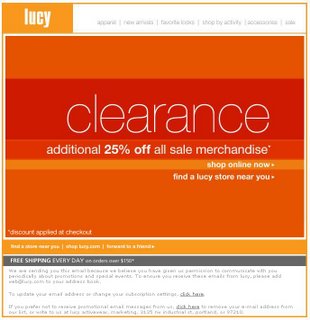
When a favorite store runs a sale, careful shoppers want to hear about it. That’s why one clearance email from lucy, the women’s activewear brand, stood out for what it was missing. Every earlier message from the brand had shown its clothing, sweaters or exercise wear. Those images gave readers an idea of what they would find after they clicked.
The half-word trick in the preview pane
The preview pane showed only the top half of the word “clearance.” Cutting off a word or image like that is a reliable way to get subscribers to scroll, because people want to see the whole thing. The idea was clever. The problem came after the scroll: there were no clothes in the email to get the reader excited and drive the click-through.
This part of the tactic is now history. The preview pane belonged to desktop clients of that era, such as Outlook 2007, and many clients back then blocked images by default. Today the first impression comes from three things on a phone screen: the sender name, the subject line and the preheader text. Gmail now fetches images through its own proxy and shows them by default, and Apple Mail loads them too. According to Litmus’s February 2026 email client figures, Apple Mail accounted for roughly 45% of tracked opens and Gmail for nearly a quarter. That makes the first screen on a phone the new “above the fold.”
The half-word trick still has a modern risk: dark mode. A headline saved as an image with dark text on a transparent background can disappear against a dark inbox. Live HTML text with real alt text avoids that problem and still reads well when images are off.
A second retailer, the same approach
About an hour and a half later, an almost identical message arrived from J.Crew. Apart from the header, the only thing visible in the preview pane was an image announcing the spring sale.

That was enough to make a reader scroll down, because a sale works nearly every time. But the email had the same gap as the first one. It showed no images of the sale items and gave no description of them. There were more words, and too many clicks stood between the reader and the clothes.
Counting the clicks
The first click led to a sale page that asked for size and gender. The next page asked for the type of clothing. Only then did any pictures appear. A quick, informal look through the dresses showed that, with a few exceptions, the same dresses appeared in every size. So the size step added a click without narrowing the choice much.
Every extra page loses some visitors, and the losses add up. A shopper who has to get through three pages before seeing a product meets that drop-off three times. That extra click could cost sales.
What these emails got right, and what they missed
Both messages were clean and colorful, and they made the main point clearly: there was a sale. But the only way to learn what was on sale was to click, and click, and click again.
The fix is to put the merchandise in the email itself and send every click to a page the shopper can buy from right away. Here is how that looks in a sale email today:
- Say the offer in the subject line and use the preheader for the details. A line like “Up to 40% off dresses, ends Sunday” names the category, the discount and the deadline before the email is opened.
- Show three to six real sale items near the top, each with the sale price and the original price in live text.
- Link each product to its own product page or to a category page that is already filtered. Don’t send shoppers through a size or gender step first.
- Use HTML text for the headline, add alt text to every image, and preview the email in dark mode before you send it.
- Add Gmail Promotions tab annotations through your email platform: a deal badge, the promo code and the expiry date. These mostly show in the Gmail mobile app, and Gmail’s quality filters decide whether they appear at all.
- Make sure the sending domain passes authentication and that the email carries a one-click unsubscribe header, as described below.
- Judge the campaign by clicks, orders and revenue, not by opens.
The sender rules a sale email has to meet
Sale emails are usually the largest sends of the year, so they are the most likely to hit mailbox provider limits.
| Mailbox provider | In force since | Who it applies to | Key requirements |
|---|---|---|---|
| Gmail | 1 February 2024 (one-click unsubscribe from June 2024) | Senders of more than 5,000 messages a day to personal Gmail accounts | SPF, DKIM, DMARC (p=none or stricter) aligned with the From domain; one-click unsubscribe honored within two days; spam rate in Postmaster Tools under 0.3%, ideally under 0.1% |
| Yahoo | February 2024 (one-click unsubscribe from June 2024) | Bulk senders (Yahoo publishes no fixed number) | SPF, DKIM, DMARC with alignment; one-click unsubscribe (RFC 8058 POST method recommended); spam rate under 0.3% |
| Microsoft Outlook.com, Hotmail.com, Live.com | 5 May 2025 | Senders of more than 5,000 messages a day | SPF, DKIM and DMARC (at least p=none, aligned with SPF or DKIM); mail that doesn’t comply can be junked or rejected |
The simplest DMARC record that meets the minimum is a TXT record published at _dmarc.yourdomain.com:
v=DMARC1; p=none;
Publish the record before a big sale, not on launch day, so you have time to check the reports and fix any sending sources that fail.
FAQ
Should a sale email include product images?
Yes. Show at least a few of the actual items on sale. Product images tell subscribers whether the sale is relevant to them before they click. A headline that only says “sale” asks them to click on trust, and many won’t.
Do image-only sale emails still work?
They work worse than mixed emails. Gmail and Apple Mail now load images by default, but some Outlook setups and privacy-minded readers still block them, and screen readers can’t read a headline saved as an image. Put the offer and the deadline in live text and use images for the products.
How do you make a sale stand out in the Gmail Promotions tab?
Use Gmail’s promotional annotations, a Gmail-specific markup that Google documents for the Promotions tab. They can show a deal badge, a promo code, an expiry date and a product image right in the tab, mostly in the Gmail mobile app. Google decides at its discretion whether to show them, based on factors such as sender quality and how often you send, so a clean sending reputation matters as much as the markup.
Are open rates a reliable way to judge a sale email?
No. Since Apple launched Mail Privacy Protection in 2021, Apple Mail can load messages on Apple’s servers whether or not a person reads them, which pushes open rates up. Compare sale emails by click rate, conversion rate and revenue per email sent.
What laws apply to a promotional sale email in the US?
The CAN-SPAM Act. It requires honest header information and subject lines, a clear statement that the message is an ad, a valid physical postal address, and an opt-out that you honor within 10 business days. The FTC’s maximum civil penalty is $53,088 per violating email. That figure was set in January 2025 and stays the same through 2026, because the FTC skipped its 2026 inflation adjustment.
How many clicks should it take to reach a sale product?
One click from the email to a page where the shopper can buy. Linking each product image to its own product page, or to a category page that’s already filtered, removes the size and category steps that slowed down the emails described above.
Sources
- Google: Email sender guidelines (Gmail Help Center)
- Google for Developers: Gmail Promotions tab annotations overview
- Yahoo Sender Hub: Sender best practices and FAQs
- Microsoft Tech Community: Outlook’s new requirements for high-volume senders
- Federal Trade Commission: CAN-SPAM Act, A Compliance Guide for Business
- Federal Register: FTC Adjustments to Civil Penalty Amounts
- Litmus: Email Client Market Share