
You saturate your subscribers when the same person gets several emails from you within minutes or hours because they sit on more than one list or segment. The fix in 2026 is the same as it always was: send one combined message, deduplicate across segments, or set a minimum gap between sends to the same person. Most email platforms can now enforce that gap for you. The stakes have changed, though. Since February 2024, Gmail and Yahoo have required bulk senders to keep reported spam below 0.3%, so a pile-up of near-identical emails that annoys people into clicking “Report spam” can now hurt your inbox placement as well as your unsubscribe rate.
How the Guess sign-up worked
Guess does a good job of sending well-designed messages. They were good enough that we mentioned some of their tactics back in February.
The sign-up process for Guess emails was painless and asked only for basic information. First name, last name, email address, ZIP code and gender were all required. The only optional field was birthday. Most subscribers will happily fill that in for the chance of a birthday offer in September, and this one did.
The form also let subscribers choose an email format: HTML, plain text, AOL or no preference. That AOL option is history now. In the late 2000s, AOL’s own client handled HTML badly enough that some retailers sent its users a separate version. Today almost every brand sends a single HTML email with a plain-text part, and the sign-up form doesn’t ask about format at all.
Pre-checked boxes and what they signal
The last part of the form, Shopping Preference, was also required. It had four boxes, all checked in advance: Guess Women, Guess Men, Guess Shoes and Guess Accessories. Plenty of subscribers leave every box checked so they don’t miss anything, and this subscriber did the same.
That’s the weak spot. A preference that the brand checked in advance tells the brand very little about what the subscriber actually wants. In the EU and UK, it also fails as consent: Recital 32 of the GDPR says pre-ticked boxes don’t count as consent. In the US, CAN-SPAM doesn’t require opt-in, but a list built on default choices will still produce the kind of overlap described below.
The subscriber gave Guess every piece of information it asked for. Several months later, Guess still hadn’t used any of it.
Two emails, five minutes apart
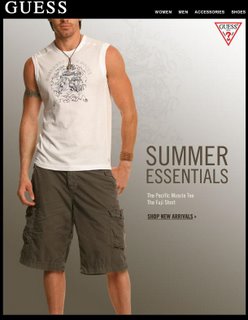
One afternoon, two separate messages from Guess arrived. The first was “Summer’s Easiest Look for Guys.” That was fine, since the subscriber had agreed to receive men’s clothing emails. Nothing seemed wrong with it.

Five minutes later, a second message arrived: “Summer’s Ultimate Look.” It featured a female model and links to the clothes she was wearing.
Five minutes.

What happened is easy to reconstruct. The men’s campaign and the women’s campaign went to two segments built from the pre-checked preferences. Anyone left in both segments got both emails, and nothing in the send setup checked whether a person had just received a message.
How Guess could have avoided over-messaging
With a little more attention to detail, Guess could have avoided over-messaging its subscribers. If you plan to send to several segments on the same day, building those segments only on shopping preferences (set by pre-checked boxes) is a bad idea. Here are three fixes, in order of preference.
1. Send one combined message
The simplest fix is one email covering both audiences. Here, a single “Summer Style” email with both men’s and women’s clothing would probably have worked better. Hollister has sent strong dual-purpose emails like this in the past, with men’s and women’s looks side by side, so each reader clicks the half that applies to them.
The trade-off is relevance. A combined email is less targeted, so it fits broad seasonal campaigns like this one better than a product launch aimed at one group.
2. Segment by gender, or deduplicate across segments
If one combined message wasn’t an option, Guess could have segmented the list by gender. The subscriber was on both the men’s and women’s lists. Segmenting by the gender field from the sign-up form would have meant one message, not two.
Today the more flexible version of this fix is deduplication. Most email service providers (ESPs) let you exclude one segment from another, or exclude anyone who received a campaign in the last X hours. That keeps both campaigns and still guarantees each person gets only one of them.
3. Space the sends out
If you really can’t avoid sending two messages, wait more than five minutes before the second one. At least a day is better, and two days is better still. A gap like that keeps you in your subscribers’ good graces.
Platforms can now enforce this gap automatically. In Klaviyo, for example, Smart Sending skips anyone who received an email within a set window. The default window for email is 16 hours. You can change it under Settings > Email > Sending preferences, in the Smart Sending Period field, and you can switch it off for individual messages that every recipient must get.
Why saturation costs more now than it used to
Over-messaging used to cost you mostly unsubscribes. Now it can also cost you inbox placement.
| Rule or data point | What it says | Why it matters for frequency |
|---|---|---|
| Google email sender guidelines (enforced from February 2024) | Bulk senders (5,000+ messages a day to personal Gmail accounts) must authenticate with SPF, DKIM and DMARC, offer one-click unsubscribe on marketing mail, and keep reported spam below 0.3%, ideally below 0.1% | Annoyed subscribers who report spam push you toward the threshold |
| Yahoo Sender Hub best practices (from February 2024) | Similar authentication, one-click unsubscribe and a 0.3% spam-rate ceiling | Same risk at Yahoo and AOL inboxes |
| Microsoft Outlook.com (from May 5, 2025) | Senders of more than 5,000 messages a day to Outlook.com, Hotmail.com and Live.com need SPF, DKIM and DMARC | Authentication alone won’t save a list that complains |
| ZeroBounce survey (updated February 2025, 985 respondents) | 43% said their main reason for unsubscribing is that the sender emails too often | Frequency is the top reason people leave |
Your metrics have changed too. Apple Mail Privacy Protection preloads images through Apple’s proxy, which fires the open pixel whether or not the person read the email. That means open rates no longer tell you reliably whether you’re sending too much. Watch unsubscribes, spam complaints (in Google Postmaster Tools and your ESP’s reports) and clicks per send.
FAQ
How many marketing emails a week is too many?
No single number works for every brand. The real test is your own unsubscribe and complaint rates as you add sends. Retailers often send several emails a week without trouble, as long as each person gets one email at a time and every message is relevant. If your spam rate in Google Postmaster Tools climbs toward 0.1% after you increase frequency, cut back.
Does CAN-SPAM limit how often you can email someone?
No. The FTC’s CAN-SPAM rules don’t cap frequency. They do require a working opt-out, honored within 10 business days, along with accurate headers and a physical postal address. Violations can cost up to $53,088 per email. That figure was set in January 2025 and kept for 2026, after the annual inflation adjustment was cancelled.
What is a safe spam complaint rate for Gmail and Yahoo?
Google advises keeping user-reported spam below 0.1% and never reaching 0.3%. Yahoo uses the same 0.3% ceiling. Google measures the rate daily. Bulk senders above 0.3% lose eligibility for mitigation until they stay below it for seven consecutive days.
Is it better to send one combined email or two targeted ones?
Send one combined email when the content is broad, like a seasonal lookbook, and the audiences overlap a lot. Send targeted emails when the content only makes sense for one group. In that case, exclude people who already received the other campaign, or space the sends at least a day apart.
Can open rates show whether subscribers are tired of your emails?
Not reliably, any more. Apple Mail Privacy Protection records opens for messages that may never have been read, which inflates open rates. Use unsubscribes, spam complaints, clicks and how long people go without engaging as your signs of fatigue.
Should pre-checked boxes be used on sign-up forms?
For EU and UK subscribers, pre-ticked boxes don’t count as valid consent under the GDPR. Even where they’re legal, they create overlapping segments that cause pile-ups like the one in this example. Ask subscribers to tick their own interests, and let them change those interests in a preference center.
The fix that matters most is to make your platform refuse to email the same person twice in quick succession, whatever segments you build. Set that gap once, and a mistake like this one can’t happen.
Sources
- Google Workspace Admin Help: Email sender guidelines
- Yahoo Sender Hub: Best practices
- Federal Trade Commission: CAN-SPAM Act, A Compliance Guide for Business
- Federal Register: Adjustments to Civil Penalty Amounts (FTC, January 17, 2025)
- Klaviyo Help Center: Smart Sending and default account settings
- Twilio SendGrid Docs: Understanding Apple Mail Privacy Protection and open events
- ZeroBounce: Email Statistics Report