
A welcome email is still the most important message most senders have. New subscribers are more likely to open and click it than any campaign that follows, and it sets their expectations. Send it right away, confirm what the person signed up for, and hold off-topic promotions until later. What has changed since this post was first written is everything around the email: since February 2024, Gmail and Yahoo have required bulk senders to authenticate with SPF, DKIM and DMARC, offer one-click unsubscribe and keep spam complaints under 0.3%, and Apple Mail Privacy Protection now inflates open rates so much that opens alone tell you little about how a welcome email performs.
The 2007 case: Reebok’s first email to new runners

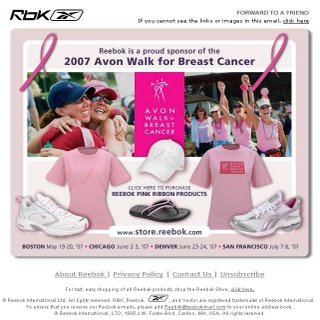
In 2007, two running brands looked set for an email head-to-head: Brooks and Reebok. The open question was how Reebok would talk to the runners who signed up through its Run Easy campaign. Its first message promoted Reebok’s line of Pink Ribbon products and its sponsorship of the 2007 Avon Walk for Breast Cancer series. That year was Reebok’s second in a row as official footwear and apparel sponsor of the walks.
Promoting and raising money for causes like this is worthwhile. The email did a fine job of mentioning the upcoming walks, and it included a link to buy Reebok Pink Ribbon products.
The problem was timing. The first message these subscribers got, after signing up on a site built for running, was about walking. It didn’t look planned.
Reebok could have softened that with a welcome message. Subscribers are much more open to hearing about a brand’s special projects once the brand has acknowledged the signup and welcomed them as runners who joined through the running site.
That welcome email could have:
- Matched the look and feel of the website, so the email clearly came from the place the subscriber had just joined.
- Explained the benefits of taking part on the site.
- Included a small surprise, such as a free iTunes download, to get people using the site’s “Hear” section, where visitors could browse running playlists, add their own and share them with other runners.
The iTunes freebie belongs to its time. Apple replaced iTunes on the Mac with the Music app in 2019. Today the same idea would be a shared playlist or an in-app perk. The principle still holds: give something small that pulls the new subscriber back into whatever they signed up for.
Advantage: Brooks.
That was the score after the opening round of the 2007 running-brand email season. The lesson has lasted longer than either campaign.
What a welcome email needs in 2026
The core advice from 2007 hasn’t changed: acknowledge the signup, stay on the topic the person chose, and earn the right to send other messages. Three things have changed around it: inbox rules, how you measure results, and where people read their email.
Send it straight away, on the topic of the signup
The welcome email should go out within minutes of the signup. It should also be about the subscriber’s reason for joining. If someone signed up for running content, the first email should be about running. Cause marketing, cross-sells and seasonal promotions can follow once the relationship exists.
Benchmarks show why the first message matters. Omnisend’s 2025 benchmark data put welcome emails at a 35.53% open rate, against a 30.22% average across all emails. In the same data, automated emails earned a 4.66% click rate, compared with 0.74% for regular campaigns. That attention is easy to waste on the wrong message.
Meet the bulk sender rules from day one
Welcome emails are usually the first mail a new address gets from you. If they fail authentication, the subscriber may never see them. Gmail and Yahoo began enforcing their bulk sender requirements in February 2024. Gmail’s threshold is about 5,000 messages a day to personal Gmail accounts. Microsoft followed on 5 May 2025 with similar rules for domains sending more than 5,000 messages a day to Outlook.com consumer addresses.
| Requirement | Gmail (Feb 2024) | Yahoo (Feb 2024) | Outlook.com (May 2025) |
|---|---|---|---|
| SPF and DKIM | Required for bulk senders | Required for bulk senders | Required for high-volume senders |
| DMARC | At least p=none, aligned with SPF or DKIM | At least p=none, passing | At least p=none, aligned with SPF or DKIM |
| One-click unsubscribe | Required on marketing mail, honored within 2 days | Required, honored within 2 days | Functional unsubscribe link expected |
| Spam complaint rate | Below 0.3%, ideally under 0.1% | Below 0.3% | Keep complaints low |
A minimal DMARC record looks like this:
_dmarc.example.com. IN TXT "v=DMARC1; p=none; rua=mailto:[email protected]"
One-click unsubscribe uses two headers, as defined in RFC 8058. Most email service providers add them for you:
List-Unsubscribe: <https://example.com/unsubscribe?id=abc123>, <mailto:[email protected]?subject=unsubscribe>
List-Unsubscribe-Post: List-Unsubscribe=One-Click
Judge it by clicks, not opens
Apple Mail Privacy Protection launched with iOS 15 in 2021. It loads email images in the background, so many Apple Mail opens are recorded whether or not anyone read the message. Clicks, conversions from the welcome series, and how many new subscribers engage with the second and third emails are better measures. Gmail’s image proxy, in place since 2013, also caches images, which makes opens fuzzier still.
Design for phones, dark mode and the Promotions tab
Most welcome emails are now read on a phone, often in dark mode. A single-column layout, live text instead of text baked into images, and logos with transparent backgrounds that stay visible on dark backgrounds all help. In Gmail, a branded welcome email often lands in the Promotions tab. A clear subject line that matches the signup form helps it get noticed there.
FAQ
When should a welcome email be sent?
Send it immediately after the signup, or within a few minutes. Interest is highest right then, and a fast confirmation tells the subscriber the signup worked. A welcome that arrives days later reads like any other campaign.
Should a welcome email include a discount or promotion?
It can, if the signup form promised one. Then the welcome email has to deliver it. What hurts is the Reebok pattern from 2007: a first message about something unrelated to the reason the person joined. Keep the first email about the subscriber’s chosen topic, and introduce other offers later in the series.
How many emails should a welcome series have?
A short series of two to four emails over the first week or two is common. Emails after the first one can introduce the brand, highlight popular content or products, and ask about preferences. Watch whether people stay engaged from email to email, and cut any message that doesn’t earn clicks.
Does a welcome email have to follow CAN-SPAM?
Yes. If it promotes products or services, the FTC treats it as a commercial message. It needs accurate header and subject information, a valid physical postal address, and a working opt-out that is honored within 10 business days. Penalties are assessed per violating email and now exceed $50,000 each.
Why do welcome emails land in spam?
The usual causes are missing or misaligned SPF, DKIM or DMARC records, sending from a new domain with no reputation, and signups from bots or typo’d addresses that generate bounces and complaints. Confirmed opt-in, a CAPTCHA on the signup form and properly authenticated sending fix most cases. Google Postmaster Tools and Yahoo Sender Hub show how the mailbox providers see your mail.
Sources
- Google Workspace Admin Help: Email sender guidelines FAQ
- Yahoo Sender Hub: Best practices for senders
- Microsoft Tech Community: Outlook’s new requirements for high-volume senders
- FTC: CAN-SPAM Act, A Compliance Guide for Business
- Omnisend: Email marketing benchmarks