
If you split your list by preferences such as women’s, men’s and kids’ clothing, add a clear link that lets each subscriber see the emails the other segments got that week, plus a link to a preference center where they can opt into those streams. Retailers were already doing this in the late 2000s, and the idea still works because a preference picked at signup rarely covers everything a subscriber wants to buy. One thing has changed since then. Gmail and Yahoo now require bulk senders to authenticate their mail with SPF, DKIM and DMARC, offer one-click unsubscribe and keep spam complaint rates low, so letting subscribers adjust what they get instead of reporting it as spam matters more than it used to.
The retail email that started the idea
Chad White at RetailEmail.Blogspot wrote about a campaign from the Gap with a simple idea. Near the bottom of the message sat a link to view the other emails the brand was sending to its other segments that week. White ran that blog for several years, tracking retailers’ promotional emails, and later wrote the book Email Marketing Rules.
The reason it works is easy to see from the subscriber’s side. Picture a shopper whose Gap emails are aimed at women because that is the box she ticked at signup. That doesn’t mean she has no interest in men’s clothing for her husband, or in clothes for her kids, who still wear what their mom picks out for them. Her segment shows one slice of the catalog, but she shops for a whole household.
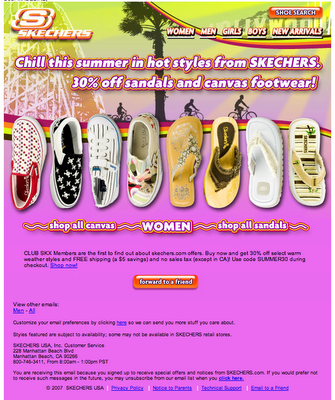
 Not long after, Skechers sent a message with the same feature: a link from one segment’s email to the versions other subscribers were getting.
If you segment your list based on preferences people chose themselves, don’t assume they have no interest in the other product lines you email about. A preference picked once at signup is a starting point. It isn’t the whole picture.
The prediction back then was that this would become standard in campaigns with several message streams. That turned out to be partly true. The literal “see our other emails” link stayed fairly rare. Its two descendants are now everywhere: the web version or campaign archive, and the preference center that lets subscribers add or drop interests.
How to add a “see what you’re missing” link today
The setup is simple: host each segment’s version as a web page, then link to those pages from every version of the email. Most email service providers already create a hosted web version of each campaign, so the main job is collecting those URLs in one place.
- Build the segment versions as usual, for example women’s, men’s and kids’.
- Grab the hosted web version of each one. In Mailchimp, the
*|ARCHIVE|*merge tag creates the “view in browser” link for a campaign. - Make a small landing page, or a footer module, that lists every version with a one-line description of each.
- Add a second link to your preference center so people can subscribe to a stream they liked. In Mailchimp, the
*|UPDATE_PROFILE|*merge tag points subscribers to a page where they can update their profile and the interest groups you’ve set up. - Tag both links with campaign parameters so you can track clicks by segment.
Where to place it
The Gap put its link near the bottom of the message. That still works for curious readers, but most email is now read on phones, so a footer link can get lost under the fold. A short line under the hero, such as “Shopping for someone else? See this week’s men’s and kids’ emails,” gets more attention. Use a text link or a button that’s big enough to tap, and check that it stays readable in dark mode.
How to measure it
Measure this with clicks, not opens. Apple Mail Privacy Protection arrived with iOS 15 in 2021. It loads remote images, tracking pixels included, through Apple’s proxy servers, often whether or not the person reads the message, so open rates for Apple Mail users are inflated. Track clicks on the cross-segment link, new preference-center sign-ups to other streams, and revenue from those pages.
Why preference options matter more under the 2024 sender rules
Since February 2024, Gmail and Yahoo have had firm requirements for bulk senders, and Google has stepped up enforcement since then. Google treats anyone who sends close to 5,000 or more messages a day to personal Gmail accounts as a bulk sender. Those senders need SPF and DKIM, a DMARC record for the sending domain, one-click unsubscribe on marketing mail, and a spam rate that stays below 0.3%. Google’s own target is below 0.1%. Google’s FAQ says that from November 2025, mail that doesn’t meet these requirements can face temporary and permanent rejections.
A preference center linked next to your cross-segment link gives an annoyed or curious subscriber another option besides the spam button. That doesn’t replace the one-click unsubscribe Gmail and Yahoo require. It sits alongside it.
A minimal DMARC record to start monitoring looks like this:
_dmarc.example.com. IN TXT "v=DMARC1; p=none; rua=mailto:[email protected]"
Two compliance points apply to cross-segment links. Showing someone another segment’s email is fine. Adding them to that stream without asking is not good practice, so let them opt in. And under the FTC’s CAN-SPAM rules, opt-out requests must still be honored within 10 business days. Google and Yahoo expect unsubscribes from bulk mail to be processed within two days.
FAQ
Is it worth showing subscribers emails from segments they didn’t choose?
Yes, as long as it’s a link and not a flood of extra emails. A link lets interested readers explore and costs the uninterested ones nothing. Sending every stream to everyone wipes out the point of segmenting and pushes up complaints.
Should the link go to a web archive or a preference center?
Use both if you can. The archive answers “what am I missing this week?” and the preference center turns that interest into a lasting subscription. One link with no next step leaves people browsing with nowhere to go.
Will extra links hurt deliverability?
A few links to your own domain won’t hurt you. What hurts deliverability is unauthenticated mail, a high complaint rate and links to domains with a poor reputation. Keep the links on your own branded domain and make sure your authentication passes.
How do I measure whether the feature works?
Track clicks on the link, opt-ins to new streams and revenue from those pages, broken down by segment. Don’t judge it on open rates, because Apple Mail Privacy Protection inflates opens for Apple Mail users.
Do CAN-SPAM rules change if I add people to new segments?
Every commercial email still needs an accurate sender, a non-deceptive subject line, a physical postal address and a working opt-out. The FTC can seek civil penalties of more than $53,000 per violating email. Adding people to streams they didn’t ask for is legal in the US but tends to drive spam complaints.
Sources
- Google: Email sender guidelines
- Google: Email sender guidelines FAQ
- Yahoo Sender Hub: Best practices
- Mailchimp: Create a preferences center
- Mailchimp: Getting started with groups