
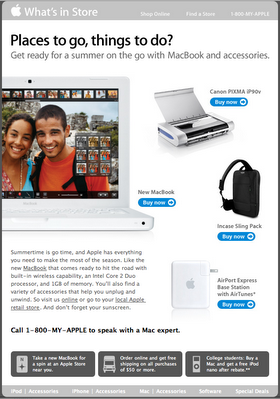
Yes. When a campaign goes out late, any copy tied to a date, season or event can make the brand look behind, even when the offer is still good. In November 2026 the fix is the same as it always was: read the copy again against the actual send date before it goes out. What has changed is the environment around it. Gmail now sorts promotions into tabs. Apple Mail Privacy Protection inflates open rates, so a late send can look fine when it isn’t. And since 2024, Gmail and Yahoo require bulk senders to authenticate with SPF, DKIM and DMARC, offer one-click unsubscribe and keep spam complaints low, which means a stale, off-season email now costs you more than a bit of embarrassment.
The Apple summer email that arrived late
This example was sent in by a reader named Ross. It’s a useful case study in timing.
The likely cause was a busy calendar. Apple released the original iPhone in the US on June 29, 2007, about a week after the first day of summer on June 21. That left little room to send a seasonal email about MacBooks and MacBook accessories on time.

So almost a month into summer, Apple was asking subscribers to “Get ready for a summer on the go.” The products and the offer were still relevant. The problem was the framing. Telling people to prepare for a summer that was already about a third over made Apple look a little behind.
Why send timing matters for seasonal copy
When you plan a message, think about when it will actually land in the inbox. References to a season, holiday or event are fine as long as they still fit on the day the email arrives. If the send slips for any reason, check that the copy is still timely. If it isn’t, change it before you send.
A few checks catch most problems with delayed copy:
- Read the subject line and preheader against the real send date. “Get ready for” becomes “Make the most of” once the season has started.
- Check every date in the body, including countdowns, “ends Sunday” lines and event dates in the footer or banner images.
- Look at the images, not just the text. Seasonal wording baked into a hero image is easy to miss and can’t be edited in the email builder.
- Confirm that offers and landing pages still work. An expired promo code or a “sold out” page does more damage than awkward copy.
- Think about time zones. A morning send in New York arrives before dawn on the West Coast and well into the evening in Europe. Features like Mailchimp’s Timewarp, which delivers at the same local time for each subscriber, change when “today” actually is for each reader.
FAQ
Should you still send a seasonal email if it is already late?
Usually yes, as long as you rewrite it for where the season actually is. Change “get ready” copy to “still time” or “mid-season” copy, and the offer often works just as well. If the event has already passed, as with a holiday, drop the reference completely rather than sending something that is plainly out of date.
Can a late, time-sensitive email cause legal problems?
The FTC’s CAN-SPAM rules ban deceptive subject lines and require a working opt-out in every commercial email. A subject line that promises a deal or deadline that has already ended can count as misleading. Check that every offer in a delayed email is still real on the day it arrives.
How do you tell whether a delayed campaign underperformed?
Don’t judge it by open rate alone. Apple Mail Privacy Protection downloads remote content in the background when a message arrives, so opens from Apple Mail users are recorded whether or not anyone read the email. Compare clicks, conversions and unsubscribes with your on-time seasonal sends instead.
Do late or irrelevant emails hurt deliverability?
They can, through complaints. Google asks bulk senders to keep their spam rate in Postmaster Tools below 0.1% and never let it reach 0.3%, and Yahoo uses a similar 0.3% threshold. Off-season copy sent to a large, less engaged list is the kind of email people mark as spam instead of unsubscribing.
What tools help emails arrive at the right time?
Most email service providers let you schedule by the recipient’s time zone, and some can also pick a send time for each subscriber. Mailchimp’s Send Time Optimization, for example, chooses a time within 24 hours of your chosen send date when each person is most likely to engage. Timewarp sends at the same local time for each subscriber. These tools fix the hour, though, not the season, so your copy still has to match the date.
Can you edit a campaign after it has been scheduled?
In most platforms, yes. Unschedule or pause the campaign, edit it and schedule it again. Make the change before the send window opens, because once delivery starts, you can’t change the copy in emails that have already gone out.
Sources
- Google Workspace Admin Help: Email sender guidelines and Email sender guidelines FAQ
- Yahoo Sender Hub: Sender Best Practices
- Federal Trade Commission: CAN-SPAM Act, A Compliance Guide for Business
- Apple Support: Mail Privacy Protection and “Unable to load remote content privately” help pages
- Mailchimp Help Center: Use Send Time Optimization and Use Timewarp