
A pre-send seed test still shows you whether a campaign lands in the inbox, the spam folder or nowhere at Gmail, Yahoo and Outlook.com. As of November 2026, though, inbox placement depends mostly on authentication and sender reputation. Mailbox providers now check those before your copy matters at all. The biggest change since this post was first written came from the bulk sender rules: Gmail and Yahoo since February 2024, and Microsoft since May 2025. If you send in volume, you need SPF, DKIM and DMARC, one-click unsubscribe and a spam complaint rate under 0.3%, or your mail can be throttled or rejected before any test result matters.
Before you click send
You have a great creative design, a relevant message to send and a database of interested subscribers. But what happens when you click send?
It helps to know ahead of time whether your message will even reach the inbox. Many email service providers include pre-send checks or partner integrations. Mailchimp’s Inbox Preview, for example, runs on Litmus and uses its own testing tokens. Standalone tools such as GlockApps, Litmus and Validity Everest run deliverability tests that show how mailbox providers like Gmail, Yahoo Mail and Microsoft Outlook.com are likely to treat your message. Prices vary widely. GlockApps sells low monthly plans, while Validity’s enterprise tools are priced as annual contracts.
How seed list testing works
You send to a seed list of monitored inboxes before the live send, so you can see whether your message delivers the way you expect. The report shows which mailbox providers, if any, put your message in spam or don’t deliver it at all.
GlockApps says it logs in to each test mailbox and checks where the message landed, and that its seed addresses use default filters with no custom rules. That is the vendor’s own claim, and it points to the method’s main limit. Seed inboxes have no reading history, so they can’t show the personal filtering that Gmail and other providers apply based on how each real subscriber engages. Treat a seed test as an early warning, then confirm with real-world data from Google Postmaster Tools and your own bounce and complaint reports.
What to do if your message is not getting delivered
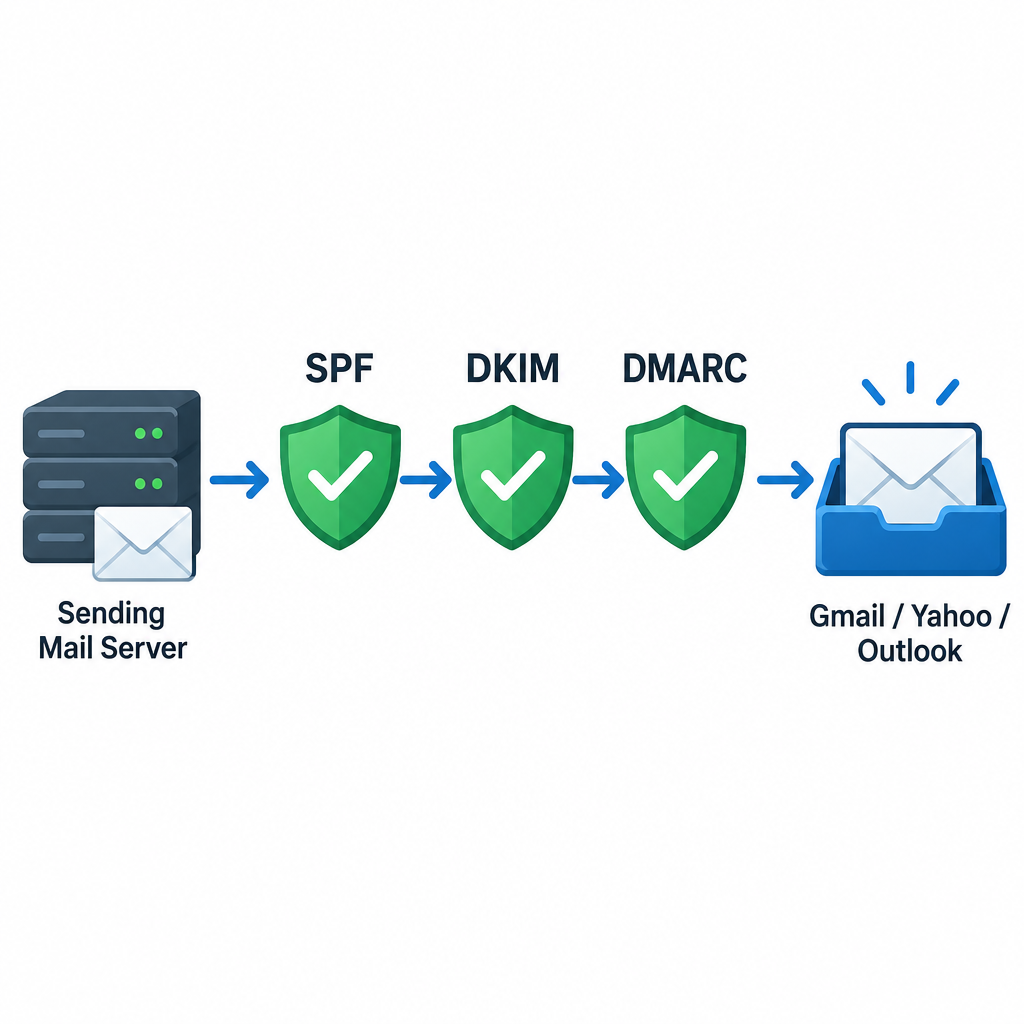
Start with the checks that carry the most weight today, then move to content.
- Confirm authentication. Your sending domain needs SPF and DKIM that pass, plus a published DMARC record that aligns with the From domain. Microsoft rejects non-compliant high-volume mail with the error “550 5.7.515 Access denied, sending domain [domain] does not meet the required authentication level.”
- Check compliance dashboards. Google Postmaster Tools has a Compliance status dashboard. It checks DNS records, encryption, message formatting and user-reported spam rate. For bulk senders it also checks DMARC, one-click unsubscribe and whether unsubscribes are honored.
- Watch your spam rate. Gmail and Yahoo both draw the line at 0.3%, and deliverability specialists recommend staying under 0.1%. Yahoo’s Complaint Feedback Loop, which you enroll in through Yahoo Sender Hub, tells you who is complaining.
- Check unsubscribe headers. Promotional mail from bulk senders needs one-click unsubscribe (RFC 8058), and unsubscribes must be processed within two days.
- Review the content, as described below.
A minimal setup looks like this. Replace the domain and the include with your own ESP’s values:
example.com. TXT "v=spf1 include:_spf.youresp.com ~all"
_dmarc.example.com. TXT "v=DMARC1; p=none; rua=mailto:[email protected]"
And the one-click unsubscribe headers in each marketing message:
List-Unsubscribe: <https://example.com/unsub?id=abc123>, <mailto:[email protected]>
List-Unsubscribe-Post: List-Unsubscribe=One-Click
A DMARC policy of p=none meets the minimum. Moving to quarantine or reject once your reports look clean protects your domain from spoofing.
Review your content and sender details
Review the content, including the subject line, the copy and even the address you send from. When you read the copy closely, an innocent phrase can turn out to look different to a filter than you meant it.
Filters have changed since this advice first ran. Keyword lists of spam “trigger words” belong to an older era. Today’s filters at Gmail and Microsoft weigh reputation and recipient engagement far more than single words. Content still matters in a few ways: misleading subject lines, link shorteners, image-only emails and links to domains with a poor reputation can all hurt you. Your From address should use your own authenticated domain, never a free mailbox. Gmail’s guidelines also bar bulk senders from impersonating Gmail in the From header.
Under the US CAN-SPAM Act, your header information and subject lines also have to be truthful. Every commercial message must include a valid physical postal address and a working opt-out, and opt-outs must be honored within 10 business days. The FTC’s compliance guide sets out the full list.
Why deliverability testing comes first
Putting a deliverability test at the front of your testing process can greatly improve your other metrics. Think about it: your subscribers can’t open a message they never received.
That point carries more weight now that open rates are less reliable. Apple Mail Privacy Protection preloads images, so it records opens that never happened, and Gmail’s tabs and image proxy blur the picture further. A campaign can show healthy opens while a large share of it sits in spam at one provider. Inbox placement, spam complaint rate, bounces and clicks give you a truer read of whether your email is getting through.
FAQ
What is a good inbox placement rate?
There is no official benchmark, because mailbox providers don’t publish placement data. Most senders aim for the large majority of seed results landing in the inbox at every major provider. A sudden drop at a single provider such as Outlook.com or Yahoo deserves a look, even if your overall average looks fine.
Who counts as a bulk sender under the Gmail rules?
Google applies its bulk sender requirements to senders who pass about 5,000 messages in a day to personal Gmail accounts. Microsoft uses the same 5,000 mark for Outlook.com consumer addresses, including Outlook.com, Hotmail and Live.com. Yahoo doesn’t publish a fixed number, and it applies its 0.3% complaint limit to all senders.
Are seed list tests accurate?
They tell you reliably where a message lands in clean test inboxes. They can’t copy each subscriber’s personal filtering. Use them to catch authentication failures, blocklist problems and provider-wide spam placement before you send, then check the results against Postmaster Tools and complaint data after the send.
Does one-click unsubscribe apply to transactional email?
No. The requirement covers promotional and marketing messages. Order confirmations, password resets and similar transactional mail are exempt, but they still need proper authentication.
Why did my deliverability drop when my content didn’t change?
Reputation and volume changes are the usual causes. A sudden spike in volume, a rise in complaints, an expired DKIM key or a DNS edit that broke SPF can push mail to spam with no change to the copy. A new sending IP or domain that hasn’t been warmed up gradually can do the same.
Sources
- Google Postmaster Tools dashboards (Gmail Help)
- Google email sender guidelines (Google Workspace Admin Help)
- Yahoo Sender Hub FAQs
- Microsoft: Fix NDR error 550 5.7.515 in Outlook.com
- Microsoft Outlook.com Postmaster: Policies, Practices, and Guidelines
- FTC: CAN-SPAM Act, A Compliance Guide for Business
- GlockApps Help: How accurate is the delivery report
- Litmus Help: Using Litmus with Mailchimp