
In 2026, brand emails usually end up in junk because of how they are sent, not because of a word or a phone number in the copy. Gmail and Yahoo now expect senders who send 5,000 or more messages a day to pass SPF and DKIM, publish an aligned DMARC record, offer one-click unsubscribe and keep reported spam below 0.3%. Outlook.com enforces the SPF, DKIM and DMARC requirements for the same volume and treats one-click unsubscribe and low complaint rates as best practices. Since this post first ran, the old content checklist of spam words, capital letters and toll-free numbers has mattered much less, because Gmail and Yahoo began enforcing these sender rules in 2024 and Microsoft followed in May 2025. Testing is still the fix. Today that means checking authentication and inbox placement before you polish the subject line.

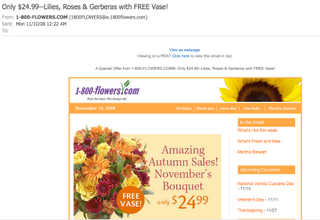
Seed inboxes are spare addresses marketers sign up with to watch what other brands send. They are good at catching a problem that is easy to miss: mail from well-known brands sitting in spam. In one of these inboxes, messages from 1-800-Flowers stood out. Valentine’s Day is probably the florist’s busiest season. Still, the year-end holidays bring their own rush of orders for flowers, table settings and gifts, so a campaign stuck in junk at that time costs real sales. The tips below apply to any brand in the same position.
Warning signs in the florist’s emails
A first look at the messages turned up several things that spam filters of the time were known to punish. The classic pre-send checklist looked like this. Each item now has a note on how it holds up in 2026.
- Avoid spammy keywords. This still makes sense, but it matters less than it used to. Gmail, Yahoo and Microsoft filter mainly on sender reputation, authentication and how recipients react. Content rules still count in corporate gateways that run SpamAssassin-style scoring.
- Avoid all caps in the subject line. This is still good advice. A shouting subject line looks spammy to filters and to people, and the people are the ones who hit “Report spam”.
- Go easy on punctuation in the subject line. The old version said to avoid exclamation points and question marks entirely. That was too strict. A single question mark is fine. Strings like “!!!” or “??” are still a risk.

- Test your subject lines and HTML with a spam scoring tool. If you want to use a word like “free”, a score shows whether it is likely to be flagged. Tools such as SpamAssassin and Mail-Tester still do this. Pair them with an inbox placement test, because a clean content score does not prove the mail reaches Gmail’s inbox.
- Stop mailing people who never engage. This matters more than ever, but you can no longer judge it by opens. Since Apple Mail Privacy Protection arrived with iOS 15 in 2021, Apple Mail preloads images and records opens that never happened. Base your sunset rules on clicks, replies and purchases instead.
- Don’t flood the inbox, especially for people who aren’t reading. Sending too often to an uninterested list drives complaints. Complaints are now a hard measure: Google and Yahoo want reported spam under 0.3% and recommend staying under 0.1%.
- Avoid 1-800 and 1-888 numbers in the email body. This was a popular tip once. It is mostly folklore now (see the next section).
The toll-free number theory
Toll-free numbers in the body are unlikely to be what sends a brand to junk in 2026. None of the published sender guidelines from Gmail, Yahoo or Microsoft mention phone numbers. They focus on authentication, consent, unsubscribe handling and complaint rates.
Back then, whether a tactic hurt you depended on how you used it, and “avoid 1-800 and 1-888 numbers” showed up on many tip lists. Since the florist’s whole brand is built on a 1-800 number, the obvious question was whether that number caused the junk placement. A spam rating tool did flag the email, but the flag pointed at the reply-to address, not the phone number in the body.
That left two theories to test. Either the 1-800 in the reply-to address triggered the flag, or the address itself had a poor reputation from heavy sending, since it was the same as the From address. A second scoring tool would have helped confirm either one, and checking with more than one tool is still good practice.
Today, the From and reply-to addresses matter for different reasons. Microsoft’s guidance for high-volume senders recommends a valid From or Reply-To address that can actually receive replies. DMARC also checks that the From domain matches the domain that passes SPF or DKIM. A reply-to address that bounces, or a From domain that doesn’t match what you authenticated, is a far likelier cause of junk placement than a phone number.
Why testing is the real fix
A strong brand gives you some cover: people know where to go when they need flowers. Subscribers still miss the deals and offers when the mail lands in junk, and every campaign that goes unseen trains the filters a little more against you. The main lesson of this post still stands: test before you send, and check where the mail lands after you send.
Your QA process and your scoring tools only go so far. It always helps to send a live message to yourself on several mailbox providers and email clients, especially for consumer (B2C) lists. Check two things: did it reach the inbox or spam, and is it worth reading once it’s found? In 2026, “worth reading” also means it works on a phone and in dark mode, since much of your list will read it that way. Once a campaign is out, find out where it landed. If it went to junk, fix the cause before the next send.
A test routine that fits current filtering:
- Confirm that SPF and DKIM pass and that DMARC aligns with your From domain. You can see this in the message headers of a test send (“Show original” in Gmail).
- Send to seed addresses at Gmail, Yahoo, Outlook.com and Apple iCloud, and note inbox, Promotions tab or spam for each.
- Run the message through a content scoring tool to catch broken HTML, image-only layouts and risky links.
- Check Google Postmaster Tools, which is now on version 2. Its Compliance status page shows pass or “needs work” for authentication, alignment, one-click unsubscribe and spam rate. Yahoo shows complaint data for verified domains through Sender Hub.
- Preview the email in light and dark mode on a phone before you approve it.
The sender rules that now decide inbox placement
The biggest change since the toll-free number debate is that the major mailbox providers wrote down their rules and started enforcing them. This table summarises them as of November 2026.
| Provider | In force since | Who it applies to | Main requirements |
|---|---|---|---|
| Gmail | February 2024 (one-click unsubscribe enforced from June 2024) | All senders must pass SPF or DKIM. The full requirements apply to senders of 5,000+ messages a day to Gmail accounts | SPF and DKIM, DMARC at least p=none aligned with From, one-click unsubscribe, opt-outs honored within 2 days, spam rate under 0.3% |
| Yahoo | February 2024 | All senders. Stricter rules for bulk senders | SPF, DKIM, aligned DMARC, one-click unsubscribe, opt-outs honored within 2 days, spam rate under 0.3% |
| Microsoft (Outlook.com, Hotmail.com, Live.com) | May 5, 2025 | 5,000+ messages a day | SPF and DKIM pass, DMARC at least p=none aligned with SPF or DKIM. Mail that fails goes to Junk first |
The DNS records behind these rules are short. Here is a typical SPF record for a domain that sends through one email service provider (ESP), and a starter DMARC record that only reports:
example.com. TXT "v=spf1 include:_spf.your-esp.example ~all"
_dmarc.example.com. TXT "v=DMARC1; p=none; rua=mailto:[email protected]"
One-click unsubscribe is two headers, and most ESPs add them for you:
List-Unsubscribe: <https://example.com/unsubscribe?id=abc123>, <mailto:[email protected]>
List-Unsubscribe-Post: List-Unsubscribe=One-Click
Once your DMARC reports show that all your real mail passes, move the policy from p=none to p=quarantine and then to p=reject. That protects your brand from spoofing, which matters for any well-known retail name.
FAQ
Do spam trigger words still send emails to junk?
Rarely on their own. Gmail, Yahoo and Outlook.com weigh sender reputation, authentication and recipient complaints far more than individual words. Words like “free” can still add points in content-scoring filters used by business mail gateways, so avoid stacking them in the subject line.
Can a phone number in an email cause spam filtering?
There is no good reason to remove a toll-free number your customers rely on. The mailbox providers’ sender guidelines don’t mention phone numbers. If your mail is landing in junk, check authentication, From-domain alignment, the reply-to address and your complaint rate first.
What spam complaint rate is too high?
Google and Yahoo set the limit at 0.3% of delivered mail and recommend staying below 0.1%. Google Postmaster Tools and Yahoo Sender Hub show these rates for your domain. They are calculated by the mailbox provider, so they won’t exactly match the complaint figures in your ESP dashboard.
Are open rates still a reliable way to find unengaged subscribers?
Not on their own. Apple Mail Privacy Protection preloads images, which records opens even when nobody read the email. Use clicks, site visits, purchases or replies over a set period, such as 90 or 180 days, to decide who gets a re-engagement campaign and who gets removed.
How do I check whether my emails are reaching the inbox?
Send each campaign to seed addresses at the major providers and note whether it lands in the inbox, a tab or spam. Use Google Postmaster Tools for Gmail and Yahoo Sender Hub for Yahoo. Read the headers of a test message to confirm that SPF, DKIM and DMARC all pass.
What does US law require in a marketing email?
Under CAN-SPAM, a commercial email needs accurate header and subject information, a valid physical postal address and a working opt-out. Opt-outs must be honored within 10 business days. The FTC’s maximum penalty is $53,088 per violating email, a level set in 2025 that was not adjusted for 2026. The mailbox providers’ two-day unsubscribe rule is stricter than the law, so build your process around the two-day window.
Sources
- Google: Email sender guidelines and the Email sender guidelines FAQ (Gmail Help)
- Google Postmaster Tools Help: Compliance status and spam rate
- Yahoo Sender Hub: Sender best practices and requirements
- Microsoft Defender for Office 365 Blog: Outlook’s new requirements for high-volume senders (April 2025)
- Federal Trade Commission: CAN-SPAM Act, A Compliance Guide for Business
- Federal Trade Commission: Inflation-adjusted civil penalty amounts for 2025