

To clean your list as of November 2026, find subscribers who haven’t clicked, bought or replied for a set period, send them a short re-permission (win-back) series, and suppress anyone who still doesn’t respond. Opens alone can’t tell you who is inactive any more. Apple Mail Privacy Protection loads tracking pixels for readers who never open the message, so judge activity by clicks and other actions too. The stakes have also gone up. Since 2024, Gmail and Yahoo have required bulk senders to authenticate with SPF, DKIM and DMARC, offer one-click unsubscribe and keep spam complaints below 0.3%, and Microsoft’s Outlook.com added similar authentication rules in May 2025. A list full of dead addresses makes every one of those numbers harder to hit.
So, you have a large email list. Congratulations! Your open and click-through rates must be off the charts.
They’re not?
Maybe hundreds of subscribers haven’t opened, clicked or replied to your messages in a long time. Their addresses aren’t bouncing, and they aren’t filing spam complaints. That sounds harmless.
It isn’t.
These unread emails cost you money. Most email service providers charge by contact count, so you pay for people who never read you. They also distort your open, click-through and conversion rates. Today there is a third cost: mailbox providers such as Gmail watch how recipients engage with your mail, and long-dead addresses can turn into spam traps.
It may be time for some spring cleaning. The goal is to remove the dusty names from your list without losing good addresses.
Recognize the non-responders
Use the tracking in your email software to segment out the addresses that have shown no activity for a reasonable length of time. That length depends on how often you send. Six months of silence might be the cutoff for a weekly message, while two years fits a quarterly one.
This step needs one update. The original method measured activity by opens alone, and that no longer works on its own. Apple Mail Privacy Protection, introduced with iOS 15 and macOS Monterey in 2021, downloads remote content (tracking pixel included) through Apple’s proxy servers, often soon after delivery. A subscriber who hasn’t read you in a year can still show up as an “opener.” Count an address as inactive only if it has also gone without:
- Clicks on any link
- Purchases, sign-ins or other activity on your site
- Replies to your messages
- Form submissions or preference updates
Most current platforms, including Mailchimp, Klaviyo and HubSpot, let you build this segment from several conditions at once, and many can filter out machine opens.
Create new groups
Put your non-responders on a new list that will get a re-opt-in message. When a subscriber clicks to opt in again, move them to a separate group so you can track them and target future messages.
Keep that “re-engaged” group apart for a few months. These people chose to stay but have a weak history, so watch how they respond before you put them back into your full sending schedule.
What your re-opt-in message should include
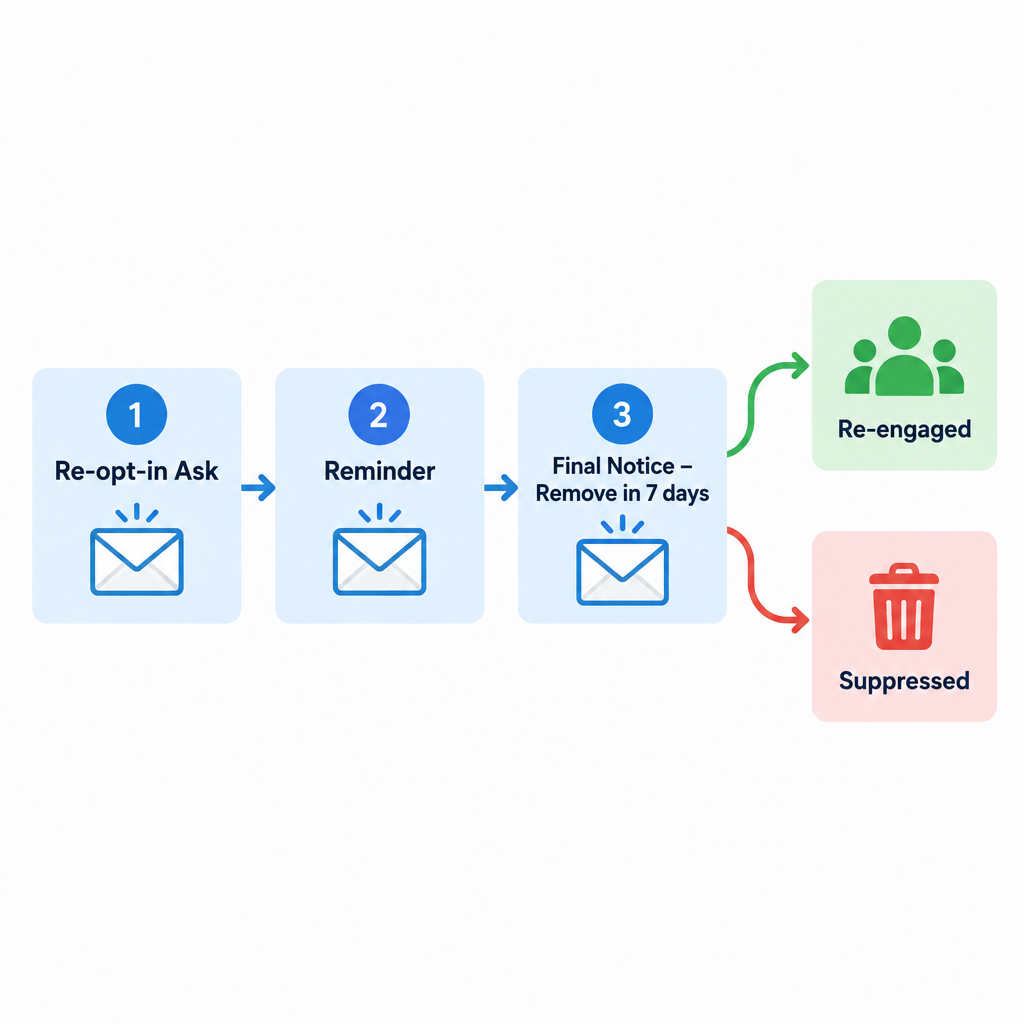
The re-opt-in email is short and gets straight to the point. The checklist below keeps the original structure, with notes where practice has changed.
- Format: The original advice was to send it as plain text, on the theory that your HTML template had triggered a block or a spam filter. That mattered more when filters were cruder and clients like Outlook 2007 rendered HTML badly. Today, send a simple, light HTML email with a plain-text version included (a multipart message). A full plain-text send is still a reasonable test if you suspect your template is the problem.
- Subject line: Make it clear and direct. The old example, “Notice regarding your eSubscription to (Your newsletter here),” sounds dated. Something like “Do you still want emails from (Your brand)?” works better. Don’t word it to look like an account or security alert. Under CAN-SPAM, a subject line must not mislead people about what the message is.
- Re-opt-in link: Give subscribers one obvious button or link to tell you they still want your mail. It should take one click and show a confirmation, with no login.
- What’s new: Link to a hosted web version of your latest issue, or show a few highlights in the email, so people remember what they would be missing.
- Unsubscribe link: Include a visible unsubscribe link. Add a statement that anyone who doesn’t opt in again will be removed from the list in 30 days. Today the visible link should come with a one-click List-Unsubscribe header. Google and Yahoo require one on marketing mail from bulk senders and expect unsubscribes to be processed within two days.
Measure your success
Track how many people opt in again, and when. Most responses usually arrive within the first few days after each send.
Watch three other numbers during the campaign as well:
- Spam complaint rate: Check it in Google Postmaster Tools and in your ESP. Google asks senders to stay below 0.1% and never reach 0.3%. Messages aimed at disengaged people bring more complaints than usual.
- Hard bounces: Remove these at once. They often show where the oldest dead addresses are.
- Unsubscribes: An unsubscribe here is a good result. That person was never going to buy, and now they won’t report you as spam either.
Last call
Three weeks into the cleanup, send a reminder to everyone who hasn’t opted in again. Tell them time is running out and they will be removed in one week.
Keep it shorter than the first email: one line, one button, one deadline. A three-message series, with a first ask, a reminder and a final notice, is now common practice. Plenty of win-back sequences also add an offer or a preference center, so people can choose to get less mail instead of none.
Remove non-responding subscribers
When the 30-day re-opt-in window ends, remove the non-responders from your active list. Be ready for that to be the whole re-opt-in group. Once they’re gone, your open, click-through and conversion rates will give you a much clearer picture.
“Remove” should usually mean suppress, not delete. Most ESPs let you archive or suppress contacts so they stop counting toward billing and stop getting mail, while you keep a record of their consent history and their opt-out. That record helps if you ever need to show how you handled them, and it stops the same old addresses from being imported again by accident.
Then make the cleanup automatic. A rolling rule, such as “no clicks or purchases in 180 days triggers the win-back series,” keeps the list clean every month and saves you from a big purge once a year.
Why non-responders stay on your list
You might wonder why these silent subscribers stayed on your list so long. Common reasons include:
- They abandoned their email account or rarely check it. Free mailbox providers now close these accounts. Yahoo treats a mailbox as inactive after 12 months without use and deletes its contents. Since December 2023, Google has been able to delete personal accounts that haven’t been used for two years. Closed accounts start hard bouncing, and some providers later reuse abandoned addresses as spam traps.
- They left a company, but their work address was never disabled. The mail lands in an inbox nobody reads, or it gets forwarded somewhere and ignored.
- Your email has been blocked or filtered since day one. If your messages have gone to spam the whole time, the subscriber may not know you exist. Missing or broken SPF, DKIM or DMARC records are a common cause today, especially at Gmail, Yahoo and Outlook.com.
- They read in plain text or with images turned off. The original version of this list said a text-only subscriber might never click a link. The bigger issue is that a plain-text message can’t record an open at all, because there’s no pixel to load. These readers may be engaged but invisible to open tracking, which is one more reason to judge activity by clicks and purchases.
- They lost interest. They delete your messages instead of unsubscribing. Gmail’s Promotions tab and its easy unsubscribe controls make this kind of quiet disengagement even easier.
FAQ
How often should you clean your email list?
Run an automated inactivity rule all the time, and do a fuller review every quarter. Weekly senders can usually use a 90 to 180 day inactivity window, while monthly or quarterly senders can wait longer. The right cutoff depends on how often you send and how long your buying cycle is.
Are open rates still useful for finding inactive subscribers?
Only as a weak signal. Apple Mail Privacy Protection loads tracking pixels automatically, so many “opens” from Apple Mail users aren’t real. Base your inactive segment on clicks, purchases, sign-ins and replies, and use opens as a supporting signal at most.
Should you delete inactive subscribers or just suppress them?
Suppress them in most cases. Suppression stops sending and usually stops billing, and it keeps the consent and opt-out records you may need later. It also stops the same addresses from being re-imported from an old spreadsheet or integration.
Does cleaning your list actually improve deliverability?
It removes the addresses that hurt you most: hard bounces, possible spam traps and people likely to mark you as spam. Gmail and Yahoo filter partly on complaint rates and engagement. A smaller, active list makes it easier to stay under Google’s 0.3% spam-rate ceiling and to look like a sender people want to hear from.
How fast do you have to honor unsubscribe requests?
The FTC’s CAN-SPAM rules give you 10 business days, and your opt-out method must keep working for at least 30 days after each send. Gmail and Yahoo set a stricter standard for bulk senders and expect one-click unsubscribes to be processed within two days. Removing people the moment they ask meets both.
Is it worth sending a win-back offer before removing people?
Often, yes, especially for online stores where a discount can bring a lapsed buyer back. Keep the offer modest and the deadline clear. Anyone who still doesn’t respond after the offer is very unlikely to come back.
Sources
- Google Workspace Admin Help: Email sender guidelines and the sender guidelines FAQ
- Google Account Help: Inactive Google Account Policy
- Yahoo Sender Hub: Sender best practices
- Yahoo Help: Inactive mailboxes in Yahoo Mail
- Microsoft Tech Community (Outlook blog): new requirements for high-volume senders, and Outlook.com postmaster policies, practices and guidelines
- Federal Trade Commission: CAN-SPAM Act, A Compliance Guide for Business
- Apple Support: Use Mail Privacy Protection on iPhone and Mac