
An email teaser is a short “something new is coming” message you send to your existing subscribers about a week before a launch, followed by a full announcement on launch day. That approach still works in November 2026. What has changed is the measurement and the rules. Apple Mail Privacy Protection, which arrived with iOS 15 in September 2021, inflates open rates, so you should judge a teaser by clicks and sign-ups. And since 2024, Gmail and Yahoo have required bulk senders to use SPF, DKIM and DMARC, offer one-click unsubscribe and keep spam complaints low. Microsoft’s Outlook.com added similar rules in May 2025.
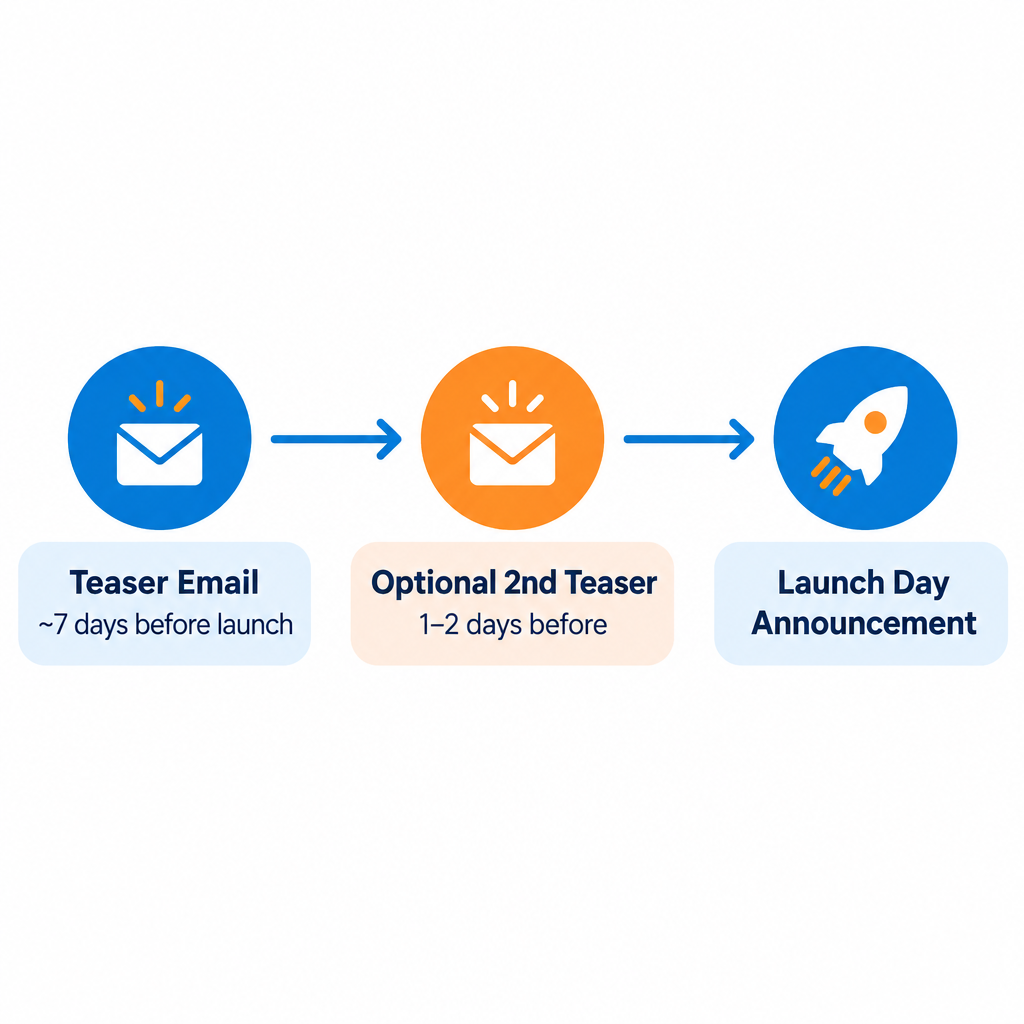
Are you planning a launch that goes beyond a regular email campaign, such as a new website, product or service? Set aside time to build an email teaser plan, and schedule the first teaser for about a week before launch day.
A teaser builds excitement and tells your audience to watch for what is coming. It is also an extra touchpoint. Your most loyal fans can forward it to friends, and it gives you another chance to reinforce your brand. Forwarding still happens, but it is hard to track. A “share with a friend” link or a referral link that you can tag is more measurable than counting forwards.
Don’t give away the surprise too soon. A teaser should be exactly what the name says: a heads-up that something new is on the way. Keep the detail for launch day. A postcard-style message suits this well: one strong image, one or two lines of copy and a single call to action, such as “Get notified first” or “Save the date.” Today that layout also needs to work on a phone screen and in dark mode. Keep the key words in live text rather than baked into the image, so the message still makes sense when images are blocked or the colors are inverted. In Gmail, a teaser will usually land in the Promotions tab, so the subject line and preview text matter more than the design.
Send a launch announcement on the day the launch goes live. That second email does the real work. It reveals what was teased and gives the full details, with a clear link to the new site or product. If you added a “notify me” option to the teaser, send a separate message to that group first. They asked for it, so they are your most engaged readers.
Send both emails only to people who opted in to hear from you. A launch is never a reason to import a purchased or scraped list. If you send close to 5,000 or more messages to personal Gmail accounts within 24 hours, Google counts you as a bulk sender. Your domain then needs SPF, DKIM and a DMARC record, a working List-Unsubscribe header with one-click unsubscribe, and opt-out requests honored within two days. Google asks bulk senders to keep the user-reported spam rate below 0.1% and never let it reach 0.3%. A teaser sent to an old, cold segment is an easy way to go over that limit.
FAQ
How far ahead of a launch should a teaser email go out?
About a week ahead is a good default. That is close enough for people to remember and far enough out to build anticipation. For a bigger launch, you can send two teasers, one about a week out and one a day or two before, then the announcement on launch day. More than that tends to raise unsubscribes and spam complaints.
What should a teaser email include?
It needs a short hook, a hint of what is coming, a date if you have one and a single call to action, such as joining a waitlist or saving the date. Hold back the full details for the announcement. The subject line and preview text matter most, because they decide whether the email gets opened at all.
How do you measure whether a teaser worked?
Look at clicks, waitlist or “notify me” sign-ups and launch-day conversions from teaser recipients. Open rates are a poor guide, because Apple Mail Privacy Protection preloads images and records opens whether or not anyone read the message. If you compare open rates at all, compare them only between similar audiences, for example in an A/B test of subject lines.
Does a teaser email need an unsubscribe link?
Yes. A teaser is a commercial message, so CAN-SPAM applies. It needs a clear way to opt out, your valid physical postal address and honest header and subject lines. Opt-outs must be honored within 10 business days. Gmail and Yahoo set a stricter bar for bulk senders: one-click unsubscribe, and opt-outs processed within two days.
Can you send a teaser to people who haven’t opted in?
No. Sending to purchased, rented or scraped addresses breaks the permission rules of every major email service provider and can breach GDPR if any recipients are in the EU. It is also the fastest way to drive spam complaints past Google’s 0.3% limit. Build your teaser audience from your own subscribers, customers and an opt-in waitlist form on your site.
Sources
- Google Workspace Admin Help: Email sender guidelines and Email sender guidelines FAQ
- Yahoo Sender Hub: Sender Best Practices and sender requirements
- Microsoft Defender for Office 365 Blog and Outlook.com Postmaster: Requirements for high-volume senders (enforced from May 5, 2025)
- Federal Trade Commission: CAN-SPAM Act, A Compliance Guide for Business
- Twilio SendGrid Docs: Understanding Apple Mail Privacy Protection and Open Events