
If a welcome email calls a new subscriber a “valued customer,” the same message has to show it. That means a real offer, a useful next step or a specific reason to stay on the list. The point held when this post was first written about a checkout-counter signup at a home décor chain, and it matters more in November 2026. Since then, Gmail and Yahoo (from February 2024) and Microsoft Outlook.com (from May 2025) have made bulk senders authenticate their mail with SPF, DKIM and DMARC and keep spam complaints low. Apple Mail Privacy Protection has also made open rates a poor way to judge whether a welcome email did its job.
Holiday shopping season pushes a lot of shoppers to buy early and skip the rush. In this case, the shopper had done most of the previous year’s holiday buying online but this year was working through in-store sales and specials. After a few purchases at Pier 1 Imports over a weekend, the cashier asked for an email address, and the shopper gave it. The welcome email arrived the next day.
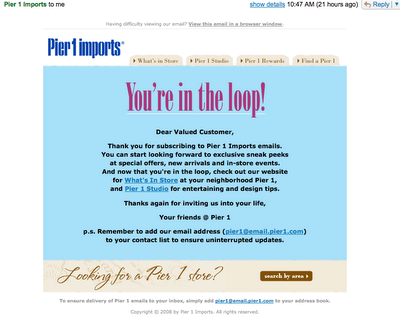
Pier 1 deserves credit for sending a welcome message at all. Plenty of brands skipped this easy touch point back then, and some still do. The problem was the message itself. It wasn’t worth the reader’s time (see the screenshot below).

Thumbs up
- The welcome message arrived quickly, the day after signup.
- It promised that, as a valued customer, the subscriber would get sneak peeks, special offers and similar perks.
Thumbs down
- The email never showed how the shopper was a valued customer. It had no discount and no incentive. If a brand calls someone a valued customer, its first email should hand over something that proves it.
Maybe that reading is harsh. Still, the shopper had just paid for a weekend purchase and handed over personal contact details, and got nothing back. The generous view is to be glad Pier 1 was sending welcome messages at all, and to expect the “valued customer” line to turn into real offers with some patience. Marketers should take the stricter lesson. The first email is the best moment to make good on the promise, because it is the one subscribers are most likely to read.
How to make a welcome email show instead of tell
Swap every claim in the welcome email for proof the reader can use straight away. “Valued customer” becomes a code, “exclusive offers” becomes the first offer, and “stay in touch” becomes a clear schedule. The table shows how the vague lines in a message like Pier 1’s turn into specific ones.
| What the email tells | What the email could show instead |
|---|---|
| “As a valued customer…” | A thank-you discount or free-shipping code with a clear expiry date |
| “You’ll get sneak peeks” | The date of the next preview, or one product image from it right now |
| “Special offers are coming” | The first offer, in this email |
| “Thanks for shopping with us” | A link-free note on care, styling or use of the item just bought |
| “Stay tuned” | How often emails will arrive and what kind of content they carry |
A practical order for an in-store signup welcome
- Send within minutes of signup if your point-of-sale system can trigger it, or within 24 hours at the latest.
- Say where the address came from (“You signed up at checkout in our store”). This cuts down on “who is this?” spam complaints.
- Put the proof near the top: the incentive, the perk or the first piece of useful content.
- Set expectations on how often you’ll email and what you’ll send.
- Make unsubscribing easy and visible. A clean exit costs less than a spam report.
The honest counter-argument
Not every brand should lead with a discount. If every new subscriber gets a coupon, you can train people to sign up only for the coupon and to wait for the next one, and that eats into margin. Shoppers who have already bought are the strongest case against a pure “show me money” approach, since they have already paid full price. For them, perks that cost little but feel real can work as well: early access, free returns, a loyalty point balance or care tips for the product. Pier 1’s email fell short because it offered none of these and still claimed the subscriber was special.
What changed for welcome emails since this post
Three things changed the stakes. Mailbox providers now police complaint rates. Open rates stopped being reliable. And most welcome emails are read on phones, many of them in dark mode.
Sender rules from Gmail, Yahoo and Microsoft
Gmail and Yahoo started enforcing new bulk sender requirements in February 2024. Google treats a bulk sender as anyone who sends close to 5,000 or more messages a day to personal Gmail accounts. Bulk senders need SPF and DKIM, a DMARC record aligned with the From domain, one-click unsubscribe on marketing mail, and a user-reported spam rate that stays below 0.3%. Google recommends keeping it under 0.1%. Microsoft added similar rules for Outlook.com, Hotmail.com and Live.com on May 5, 2025, for domains sending more than 5,000 messages a day.
| Provider | Applies to | Key requirements | In force since |
|---|---|---|---|
| Gmail | Bulk senders (about 5,000+ messages a day to personal Gmail accounts) | SPF, DKIM, aligned DMARC, one-click unsubscribe, spam rate under 0.3% | February 2024 |
| Yahoo Mail | Bulk senders | SPF, DKIM, DMARC, one-click unsubscribe, low complaint rate | February 2024 |
| Outlook.com, Hotmail.com, Live.com | Domains sending 5,000+ messages a day | SPF, DKIM, DMARC (at least p=none, aligned) | May 5, 2025 |
A minimal DMARC record that meets the baseline looks like this:
_dmarc.example.com. TXT "v=DMARC1; p=none; rua=mailto:[email protected]"
One-click unsubscribe (RFC 8058) uses two headers on marketing and promotional messages, and the List-Unsubscribe header must contain an actionable HTTPS or mailto URI:
List-Unsubscribe: <https://example.com/unsubscribe?id=abc123>, <mailto:[email protected]>
List-Unsubscribe-Post: List-Unsubscribe=One-Click
The unsubscribe side of these rules ties back to the Pier 1 story. A new subscriber who feels the first email was pointless is more likely to hit “Report spam” than to look for an unsubscribe link, and every one of those reports counts against your domain.
Open rates after Apple Mail Privacy Protection
Apple launched Mail Privacy Protection with iOS 15 in September 2021. It preloads images, including tracking pixels, for users who turn it on, so many welcome emails register as “opened” even when nobody read them. Gmail has also loaded images through its own proxy since 2013. Published welcome email benchmarks range from roughly 35% to more than 80% opens, depending on the platform and sample. GetResponse reports figures above 80%, and Omnisend’s are in the mid-30s. Judge a welcome email by clicks, code redemptions, first or repeat purchases and complaint rate instead.
Mobile and dark mode
Most subscribers will see a welcome email on a phone first, often in dark mode, and often in Gmail’s Promotions tab. Put the offer in live text near the top so it still shows when images are blocked or colors get inverted. If the “proof” is a coupon baked into a single image, many readers won’t see it.
What happened to Pier 1
Pier 1 is no longer the store chain in this story. The company filed for bankruptcy in 2020 and closed its stores. Retail Ecommerce Ventures bought the brand and relaunched it as an online-only shop at Pier1.com. In 2024, Omni Retail Enterprises acquired most of Retail Ecommerce Ventures’ assets, Pier 1 among them. In March 2026, Omni announced a licensing deal with ID Home Fashions to bring Pier 1-branded bedding, bath, tabletop and cushion products back to physical retail through wholesale channels, not Pier 1 storefronts. The checkout-counter signup described above is history now. The lesson about welcome emails still applies.
FAQ
When should a welcome email be sent?
Send it right after signup, within minutes if you can and within 24 hours at most. The subscriber’s interest peaks at the moment they hand over the address, and a quick send also confirms the address is valid. Waiting days lets people forget why they signed up, and that drives complaints.
Does a welcome email have to include a discount?
No, but it has to include something concrete. A discount is the most common form of proof, but early access, free shipping, loyalty points or genuinely useful content can work too, especially for customers who just paid full price. An email that only promises future value is the weak option.
Is it legal to email customers who gave their address at a store checkout?
In the US, the FTC’s CAN-SPAM Act doesn’t require prior consent for commercial email. It does require accurate header information, honest subject lines, a valid physical postal address, a working opt-out and that opt-outs are honored within 10 business days. Laws such as GDPR in the EU and CASL in Canada set stricter consent rules, so tell shoppers at the counter what they’re signing up for.
Do Gmail and Yahoo’s bulk sender rules apply to welcome emails?
Yes. If your domain sends at bulk volume, every message you send counts, welcome emails included, and they need SPF, DKIM, aligned DMARC and one-click unsubscribe headers. Welcome emails also go to your newest and least engaged contacts, so they’re often where spam complaints start.
What is a good open rate for a welcome email?
Welcome email open rates usually beat regular campaigns, but published benchmarks range from about 35% to more than 80%, depending on the platform and the sample. Apple Mail Privacy Protection inflates opens, so click rate, conversion and complaint rate are better measures. Compare your welcome emails against your own regular campaigns, not someone else’s benchmark.
How many emails should a welcome series have?
Many ecommerce brands use three to five messages over the first one to two weeks. The first delivers the promised perk, and later ones introduce the brand, best sellers or how-to content. If people stop clicking after a certain message, shorten the series at that point.
Sources
- Google, Email sender guidelines (Gmail Help)
- Google, Email sender guidelines FAQ
- Yahoo Sender Hub, Sender Best Practices and bulk sender requirements
- Microsoft, Outlook.com requirements for high-volume senders (Microsoft Community Hub, April 2025)
- Federal Trade Commission, CAN-SPAM Act: A Compliance Guide for Business
- Apple, Mail Privacy Protection (Apple Support)
- IETF, RFC 8058: Signaling One-Click Functionality for List Email Headers