
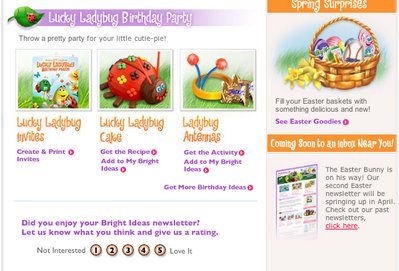
The simplest survey that works in an email is still a row of numbers where each number is its own link. A reader clicks once, your platform logs which link was clicked, and you have a rating without making anyone fill in a form that most email clients can’t show properly. What has changed since this idea first spread: security scanners now click links before people do, Apple Mail Privacy Protection has made open rates unreliable, and since 2024 Gmail and Yahoo require bulk senders to use SPF, DKIM, DMARC and one-click unsubscribe, and to keep spam complaints low.
To learn what readers think, many email marketers rely on heavy reporting: open rates, click-through rates and more. Mars took a simpler route in an email for its M&M’s brand. It put a rating scale right in the body of the message:

Email marketers know that polls and surveys built from real HTML forms often break in the inbox and leave an ugly message behind. That was especially true in the Outlook 2007 era, when Outlook used Microsoft Word to render HTML. It is still a risk today, because form support varies so much from one client to the next. Mars found a way around this: each number on the scale is its own link. That keeps the email looking right everywhere, because a link is the most widely supported interactive element in email.
The trade-off is accuracy. One reader can click several numbers, and today a machine may click them before any person does. Klaviyo’s help center explains that inbox providers, some third-party security software and mobile carriers use bots to click links in emails, often to check that a link is safe or to build a preview. In a survey email, a scanner that follows every link would “vote” for every number at once. So the results are unscientific, but they still give you useful data: a quick read on how people feel, straight from the inbox.
Mars had a good idea, and it could go further. Each rating is also a segmentation signal. Readers who weren’t interested in the newsletter can go into one group and readers who loved it into another, so later messages can be more personal. One simple survey opens up a lot of follow-up messaging.
How to build a one-click rating scale today
You build a one-click rating scale from ordinary links: a row of numbers or icons, each pointing to a unique tracked URL, plus a thank-you page that records the answer. It renders in every major client, works in dark mode if you use live text instead of images, and gives you click data, which is more reliable than opens now that Apple Mail Privacy Protection preloads images.
- Ask one question. Keep it short, for example “How useful was this issue?” or “How likely are you to recommend us?”
- Pick a short scale. A 1 to 5 scale fits on a phone screen. A 0 to 10 scale is the standard for Net Promoter Score (NPS) but needs smaller tap targets.
- Give every point its own link. Add a parameter such as
?rating=4so the landing page and your reports can tell the answers apart. - Use live text, not one big image. Text buttons stay readable when images are blocked and when dark mode inverts colors.
- Send people to a thank-you page. Confirm the vote there, and add an optional comment box for readers who want to say more.
- Record a vote only after a human action. A confirm button on the landing page, or a filter that drops clicks flagged as bots, helps separate intentional responses from automated link scans, though neither guarantees that every scanner click is kept out of your results.
- Count one vote per subscriber. Decide whether the first or the last click counts, and stick to that rule.
- Tag or segment by answer. Most email platforms can build a segment from clicks on a specific link. That is the “segmentation goldmine” the Mars email left unused.
Here is the link markup the scale needs, in a simple table-based layout:
<table role="presentation" cellpadding="0" cellspacing="0">
 <tr>
 <td>1</td>
 <td>2</td>
 <td>3</td>
 <td>4</td>
 <td>5</td>
 </tr>
</table>
Ways to put a survey in an email, compared
Plain links are still the safest choice. Use the alternatives below only when you need more than one question, or when most of your list reads in a client that supports them.
| Method | Where it works | Strength | Main drawback |
|---|---|---|---|
| Separate link per rating (the Mars method) | Every major client | Renders everywhere, easy to segment | Bot clicks and repeat clicks skew counts |
| ESP poll feature (for example Mailchimp’s 1 to 10 rating poll) | Every client, because it is built from links | Results land in your ESP reports | Tied to one platform’s features and reports |
| AMP for Email form | Gmail, Yahoo Mail and Mail.ru after sender registration, plus FairEmail | True in-email answers, no landing page | Outlook and Apple Mail only show the HTML fallback |
| HTML form in the email body | Inconsistent | Can collect more than one answer | Often blocked, stripped or broken |
| Link to a hosted survey | Every client | Full questionnaire, branching logic | Extra step, so fewer people finish |
Mailchimp’s help pages describe its email poll as a way to gauge subscribers’ opinions on a 1 to 10 rating scale, with a choice of horizontal or vertical layout. Its hosted surveys are a separate feature for longer questionnaires. AMP looked promising when Outlook.com tested it as a developer preview in 2019, but Microsoft withdrew that support in September 2020. Today AMP is mainly a Gmail and Yahoo Mail option.
Sender rules that apply to survey emails
A survey sent to your marketing list is a marketing email. It has to meet the same sender rules as any campaign. Readers can mark a “quick question” email as spam just as easily as a sales email.
| Rule | Who sets it | What it means for a survey send |
|---|---|---|
| SPF, DKIM and DMARC | Gmail and Yahoo since February 2024; Outlook.com since May 5, 2025 for senders of over 5,000 emails a day | Authenticate the sending domain before you send |
| One-click unsubscribe (RFC 8058 List-Unsubscribe header) | Gmail and Yahoo, enforced from June 2024 | Required on promotional mail. A link in the body alone is not enough for Yahoo |
| Spam rate under 0.3% | Gmail (bulk senders send 5,000+ messages a day to Gmail) and Yahoo | Google recommends staying below 0.10% |
| Honor unsubscribes within two days | Gmail and Yahoo | Make sure a survey click is never treated as consent to more mail |
| Postal address and a working opt-out | CAN-SPAM (US FTC) | Opt-outs must be honored within 10 business days |
FAQ
Do clickable rating scales in email give accurate results?
They give you a direction, not a scientific sample. Repeat clicks, security scanners that follow every link, and the fact that only engaged readers answer all skew the numbers. Filter bot clicks, count one vote per subscriber, and treat the results as a trend over several sends.
How do I stop security scanners from voting in my survey?
Don’t count a vote from the first click alone. Ask the reader to confirm on the landing page, or use your platform’s bot click filter. Klaviyo, for example, flags each Clicked Email event as a bot click or not. Clicks that come in seconds after delivery, with no open first, are the usual sign of a scanner.
Can I embed a real form in an email instead of links?
Only reliably with AMP for Email, which works in a limited set of clients such as Gmail, Yahoo Mail, Mail.ru and FairEmail, with support and sender-registration requirements that vary by provider. Every other client shows your HTML fallback, so you still need the link version. Plain HTML forms in the body are blocked or broken in too many clients to be worth the risk.
Should I use open rates to judge how a survey email performed?
No. Apple Mail Privacy Protection loads images on Apple’s servers, often whether or not the message is read, and each load counts as an open. The rating clicks and the completion rate on the thank-you page tell you much more than opens do.
Does a survey email need an unsubscribe link?
Yes, if it goes to your marketing list. CAN-SPAM requires a working opt-out and a postal address. Gmail and Yahoo also expect a one-click List-Unsubscribe header on promotional mail from bulk senders. Leaving it out to get more answers risks complaints and spam-folder placement.
What scale should an email survey use?
Use a 1 to 5 scale for content feedback, because it fits on a phone and is quick to answer. Use 0 to 10 only for NPS, where the standard scale lets you compare with past results. Whatever you choose, label both ends so readers know which direction is good.
Sources
- Google: Email sender guidelines
- Yahoo Sender Hub: FAQs
- Microsoft Tech Community: Outlook’s new requirements for high-volume senders
- FTC: CAN-SPAM Act compliance guide for business
- Mailchimp: Add a simple poll or survey to an email campaign
- Mailchimp: Create a survey
- Klaviyo Help Center: Bot clicks
- Twilio SendGrid: Understanding Apple Mail Privacy Protection and open events
- AMP blog: Building the future of email with AMP