
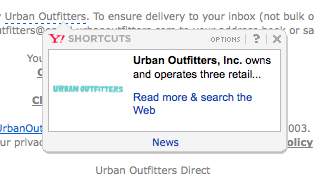
As of November 2026, the Yahoo Shortcuts described below are history. They belonged to an older version of Yahoo Mail’s web interface. The problem behind them is still around, though. Gmail, Apple Mail and Outlook can all turn the addresses, phone numbers and dates in your email into links you never added, and your email service can’t track any of them. Two things have changed since this post first ran. Gmail has auto-linked addresses and phone numbers since September 2017. And in 2024, Yahoo and Gmail both began enforcing bulk sender rules on SPF, DKIM, DMARC, one-click unsubscribe and spam rates. Both providers’ requirements took effect in February, and Google started rejecting non-compliant mail in April. Gmail added stricter enforcement in November 2025.
How Yahoo Shortcuts worked
For years, Yahoo Mail added its own Shortcut links to the emails people received. Company names, street addresses and the titles of well-known books or movies got a blue dashed underline. Clicking one sent the reader to a page Yahoo chose, such as a map for an address. Design write-ups from that time also describe Yahoo recoloring the detected text to a blue (#336699) and opening a Shortcuts bubble.
For the reader, this was a plus. They got extra links and information about the brand or product they had signed up to hear from. For the sender, it could be a nightmare. Your email service couldn’t track Shortcut links, and they could point your email at sites you never meant to link to.

The fix back then was to add your own link to any text Yahoo might turn into a Shortcut. Mail clients generally don’t replace a link that’s already there, so that approach still works today. It also showed why you should test every email in every client and browser you can.
Credit for the original tip goes to the MailChimp Jungle.
Auto-linking in today’s inboxes
Yahoo’s Shortcuts are gone, but auto-linking isn’t. The big mail clients now spot certain kinds of text and turn them into links or tap targets. Your email service never sees these links, so it can’t wrap them for click tracking, and its reports never count those clicks.
| Mail client | What it tends to auto-link | How it shows up |
|---|---|---|
| Gmail | Street addresses, phone numbers, email addresses, times | Blue links; rolled out in September 2017 |
| Apple Mail (iOS) | Phone numbers, addresses, dates | Blue underlined “data detector” links |
| Outlook | Dates and addresses | Dashed blue underline; one Marketo community thread blamed a meeting-suggestion add-in |
This matters more than it used to. Apple Mail Privacy Protection, which arrived with iOS 15 in 2021, inflates open rates. That leaves clicks as the engagement number most marketers trust. Any click that lands on an auto-link instead of your tracked link doesn’t show up in that number.
How to stop or control auto-links
There’s no single switch that works everywhere. The dependable approach is to stack a few fixes and then check the result in real clients.
- Link it yourself. If the text has a sensible place to go, link it there. That means a map link for your store address, a
tel:link for your support line, or a page link for a product name. Mail clients won’t replace a link that’s already there, and your email service will track it. - Add the format-detection meta tag in the
<head>. Results vary. Some developers say Apple Mail ignores it and that it does nothing in Outlook.com or Office 365. Use it as a baseline, not a guarantee. - Break up the pattern with a zero-width space (
​) inside the number, date or address. Readers can’t see it, and it stops detection in iOS and Gmail. If the value comes from a merge field, add the character in the template code. - Restyle what you can’t stop. iOS adds an
x-apple-data-detectorsattribute to the links it creates, so you can target them with CSS. For Gmail, Litmus recommends theu + #body aselector. Keep that rule on its own, because Gmail strips CSS that uses attribute selectors. - Test the final build in Gmail, Apple Mail, Outlook and Yahoo Mail, on both mobile and desktop and in dark mode, using a preview tool such as Litmus or Email on Acid.
Here’s the meta tag:
<meta name="format-detection" content="telephone=no, date=no, address=no, email=no">
Here’s the styling override for links you can’t prevent:
a[x-apple-data-detectors] {
 color: inherit !important;
 text-decoration: none !important;
 font-size: inherit !important;
 font-family: inherit !important;
 font-weight: inherit !important;
 line-height: inherit !important;
}
u + #body a {
 color: inherit;
 text-decoration: none;
 font-size: inherit;
 font-family: inherit;
 font-weight: inherit;
 line-height: inherit;
}
The u + #body selector only works if your <body> tag has id="body".
When to leave auto-links alone
Not every auto-link hurts you. A tappable phone number in a store-hours email or a shipping notice helps mobile readers. In that case, the better choice is to add a proper tel: link yourself. You keep the convenience and get the click data too. Fight the auto-links that go somewhere you didn’t choose, like a book title turned into a search result or a date that opens a calendar invite you never planned.
What Yahoo actually controls now
Today, Yahoo’s influence over your email is less about rewriting your content and more about letting it in at all. Yahoo began enforcing its sender requirements in February 2024, and one-click unsubscribe enforcement followed in June 2024. The main rules:
- Authenticate with SPF and DKIM, and publish a DMARC record.
- Keep your spam complaint rate below 0.3%. Yahoo measures this against mail delivered to the inbox, not total mail sent.
- Add a List-Unsubscribe header to marketing mail, ideally the RFC 8058 one-click POST method, and honor unsubscribe requests within two days. A link in the email body alone doesn’t count.
- Sign up for Yahoo’s Complaint Feedback Loop through Sender Hub so you can see complaints from Yahoo users.
- Avoid sudden jumps in volume, which can make Yahoo treat you as a compromised sender.
A minimal DMARC record to start with looks like this:
_dmarc.example.com. TXT "v=DMARC1; p=none; rua=mailto:[email protected]"
Gmail’s rules are much the same. It defines a bulk sender as one that sends close to 5,000 or more messages to personal Gmail accounts in 24 hours, counted across the whole primary domain. Once you cross that line, you’re treated as a bulk sender permanently.
The best next step is a review of your own templates. Find every address, phone number, date and product name that’s still plain text. Then link it yourself, break up the pattern, or restyle it, and send one test to each major client before your next campaign.
FAQ
Does Yahoo Mail still add Shortcut links to emails?
No. The dashed-underline Shortcuts were part of an older Yahoo Mail interface that Yahoo has since retired. Other clients do something similar today, including Gmail and Apple Mail, so the issue hasn’t gone away.
Why are the addresses and phone numbers in my email turning blue?
The recipient’s mail client detected them and turned them into links. Gmail has done this since 2017, and Apple Mail on iOS does it with its data detectors. You can prevent it with your own links or zero-width spaces, or restyle it with CSS targeting x-apple-data-detectors and u + #body a.
Can my email service track clicks on auto-generated links?
No. Your email service only tracks links that are already in your email when it goes out. That includes links in the HTML and, with services such as Mailchimp, links in the plain-text version. It can track them because it wraps them with its own tracking. Links that a mail client adds later go straight to their destination and never show up in your click reports.
Does the format-detection meta tag work in every mail client?
No. It helps in some places, but developers report that Apple Mail and Outlook.com ignore it in many cases. Combine it with explicit links or zero-width spaces, and check the result in real clients.
Can auto-links hurt deliverability?
Not directly. Spam filters judge your authentication, your complaint rate and your sending reputation, not links the client adds after delivery. The bigger risk is readers clicking somewhere unexpected and losing trust, which can push up complaints over time.
What do Yahoo and Gmail require from bulk senders in 2026?
SPF, DKIM and DMARC authentication, a spam complaint rate below 0.3%, and one-click unsubscribe in a List-Unsubscribe header that you honor within two days. Gmail has enforced these rules more strictly since November 2025, including rejecting mail that fails authentication.
Sources
- Google: Email sender guidelines FAQ
- Yahoo Sender Hub: FAQs
- Litmus Help: Removing blue links on iOS devices
- Litmus: How to fix blue links in Gmail