
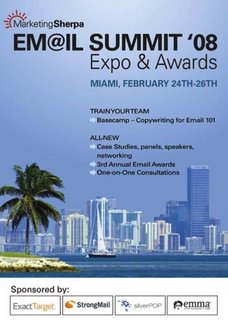
This post was written a few days before MarketingSherpa’s 2008 Email Summit, held February 24 to 26, 2008, at the InterContinental Hotel in Miami. It points to MarketingSherpa’s free report “Dirty Dozen: Email Newsletter Mistakes That Nearly Everyone Makes,” and the report’s main lessons still hold today: segment your list, write a real welcome message, make emails personal and judge results by what readers do. What changed is the inbox. Gmail and Yahoo set bulk sender rules in 2024 (SPF, DKIM, DMARC, one-click unsubscribe and a spam rate cap), Microsoft added its own rules for Outlook.com in May 2025, and Apple Mail Privacy Protection now inflates open rates. A newsletter can avoid all twelve old mistakes and still miss the inbox if those basics are missing.
Three days to the Email Summit in Miami
The countdown was on: three days until the email marketing team arrived at MarketingSherpa’s
Annual Email Marketing Summit in Miami!

The 2008 event was the third annual Email Summit. About 800 email marketers attended, which made it MarketingSherpa’s biggest Email Summit up to then. The plan was to post live from the sessions, workshops and one-on-one interviews over the three days, for readers who could not make the trip.
What happened to the summit later
The Email Summit stayed in Miami for one more year. The 2009 edition ran March 15 to 17. In 2011 it moved to Caesars Palace in Las Vegas, where 826 marketers attended, and the 10th annual Email Summit took place at the ARIA Resort and Casino in Las Vegas in February 2015. In 2016 MarketingSherpa turned it into a broader digital marketing event called the MarketingSherpa Summit. The 2017 edition ran April 10 to 13 at ARIA Las Vegas.
The Dirty Dozen report on email newsletter mistakes
Just before the summit, MarketingSherpa put out a free special report:
“Dirty Dozen: Email Newsletter Mistakes That Nearly Everyone Makes.” It came as a PDF download:
http://DirtyDozenPR.MarketingSherpa.com
The report shows common mistakes in email newsletter campaigns, along with examples of companies that were getting their newsletters right. It explains why newsletters need to keep changing if you want results to keep improving, and it shows what to change. It also covers mobile readers, how good deliverability drives revenue, and why subject lines matter. Any email marketer trying to get better results from a newsletter can use it.
HubSpot later offered the report as a free download. Jeanne Hopkins, who had worked at MarketingSherpa, revisited it on HubSpot’s blog about three years after it came out. She wrote that the mistakes that were most common in 2008 were “still rampant,” and parts of the report were updated with data from MarketingSherpa’s 2011 Email Marketing Benchmark Report.
Mistakes from the list that are still common
Several of the twelve mistakes appear in later coverage of the report by HubSpot and ThinkAdvisor. Each one still applies to newsletters in 2026:
- Poor segmentation. Sending every subscriber the same issue. Today this also hurts deliverability, because readers who don’t care about the content stop opening and start reporting spam.
- Weak welcome messages. The first email after signup gets the most attention, and many senders waste it. A welcome message also tells Gmail and Yahoo early on that your subscribers want your mail.
- Impersonal messages. Emails that sound like they come from a brand, not a person.
- No real interactivity. Nothing for the reader to click, answer or do.
- Repeating the same ad types. Readers learn to skip ad blocks that look the same in every issue.
- Measuring response badly. In 2008 this meant collecting response rates that told you little. Today the biggest trap is open rate, for the reasons in the next section.
- Relying on email alone. Running the newsletter with no link to your other channels.
What changed since 2008
The report’s advice on content and audience has held up well. The rules about technology and delivery have changed completely. The table below compares newsletter practices in 2008 with what mailbox providers expect in November 2026.
| Area | 2008 practice | November 2026 reality |
|---|---|---|
| Authentication | SPF optional, DKIM new, no DMARC | Gmail and Yahoo require SPF, DKIM and DMARC for bulk senders (since February 2024); Microsoft requires them for Outlook.com senders above 5,000 emails a day (since May 5, 2025) |
| Unsubscribe | A link in the footer | One-click unsubscribe (RFC 8058) on marketing mail, with requests honored within two days |
| Spam complaints | Feedback loops at some ISPs | Gmail asks for a spam rate below 0.1% and never 0.3% or higher; Yahoo sets 0.3% |
| Open rates | A reliable engagement signal | Inflated by Apple Mail Privacy Protection, so clicks and conversions are more trustworthy |
| Rendering | Outlook 2007’s Word engine, images off by default | Images load through Gmail’s proxy; mobile screens and dark mode shape the design |
| Inbox placement | One inbox | Gmail sorts mail into tabs, so newsletters often land in Promotions |
The Gmail, Yahoo and Microsoft sender rules
Google’s rules cover anyone sending 5,000 or more messages to Gmail accounts in a single day. Those senders must pass SPF and DKIM, publish a DMARC record, offer one-click unsubscribe on marketing messages, and keep the spam rate shown in Postmaster Tools below 0.3%. Google recommends staying under 0.1%. Transactional mail such as receipts doesn’t need one-click unsubscribe.
Yahoo started enforcing one-click unsubscribe in June 2024. Yahoo’s Sender Hub prefers the RFC 8058 POST method, accepts mailto as a fallback, and uses a 0.3% complaint rate threshold. Microsoft’s rules cover Outlook.com, Hotmail.com and Live.com for senders above 5,000 emails a day. It asks for SPF, DKIM and a DMARC policy of at least p=none that aligns with SPF or DKIM.
The simplest DMARC record that meets all three providers’ rules looks like this:
_dmarc.example.com. TXT "v=DMARC1; p=none; rua=mailto:[email protected]"
One-click unsubscribe uses two message headers, which most email platforms now add for you:
List-Unsubscribe: <https://example.com/unsub?id=abc123>, <mailto:[email protected]>
List-Unsubscribe-Post: List-Unsubscribe=One-Click
Begin with p=none so DMARC reports can show you every service that sends mail as your domain. Then move to p=quarantine and later p=reject once all your legitimate mail passes.
Why open rates no longer prove much
Apple Mail Privacy Protection launched with iOS 15 in 2021. It downloads each message’s images, including the tracking pixel, through Apple’s servers, whether or not the person reads the email. The result is an “open” that may not be real, and once the images are cached, a real open can go uncounted too. Click tracking uses wrapped links, so it still works. This is the modern version of the report’s warning about collecting bad response data: judge subject line tests and engagement by clicks, replies and conversions, not opens alone.
Mobile and dark mode reading
The report flagged mobile readers when most people still read newsletters on a desktop. Mobile reading is now the default, and dark mode is common on phones and in desktop clients. That means single-column layouts, large tap targets, logos with transparent backgrounds that work on dark screens, and a preheader written as carefully as the subject line.
The law hasn’t moved much
CAN-SPAM still requires an accurate “From” line, a subject line that isn’t misleading, a valid physical postal address, and a working opt-out that you honor within 10 business days. The FTC’s maximum civil penalty is $53,088 for each email that breaks the law. That is the 2025 level, and the FTC kept it unchanged for 2026. Gmail and Yahoo’s two-day unsubscribe rule is much stricter than the law’s 10 days, so in practice you need to meet the two-day rule.
Topics: email marketing summit, email mistakes, email newsletters, email subject lines
FAQ
Is the Dirty Dozen report still worth reading?
Yes, for the parts about content and audience. Its points on segmentation, welcome messages, personal tone and measuring response still apply. Skip its technical and deliverability advice, which dates from before DMARC, one-click unsubscribe and Apple Mail Privacy Protection.
Does a small newsletter need to follow the Gmail and Yahoo bulk sender rules?
The strict rules apply above 5,000 messages a day to Gmail. But Google requires SPF or DKIM from every sender, and Yahoo applies its 0.3% complaint threshold to all senders. Setting up SPF, DKIM and DMARC costs nothing, and it protects you if your list grows.
What spam complaint rate is safe for a newsletter?
Keep it below 0.1% in Google Postmaster Tools. Gmail and Yahoo both treat 0.3% as the line where filtering gets serious. At 0.1%, that means no more than one complaint for every 1,000 delivered emails.
Why did my newsletter open rate jump without any change in clicks?
Apple Mail Privacy Protection is the most likely cause. Apple’s servers load the tracking pixel for anyone using Apple Mail with the feature on, so those opens are counted whether or not the person read the email. Compare clicks and conversions over time to see real engagement.
Is MarketingSherpa’s Email Summit still held in Miami?
No. The Email Summit was held in Miami in 2008 and 2009, moved to Las Vegas in 2011, and in 2016 became the broader MarketingSherpa Summit. The 2017 edition ran April 10 to 13 at ARIA Las Vegas.
How fast do I have to process unsubscribe requests?
CAN-SPAM allows 10 business days. Gmail and Yahoo expect one-click unsubscribe requests on marketing mail to be honored within two days. Senders who want to reach the inbox should treat two days as the real deadline.
Sources
- Google Workspace Admin Help: Email sender guidelines FAQ
- Yahoo Sender Hub FAQs
- Microsoft Tech Community: Outlook’s new requirements for high-volume senders
- FTC: CAN-SPAM Act compliance guide for business
- FTC notice on 2026 civil penalty amounts (Federal Register)
- MarketingSherpa 2008 Email Summit
- HubSpot: Email newsletter mistakes nearly everyone makes