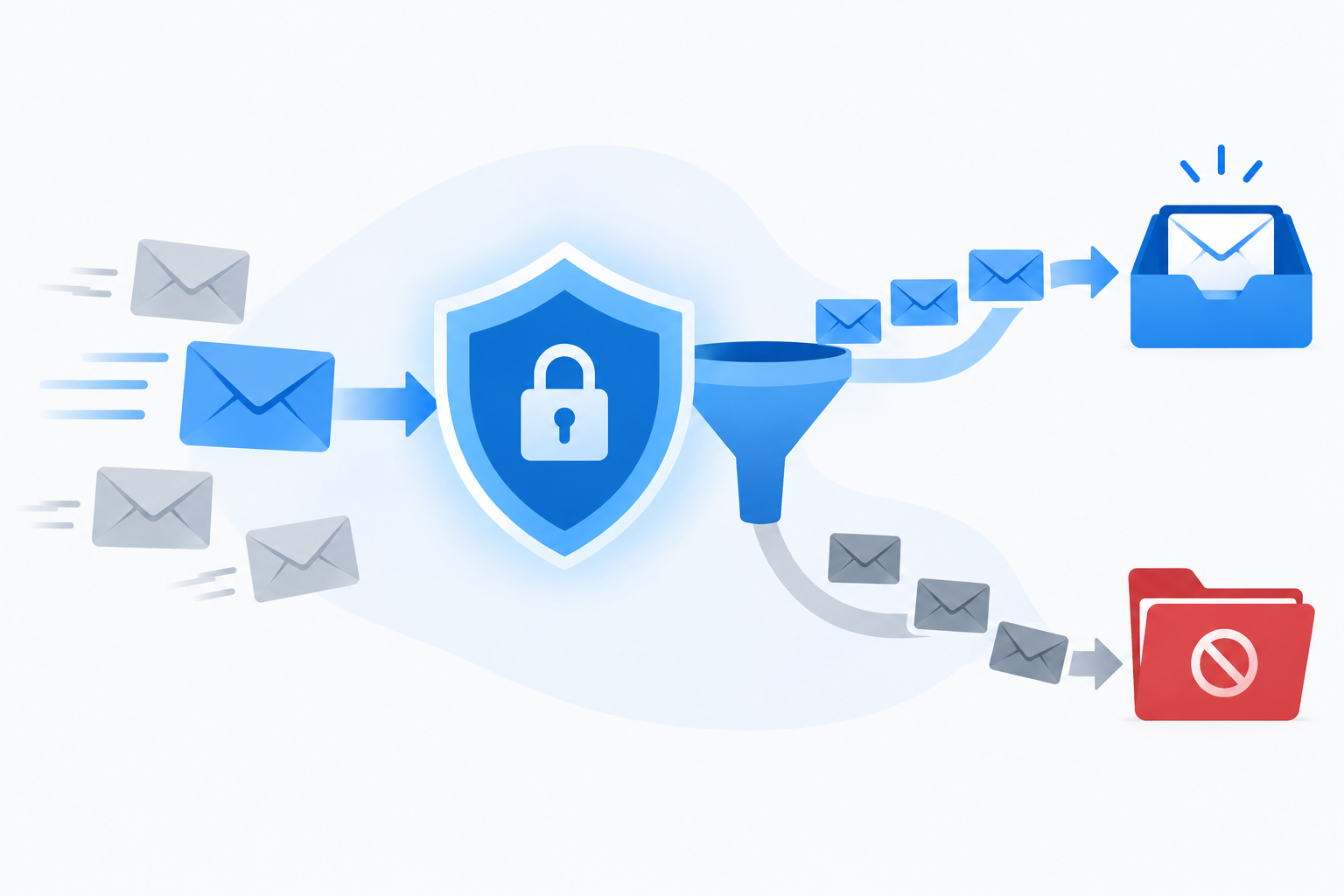
E-mail spam filtering is the set of tests a receiving mail server runs on every incoming message. Those tests decide whether the message lands in the inbox, goes to the spam folder, or gets rejected. Modern filters combine connection checks, sender authentication, reputation lookups, content analysis, machine learning and recipient behaviour into a single verdict, and most legitimate mail gets caught because it fails one of those layers.
What an email spam filter actually does
A spam filter is software that scores incoming mail and acts on that score. It can run at your mailbox provider (Gmail, Outlook.com, Yahoo), on a corporate gateway, on your own mail server, or inside your email client.
The volume explains why filters are so aggressive. Kaspersky’s annual spam and phishing report put spam at 45.6% of global email traffic in 2023. Close to half of all mail is junk, so providers err on the side of suspicion. A sender with no history gets less benefit of the doubt than one with years of clean sending.
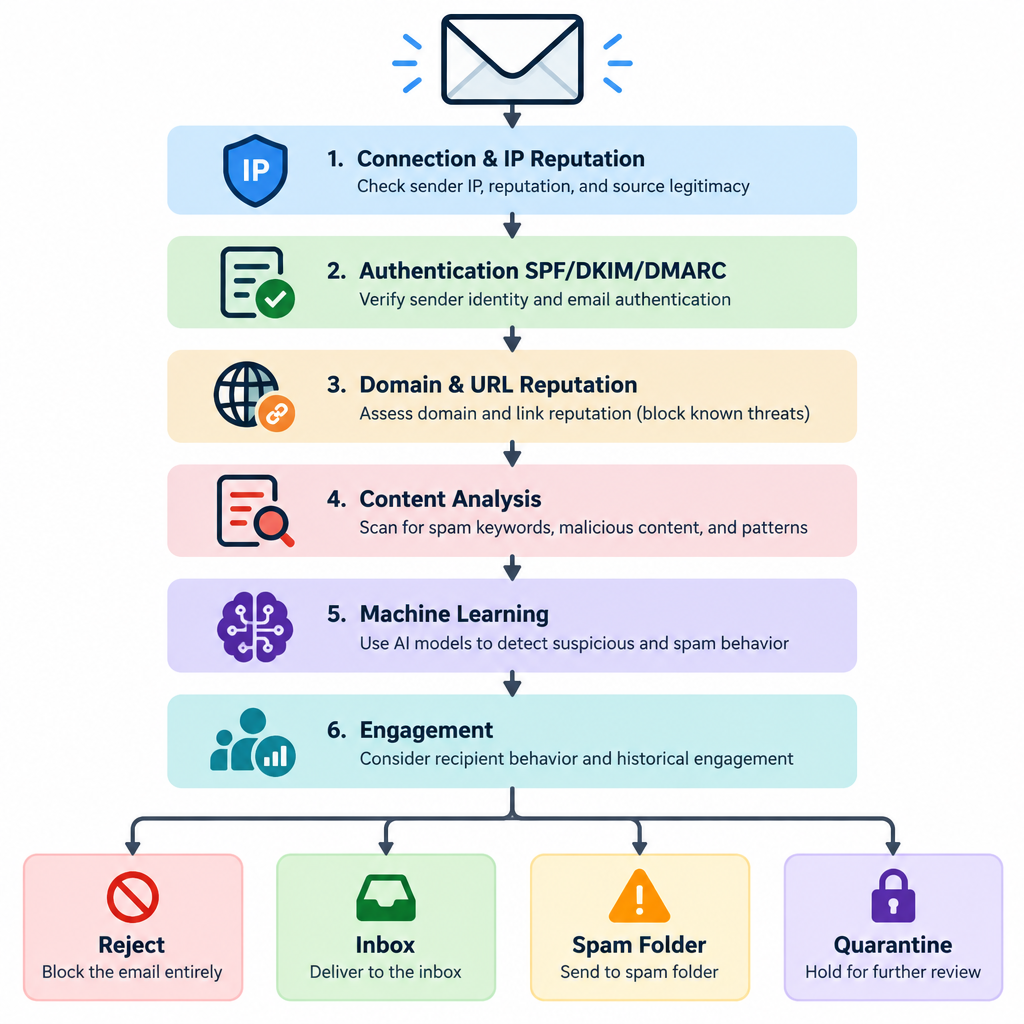
Every filter ends with one of four outcomes:
- Reject at the door. The receiving server refuses the message during the SMTP conversation and returns an error code. The sender gets a bounce.
- Accept to the inbox. The message passed and gets delivered normally.
- Accept to spam or junk. The server took the message but routed it away from the inbox.
- Quarantine. Common in business filters. An admin or user has to release the message before anyone sees it.
Most filters work on points, not a single pass or fail. Apache SpamAssassin, the open-source filter that shaped a lot of this industry, adds up scores from hundreds of rules and treats anything at 5.0 or above as spam by default. Commercial and mailbox-provider filters are far more complex, but the idea holds. Small problems add up, and one big problem can sink you alone.
The 6 checks a message has to pass
You can follow a message through roughly six layers, from the moment your server connects to the moment a human decides whether to open it. Here is the short version before we go through each one.
| Layer | What it examines | Typical tools and signals | What failure looks like |
|---|---|---|---|
| 1. Connection | Sending IP, reverse DNS, sending rate | DNS blocklists, PTR lookups, greylisting | SMTP rejection or temporary deferral |
| 2. Authentication | Proof the sender owns the domain | SPF, DKIM, DMARC | Rejection or spam folder |
| 3. Domain and URL reputation | Domains in the From line and links | Spamhaus DBL, URIBL, domain age | Spam folder or rejection |
| 4. Content | Headers, body, HTML, attachments | Rule sets, Bayesian scoring, malware scanning | Higher spam score, quarantine |
| 5. Machine learning | Patterns across billions of messages | Neural networks, text classifiers | Spam folder, warning banners |
| 6. Engagement | How recipients treat your mail | Opens, replies, deletes, spam reports | Gradual slide into the spam folder |
1. Connection and IP reputation
Before the receiving server reads a single word, it looks at who is knocking. The sending IP address is checked against DNS-based blocklists such as Spamhaus ZEN, Barracuda’s BRBL and SpamCop. If your IP is listed, many servers drop the connection on the spot.
The server also checks reverse DNS. Your sending IP should have a PTR record that resolves to a hostname, and that hostname should resolve back to the same IP. Gmail requires this from every sender, regardless of volume.
Rate matters too. A brand-new IP that suddenly pushes 50,000 messages an hour looks like a compromised machine. Receivers throttle it with temporary 4xx errors. Some servers use greylisting, which deliberately defers the first message from an unknown sender. Real mail servers retry a few minutes later, while a lot of spam software never does.
2. Authentication: SPF, DKIM and DMARC
Authentication answers one question: is this server allowed to send mail for this domain? Three DNS records handle it.
SPF lists the servers permitted to send for your domain. Keep it under the 10 DNS lookup limit or it fails silently.
example.com. TXT "v=spf1 include:_spf.google.com include:sendgrid.net ~all"
DKIM adds a cryptographic signature to each message. The receiving server fetches your public key from DNS and checks the signature, which proves the message wasn’t altered and came from someone holding your private key.
s1._domainkey.example.com. TXT "v=DKIM1; k=rsa; p=MIIBIjANBgkqhkiG9w0BAQEFAAOCAQ8AMIIBCgKCAQEA..."
DMARC ties the two together. It requires that SPF or DKIM pass and align with the domain in the visible From address. It also tells receivers what to do when checks fail and where to send reports.
_dmarc.example.com. TXT "v=DMARC1; p=none; rua=mailto:[email protected]; adkim=r; aspf=r"
Start at p=none to collect reports. Then move to p=quarantine and finally p=reject once you’re sure every legitimate source is authenticated. Alignment is the part people miss. If your newsletter platform signs DKIM with its own domain instead of yours, DMARC can fail even though DKIM technically passed.
3. Domain and URL reputation
Filters look past your IP to the domains inside the message. That includes your From domain, the Return-Path domain, every link and the image hosts. Services like the Spamhaus Domain Blocklist (DBL) and URIBL track domains seen in spam.
This is why a single bad link can sink a clean campaign. A public link shortener that spammers also abuse, a tracking domain shared with thousands of other customers, or a freshly registered domain can all drag your score down. Domain age counts. A domain registered last week and already sending bulk mail is a classic spam pattern.
4. Content analysis
Content filters read the headers and body. Rule-based filters look for known patterns. Think mismatched From and Reply-To addresses, HTML that hides text in tiny fonts or white-on-white colour, image-only emails with almost no text, malformed headers, and attachments with risky file types like .exe, .js or macro-enabled Office files.
Bayesian filtering adds statistics. Paul Graham’s 2002 essay “A Plan for Spam” popularised the approach: train a filter on known spam and known good mail, then score new messages by the probability that their words and tokens appear in spam. Desktop clients like Thunderbird still use adaptive filters built on the same idea.
Attachments and links are also scanned for malware and phishing. Business filters often open them in a sandbox before releasing the message.
5. Machine learning and AI
The big mailbox providers rely mainly on machine learning now. Rules can’t keep up with spammers who rotate wording, domains and IPs hourly. Models trained on billions of messages pick up patterns no human would write as a rule. More on this below.
6. Engagement and recipient signals
The last check happens after delivery, and it is the one senders ignore most. Gmail, Yahoo and Microsoft watch what recipients do with your mail. Opening, replying, moving a message out of spam and adding you to contacts all count in your favour. Deleting without reading, ignoring you for months and hitting “Report spam” all count against you.
These signals feed back into your reputation for future sends. That’s why a sender can pass every technical check and still drift into the spam folder. The filter learned from its users that people don’t want this mail.
Types of spam filters
The layers above describe what gets checked. Where the filter sits determines how much control you have.
Mailbox provider filters. Gmail, Outlook.com, Yahoo and Apple iCloud run their own filtering. You can’t configure it as a sender. You can only earn a good reputation.
Secure email gateways (SEGs). These sit in front of a company’s mail server and filter traffic before it arrives, usually by changing the domain’s MX records to point at the gateway. Proofpoint, Mimecast, Barracuda and Cisco Secure Email are long-standing names here.
API-based cloud email security. Newer tools connect directly to Microsoft 365 or Google Workspace through their APIs and scan mail after the platform’s built-in filter. Abnormal Security, Check Point Harmony Email and Collaboration, and similar products focus on behavioural analysis. They learn who normally emails whom and flag oddities like a “CEO” suddenly asking finance for a wire transfer.
Server-side open-source filters. SpamAssassin and Rspamd run on self-hosted mail servers. Both are free, highly configurable, and need someone who knows what they’re doing to maintain them.
Client-side filters. Outlook’s Junk Email settings, Apple Mail’s junk filter and Thunderbird’s adaptive filter run on the user’s device or account. They mostly add a personal layer on top of server filtering.
There’s also the old challenge-response model, where unknown senders must confirm they’re human before delivery. It still exists in a few services, but it annoys legitimate senders and generates backscatter, so most admins avoid it.
Spam filtering with AI
Google has been the most open about its machine learning. In 2019 it said its TensorFlow models were blocking an extra 100 million spam messages a day that earlier systems missed. In late 2023 it introduced RETVec, a text classifier built to handle the tricks spammers use to dodge text filters: misspellings, swapped characters, invisible Unicode and homoglyphs. Google reported that RETVec improved Gmail’s spam detection rate by 38% over the previous baseline and cut false positives by 19.4%.
Google also says Gmail blocks more than 99.9% of spam, phishing and malware. That number explains why getting into the Gmail inbox is so hard for marginal senders. The system is tuned to catch nearly everything questionable.
AI cuts both ways. Spammers and phishers now use large language models to write fluent, personalised messages with none of the broken grammar that older content rules relied on. That has pushed filters toward signals that are harder to fake, like authentication, sending history, relationship patterns between sender and recipient, and behaviour after delivery. The words in your email matter less every year. Who you are and how people react to you matter more.
The Gmail, Yahoo and Microsoft sender rules
The three largest consumer mailbox providers now publish hard requirements. Fail them and no amount of good content will help.
| Provider | Applies to | Effective date | Key requirements |
|---|---|---|---|
| Gmail (all senders) | Anyone sending to personal Gmail accounts | February 2024 | SPF or DKIM, valid forward and reverse DNS, TLS, spam rate under 0.3%, RFC 5322 formatting |
| Gmail (bulk senders) | 5,000+ messages a day to Gmail accounts | February 2024; one-click unsubscribe by June 1, 2024 | SPF and DKIM, DMARC at p=none or stricter, From domain aligned, one-click unsubscribe, honour unsubscribes within 2 days |
| Yahoo | Bulk senders (no public numeric threshold) | February 2024 | SPF and DKIM, DMARC at p=none or stricter, aligned From domain, one-click unsubscribe, spam rate under 0.3% |
| Microsoft Outlook.com | 5,000+ messages a day to Outlook.com, Hotmail and Live addresses | May 5, 2025 | SPF pass, DKIM pass, DMARC at p=none or stricter aligned with SPF or DKIM |
Google recommends keeping your spam rate below 0.1% and treats 0.3% as the line you must never cross. It also said it would step up enforcement from November 2025, including temporary and permanent rejections for non-compliant mail. Microsoft rejects non-compliant bulk traffic with a specific error code, covered in the next section.
One-click unsubscribe means the List-Unsubscribe and List-Unsubscribe-Post headers defined in RFC 8058. A footer link alone doesn’t satisfy it, though you should still include one.
List-Unsubscribe: <https://example.com/unsub?id=abc123>, <mailto:[email protected]?subject=unsubscribe>
List-Unsubscribe-Post: List-Unsubscribe=One-Click
Inbox tip
Make unsubscribing easier than reporting spam. Every person who unsubscribes instead of clicking “Report spam” protects your complaint rate.
Why legitimate emails get caught
When a real business email lands in spam, the cause is almost always one of these, roughly in order of how often I see them.
- Broken or misaligned authentication. SPF that doesn’t include your email platform, DKIM signed with the vendor’s domain instead of yours, or no DMARC record at all. This is the most common and the easiest to fix.
- A complaint rate that’s too high. Mailing people who forgot they signed up, or who never really did, drives up spam reports fast. At Gmail, crossing 0.3% is enough to hurt every message you send.
- Old or acquired addresses. Lists that sat unused for a year contain abandoned addresses. Some of those get recycled into spam traps, which are addresses that exist only to catch senders who don’t clean their lists. Purchased lists are worse, and they also break consent rules under GDPR and many anti-spam laws.
- Volume spikes on a cold IP or domain. Going from zero to 100,000 sends overnight looks like an attack. New IPs and domains need gradual warming.
- Shared IP reputation. On a shared pool at an email service provider, other customers’ behaviour affects you. Good providers police this. Cheap ones don’t always.
- Bad neighbours in your links. A blocklisted link shortener, an image host with a poor reputation or a tracking domain shared with spammers.
- Low engagement over time. Sending to people who never open teaches the filter your mail isn’t wanted.
- Sloppy formatting. Image-only emails, broken HTML, a missing plain-text part, or From and Reply-To domains that don’t match your brand.
Notice what isn’t on that list: “spam trigger words.” Writing “free” or “act now” in a subject line used to add points in old rule sets. Today it barely matters. Ranking lists of 400 forbidden words is a myth that wastes your time. Phrases that sound deceptive still hurt, but because recipients report the mail, not because a keyword list flagged it.
Deliverability risk
Sending to purchased or scraped lists is the fastest way onto a Spamhaus blocklist. One listing can block your mail across thousands of receiving servers at once.
What the bounce codes tell you
When a filter rejects mail at the SMTP stage, the error code tells you which layer failed. These are the ones worth recognising.
| Code | Provider | What it means |
|---|---|---|
| 550 5.7.26 | Gmail | Message failed authentication (usually DMARC). Fix SPF, DKIM and alignment. |
| 550 5.7.25 | Gmail | Sending IP has no PTR (reverse DNS) record. |
| 550 5.7.1 | Gmail | Message looks like unsolicited mail based on content or reputation. |
| 421 4.7.28 | Gmail | Unusual rate of unsolicited mail from your IP or domain. Slow down and investigate. |
| 421 4.7.0 | Gmail | Temporary block or rate limit. Retry later at lower volume. |
| 550 5.7.515 | Outlook.com | Sending domain doesn’t meet Microsoft’s authentication requirements for bulk mail. |
| 554 5.7.1 (with a blocklist name) | Many servers | Your IP or domain is on a named blocklist such as Spamhaus ZEN. |
A 4xx code is temporary and your server will retry. A 5xx code is permanent for that message. Repeated 5xx bounces need a fix, not more retries.
How to find out why your mail is being filtered
Guessing wastes days. Work through the evidence in this order.
Diagnose a spam folder problem
- Send a test to a Gmail account and open Show original.
- Read the SPF, DKIM and DMARC results.
- Check Gmail Postmaster Tools for spam rate and compliance.
- Look up your IP and domains on major blocklists.
- Read your DMARC aggregate reports for unknown senders.
- Review complaints and bounces from your email platform.
Read the headers. In Gmail, open the message, click the three-dot menu and choose Show original. The top summary shows SPF, DKIM and DMARC as PASS or FAIL. The Authentication-Results header gives the detail, including which domain was checked. In Outlook and Microsoft 365, the X-Forefront-Antispam-Report header includes the Spam Confidence Level (SCL). A value of -1 means filtering was skipped, 0 or 1 means clean, and 5 and up means the message was judged spam. Self-hosted SpamAssassin adds an X-Spam-Status header listing every rule that fired and the total score.
Use the provider dashboards. Google Postmaster Tools shows your domain’s spam rate, authentication results and compliance status against the sender rules. Microsoft offers Smart Network Data Services (SNDS) for IP data and the Junk Mail Reporting Program (JMRP) for complaint feedback. Yahoo runs a complaint feedback loop you can sign up for.
Feed events into your own systems. Most email platforms push bounce, complaint and unsubscribe events to your app in real time. If you need the webhook definition first, it’s simply an automated HTTP message one service sends another when something happens. Wiring complaints into your CRM means you can suppress unhappy contacts everywhere, not only in one tool.
Check DMARC reports. Aggregate reports, sent to the rua address in your DMARC record, show every IP sending mail as your domain. You’ll often find a forgotten CRM, help desk or invoicing tool that was never added to SPF or set up for DKIM.
Choosing an email filter service for your business
On the receiving side, a corporate email spam filter protects your staff from phishing, malware and business email compromise, and it keeps inboxes usable. Microsoft 365 and Google Workspace include solid built-in filtering. Many businesses add a second layer because targeted phishing and impersonation attacks slip past general-purpose filters.
Here is what the main options cost. Prices are list prices at the time of writing, so confirm on vendor pages before you buy.
| Option | Type | Price |
|---|---|---|
| Gmail, Outlook.com, Yahoo | Built-in consumer filtering | Free |
| Google Workspace | Built-in business filtering | Included in all Workspace plans |
| Exchange Online Protection | Built-in Microsoft 365 filtering | Included with Exchange Online mailboxes |
| Microsoft Defender for Office 365 Plan 1 | Add-on: safe links, safe attachments | $2 per user per month |
| Microsoft Defender for Office 365 Plan 2 | Add-on: Plan 1 plus threat investigation and simulation | $5 per user per month |
| Apache SpamAssassin | Open-source server filter | Free (Apache License 2.0) |
| Rspamd | Open-source server filter | Free (Apache License 2.0) |
| Proofpoint, Mimecast, Barracuda | Secure email gateway | Quote-based |
| Abnormal Security, Check Point Harmony Email | API-based cloud security | Quote-based |
When you compare email filtering services, weigh these factors:
- Deployment model. Gateways need an MX change and catch threats before they reach your mailboxes. API tools deploy in minutes and can pull a malicious message back out of inboxes after delivery. Many companies pair built-in filtering with one API tool.
- Phishing and impersonation detection. Ask how the product handles messages with no malicious link or attachment, such as invoice fraud or payroll diversion requests. Pure content filters struggle with these.
- False positive handling. Blocking a customer’s purchase order costs real money. Look for clear quarantine digests, easy user release, and allow-list controls that admins can audit.
- Admin effort. A powerful filter that needs constant tuning will drift out of date if nobody owns it.
- Reporting. You want to see what was blocked, why, and which users get targeted most.
Don’t layer three filters on top of each other without a reason. Every extra layer adds false positive risk and another quarantine to check.
What recipients can do to train their filter
Filters learn from you. If a newsletter you want keeps landing in spam, mark it “Not spam” and move it to your inbox. Add the sender’s address to your contacts. In Gmail, you can also create a filter with the sender’s address and choose “Never send it to Spam.”
For genuine junk, use the “Report spam” or “Junk” button rather than just deleting it. That report trains your provider’s models and lowers the sender’s reputation for everyone. Don’t click unsubscribe links in obvious scam or phishing emails, though. That only confirms your address is live. Report them instead.
In business settings, use your company’s report-phishing button if one exists. It sends the message to the security team, who can pull identical copies out of colleagues’ inboxes before anyone clicks.
FAQ
What is e-mail spam filtering in simple terms?
It’s an automated check that receiving mail servers run on every incoming message. The filter looks at who sent it, whether the sender is authenticated, the reputation of the domains and links involved, the content, and how recipients reacted to similar mail. It then delivers, diverts or rejects the message.
Do spam filters read my emails?
They scan them automatically. Content and machine learning filters analyse text, links and attachments to classify messages, and providers state this in their terms. No person reads your mail as part of normal spam filtering.
Why do emails from my own domain go to spam?
Usually because a sending service isn’t authenticated for your domain. A website contact form, a CRM or an invoicing tool may send as your domain without being included in SPF or signing with your DKIM key. DMARC then fails. Check the headers and your DMARC reports to find the culprit.
Do spam trigger words still matter?
Very little. Modern filters lean on authentication, reputation and engagement far more than individual words. Misleading subject lines still hurt, but mainly because recipients report them as spam.
How accurate are spam filters?
The large providers are extremely accurate. Google says Gmail blocks more than 99.9% of spam, phishing and malware. The trade-off is that marginal or poorly authenticated legitimate mail sometimes gets caught, which is why sender setup matters so much.
What spam complaint rate is too high?
For Gmail, 0.3% is the hard limit, and Google recommends staying below 0.1%. Yahoo applies similar thresholds. That’s one complaint per 1,000 delivered messages. If you’re near that line, tighten your opt-in process and stop mailing people who haven’t engaged in months.