
Edgy, witty email headlines still work in November 2026 if three things hold: the copy suits the audience, the subject line is honest about what’s inside, and the clever line can be read as live text. Turning “risky” words into images to slip past spam filters is an old tactic that has stopped paying off. Since February 2024, Gmail and Yahoo have judged bulk mail mostly on authentication (SPF, DKIM, DMARC), one-click unsubscribe and a user-reported spam rate under 0.3%, with Microsoft adding similar rules in May 2025. Write the pun as an HTML headline, give any headline image good alt text, and let your sender reputation decide whether you reach the inbox.
Edgy copy has to fit the audience
Double meanings and vivid words can make an email stand out. Before you send them, check one thing first: does the material suit the people on this list? That check covers every part of the message:
- Subject line: the first thing people see in the inbox, and the line they react to when deciding whether to click “Report spam”.
- Preheader: the preview text next to or under the subject line in Gmail, Apple Mail and Outlook. It can soften or set up a joke.
- Headline: the big line at the top of the email. This is the safest place for wordplay, because the reader has already chosen to open.
- Body copy: has to deliver on the headline’s promise without going further than your brand voice usually does.
A fashion retailer can use a cheeky pun. A bank, a healthcare provider or a B2B software company usually can’t, and the cost of misjudging it is real. Under Google’s and Yahoo’s bulk sender rules, a complaint rate that stays above 0.3% makes you ineligible for help with delivery problems. Google advises keeping it below 0.1% in Postmaster Tools.
Will the message reach the inbox
When this post was first written, spam filters relied heavily on keyword lists. Words like “free”, “sexy” or “guarantee” in a subject line or body could push a message into the junk folder. A popular workaround was to turn the risky word, or the whole headline, into an image so that keyword filters couldn’t read it.
That tactic is history now, and it should stay that way. Modern filtering at Gmail, Yahoo and Outlook.com weighs who you are and how recipients react to you much more than individual words. Deliverability firms such as Movable Ink and Suped point out that the old keyword lists and the “60/40 text-to-image ratio” rule came from how older filters worked. Engagement is a far better signal of a message’s value than any trigger word.
| What filters leaned on then | What decides inbox placement in 2026 |
|---|---|
| Keyword lists in subject and body | Domain and IP reputation |
| Text-to-image ratio rules | SPF, DKIM and DMARC authentication with alignment |
| Exclamation marks and all caps | User-reported spam rate (under 0.3%, ideally under 0.1%) |
| Hidden or image-only text | Engagement: opens, clicks, replies, deletes without reading |
| Blocklists only | One-click unsubscribe and fast opt-out handling |
The sender rules that now matter more than any word
The rules that decide whether a clever headline gets seen at all are about authentication and complaints, not vocabulary:
- Gmail (from February 2024): all senders need SPF or DKIM, valid reverse DNS, TLS and a spam rate below 0.3%. Bulk senders (about 5,000 or more messages a day to personal Gmail accounts) also need SPF, DKIM and DMARC, alignment with the From domain, and one-click unsubscribe, with opt-outs honored within two days. Deliverability firms report that Google tightened enforcement against non-compliant traffic in November 2025.
- Yahoo (from February 2024): similar requirements, with List-Unsubscribe enforcement from June 2024 and a 0.3% complaint threshold for bulk senders. Yahoo does not publish a fixed volume threshold.
- Microsoft Outlook.com, Hotmail.com and Live.com (from May 5, 2025): domains sending more than 5,000 messages a day must pass SPF and DKIM and publish a DMARC policy of at least p=none that aligns with the From domain.
A minimal starting DMARC record looks like this:
_dmarc.example.com. TXT "v=DMARC1; p=none; rua=mailto:[email protected]"
The one-click unsubscribe requirement uses this RFC 8058 header pair, which most ESPs add for you:
List-Unsubscribe: <https://example.com/unsubscribe?id=abc123>
List-Unsubscribe-Post: List-Unsubscribe=One-Click
Why image headlines are a weaker bet today
Putting a headline in an image is fine as a design choice. As a way to hide words from filters, it backfires:
- Images are still blocked in some clients. Desktop Outlook blocks external images by default unless the reader allows them. Your crafty headline turns into a blank box or a security notice.
- Alt text gets read anyway. Good practice means writing alt text, and filters treat alt text as content. Hiding a word in an image and then writing it into the alt text defeats the purpose.
- Image-only emails look suspicious. Suped and Omnisend both warn against image-only campaigns, because filters can’t judge content they can’t read, and spammers have used that trick for years.
- Dark mode and accessibility suffer. Text baked into an image can’t adapt to dark mode in Apple Mail, Gmail or Outlook, and screen readers depend on the alt text.
- Gmail shows images by default. Since December 2013, Gmail has served images through Google’s own proxy servers and displayed them automatically. Image blocking no longer hides anything from Gmail users, and it never hid anything from Gmail’s filters.
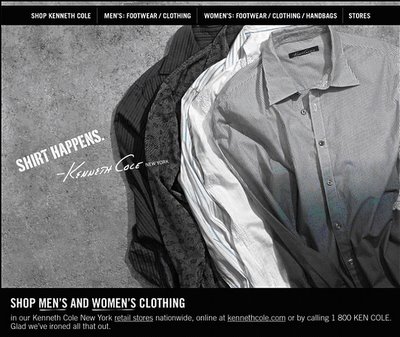
Example: Kenneth Cole’s “Collar a new shirt”
A Kenneth Cole promotional email from the time this post was written used a safe subject line, “Collar a new shirt”, and saved the riskier line for the headline inside:

Notice the pun in the copy.
The structure still works today. The subject line is mild and says what the email is about, so it doesn’t mislead anyone or invite spam reports. The cheekier wordplay sits inside, where only people who chose to open will see it. The part to update is the way it’s built. Today you would set the headline as live HTML text in a web-safe or fallback font, or use an image with alt text that carries the same pun. That way the joke still lands when images are off, in dark mode, and for screen reader users.
Use good judgment: the line between clever and deceptive
There is a clear line between an email that uses an image headline for style and one that hides words to get around filtering systems. The first is design. The second is the kind of behavior that damages your sender reputation once recipients start hitting “Report spam”, because filters at Gmail, Yahoo and Outlook.com learn from those reports.
The subject line also has a legal side. The FTC’s CAN-SPAM guide says subject lines must not mislead about what the message contains. Each email that breaks the law can draw a civil penalty of up to $53,088 under the FTC’s most recent inflation adjustment, which took effect in January 2025. A pun is fine. A subject line that promises one thing and delivers another is not.
Before you send an edgy headline, run through this check:
- Does the subject line describe the email honestly, even if the headline inside plays with words?
- Would your typical subscriber smile at it, or would some of them complain?
- Does the joke still make sense as alt text with images turned off?
- Is your domain authenticated with SPF, DKIM and DMARC, with one-click unsubscribe in place?
- Will you judge the result by clicks and conversions rather than opens?
That last point matters more than it did when this post was written. Apple Mail Privacy Protection, introduced with iOS 15 in September 2021, preloads images for users who turn it on, so open rates now count many “opens” by people who never looked at the email. Often the easier path is to write around a risky word instead of wrapping it in an image. The thing you’re protecting isn’t the open rate. It’s your inbox placement and your complaint rate.
FAQ
Do spam trigger words still send emails to junk?
Single words rarely decide placement at Gmail, Yahoo or Outlook.com today. Reputation, authentication and how recipients react carry far more weight. A message stuffed with promotional clichés, all caps and lots of exclamation marks can still get lower engagement and more complaints, and those signals are what hurt you.
Is it OK to put my headline text in an image?
Yes, as a design choice, as long as the image has alt text that says the same thing and the email has enough live text around it. Desktop Outlook still blocks images by default, so a headline that only exists as an image can disappear for part of your list. Avoid image-only emails altogether.
What text-to-image ratio should I use?
The strict 60/40 rule is mostly folklore left over from older filters. The practical guidance from Email on Acid, Suped and Omnisend is simpler: include real HTML text, keep image files small, write descriptive alt text and never send an email that is a single image.
Can a risqué or pun-based subject line break CAN-SPAM?
A pun alone does not break the law. CAN-SPAM bans subject lines that mislead recipients about the content of the message, so the risk comes from deception, not cheekiness. Keep the subject line honest and you can save the bolder wordplay for the headline inside.
How can I tell if an edgy headline is working when open rates are inflated?
Use click-through rate, click-to-conversion rate, unsubscribes and spam complaints in Google Postmaster Tools or your ESP’s reporting. Apple Mail Privacy Protection inflates opens, so A/B test the safe headline against the edgy one and compare clicks and complaints.
Do the Gmail and Yahoo rules apply to small senders?
Some of them do. Gmail requires every sender to use SPF or DKIM, valid reverse DNS and TLS, and to keep spam rates below 0.3%. The full DMARC and one-click unsubscribe requirements apply to bulk senders of about 5,000 or more messages a day. Setting up all of it early costs little and protects you as your list grows.
Sources
- Google: Email sender guidelines
- Yahoo Sender Hub: Sender best practices
- FTC: CAN-SPAM Act, A Compliance Guide for Business
- Federal Register: FTC Adjustments to Civil Penalty Amounts (January 2025)
- Microsoft Tech Community: Outlook’s new requirements for high-volume senders
- Campaign Monitor: Image blocking in email
- Litmus: The ultimate guide to styled alt text in email
- Omnisend Help Center: Optimize email content for improved deliverability