
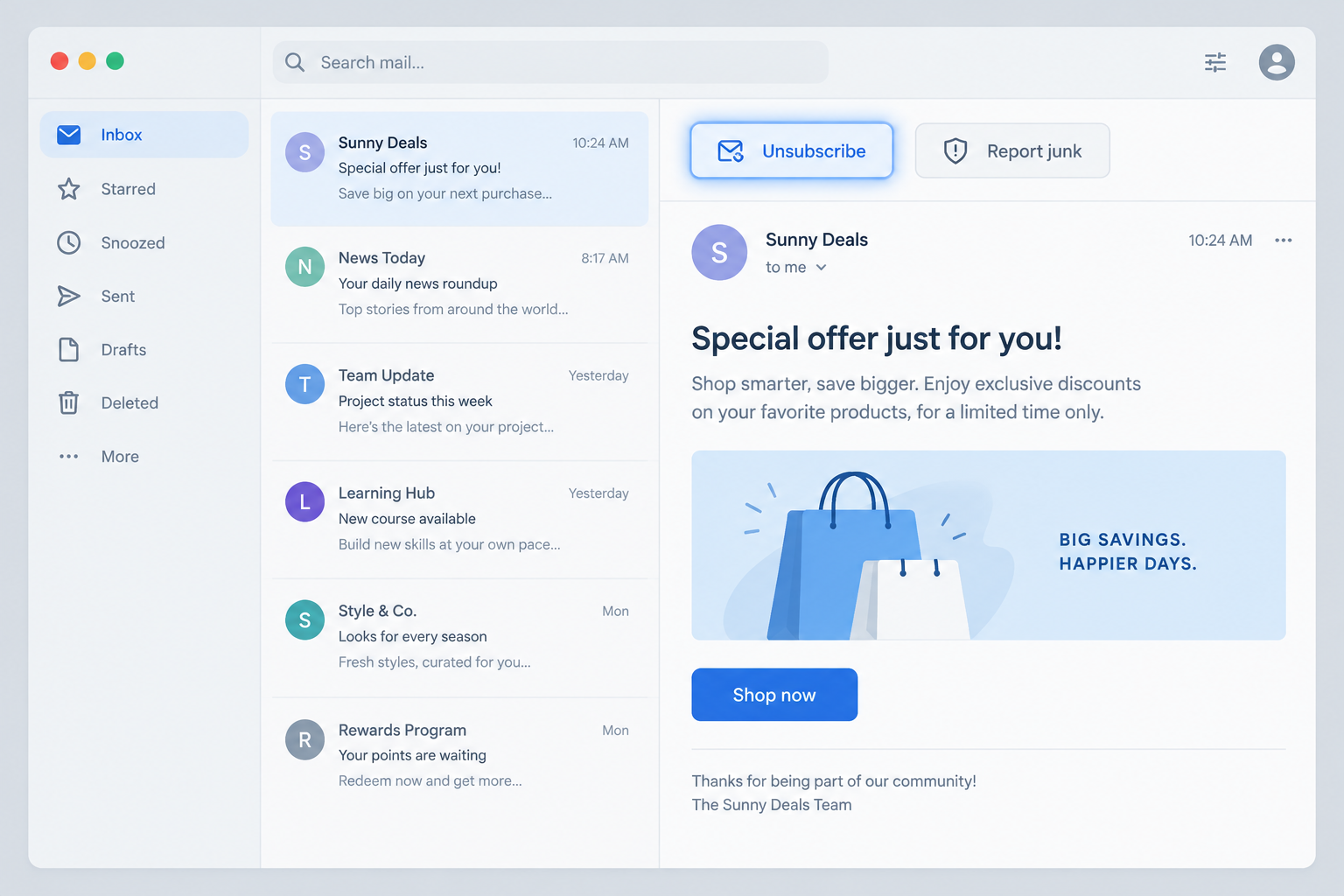
Outlook.com replaced Windows Live Hotmail, and it still shows an Unsubscribe option at the top of many bulk messages. That option comes from the List-Unsubscribe header your email platform adds to each send. It now sits beside Report junk instead of replacing it, and Microsoft does not promise it will appear on every message. The big change is that the button is now required in practice: Gmail and Yahoo introduced bulk-sender requirements in 2024 that include one-click unsubscribe (RFC 8058), and since May 5, 2025 Microsoft has required domains sending more than 5,000 messages a day to Outlook.com to pass SPF, DKIM and DMARC, with noncompliant mail rejected.
When this post was first written, Microsoft had a reputation for being hit-and-miss. Internet Explorer 7 annoyed people with too many security prompts. Outlook 2007 let designers down by switching to Microsoft Word’s rendering engine. Live Mail had weak CSS support. All three are history now. Microsoft retired the Internet Explorer 11 desktop app in June 2022, and Windows Live Hotmail became Outlook.com in 2013. Still, Live Mail had a few features that helped email marketers, and the best of them was an “Unsubscribe” button.
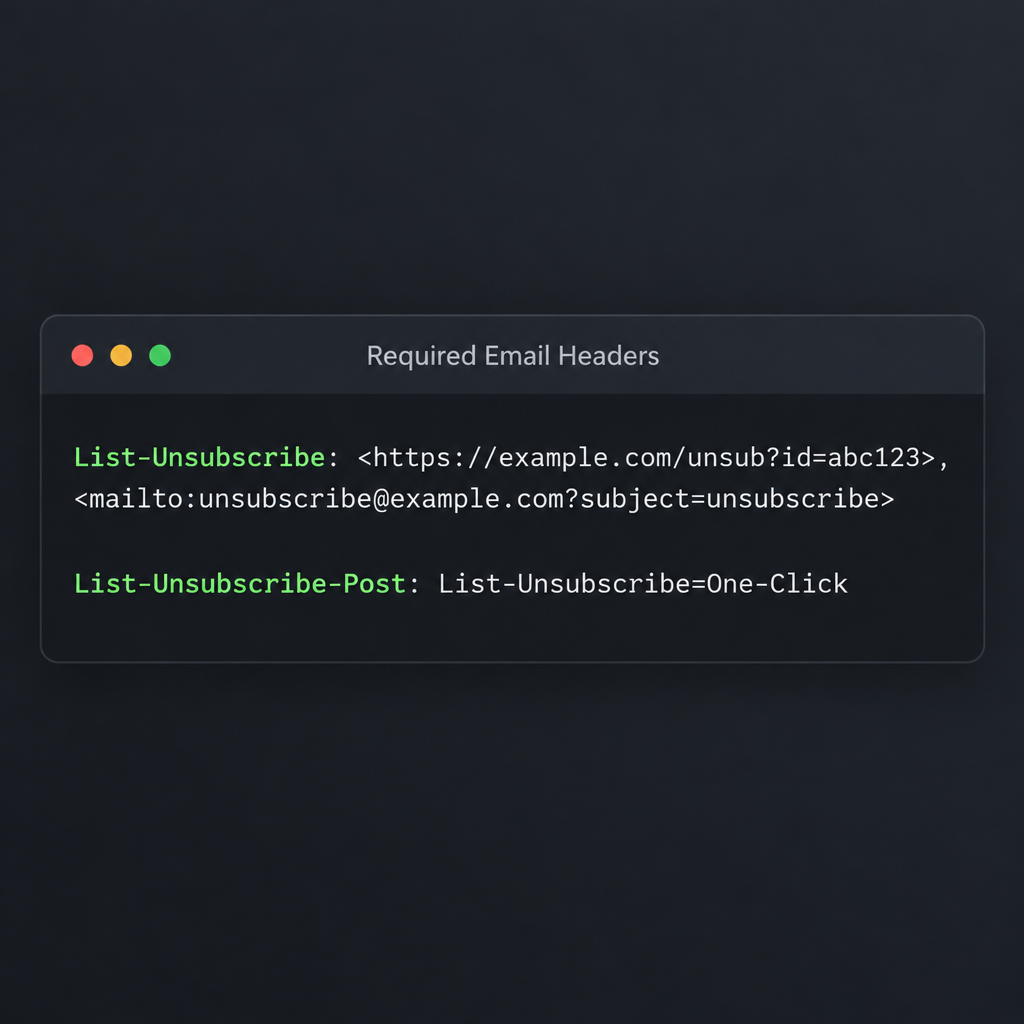
The unsubscribe button showed up in place of the report spam button, but only when the right settings were in place. Microsoft’s original instructions for setting it up were published here. Today the setup happens on the sender’s side. Outlook.com looks for the List-Unsubscribe header, and Gmail and Yahoo want it paired with List-Unsubscribe-Post so a single click unsubscribes the reader:
List-Unsubscribe: <https://example.com/unsub?id=abc123>, <mailto:[email protected]?subject=unsubscribe>
List-Unsubscribe-Post: List-Unsubscribe=One-Click
Whether your email service provider adds these headers for you depends on the provider. If you send from your own servers, sign both headers with DKIM. RFC 8058 requires that signature for one-click unsubscribe to count.
In the Live Mail version, clicking the button took the reader to a landing page built by the marketer. There they could choose which emails to stop getting. That flow is now outdated for the header link. Under RFC 8058, the mailbox provider sends a POST request to your HTTPS address, and the reader is unsubscribed without visiting a page or confirming anything. You can still link to a preference center in your email footer, where readers can choose topics or send less often. Just don’t make that page the only way out.
The original post argued that the button would lift deliverability. With no report spam button, readers would be less likely to mark email they had signed up for as spam by mistake, so the sender’s IP address would be less likely to land on a blocklist. The main idea still holds: an easy exit means fewer complaints. The details have changed. Outlook.com keeps Report junk next to Unsubscribe, so readers who skip the button can still complain. Mailbox providers now judge your sending domain as well as your IP address. Google and Yahoo also set a spam complaint ceiling of 0.3%, and Google asks senders to stay under 0.1%. Microsoft’s Junk Mail Reporting Program (JMRP) and Smart Network Data Services (SNDS) show how Outlook.com users are reacting to your mail.
The old praise for Microsoft has aged well. Header-based unsubscribe became the industry standard. Gmail, Yahoo, Apple Mail and Outlook.com all show some form of it, and the major mailbox providers now treat a working unsubscribe as a basic requirement for bulk mail.
FAQ
Why doesn’t the Unsubscribe button show on my emails in Outlook.com?
Outlook.com filters for junk first and only then checks for subscription headers. So messages in Junk, or from senders the reader has blocked, may not show the button. Microsoft has not published an exact rule for when it appears, and a valid List-Unsubscribe header is needed but does not guarantee the button. Check that the header is in your raw message source, that it is DKIM-signed, and that your SPF, DKIM and DMARC checks pass.
Is one-click unsubscribe required for Outlook.com?
Microsoft’s 2025 rules for high-volume senders require SPF, DKIM and DMARC from domains sending more than 5,000 messages a day. They also call for an easy, clearly visible way to opt out, especially for marketing mail. Microsoft’s post does not name RFC 8058, but Gmail and Yahoo do. Since most lists reach all three providers, send both headers to every bulk recipient.
How fast do I have to process unsubscribe requests?
Google and Yahoo expect you to honor unsubscribes within 2 days. The US CAN-SPAM Act sets a legal maximum of 10 business days, and your opt-out method has to keep working for at least 30 days after you send. Aim to remove people right away, because anyone who gets mail after unsubscribing is likely to click Report junk next.
Does the header unsubscribe replace the link in my email footer?
No. CAN-SPAM requires a clear opt-out notice in the message itself, and Microsoft asks for an unsubscribe link that is easy to find. The header option is extra. Keep a visible footer link as well, ideally one that unsubscribes in one step or leads to a simple preference page.
Do transactional emails need a List-Unsubscribe header?
Google and Yahoo apply the one-click rule to marketing and subscribed mail, not to receipts, password resets or shipping notices. If a message mixes promotional content into a transactional email, treat it as marketing. Keeping transactional mail on its own subdomain or stream makes the line clear to both readers and filters.
Sources
- Google Workspace Admin Help: Email sender guidelines
- Yahoo Sender Hub: Sender best practices
- Microsoft Tech Community: Outlook’s new requirements for high-volume senders
- Outlook.com Postmaster: Sender support
- IETF RFC 8058: Signaling One-Click Functionality for List Email Headers
- FTC: CAN-SPAM Act compliance guide for business