
The best email marketing platforms for small businesses keep the bill small while your list is small. They also get your mail into the inbox under the Gmail, Yahoo and Microsoft sender rules, and they let you send a good-looking newsletter without hiring a designer. Below are ten platforms ranked for small teams, with pricing, free-plan limits, how each one bills you, and the specific type of business each one suits.
Our top pick, in one paragraph
MailerLite is the best email marketing platform for most small businesses. Its drag-and-drop editor is the easiest to learn on this list. The automation builder handles welcome series and abandoned carts without a manual. Landing pages, signup forms and a website builder are included, and paid plans start at $12 a month. It lacks a CRM and a native SMS-first setup. Most small teams don’t need either in year one.
If you run a Shopify store and expect email to drive a big share of revenue, skip to Klaviyo. If you send a lot of email to a modest list, look at Brevo first. It bills by emails sent, not by contacts.
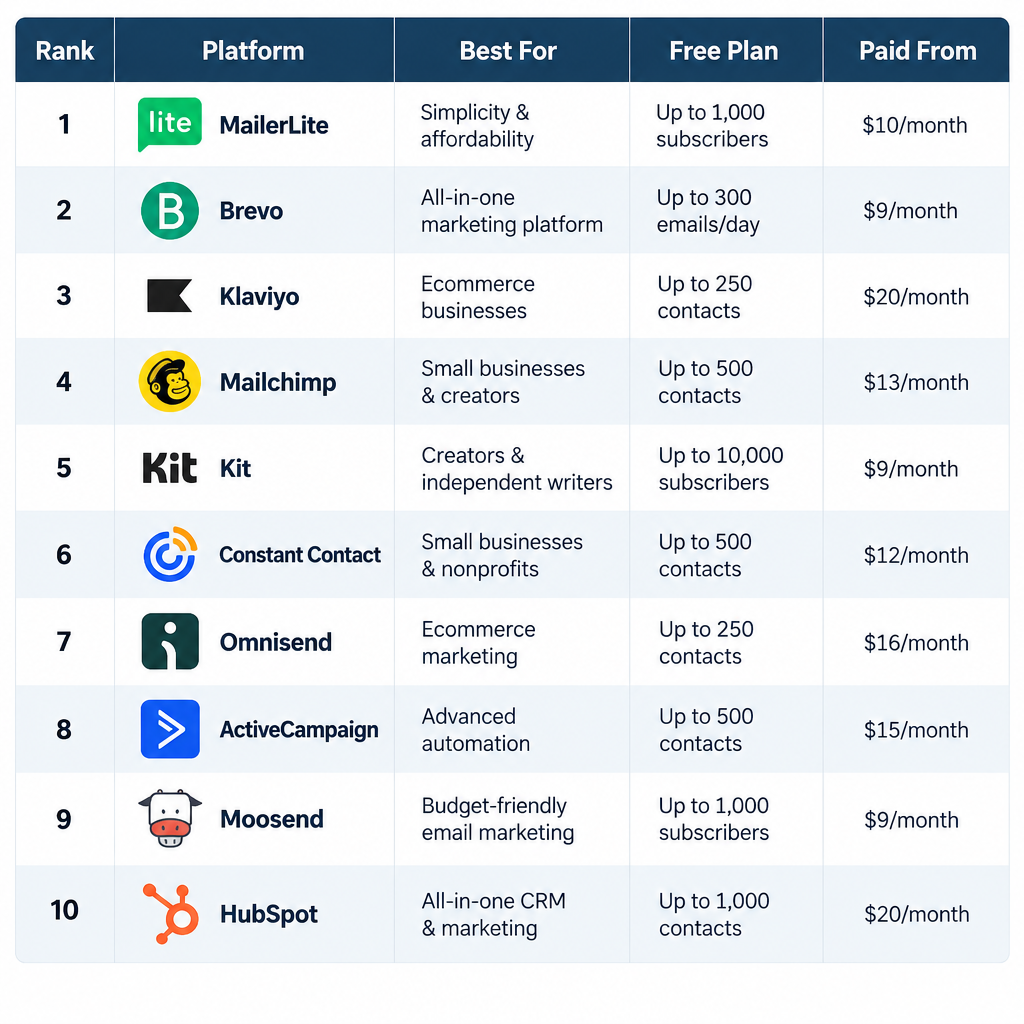
Quick comparison: best email marketing services for small businesses
Prices below are US list prices from each vendor’s pricing page in 2025, for the smallest paid tier on monthly billing unless noted. Vendors change these often, so treat them as a starting point and confirm before you commit.
| Rank | Platform | Best for | Free plan | Paid plans from |
|---|---|---|---|---|
| 1 | MailerLite | Most small businesses | Yes, up to 250 subscribers, 12,000 emails/month | $12/month |
| 2 | Brevo | High send volume, transactional plus marketing | Yes, 300 emails/day | $9/month |
| 3 | Klaviyo | Shopify and ecommerce stores | Yes, 250 active profiles, 500 emails/month | $20/month |
| 4 | Mailchimp | Integrations and brand familiarity | Yes, 250 contacts, 500 sends/month | $13/month (Essentials) |
| 5 | Kit (formerly ConvertKit) | Creators, newsletters, digital products | Yes, up to 10,000 subscribers | About $33/month billed annually |
| 6 | Constant Contact | Local businesses, events, phone support | No (free trial) | $12/month (Lite) |
| 7 | Omnisend | Budget ecommerce, email plus SMS | Yes, 250 contacts, 500 emails/month | $16/month |
| 8 | ActiveCampaign | Advanced automation and sales follow-up | No (14-day trial) | $15/month billed annually |
| 9 | Moosend | Cheapest paid automation | No (30-day trial) | $9/month |
| 10 | HubSpot | Teams already using HubSpot CRM | Yes, 2,000 sends/month with HubSpot branding | $15/seat/month billed annually |
How we ranked these email platforms for businesses
The ranking weighs the things that actually decide whether a small business sticks with a platform after the first three months. Feature count was not one of them.
- Cost at your size, and at 5x your size. A cheap starting price means little if the next contact tier doubles your bill. We looked at how each platform counts what you pay for (more on that below, because it trips up a lot of owners).
- Ease of use. Can a non-designer create a branded campaign in under an hour? Can one person run the whole thing?
- Automation that a small team will actually use. Welcome series, abandoned cart, post-purchase, re-engagement. Branching logic matters more than a list of 200 triggers.
- Deliverability tooling. Custom domain authentication (SPF, DKIM, DMARC alignment), automatic one-click unsubscribe headers, and list hygiene features. Every platform here handles the basics. Some make it much easier than others.
- Integrations. Your store, your booking tool, your forms, your CRM. Native integrations beat Zapier workarounds for anything revenue-critical.
- Support. Chat and email support on the plan you’ll actually be on, not only on the enterprise tier.
Nothing here is ranked on affiliate payout, and no platform paid for placement.
The 10 best email marketing platforms for small business
1. MailerLite: best overall for small businesses
MailerLite wins because it gets the fundamentals right at a price that stays reasonable as you grow. The drag-and-drop editor produces clean, mobile-friendly emails with very little fiddling. The automation builder is visual and covers the flows most small businesses need: welcome sequences, abandoned cart (with its Shopify and WooCommerce integrations), birthday or anniversary emails, and re-engagement.
Beyond email, you get landing pages, pop-up and embedded forms, a basic website builder, and the ability to sell digital products and paid newsletter subscriptions. For a bakery, a consultancy or a small Shopify shop, that covers the full stack.
Where it falls short: There’s no built-in CRM or sales pipeline, so B2B teams tracking deals will need a separate tool. Reporting is solid but not deep. Klaviyo’s revenue attribution is far ahead for ecommerce. MailerLite also reviews new accounts before approving them to send. That’s good for the platform’s deliverability, but it can slow your first campaign by a day or two if your signup forms or list source raise questions.
Pricing: The free plan has covered fewer subscribers over the years, so check the current cap. Paid plans start at $12 a month for 500 subscribers and scale by subscriber count. The Advanced plan adds features like a custom HTML editor, promotion pop-ups and multiple triggers per automation.
Choose it if you want one tool that handles newsletters, automations, forms and landing pages without a learning curve.
2. Brevo: best for high send volume
Brevo (it was called Sendinblue until 2023) flips the usual pricing model. You pay for the number of emails you send each month, not the number of contacts you store. If you have 8,000 contacts and email them twice a month, you’ll pay far less here than on a contact-based platform.
It also covers more channels than most tools at this price. Brevo includes transactional email (order confirmations, password resets) through the same account, plus SMS and WhatsApp campaigns, a shared inbox for live chat, and a lightweight sales CRM. A small business that wants marketing email and receipts coming from one provider will appreciate that.
Where it falls short: The editor is functional but feels busier than MailerLite’s. The free plan’s 300-emails-a-day cap means you can’t send one campaign to 1,000 people on the same day. Free and lower-tier emails also carry Brevo branding.
Pricing: Free with 300 emails per day. Starter begins at $9 a month for a monthly email volume tier, and Business at $18 a month adds features like marketing automation without Brevo’s Starter limits, A/B testing and advanced statistics.
Choose it if you have a large list that you email infrequently, or you want transactional and marketing email under one roof.
3. Klaviyo: best for ecommerce stores
If you sell online, and especially on Shopify, Klaviyo is the platform the rest are measured against. It pulls in your product catalogue, order history and browsing behaviour, then lets you segment and personalise on that data. “Customers who bought twice, spent over $100, and haven’t ordered in 60 days” takes about a minute to build.
The pre-built flows are where it pays for itself: welcome series, browse abandonment, abandoned cart, post-purchase cross-sell, win-back and back-in-stock. Each flow reports the revenue it drove. That makes it easy to see which emails earn their keep. SMS lives in the same platform, so you can coordinate both channels in one flow.
Where it falls short: Price. Klaviyo gets expensive as your profile count grows, and it’s overkill for a service business with no product catalogue. The interface has a real learning curve. Its strength is data, so if your store data is thin, you won’t get much from it.
Pricing: Free for up to 250 active profiles and 500 email sends a month. The Email plan starts at $20 a month, with SMS available as a separate plan or add-on. Klaviyo bills on active profiles, meaning contacts you can actually message. Suppressed contacts don’t count.
Choose it if you run an ecommerce store and plan to make email a major revenue channel.
4. Mailchimp: best for integrations and familiarity
Mailchimp is the name most small business owners know, and its integration library is still one of the largest in the category. Almost every booking tool, form builder, website platform and point-of-sale system connects to it. The template library is large. The editor is easy, and the AI-assisted content tools help if writing subject lines isn’t your strength.
Paid plans add customer journeys (multi-step automations), A/B testing, and on Standard and above, predictive segments and send-time optimisation.
Where it falls short: Value. Mailchimp’s free plan has shrunk to 250 contacts and 500 monthly sends (with a 250-a-day cap), and automation has been removed from the free tier entirely. Paid tiers cost more than MailerLite or Brevo for the same list size. It also counts unsubscribed and non-subscribed contacts toward your audience limit. If you don’t archive them regularly, you can pay for people you’re no longer allowed to email.
Pricing: Free for 250 contacts. Essentials from $13 a month, Standard from $20 a month, Premium from $350 a month, all scaling with contact count.
Choose it if a specific integration you depend on works best with Mailchimp, or your team already knows it well.
5. Kit: best for creators and newsletters
Kit (renamed from ConvertKit in 2024) is built around a creator’s business: a newsletter, a lead magnet, a course or digital product, maybe paid subscriptions. Its subscriber model uses tags instead of separate lists. One person can be tagged “downloaded pricing guide” and “bought course” without being counted twice.
The free Newsletter plan is unusually generous at up to 10,000 subscribers. It includes landing pages, forms, broadcasts and the ability to sell digital products. The Kit Recommendations network helps newsletters grow by cross-promoting each other.
Where it falls short: Email design is deliberately simple. That suits text-heavy newsletters but disappoints product-led brands that want image-rich layouts. Automated sequences and visual automations need a paid plan. Ecommerce features are thin compared to Klaviyo or Omnisend.
Pricing: Free up to 10,000 subscribers. The Creator plan starts around $33 a month billed annually for 1,000 subscribers (more on monthly billing). Creator Pro adds advanced reporting and subscriber scoring.
Choose it if you’re a coach, writer, course creator or podcaster whose product is expertise rather than physical goods.
6. Constant Contact: best for local businesses and events
Constant Contact has been doing this since the 1990s, and it shows in the support. Phone and chat help are available to small customers, which matters if you’re the owner, the marketer and the IT department all at once. Restaurants, gyms, churches, nonprofits and local retailers make up a big chunk of its customer base.
It also handles event registration and ticketing, social media posting and simple surveys alongside email. For a business that runs workshops or community events, that bundle removes a second subscription.
Where it falls short: No free plan. Templates feel dated next to MailerLite or Mailchimp. Automation on the Lite plan is limited, so you’ll need Standard for useful workflows.
Pricing: Lite from $12 a month, Standard from $35 a month, Premium from $80 a month, scaling by contact count. A free trial is available.
Choose it if you value a human on the phone more than the slickest interface, or events are central to how you grow.
7. Omnisend: best budget pick for ecommerce
Omnisend sits between MailerLite and Klaviyo. You get pre-built ecommerce automations (cart abandonment, browse abandonment, order follow-up) and product blocks that pull straight from Shopify, WooCommerce or BigCommerce. Email and SMS run from the same workflow builder. For most stores under a few thousand customers, it covers what Klaviyo covers at a lower monthly cost.
The editor is easy, and the product picker saves real time when you create promotional campaigns.
Where it falls short: Segmentation and reporting are good but not as deep as Klaviyo’s. Integrations outside ecommerce are limited. A service business won’t get much from it.
Pricing: Free for 250 contacts and 500 emails a month. Standard from $16 a month, Pro from $59 a month (Pro raises email limits and adds advanced reporting and more SMS credits).
Choose it if you run a small store and want ecommerce automation without paying Klaviyo prices.
8. ActiveCampaign: best for advanced automation
ActiveCampaign has the most capable automation builder among the email marketing services small businesses can realistically afford. Workflows can branch on almost anything: link clicks, site visits, purchase data, custom fields, lead scores. Higher plans include a sales CRM with deal pipelines, so a B2B service business can move a lead from “downloaded guide” to “booked call” to “proposal sent” in one system.
It has hundreds of native integrations. It also supports outbound webhooks, so developers can push automation events into almost any other system.
Where it falls short: The Starter plan is restrictive, and the features that make ActiveCampaign special (CRM, conditional content, landing pages) sit on Plus or higher. Expect a few weeks of learning before you’re comfortable. If all you send is a monthly newsletter, you’re paying for power you won’t use.
Pricing: Starter from $15 a month billed annually for 1,000 contacts. Plus and Pro tiers cost substantially more and are where most growing teams end up.
Choose it if you sell high-value services or B2B products and need email to follow up on leads automatically.
9. Moosend: cheapest paid option with real automation
Moosend, owned by Sitecore since 2021, gives you unlimited sends, an automation builder, landing pages and forms on its entry Pro plan for less than most competitors charge. The recipe library includes abandoned cart, welcome, and product recommendation flows. Setting one up takes minutes.
Where it falls short: No free plan, a smaller integration library than Mailchimp or ActiveCampaign, and less brand recognition, which means fewer tutorials and community answers when you get stuck.
Pricing: Pro from $9 a month for 500 subscribers, with a 30-day free trial.
Choose it if you want paid-tier automation on a strict budget and don’t need a long integration list.
10. HubSpot: best if you already use HubSpot CRM
HubSpot’s email tools are good. What makes them worth considering is that they sit on top of the free HubSpot CRM. If your sales team already logs calls and deals there, your emails can use that data directly, and every open and click lands on the contact’s timeline.
The free tier includes marketing email up to 2,000 sends a month with HubSpot branding. Marketing Hub Starter removes the branding and raises limits.
Where it falls short: Costs climb steeply once you need real automation, which lives on Marketing Hub Professional. Starter pricing is per seat. HubSpot bills on “marketing contacts,” so you’ll want to mark anyone you don’t email as non-marketing to keep the bill down.
Pricing: Free tools available. Marketing Hub Starter from $15 per seat per month billed annually ($20 monthly).
Choose it if HubSpot is already your CRM and you want email that talks to it without an integration.
Top small business email marketing software by use case
| Your business | Start with | Runner-up | Why |
|---|---|---|---|
| Shopify or WooCommerce store, growing fast | Klaviyo | Omnisend | Purchase-based segmentation and revenue reporting |
| Small online store on a budget | Omnisend | MailerLite | Ecommerce flows without Klaviyo pricing |
| Local service business (salon, gym, clinic) | MailerLite | Constant Contact | Easy editor, forms, low cost |
| Restaurant, nonprofit, events-heavy | Constant Contact | Mailchimp | Event tools and phone support |
| Coach, writer, course creator | Kit | MailerLite | Tag-based subscribers, generous free plan |
| B2B services with a sales process | ActiveCampaign | HubSpot | Lead scoring and CRM pipelines |
| Large list, infrequent sends | Brevo | MailerLite | Billing by volume, not contacts |
| Absolute minimum spend on a paid tool | Moosend | Brevo | Low entry price with automation |
How each platform counts what you pay for
This is the single most overlooked factor when small businesses compare email marketing platforms, and it’s why two tools with the same “from” price can cost very different amounts a year later.
| Platform | What you’re billed on | Watch out for |
|---|---|---|
| MailerLite | Active subscribers | Unsubscribed contacts don’t count, but clean out bounces anyway |
| Brevo | Emails sent per month | Daily cap on the free plan; contacts stored aren’t the billing driver |
| Klaviyo | Active profiles | Suppress unengaged profiles to drop a tier |
| Mailchimp | All contacts in the audience, including unsubscribed and non-subscribed | Archive unsubscribes regularly or you pay for them |
| Kit | Subscribers | Free plan cap is high, so the jump to paid comes from features, not size |
| HubSpot | Marketing contacts (plus seats on Starter) | Set non-emailed contacts to non-marketing |
| ActiveCampaign | Contacts | CRM and key automation features sit on higher tiers |
Here’s a concrete example. A clinic with 4,000 contacts that sends one newsletter a month sends about 4,000 emails. On Brevo, that fits comfortably into a low volume tier. On a contact-based platform, you’re priced at the 4,000-contact tier no matter how rarely you send. Flip it around: a shop with 1,500 contacts that emails three times a week sends roughly 18,000 emails a month. Contact-based pricing is usually the better deal there.
How to choose the best email marketing software for a small business
Skip the 40-row feature matrices. Answer these five questions, in order, and the list narrows itself.
- Do you sell physical products online? If yes, start with Klaviyo or Omnisend. Ecommerce data integration is the feature you’ll lean on most, and general tools do it less well.
- Do you have a sales process with deals and follow-ups? If yes, look at ActiveCampaign or HubSpot so email and CRM share data.
- How big is your list and how often will you email it? Big list plus low frequency points to Brevo. Small list and frequent sends points to contact-based tools.
- Who will build the emails? If it’s you, at 10pm, after closing, put the editor first. Use the free plan or trial to build one real campaign before you decide.
- What do you need to connect? List your must-have integrations (store, booking system, forms, CRM) and confirm each one is native, not a third-party bridge.
Inbox tip
Before you pick, sign up for each shortlisted platform’s free plan and send one real test campaign to your own Gmail and Outlook addresses. Look for where it lands, how it renders on your phone, and how long the build took you.
Set up your platform so your email reaches the inbox
Picking a platform is half the job. The other half is configuring it so mailbox providers trust your mail. Since February 2024, Gmail and Yahoo have required bulk senders to authenticate properly, and Microsoft added its own requirements for Outlook.com consumer addresses in May 2025. Every platform on this list supports these rules. None of them can set up your DNS for you.
The current mailbox provider rules
| Provider | Who it applies to | In effect from | Key requirements |
|---|---|---|---|
| Gmail | Senders of 5,000+ messages a day to personal Gmail accounts | February 1, 2024, with one-click unsubscribe required by June 1, 2024 | SPF and DKIM, DMARC published (p=none is acceptable), From domain aligned with SPF or DKIM, one-click unsubscribe honored within two days, spam rate below 0.3% |
| Yahoo | Bulk senders to Yahoo addresses | February 2024 | SPF and DKIM, DMARC published, one-click unsubscribe, low complaint rate |
| Microsoft (Outlook.com, Hotmail, Live) | Senders of 5,000+ messages a day to Microsoft consumer addresses | May 5, 2025 | SPF, DKIM and DMARC (at least p=none) with alignment; non-compliant mail goes to Junk, with rejection as the next step |
Even if you send far fewer than 5,000 messages a day, meet these rules anyway. Gmail’s baseline requirements for all senders include SPF or DKIM, valid reverse DNS and a TLS connection, and providers clearly favour authenticated mail. Most e-mail spam filtering now leans heavily on authentication results before it ever looks at your content.
Setup steps
- Send from your own domain, never a free Gmail or Yahoo address.
- In your platform, open the domain authentication or sender settings page.
- Copy the DKIM records it generates into your DNS host.
- Add or update your SPF record if the platform asks for it.
- Publish a DMARC record starting at p=none.
- Click verify in the platform and wait for DNS to propagate.
- Send a test campaign and check the headers show DKIM and DMARC pass.
The exact menu varies. In MailerLite it’s under Account settings, then Domains. In Mailchimp it’s Website, then Domains. In Klaviyo it’s Settings, then Domains, under the dedicated sending domain option. Brevo puts it under Senders, Domains and Dedicated IPs.
What the records look like
Your platform will give you the exact values. These examples show the structure so you know what you’re looking at.
SPF is a single TXT record on your root domain. You can only have one, so if you already have an SPF record for Google Workspace or Microsoft 365, add the platform’s include to it rather than creating a second record:
yourdomain.com. TXT "v=spf1 include:_spf.google.com include:spf.example-esp.com ~all"
DKIM is usually one or two CNAME records that point to keys your platform manages:
s1._domainkey.yourdomain.com.  CNAME  s1.domainkey.example-esp.com.
s2._domainkey.yourdomain.com.  CNAME  s2.domainkey.example-esp.com.
DMARC is a TXT record at _dmarc. Start in monitoring mode, read the reports for a few weeks, then tighten the policy:
_dmarc.yourdomain.com. TXT "v=DMARC1; p=none; rua=mailto:[email protected]; adkim=r; aspf=r"
Once your reports show all legitimate mail passing, move to p=quarantine and eventually p=reject. A reject policy is also a prerequisite for BIMI, which can show your logo next to your messages in supporting inboxes, though it typically requires a paid verified mark certificate.
One-click unsubscribe is handled by your platform, which adds these headers to every campaign automatically:
List-Unsubscribe: <https://example-esp.com/unsub/abc123>, <mailto:[email protected]>
List-Unsubscribe-Post: List-Unsubscribe=One-Click
Don’t remove or hide the unsubscribe link in your template to “reduce churn.” People who can’t unsubscribe hit the spam button instead, and that hurts you far more.
Deliverability risk
A spam complaint rate above 0.3% in Google Postmaster Tools puts your Gmail delivery at risk. Imported lists you didn’t collect yourself are the fastest way to get there.
Troubleshooting common setup problems
- Platform says the domain isn’t verified after a day. Check that your DNS host didn’t append your domain twice (
s1._domainkey.yourdomain.com.yourdomain.com). Many DNS panels add the root domain automatically, so you only enters1._domainkey. - DMARC fails even though SPF passes. SPF passes for the platform’s bounce domain, not yours, so it doesn’t align. Make sure DKIM is set up for your domain; aligned DKIM alone satisfies DMARC.
- Two SPF records. Merge them into one. Two records cause SPF to return a permanent error.
- Emails land in Promotions. That’s a tab, not spam. Image-heavy promotional layouts land there by design. A plainer layout and a reply-inviting tone help for relationship emails.
What to send in your first 30 days
A new platform and an empty automation tab can stall a small business for months. Build these three things first, in this order.
1. A welcome email or short series. It goes out the moment someone subscribes, when interest is highest. Deliver whatever you promised (discount code, guide, checklist), say what you’ll send and how often, and ask one simple question they can reply to. Replies are a positive engagement signal for mailbox providers.
2. One automation that maps to money. For a store, that’s abandoned cart. For a service business, it’s a follow-up sequence after an enquiry or a booking reminder. For a creator, it’s a nurture sequence leading to your paid offer. One working flow beats six half-built ones.
3. A regular campaign you can sustain. Monthly is fine. Pick a cadence you can keep for a year. A useful format for local businesses: one story or tip, one offer or update, one call to action. Send a test to yourself and one colleague every time; a typo email to your whole list is recoverable, but a broken discount code costs real sales.
Two smaller jobs are worth doing on day one too. Write a plain-text version of your signup confirmation, and make sure the reply-to address goes to an inbox someone reads. While you’re setting up your sender details, it’s a good moment to tidy up the signature you use for one-to-one customer email as well, since those messages share your domain’s reputation.
Metrics to watch (and one to stop trusting)
Stop leaning on open rate. Apple Mail Privacy Protection, introduced with iOS 15 in September 2021, preloads images for Apple Mail users, which registers as an open whether or not anyone read the email. Open rates across every platform are inflated as a result. Use them only to spot sudden drops, which can signal a deliverability problem.
Track these instead:
- Click rate. The most honest engagement signal you have. Compare campaign to campaign, not to industry averages.
- Conversion or revenue per email. Klaviyo, Omnisend and Mailchimp’s ecommerce integrations report this directly. For service businesses, track bookings or enquiries from email with UTM tags in your analytics.
- Unsubscribe rate. A spike after a specific campaign tells you that content or frequency missed.
- Spam complaint rate. Set up Google Postmaster Tools for your domain. It’s free and it shows your spam rate as Gmail sees it, which no platform dashboard can.
- Bounce rate. Hard bounces should be suppressed automatically. If they’re climbing, check how contacts are entering your list.
For testing, run A/B tests on one variable at a time (subject line, send time, or offer), and only on lists large enough to produce a meaningful difference. On a 600-person list, a subject line test won’t tell you much. Spend that effort on better content.
Switching platforms later without losing your list
Most small businesses change platforms at least once, usually when pricing jumps or they outgrow a tool’s automation. Moving is easier than vendors make it look.
- Export everything, including suppression lists. Your unsubscribed and bounced contacts must stay suppressed on the new platform. Importing them as active subscribers is a legal and deliverability problem.
- Rebuild automations before you cancel. Screenshot every flow, its timing and its copy. Nothing migrates automatically between vendors.
- Re-authenticate your domain. Add the new platform’s DKIM records before removing the old ones, so there’s no gap.
- Warm up gradually. Send your first campaigns on the new platform to your most engaged segment, then widen. A sudden full-list blast from a brand-new sending setup can trigger filtering.
- Check your forms and integrations. Every signup form, checkout opt-in and booking tool needs pointing at the new account.
Stay on the right side of the law
Every reputable platform requires you to have permission to email your contacts, and they will suspend accounts that don’t. In the US, CAN-SPAM requires an accurate From line, a non-deceptive subject, your physical postal address, and a working unsubscribe that you honor within 10 business days. In the UK and EU, GDPR and PECR generally require clear opt-in consent for marketing email to individuals. Keep a record of when and how each person signed up.
Never buy, rent or scrape email lists. Beyond the legal risk, purchased lists are full of spam traps and dead addresses, and most platforms in this guide ban them outright in their terms. Grow your list with signup forms, checkout opt-ins, lead magnets and in-store sign-ups instead. It’s slower and it works.
FAQ
What is the best email marketing platform for a small business?
MailerLite is the best fit for most small businesses because it combines an easy editor, solid automation, landing pages and forms with low monthly pricing. Online stores that want deep purchase data should choose Klaviyo instead, and creators selling digital products should look at Kit.
Which email marketing service is free for small businesses?
Several have usable free plans. Kit’s covers up to 10,000 subscribers, Brevo’s allows 300 emails a day, Mailchimp’s covers 250 contacts and 500 sends a month, HubSpot includes 2,000 sends a month, and Klaviyo and Omnisend each offer small free tiers aimed at stores. Free plans typically add the vendor’s branding and limit automation.
How much should a small business spend on email marketing software?
Most small businesses with under 2,500 contacts spend somewhere between $10 and $60 a month. Ecommerce brands using Klaviyo, and B2B teams on ActiveCampaign’s higher tiers, usually spend more because the revenue attribution and CRM features justify it. Check how each platform bills (contacts versus emails sent) before comparing prices.
Do I need my own domain to use an email marketing platform?
Yes, in practice. Gmail, Yahoo and Microsoft all expect bulk mail to be authenticated with SPF, DKIM and DMARC on the sending domain, and sending marketing email from a free @gmail.com or @yahoo.com address fails DMARC at the receiving end. A domain costs little and protects your deliverability.
Can I use Gmail or Outlook instead of an email marketing platform?
Not for marketing campaigns. Personal mailboxes have sending limits, no unsubscribe handling, no list management and no reporting, and bulk sending from them risks your account being locked. Use your regular inbox for one-to-one customer conversations and an email marketing platform for anything sent to a list.