A good internal newsletter is the one company email people open on purpose. This guide gives you 40 section ideas, five proven formats, a month-by-month content calendar, and a step-by-step plan to build, send and measure your own. It also covers the deliverability work most internal comms guides skip.
What an internal newsletter is for
An internal newsletter is a recurring email to your own employees. It collects company news, people updates and practical reminders in one predictable place.
It does three jobs well:
- Cuts noise. One digest replaces a dozen scattered “FYI” emails.
- Gives context. Slack and Teams carry fast-moving chatter. The newsletter explains what it means.
- Builds connection. It shows colleagues in other teams, offices and time zones what everyone else is working on.
It does a few jobs badly. It should not carry urgent safety alerts, anything needing a reply within hours, or sensitive news that deserves a face-to-face conversation. Layoffs, restructures and leadership exits belong in a meeting first. The newsletter can follow up with the written detail.
Why it’s worth the effort: the data
Engagement is low and falling, and communication is part of the fix. Gallup’s State of the Global Workplace research is the most cited source here.
| Metric | Figure | Source |
|---|---|---|
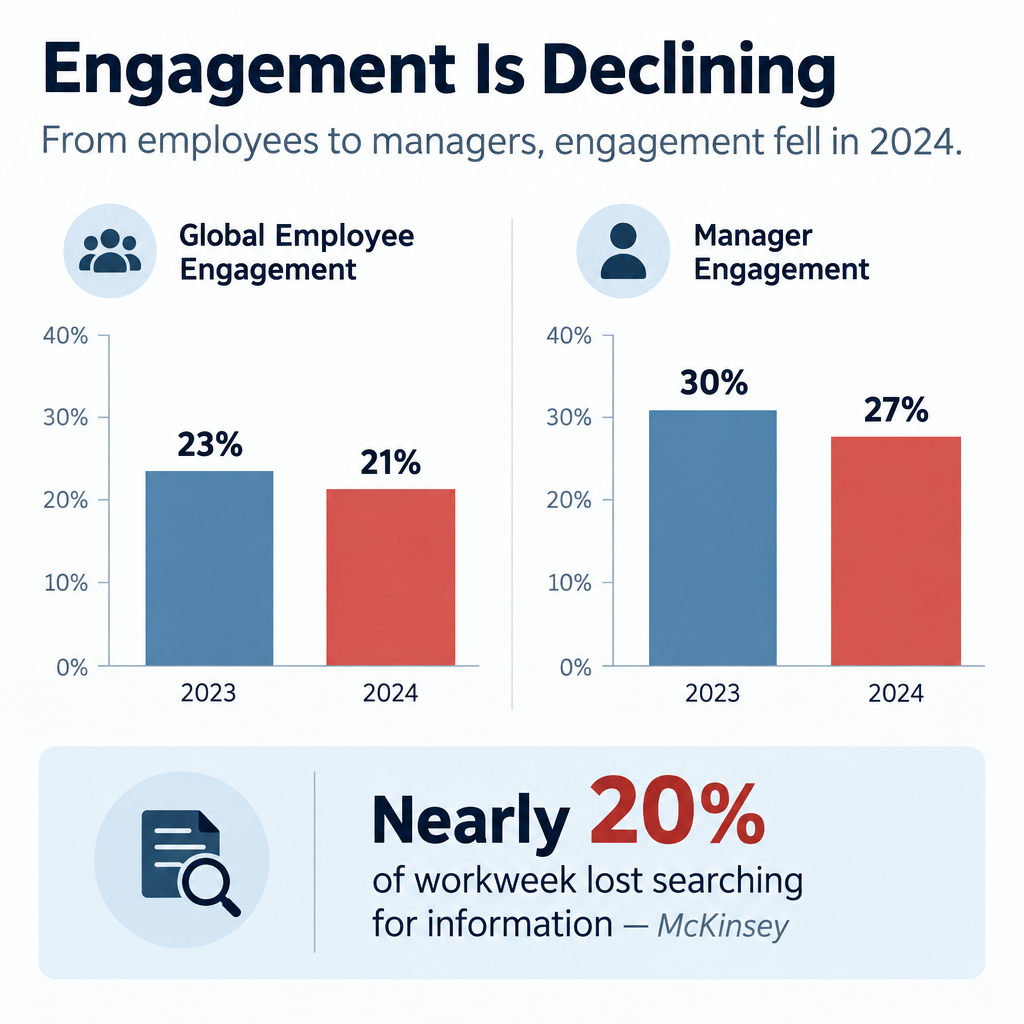
| Global employees engaged at work, 2023 | 23% | Gallup, State of the Global Workplace 2024 |
| Global employees engaged at work, 2024 | 21% | Gallup, State of the Global Workplace 2025 |
| Managers engaged, 2023 to 2024 | Fell from 30% to 27% | Gallup, State of the Global Workplace 2025 |
| Lost productivity from the 2024 engagement drop | $438 billion | Gallup, State of the Global Workplace 2025 |
| Share of team engagement variance tied to the manager | 70% | Gallup |
| Workweek spent searching for internal info or tracking down colleagues | Nearly 20% | McKinsey Global Institute, The Social Economy (2012) |
Two numbers matter most for your newsletter.
The first is the manager figure. Gallup attributes about 70% of the variance in team engagement to the manager. Managers are disengaging too. A newsletter that equips managers with talking points has more leverage than one written only for individual staff.
The second is the McKinsey finding. Knowledge workers lose close to a fifth of their week hunting for information. A well-organised newsletter with a clear “where to find it” section gives some of that time back.
A newsletter won’t fix a bad culture. It does make a good one visible, and it stops people from feeling like the last to know.
What you need before you start
Get these in place before you write a word. Skipping them is how newsletters die by issue four.
- A clear owner. One named person who edits, chases contributors and hits send.
- An executive sponsor. Someone senior who will contribute and defend the newsletter’s time.
- A distribution list. Synced to your HR system or directory, so joiners and leavers update automatically.
- A sending tool. Outlook or Gmail for small teams. An email service provider (ESP) or internal comms platform for tracking and design.
- A content pipeline. A simple form or shared channel where colleagues submit news.
- A template. Fixed sections, in a fixed order, that you reuse every issue.
- A goal. One or two outcomes you want, written down. “Fewer repeat HR questions” is a goal. “Better engagement” is not.
- Brand basics. Logo, colours and a tone guide, even a one-page one.
How to build your internal newsletter in 6 steps
Setup steps
- Pick one or two concrete goals.
- Choose your audience and cadence.
- Design a fixed section template.
- Set up a contribution pipeline.
- Choose a sending tool and authenticate it.
- Launch, measure and cut what nobody reads.
Step 1: Set focused goals
Pick goals you can check. Good examples:
- Reduce “where do I find X?” tickets to HR or IT by a set amount over a quarter.
- Get a target share of staff to click the quarterly strategy update.
- Raise employee referral applications.
- Increase sign-ups for internal events or training.
Each goal should map to at least one recurring section. If a section serves no goal, it’s filler.
Step 2: Choose audience and cadence
One newsletter for everyone works up to a few hundred people. Beyond that, you typically need layers: a company-wide edition plus team or region editions.
For cadence, these rules hold up:
- Weekly suits fast-moving companies with lots of operational change.
- Fortnightly is the best default for most organisations of 50 to 500 people.
- Monthly suits culture and story content, not deadlines.
Pick a day and time and never move it. Tuesday or Wednesday morning in your main time zone avoids Monday inbox pile-ups and Friday drift.
Step 3: Design a fixed template
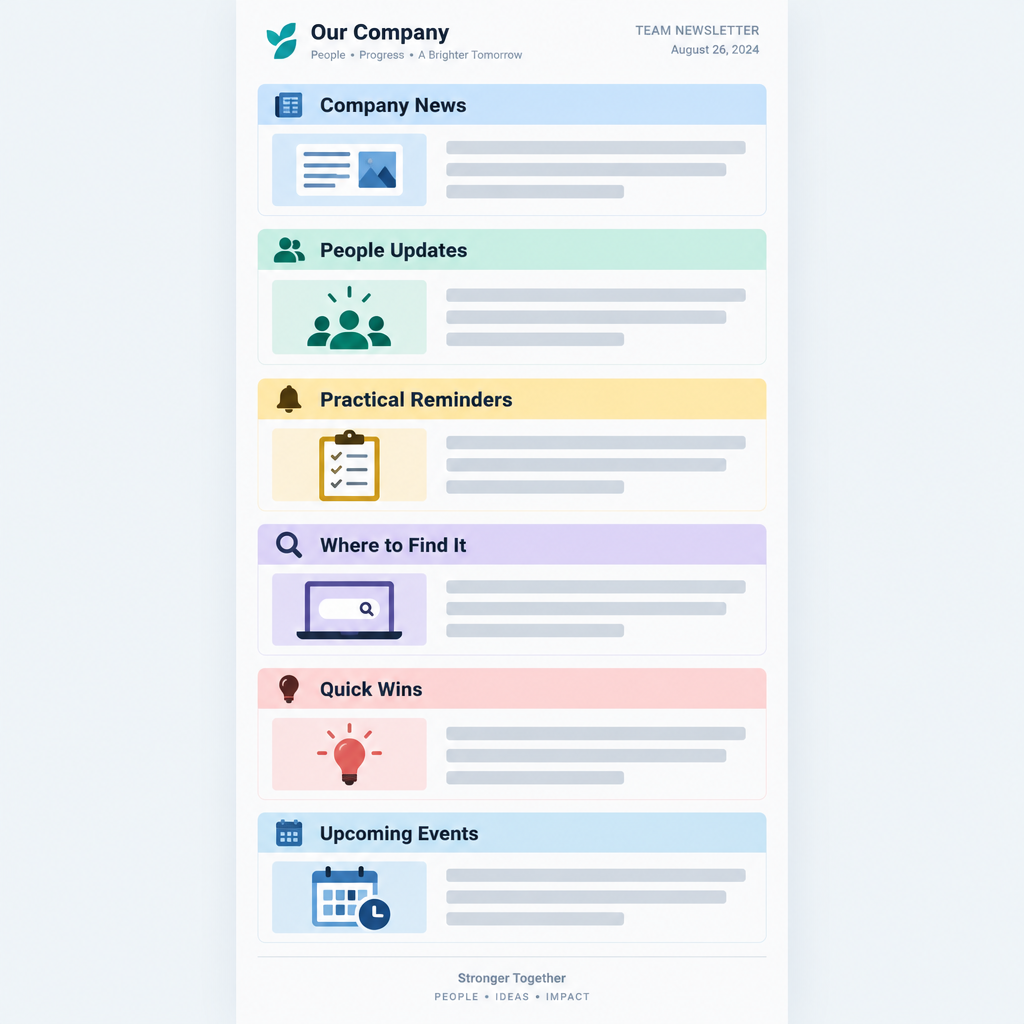
Readers learn where things live. Use the same order every issue so people can jump to what they care about. The structure section below gives you a template to copy.
Step 4: Build the content pipeline
The editor should not write everything. Set up:
- A short form with three fields: what happened, who’s involved, why it matters.
- A rota of department contributors, one per issue.
- A standing deadline, such as noon two days before send.
A shared Slack or Teams channel called something like #newsletter-tips works well for photos and quick wins.
Step 5: Pick a tool and authenticate it
Small teams can send from Outlook or Gmail. Once you want design, tracking and scheduling, move to an ESP or internal comms platform. If you send through an ESP, you must authenticate your domain. Internal mail from an outside service can land in junk just like marketing mail. The deliverability section covers this.
Step 6: Launch, measure and prune
Send the first issue with a one-line explanation of what it is and when it arrives. After four issues, look at which sections got clicks. Cut or rework the bottom one. Repeat every quarter.
40 internal newsletter ideas, by section
These are ideas for a company newsletter that hold up issue after issue. Most work as recurring sections, which saves you reinventing the wheel every time.
Company news and strategy
- Leader’s note in 150 words. One topic, plain language, signed by a real person. Cap it hard.
- Decision log. “What we decided this month and why.” This kills more rumours than any FAQ.
- Goals scorecard. Progress on three to five company goals, shown as a simple green, amber or red status.
- Customer win of the week. Name the customer (if allowed), the team and the problem solved.
- Lost deal lesson. What we learned from a loss. It signals honesty and helps sales and product.
- Release notes for non-product people. What shipped, explained so finance and HR understand it.
- All-hands follow-up. Answers to questions that ran out of time in the meeting.
- Myth vs fact. Address one rumour directly. If people are talking about it, they’re already reading about it somewhere.
People and culture
- New starters. Photo, role, team and one fun fact. Include who their manager is.
- Work anniversaries and milestones. Group them by month to save space.
- Internal moves and promotions. This shows career paths exist.
- Day in the life. One team per issue explains what they actually do.
- Workspace tour. Desk setups, home offices, or the warehouse floor.
- Employee resource group spotlight. Upcoming events and how to join.
- What we’re reading. Book, podcast or article picks from colleagues.
- Ten years in. Lessons from a long-tenure employee.
Recognition
- Peer shout-outs. Submitted through a form, published with names.
- Values in action. A short story tied to one company value.
- Customer praise. Reviews or emails that mention staff by name.
- The small fix award. Recognise someone who removed an annoying process step.
Learning and how-tos
- Tool tip of the week. One shortcut in Slack, Teams, Outlook or your CRM.
- Acronym decoder. Define three internal acronyms per issue. New starters love this.
- Phishing example of the week. A real (sanitised) phish someone reported, with the giveaways marked.
- Learning budget reminder. What courses staff can take and how to claim.
- Lunch-and-learn recap. Three takeaways and a recording location.
- Email signature rollout. When you standardise signatures, include email signature examples people can copy.
Need-to-know operations
- Deadlines box. Expenses, timesheets, reviews, benefits enrollment. Dates in bold.
- Policy change in plain English. Lead with “What changes for you” before any legal detail.
- Facilities updates. Office closures, parking, building works.
- IT maintenance windows. What’s down, when, and the workaround.
- Open roles and referrals. Three roles and the referral bonus terms.
- Events calendar. Next four weeks only.
Engagement and fun
- One-question poll. Publish last issue’s results alongside the new question.
- Photo of the week. Pets, team outings, views from the office.
- Caption contest. Winner gets a small prize and bragging rights.
- Company history trivia. Old logos, first office, first customer.
- Local tips from another office. Where colleagues in Berlin eat lunch.
- Volunteering and charity. Hours logged, causes supported, how to join.
Employee-generated
- Guest editor rotation. A different team curates one issue per quarter.
- What I wish I knew in my first month. One tip from a recent hire.
Inbox tip
Rotate who appears in people sections. If the same five names show up every issue, everyone else stops reading.
Internal newsletter examples by format
Different formats serve different goals. Most companies end up with two: one operational, one cultural.
| Format | Cadence | Length | Best for | Core sections |
|---|---|---|---|---|
| Need-to-know digest | Weekly | 3 to 5 items | Deadlines and changes | Deadlines, policy, IT, events |
| Culture digest | Monthly | 6 to 8 items | Connection and recognition | People, shout-outs, stories |
| Leader’s letter | Monthly or quarterly | One essay | Strategy and context | Note, scorecard, Q&A |
| Frontline digest | Weekly | 3 items | Deskless workers | Shifts, safety, recognition |
| Team newsletter | Fortnightly | 4 to 6 items | Departments over 30 people | Wins, priorities, who’s who |
Example 1: Weekly need-to-know all-company newsletter
This is the workhorse format. It answers one question: what do I need to do or know this week?
A typical issue:
- Subject: “This week: expense deadline Friday, new VPN Monday”
- Top block: three bullet points, each with an action and a date
- Policy change: two sentences plus a “read the full policy” button
- IT notice: maintenance window and workaround
- Events: next seven days only
- Footer: who to contact, how to submit news
Keep it under 300 words. People read it in under a minute, and that is the point.
Example 2: Monthly culture digest
This format earns the “newsletter” name. It’s where stories, photos and recognition live.
A typical issue opens with a short leadership note, then a team spotlight, new starters, anniversaries, peer shout-outs, a photo of the month and a poll. It can run longer because readers choose to spend time on it.
Use visually rich layouts here. Photos of real colleagues outperform stock images every time.
Example 3: The leader’s letter
A CEO or division head writes one focused piece. It covers what’s going well, what isn’t, and what comes next.
The best ones read like a person talking. They name specific numbers and admit specific problems. Add a goals scorecard and two or three answered questions from staff below the letter.
Avoid having comms ghost-write it into corporate mush. Edit for clarity, not personality.
Example 4: Frontline digest for deskless workers
Retail, healthcare, logistics and manufacturing staff often don’t have a work email they check. Many don’t sit at a computer at all.
For them, the content needs to shrink and the channel needs to change:
- Print a one-page version for break rooms.
- Send a three-item summary by SMS or through a staff app.
- Ask shift leads to read the top item aloud in pre-shift huddles.
- Lead with schedules, safety and pay dates, then one recognition story.
If your organisation has frontline staff, check what share of them actually receive your email version. It is often far lower than leadership assumes.
Example 5: Team or department newsletter
Once a department passes about 30 people, it needs its own update. Engineering, sales and operations are the usual candidates.
Keep it distinct from the company edition. Focus on team priorities, wins, who’s working on what, and decisions that affect the team. Don’t repeat company news. Link to the main edition instead.
How to structure an internal newsletter
Use this order. It puts action first and stories second, which matches how people triage email.
- Subject line naming the one or two most useful items.
- Preheader with a third item or a teaser.
- Top three: short bullets with actions and dates.
- Lead story: one item with a headline, 80 to 120 words and a button.
- People: new starters, milestones, moves.
- Recognition: shout-outs and customer praise.
- Learn something: one tip.
- Coming up: the next two to four weeks.
- Fun: poll, photo or trivia.
- Footer: contacts, submission form, archive location.
Rules that keep it scannable:
- One idea per block.
- Headlines that tell the story, such as “Benefits enrollment closes 14 November”, not “Benefits update”.
- Buttons with specific labels, such as “Book your flu shot”, not “Learn more”.
- Single-column layout so it reads well on phones.
- Alt text on every image, and never put key information only inside an image.
Tone: how internal newsletters should sound
Write like a well-informed colleague, not a press office.
Do:
- Use “we” and “you”.
- Name people and teams.
- Use numbers. “We closed 42 support tickets faster than last quarter” beats “Support had a great quarter.”
- Admit when things went wrong.
Don’t:
- Use jargon nobody outside the exec team understands.
- Write “exciting news” or “we’re thrilled”. Let the news be exciting.
- Hide bad news at the bottom.
- Make jokes at anyone’s expense.
A quick test: read a paragraph aloud. If you wouldn’t say it to a colleague over coffee, rewrite it.
How to get employees to actually read it
Open rates on internal email suffer from the same problem as any email. People have too much of it. These tactics move the numbers.
Make subject lines specific. “Issue #47” tells people nothing. “Pay date moves to the 25th, plus a new parking app” gets opened.
Keep it short. Five to seven items is the sweet spot for most digests. If you have more, you have two newsletters.
Put people in it. Names and faces are the most reliable hook you have. People open emails that might mention them or someone they know.
Make it useful every time. Include at least one thing per issue that saves time or prevents a mistake, like a deadline or a how-to.
Close the loop on feedback. When a poll or suggestion leads to a change, say so. “You asked for later Friday lunches. Starting next week, the canteen stays open until 2:30.”
Get leaders to reference it. When a manager says “it was in the newsletter” in a meeting, readership climbs.
Pair it with chat. Post a one-line teaser and link in your main Slack or Teams channel on send day.
Make it easy to contribute. Every issue should end with a one-click way to submit news.
Inbox tip
Send at the same time every issue. Predictability trains people to look for it, and it shows up in your open timing data within a few sends.
Employee newsletter content calendar: ideas by month
A content calendar stops the panic of a blank issue. Plan recurring themes a quarter ahead, then fill in news as it happens.
Dates below are fixed observances. Check which ones fit your workforce and region. Some are US-specific.
| Month | Observances and dates | Newsletter ideas |
|---|---|---|
| January | Data Privacy Day (28 Jan) | Goals for the year, privacy tips, benefits reminders |
| February | Black History Month (US, Canada) | ERG spotlight, history stories, Q4 results recap |
| March | Employee Appreciation Day (first Friday), International Women’s Day (8 Mar) | Recognition issue, women leaders’ stories |
| April | Earth Day (22 Apr) | Sustainability wins, office recycling, Q1 scorecard |
| May | Mental Health Awareness Month (US) | Wellbeing resources, EAP reminder, manager toolkit |
| June | Pride Month, National Safety Month (US), Juneteenth (19 Jun) | Safety refresher, ERG events, mid-year check-in |
| July | Mid-year | H1 scorecard, summer schedules, intern introductions |
| August | Summer wind-down | Intern farewells, vacation coverage, back-to-school tips for parents |
| September | Hispanic Heritage Month begins (15 Sep, US) | Q3 priorities, learning budget push |
| October | Cybersecurity Awareness Month, World Mental Health Day (10 Oct), Black History Month (UK) | Phishing quiz, security tips, wellbeing |
| November | Benefits open enrollment (typical in US), Veterans Day and Remembrance Day (11 Nov) | Enrollment deadlines, veteran colleague stories, gratitude |
| December | International Day of Persons with Disabilities (3 Dec) | Year in review, milestones, holiday schedules |
Layer your own business calendar on top: fiscal year end, review cycles, product launches, peak seasons and company anniversaries.
Tools for sending an internal newsletter
You have three realistic options. The right one depends on headcount and how much tracking you need.
| Option | Typical fit | Tracking | Design | Main drawback |
|---|---|---|---|---|
| Outlook or Gmail | Under 50 people | None built in | Basic | No metrics, inconsistent rendering |
| ESP (Brevo, Mailchimp and similar) | 50 to several hundred | Opens, clicks, per-link data | Drag-and-drop templates | Needs domain authentication, unsubscribe link |
| Internal comms platform (Staffbase, Poppulo, ContactMonkey and similar) | Large or complex organisations | Detailed, often by department | Templates plus intranet and app | Higher cost, longer setup |
ESPs built for marketing work fine for internal email if you configure them properly. Many teams start with one of the small business email platforms they already pay for.
Internal comms platforms add features ESPs lack. These include directory sync, sending as an Outlook mailbox, and reporting by department or location. They earn their price once you have thousands of staff or multiple languages.
Sending an employee newsletter with Brevo
Brevo is a common pick for smaller companies. As of 2025, its free plan allows 300 emails per day, which covers a weekly send for a team of up to 300. Paid plans remove the daily cap. Check Brevo’s pricing page for current plan prices before you commit.
Brevo setup for an internal newsletter
- Authenticate your sending domain under your account menu, then Senders, Domains & Dedicated IPs, then Domains.
- Go to Contacts, then Lists, and create a list named for your audience.
- Import employees from a CSV exported from your HR system.
- Go to Campaigns, then Email, then Create campaign.
- Build your template in the drag-and-drop editor and save it for reuse.
- Send a test to three colleagues on different devices.
- Schedule the send for your fixed day and time.
A few practical notes:
- Add custom fields for department, location and start date. You can then segment by office or send a “welcome” block only to people who joined recently.
- Save the template after your first issue. Every later issue starts from it.
- Keep the unsubscribe link. Brevo, like most ESPs, expects campaigns to carry one. Treat it as a signal. If people opt out of the culture digest, the content needs work. Truly mandatory notices should go out through a separate channel your IT team controls, such as a mailbox in your own tenant.
- Pipe data into other systems if you need it. Brevo supports webhooks, which push events like clicks to another app automatically. For a quick webhook definition: it’s an automated message one system sends another when something happens.
Employee data is personal data. Under GDPR and similar laws, your ESP acts as a data processor. Make sure a data processing agreement is in place and only upload the fields you need.
Deliverability: yes, internal email can land in junk
This is where many internal newsletters quietly fail. When you send from an ESP, your email comes from the ESP’s servers, not your company’s mail system. Your own mail filters treat it as external email claiming to come from your domain. That’s exactly what a phishing attack looks like.
If authentication isn’t right, Microsoft 365 or Google Workspace may junk or quarantine your newsletter. Understanding how e-mail spam filtering works makes this obvious: filters check whether the sender is authorised to use your domain.
The big consumer mailbox providers have also tightened the rules. These apply to personal accounts, not your company tenant, but they set the standard every filter now expects.
| Requirement | Gmail (from Feb 2024) | Yahoo (from Feb 2024) | Outlook.com (from 5 May 2025) |
|---|---|---|---|
| Applies to | Senders of 5,000+ messages a day to personal Gmail | Bulk senders | Senders of 5,000+ messages a day to consumer Outlook domains |
| SPF | Required | Required | Required |
| DKIM | Required | Required | Required |
| DMARC | Required, p=none minimum | Required, p=none minimum | Required, p=none minimum, aligned with SPF or DKIM |
| One-click unsubscribe | Required for marketing mail (from June 2024) | Required | Expected as best practice |
| Spam complaint rate | Below 0.3%, ideally below 0.1% | Below 0.3% | Not stated as a hard number |
For your internal send, the practical steps are the same.
SPF authorises the ESP to send for your domain. You add its include to your existing SPF record. Use the exact value your ESP gives you. The example below uses a placeholder.
example.com. TXT "v=spf1 include:spf.protection.outlook.com include:_spf.your-esp.example ~all"
DKIM signs your mail with a key published in DNS. Most ESPs give you CNAME or TXT records to copy.
esp1._domainkey.example.com. CNAME esp1.domainkey.your-esp.example.
DMARC tells receivers what to do when checks fail, and sends you reports.
_dmarc.example.com. TXT "v=DMARC1; p=none; rua=mailto:[email protected]"
Start with p=none while you confirm all your legitimate senders pass. Then move to quarantine and reject in stages.
Better still, send from a subdomain such as news.example.com. It keeps the newsletter’s reputation separate from your main domain.
Deliverability risk
Don’t ask IT to allowlist your whole domain to rescue the newsletter. Allowing a sender domain without authentication checks lets spoofed phishing emails straight into every inbox.
If your newsletter still lands in junk after authentication, ask your Microsoft 365 admin to check message headers in a test send. They can confirm SPF, DKIM and DMARC results and review any mail flow rules. Microsoft’s guidance is to avoid broad domain allow entries. A rule tied to authentication results or your ESP’s sending infrastructure is safer.
How to measure your internal newsletter
Measure against the goals you set in step one. Raw open rates are a weak signal on their own.
| Metric | What it tells you | Watch out for |
|---|---|---|
| Open rate | Whether subject lines and send timing work | Apple Mail Privacy Protection (since iOS 15, 2021) preloads images and inflates opens |
| Click-through rate | Whether content drives action | Low counts per section in small companies, so look at trends |
| Clicks per section | Which sections earn their space | Position bias: top items always get more clicks |
| Read time (comms platforms) | Whether people scan or read | Not available in most ESPs |
| Replies and submissions | Whether people feel ownership | Hard to automate, so track manually |
| Downstream actions | Real outcomes such as event sign-ups or enrollment completions | Needs tracking links or system data |
| Survey feedback | What people want more or less of | Run it quarterly, keep it to three questions |
Track a few numbers consistently rather than everything once. A simple sheet with issue number, send date, open rate, click rate and top three sections is enough.
The most useful tracking habit is per-section clicks over time. After eight issues, the pattern is clear. A section that never gets clicks either needs a rewrite or needs to go.
For small teams, qualitative signals matter more than percentages. If people mention the newsletter in meetings, submit stories without being chased, and complain when it’s late, it’s working.
Common mistakes and troubleshooting
Nobody opens it
Your subject lines are probably generic. Name specific, useful items. Check deliverability too. A test send to a few colleagues’ junk folders often reveals the real problem.
Opens are fine, clicks are near zero
Everything is in the email and there’s nothing to click, or the buttons are vague. Add one clear action per item. Move the most useful item to the top.
The editor writes everything
The pipeline is broken. Assign a contributor rota and set a deadline. Reduce the template if needed. A shorter issue with real contributions beats a long one written by one person.
It’s become a leadership press release
If every item is an announcement from the top, readers disengage. Aim for at least half the content to be about colleagues, not executives.
It keeps getting longer
Teams add sections and nobody removes them. Each quarter, cut the lowest-performing section. New sections must replace old ones, not stack on top.
A mistake went out to everyone
It happens. A wrong date or broken link in a typo email to 2,000 colleagues feels huge but rarely is. Send a correction only if the error changes meaning, such as a wrong deadline. Otherwise, fix it in the archive and note it in the next issue.
Frontline staff never see it
Email isn’t reaching them. Add print, SMS or app versions, and ask shift leads to share the top item in person.
Mandatory messages get lost
You’re mixing must-read notices with culture content. Separate them. Critical compliance or safety notices need their own direct email, with read tracking if required.
Fixes at a glance
| Symptom | Likely cause | First fix |
|---|---|---|
| Low opens | Vague subject or junk folder | Specific subject, check authentication |
| Low clicks | No clear action | One button per item, specific labels |
| Few submissions | Hard to contribute | One-click form in footer, contributor rota |
| Unsubscribes rising | Too long or irrelevant | Cut sections, segment by team or location |
| Complaints of missing info | Wrong channel for urgent news | Separate urgent notices from the digest |
What a good result looks like
After about three months of consistent sends, a healthy internal newsletter typically shows:
- A stable or rising open trend, issue to issue.
- Clicks concentrated in three or four sections you can name.
- Contributions arriving without chasing for at least half the content.
- Fewer repeat questions to HR, IT and facilities about things you covered.
- Leaders and managers referencing it in meetings.
- Your send landing in the inbox, not junk, with SPF, DKIM and DMARC all passing.
If you see most of those, keep going and refine. If you see few of them after six issues, go back to your goals and template, not just the subject lines.
FAQ
How often should you send an internal newsletter?
Fortnightly is the best default for most companies. Go weekly if you have frequent operational changes and keep it short. Go monthly for culture-focused editions. Consistency matters more than frequency.
How long should an internal newsletter be?
Five to seven items, or roughly 300 to 600 words, for most digests. Weekly need-to-know editions should be shorter. If you regularly exceed that, split it into two newsletters.
Who should write the internal newsletter?
One editor owns it, usually in HR, internal comms or the CEO’s office. Content should come from across the business through a submission form and a contributor rota. The editor curates and polishes.
Should employees be able to unsubscribe?
From culture and engagement content, yes. ESPs generally require an unsubscribe link anyway, and opt-outs tell you something useful. Mandatory notices such as policy or compliance updates should go out through a separate channel that people can’t opt out of.
What’s the difference between an internal newsletter and Slack or Teams updates?
Chat handles quick, fast-moving conversation. The newsletter is a curated summary with context, people stories and deadlines. Most companies need both, and the best setups tease the newsletter in chat on send day.
Can I send an internal newsletter from Outlook?
Yes, and it’s fine for small teams. You won’t get click tracking or reliable design, and large distribution lists can trigger sending limits. Most organisations move to an ESP or internal comms platform past about 50 employees.
What are good ideas for a company newsletter when there’s no big news?
Lean on recurring people and learning sections: new starters, milestones, peer shout-outs, a tool tip, an acronym decoder, a poll with last issue’s results, and a team spotlight. A quiet month is the perfect time for a day-in-the-life feature.