
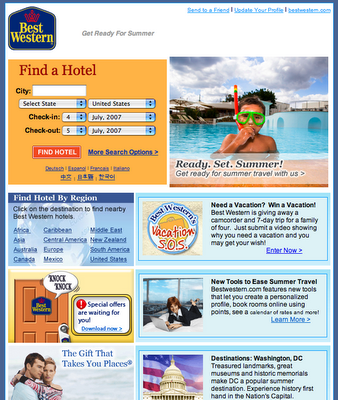
In November 2026, the most reliable way to let subscribers start shopping from an email is still to give each choice (a size, a destination, a category) its own link to a pre-filtered landing page. Plain links work in every email client. Drop-down forms don’t: Apple Mail handles them, Gmail’s support is partial, and classic Outlook for Windows drops or flattens form fields. The big change since this post first ran is that Apple Mail Privacy Protection now inflates open rates, so clicks on those links are the honest measure of whether the tactic works.
Drop-down search boxes inside the email
Some marketing emails put a search tool right in the message, with drop-down boxes for dates, locations or product options. The worry has always been that these drop-downs don’t display or work correctly in every email client.
Senders who build this in must believe the payoff is worth it. Best Western is one example. The benefit is that subscribers can start searching for rooms without leaving the email. The cost is annoying everyone whose email client can’t run the form as intended.

That worry turned out to be justified, and it still is. Can I Email, the community database of email client support, shows HTML forms as only partly supported. Apple Mail renders and submits them. Gmail renders them but may warn people when they submit. Outlook on Windows, which has long used Microsoft Word to render HTML, has a history of turning select boxes into plain text or ignoring them. Mailbox providers are wary of forms partly because phishing emails use them to collect passwords and card numbers.
Separate links instead of drop-downs
Some email marketers avoid the risk with a simple fix: they replace the drop-down with a row of separate links.
Piperlime, Gap Inc.’s online shoe and fashion store, did exactly this. One of its emails let subscribers shop its Lime Tag Sale by size. Each size was its own link, so one click on your size opened the sale already filtered to that size. Gap Inc. announced in January 2015 that it would close the brand, and it shut down that spring. The idea has outlived the store.

It’s a smart way to keep subscribers engaged, because it takes them straight to the place where they can start shopping. Making subscribers click and click and click before they see a single product is frustrating, and every extra step loses people.
How the options compare today
Separate links are still the default choice. Interactive formats only make sense when most of your list reads email in a client that supports them. The table below compares the three main approaches as they stand in 2026.
| Approach | Where it works | Setup effort | Main risk |
|---|---|---|---|
| Drop-down HTML form | Apple Mail fully, Gmail partly | Moderate | Broken or missing fields in Outlook for Windows, security warnings |
| AMP for Email | Gmail, Yahoo Mail and Mail.ru, after sender registration | High | Outlook and Apple Mail show only the HTML fallback |
| Separate links to filtered pages | Every email client | Low | Long lists of options take up space, especially on mobile |
Building the link version well
These four steps turn the size-link idea into something you can reuse in any campaign:
- Pick the one filter that matters most to the reader, such as size for apparel, destination for travel or price band for gifts.
- Build a landing page URL for each value, with the filter already applied and UTM tags so analytics can tell the links apart.
- Design the links as buttons big enough to tap on a phone, and test them in both light and dark mode.
- Track clicks for each option. That shows you demand by size or segment, which you can use to personalise the next send.
Where AMP fits
AMP for Email is the modern version of the in-email search box, and its reach is narrow. Gmail, Yahoo Mail and Mail.ru all require you to register as a sender before they will render AMP content. Outlook.com dropped its developer preview in 2020, and Apple Mail never supported AMP. Every AMP message also needs a standard HTML version, so you still have to build the link-based version anyway.
FAQ
Do drop-down menus work in email in 2026?
Only in some clients. Apple Mail supports HTML forms, Gmail supports them partly and may show warnings on submit, and Outlook for Windows has a long record of dropping or flattening select fields. If a large share of your list opens in Outlook, a drop-down will fail for a large share of your readers.
Is AMP for Email worth it for shopping emails?
It suits senders with a big Gmail or Yahoo Mail audience and the developer time to build and maintain two versions of each email. You have to register with each provider, and everyone in an unsupported client sees the HTML fallback. For most stores, well-designed links get most of the benefit for a fraction of the work.
How do I measure whether one-click links are working?
Measure clicks and the revenue that follows them, not opens. Since Apple launched Mail Privacy Protection in 2021, Apple Mail can load images ahead of time, which counts as an open whether or not anyone read the email. Click-through rate per link and conversions on each filtered landing page are the numbers to trust.
Do the Gmail and Yahoo sender rules affect interactive emails?
The rules apply to the sender, not to the email’s design. Since February 2024, Gmail and Yahoo have required bulk senders to authenticate with SPF, DKIM and DMARC and to keep user-reported spam rates below 0.3%. Since June 2024, they have also required one-click unsubscribe for marketing mail. Microsoft added similar authentication rules for Outlook.com senders of more than 5,000 messages a day from May 5, 2025.
Does every shopping email still need an unsubscribe link?
Yes. The FTC’s CAN-SPAM rules require a clear way to opt out, a valid physical postal address and opt-outs honored within 10 business days. Gmail and Yahoo also expect a working one-click unsubscribe header for promotional mail, with requests processed within two days.
Sources
- Google Workspace Admin Help: Email sender guidelines and the related sender guidelines FAQ
- Yahoo Sender Hub: Best practices for senders
- Microsoft Tech Community: Outlook’s new requirements for high-volume senders
- Federal Trade Commission: CAN-SPAM Act, A Compliance Guide for Business
- Can I Email: support table for the form element
- Gap Inc.: announcement of the Piperlime closure, January 2015